

MSI CD270 Multi Node Compute Server
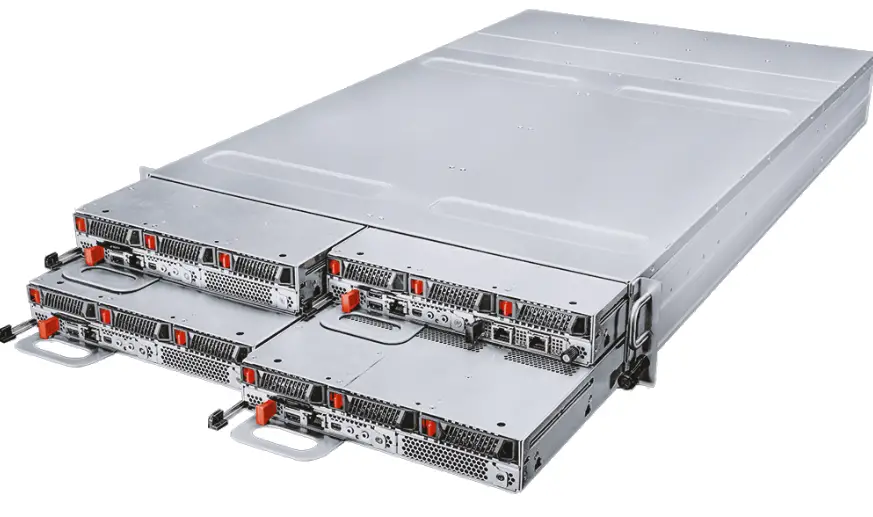
Imininingwane
- Imodeli: G52-S3862X1
- CPU: CD270-S3071-X2
- Drive Bays: 12 x Hot-Swap 2.5 U.2 Drive Bays (PCIe 5.0 x4, NVMe)
- Memory: Supports DDR5 DIMM slots compatible with RDIMMs, 3DS-RDIMM, and MRDIMMs
CD270-S3071-X2
Server System Quick Start Guide
Incazelo
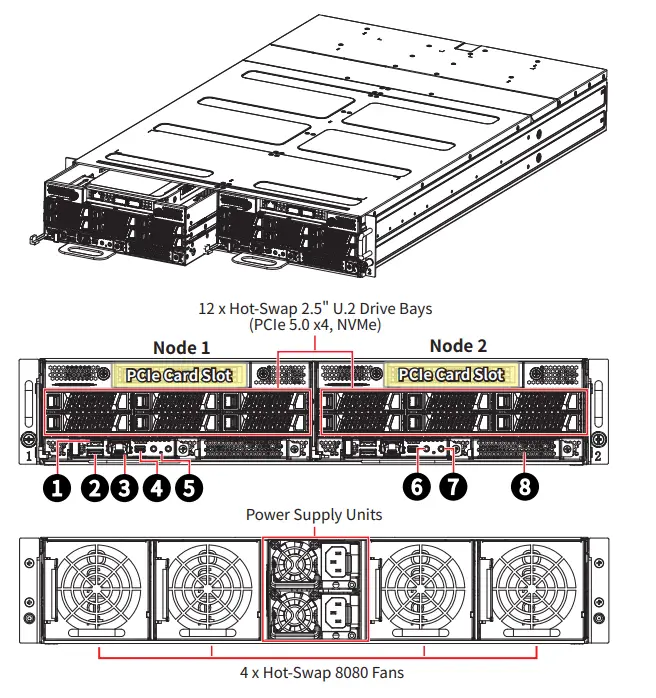
| 1 | COM USB Type-A Port | 5 | Isimo Sesistimu LED |
| 2 | Imbobo yohlobo A ye-USB 2.0 | 6 | UID LED Button (default)/ System Reset Button* |
| 3 | 1000Base-T Ethernet Port (for mgmt.) | 7 | System Power LED Button |
| 4 | IMini-DisplayPort | 8 | OCP 3.0 Mezzanine Card Slot |
* The UID LED button can also function as system reset button, configured using jumper J1_1.
System Node Tray Removal
Okubalulekile
- Power Off Node First: Removing a powered-on node will cause immediate power loss.
- Independent Power: Each node operates with its own power supply. Turning off one node does not affect others.
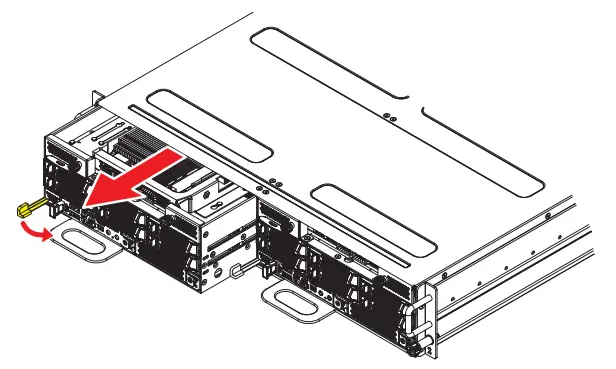
Izinyathelo Zokususa
- Pull the thumb latch aside to release the node.
- Grasp the handle to gently slide the node out of its slot.
Support the weight of the node while removing it to prevent accidental drops.
CPU
Single Intel® Xeon® 6900P series processors, TDP up to 500W per node.
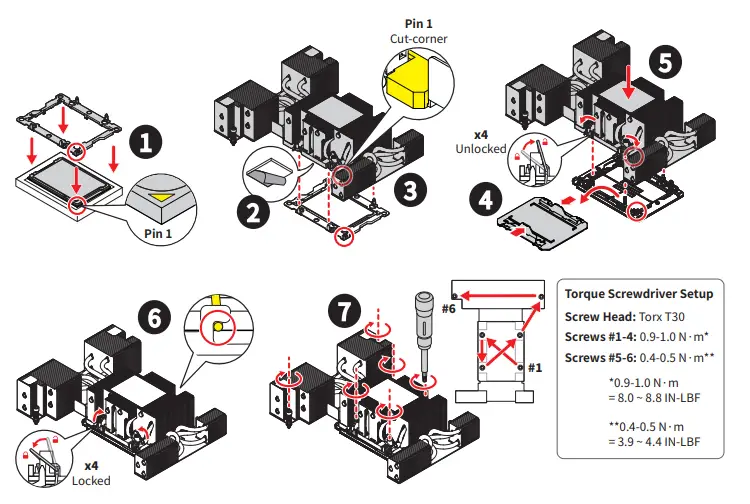
Ukufakwa kwe-CPU ne-Heatsink
Inkumbulo
Each node supports 12 DDR5 DIMM slots, compatible with RDIMMs, 3DS-RDIMM and MRDIMMs
| Uhlobo lwe-DIMM | Ubuningi beMax | Umthamo omkhulu nge-DIMM ngayinye |
| RDIMM/ 3DS-RDIMM | 6400 MT/s (1DPC) | 256 GB |
| MRDIMM | 8800 MT/s (1DPC) |
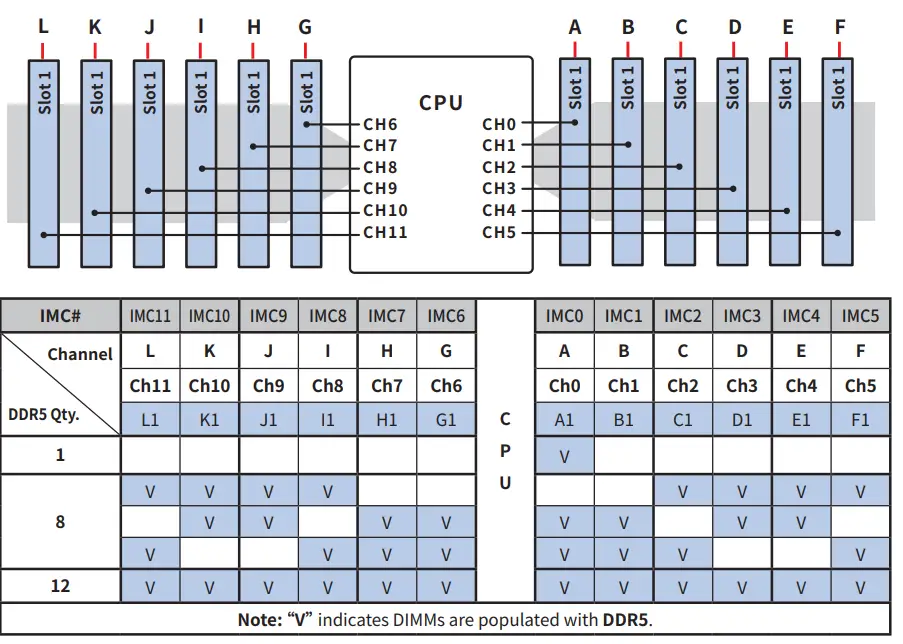
DDR5 Only DIMM Configuration Diagram ( for Intel® Xeon® 6900P Series)
⚠ Okubalulekile
- Kufanele okungenani kube ne-DDR5 DIMM eyodwa isokhethi.
- Ukulungiselelwa kwenkumbulo ye-DDR5 kudinga izinhlobo ezifanayo ze-DIMM, amazinga, isivinini, nokuminyana.
- Ukuxuba abathengisi, ama-RDIMM angewona ama-3DS/3DS, ama-RDIMM angu-9×4, noma ama-X8/x4 DIMM akuvunyelwe.
- Ukuxuba ama-DIMM namaza okusebenza ahlukene akuqinisekisiwe. Uma amafrikhwensi ehluka, isistimu izenzakalela iye kwisivinini esivamile esiphansi kakhulu.
Ibhodi Lesistimu
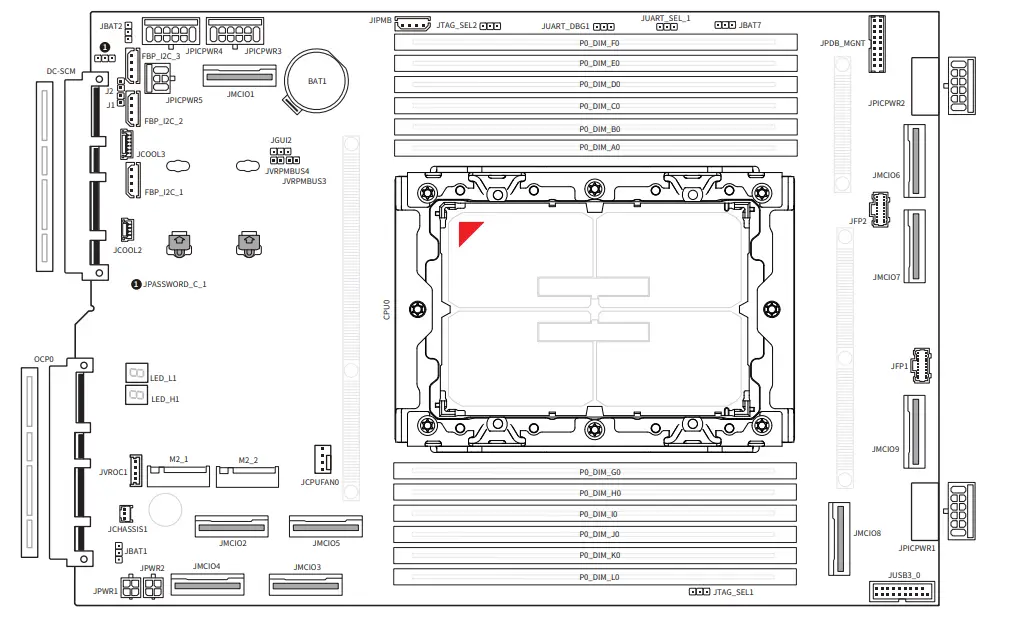
On Board Connectors, Jumpers and LEDs
| Igama | Incazelo |
| Ibhodi Lesistimu | |
| JPICPWR_1~4 | 12V PICPWR power connectors (12-pin) |
| JPICPWR_5 | 12V PICPWR power connectors (6-pin) |
| JPWR1~2 | 4-pin power connectors |
| JMCIO1~9 | MCIO 8i connectors (PCIe 5.0 x8) |
| M2_1~2 | Izikhala ze-M.2 (M Key, PCIe 5.0 x2, 2280/ 22110) |
| I-OCP0 | OCP 3.0 mezzanine slot (PCIe 5.0 x16, NCSI supported) |
| I-DC-SCM | I-DC-SCM 2.0 edge slot |
| JCOOL2 | 4-Pin liquid leak detection header |
| JCOOL3 | 6-Pin liquid cooling header |
| UJUSB3 | Isixhumi se-USB 3.2 Gen 1 (5 Gbps, yezimbobo ezi-2 ze-USB) |
| JFP1~2 | Isihloko sephaneli yokulawula ye-DC-MHS |
| JPDB_MGNT | PDB management header |
| I-JIPMB1 | IPMB header (debug only) |
| JVROC1 | VROC connector (debug only) |
| FBP_I2C_1~3 | Izihloko ze-I2C |
| JCHASSIS1 | Unhlokweni wokungena kwe-Chassis |
| JASSWORD_C_1 | I-jumper ecacile yephasiwedi (iphinikhodi ezenzakalelayo 1-2, Ejwayelekile) |
| JUART_SEL1 | UART BMC/CPLD khetha jumper (iphinikhodi ezenzakalelayo 1-2, UART BMC kuya ku-CPU) |
| JTAG_SEL2 | JTAG select jumper (default pin 2-3, BMC to CPU) |
| I-JBAT1 | MBP/ I3C select jumper (default pin 1-2, MBP) |
| I-JBAT2 | RTC clear jumper (default pin 1-2, Normal) |
| I-JBAT7 | PESTI flash select jumper (default pin 2-3, PESTI2 flash) |
| I-LED_H1, i-LED_L1 | Ama-LED wokulungisa iphutha we-Port 80 |
| MGT1 DC-SCM Module | |
| TPM | SPI TPM Header (for TPM20-IRS) |
| M2_1 | M.2 Slot (M Key, for ROT1) |
| J_JTAG | Manual programming header (debug only) |
| J3D2 | Force BMC update jumper (default pin 1, Normal) |
| J3C1 | FRU jumper (default pin 2-3, FRU normal operated) |
| J3C5 | JTAG SW jumper (default pin 2-3, JTAG SW enable) |
| J1_1 | ID/ Reset button select jumper (default pin 1-2, ID Button) |
| I-LED1 | BMC ukushaya kwenhliziyo LED |
imibuzo ejwayelekile ukubuzwa
- Q: Can I mix different types of DIMMs in this system?
A: No, mixing vendors, non-3DS/3DS RDIMMs, 9×4 RDIMMs, or x8/x4 DIMMs is not allowed. It is recommended to use identical DIMMs for optimal performance. - Q: What is the maximum memory capacity supported per DDR5 DIMM?
A: The maximum capacity supported per DDR5 DIMM is 256 GB.
Amadokhumenti / Izinsiza
 | Iseva ye-CD270 Multi Node Compute |
Izithenjwa
- Imaniwali yosebenzisayomanual.tools
Published: July 10, 2025
Kubuyekezwe: Julayi 11, 2025