

Imanuwali Yomnikazi Webhethri Ye-Hunter NODE
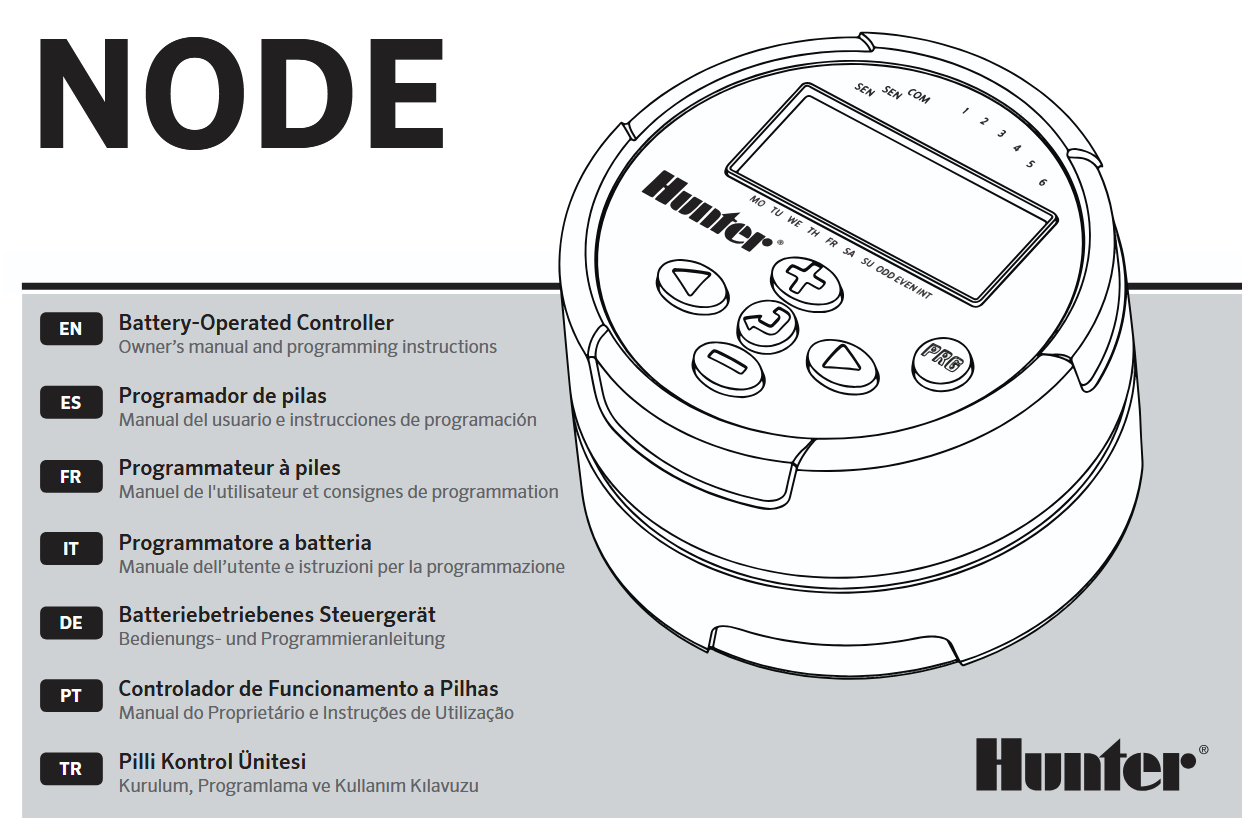

IZICI ZENODE
- Simple push-button programming
- Single-station model (NODE-100) with DC latching solenoid. Single-, two-, four-, or six-station models are also available (solenoids not included).
- Large Liquid Crystal Display (LCD) with easy-to-understand icons
- Operates using at least one standard nine-volt alkaline battery (use two for extended battery life)
- Three programs (A, B, or C) with up to four start times each
- Run times from one minute to six hours
- Manual watering capabilities
- Battery-life indicator
- Wired rain sensor compatible
- Non-volatile memory retains all program information
- Seasonal Adjustment from 10–150%
- Easy Retrieve™ memory allows saving/retrieval of preferred program data
- Manual bypass of rain sensor
- Total Run Time Calculator shows total program irrigation time per program
IZIMPENDULO ZAMANODE
Lesi sigaba sinikeza i-overview kwezinye zezingxenye ze-NODE. Into ngayinye kuzoxoxwa ngayo ngemininingwane eyengeziwe kamuva. Nokho, lesi sigaba singaba usizo ekujwayelaneni nezinketho ezihlukahlukene ezitholakalayo.
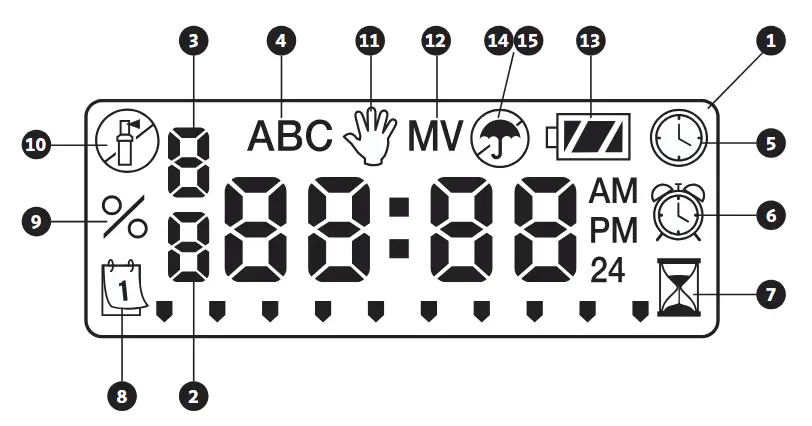
 Inkinobho – Increases the selected flashing display
 Inkinobho – Decreases the selected flashing display
 Inkinobho – Selects programming function
 Inkinobho – Advances the selected flashing display back to the next item
 Inkinobho – Navigates the selected flashing display back to the previous item
 Inkinobho – Selects the program (A, B, or C)
Isibonisi se-LCD
- Isibonisi Esiyinhloko – Indicates all program information
- Inombolo Yesiteshi – Indicates the station number being programmed
- Start Time Number – Indicates the start timer number being programmed
- Uhlelo – Indicates the program (A, B, or C)
 Current Time/Day – Indicates when current day/time is being set
 Isikhathi Sokuqala – Indicates when start times are being set
 Izikhathi Zokugijima – Indicates when Run Times are being set. Allows user to set run times from one minute to six hours.
 Izinsuku zokunisela – Allows the user to select individual days to water or a selected number of days between watering (interval)
- % Ukulungiswa Kwesizini – Allows the seasonal adjustment to be programmed form 10–150% (default value is 100%)
 Isistimu icishiwe – Indicates that watering is suspended
 Imanuwali Ivuliwe/Cishiwe – Indicates when manual watering is programmed. Allows the user to activate the station manually.
- MV – Indicates that station one is set to master valve operation (only available on two-, four-, or six-station models)
 Isimo Sebhethri – Indicates remaining battery life
 Isambulela – Indicates the rain sensor is suspending irrigation
 Crossed Umbrella – Indicates the rain sensor has been manually bypassed
IXHUMANA IBHATHI/AMABHATHRI
I-NODE isebenzisa ibhethri elilodwa noma amabili ajwayelekile angama-volt ayisishiyagalolunye (angafakiwe) ukuze asebenzise ama-valve futhi ahlele isilawuli. Isilawuli singasebenza sisebenzisa ibhethri elilodwa lama-volt ayisishiyagalolunye noma sisebenzisa amabhethri amabili angama-volt ayisishiyagalolunye. Ngaphansi kwezimo ezijwayelekile, impilo elindelekile unyaka owodwa webhethri elilodwa kanye neminyaka emibili uma usebenzisa amabhethri amabili ayisishiyagalolunye-volt.
 QAPHELA: I-NODE inenkumbulo engaguquki. Lokhu kuvumela ibhethri ukuthi ikhishwe ngaphandle kokulahlekelwa ulwazi lohlelo.

Ukufaka Ibhethri/Amabhethri
- Unscrew the rear body of the NODE body to gain access to the battery compartment.
- Insert the battery/batteries into the battery tray and connect to the controller using the battery connector.
- Make sure that no water is inside the battery compartment.
- Khipha umzimba ongemuva we-NODE uwubuyisele engxenyeni engaphambili.
QAPHELA: Qinisekisa ukuthi umaka wophawu engxenyeni engemuva ye-NODE ihambisana nengxenye engaphambili, uqinisekisa ukuthi kwakhiwa uphawu olufanele.

UKUnamathisela ama-SOLENOIDS
I-NODE-100 ihlinzekwa nge-solenoid exhunywe kusilawuli. I-NODE-100-LS ayifaki i-solenoid. Izilawuli zeziteshi eziningi ze-NODE-200, NODE-400, kanye ne-NODE-600 zizosebenzisa ama-solenoid amabili, amane, noma ayisithupha, ngokulandelana. I-Hunter DC-latching solenoids (P/N 458200) ingafakwa kalula kuwo wonke amavalvu epulasitiki e-Hunter.
QAPHELA: Sebenzisa i-DC latching solenoid esebenza phakathi kuka-9-11 VDC. I-24 VAC solenoids ngeke isebenze ne-NODE.

Ukuxhuma i-DC Solenoids ku-NODE
- Attach the black leads from each solenoid to the single common wire (black lead) coming from the NODE. Secure all wire connections with waterproof connectors.
- Attach one red wire from each solenoid to the corresponding station wire (red lead) from the NODE. The station numbers are identified on the face of the NODE. Secure all wire connections with waterproof connectors.
QAPHELA: Ibanga lentambo eliphakeme kakhulu phakathi kwe-solenoid ne-NODE ngu-100′ (30 m) kusetshenziswa usayizi wentambo ongu-18 AWG (1 mm).
UKUKHIPHA INODE
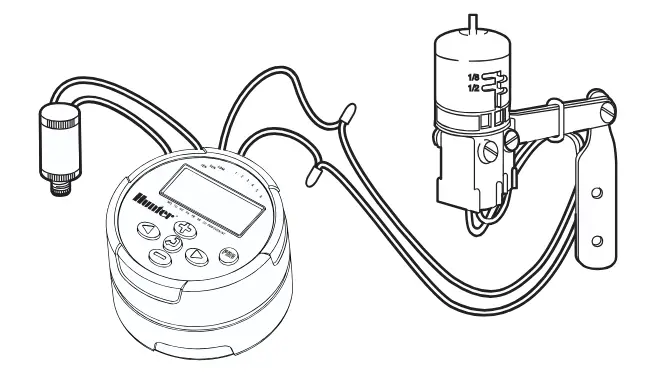
I-NODE ingafakwa kalula kunoma iyiphi i-valve yepulasitiki ye-Hunter. Isiqeshana sokukhweza i-valve esiklanywe ngokukhethekile senza ukufakwa kusheshe. Isembozo senjoloba esivikelayo sinikezwa ukuvimbela ukungcola ekuqoqeni ebusweni be-NODE.
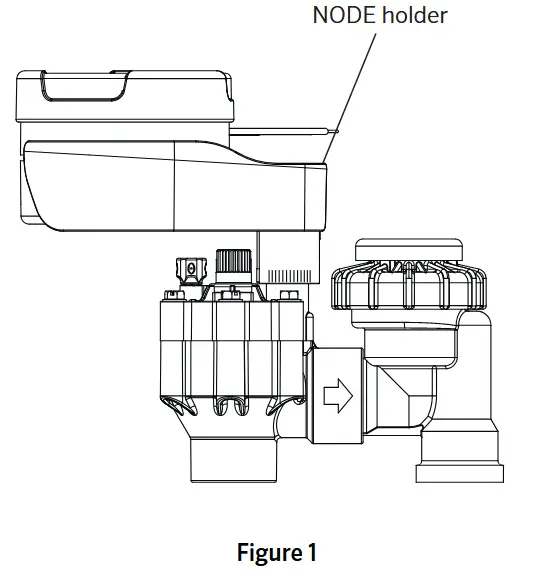
Ukukhweza i-NODE kuValve (Umfanekiso 1)
- Screw the Hunter DC latching solenoid (P/N 458200) into the valve bonnet.
- Set the small open end of the NODE holder on top of the solenoid.
- Set the NODE controller into the large open end of the NODE holder.
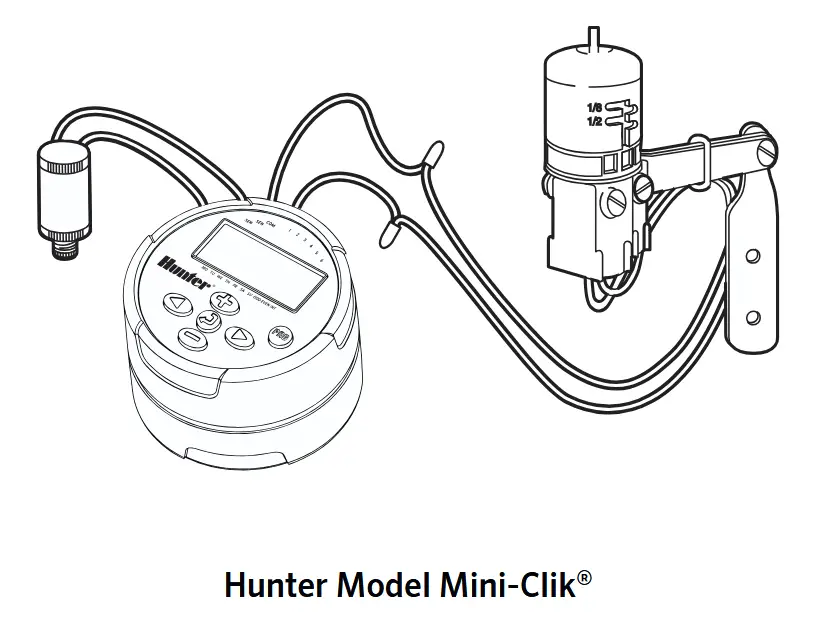
CONNECTING A WEATHER SENSOR
A Hunter Mini-Clik ® or Wired Rain-Clik® rain sensor can be connected to the NODE. The purpose of this sensor is to stop watering when weather conditions dictate.
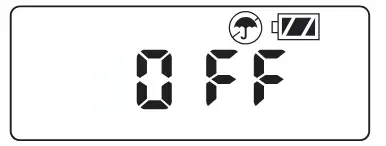
NOTE: When the Wired Rain Sensor is interrupting the watering, the display will show the System Off icon , “OFF” and esibukweni.
- Cut the yellow wire loop attached to the NODE at approximately the middle of the loop.
- Remove approximately ½” (13 mm) of insulation from each wire. Attach one yellow wire to each of the wires of the weather sensor. You can mount the rain sensor up to 100 ft (30 m) from the NODE controller (18 AWG/1 mm minimum wire size).
- Secure wire connections with waterproof connectors.
IMODI YE-IDLE
Imvamisa, isibonisi se-NODE sibonisa isikhathi nosuku, usuku lwesonto, i-MV (uma inketho ye-valve eyinhloko icushiwe), kanye nenkomba yempilo yebhethri. Ngemva kwesikhathi esifushane sokungasebenzi, isibonisi sizovala ukuze sigcine amandla ebhethri. Ukucindezela noma iyiphi inkinobho kuzoletha i-NODE kumodi yokungenzi lutho.

GIJIMA IMODI
Lapho isilawuli sisebenzisa uhlelo, izinto eziboniswa esibukweni zizofaka inombolo yesiteshi, incwadi yohlelo, isikhathi sokusebenza esisele, kanye nesithonjana seRotor ecwayizayo.

UKUHLELA
The NODE uses standard Hunter controller programming with three programs (A, B, or C) and four start times per program. On standard Hunter controllers a dial is used to scroll between the programming functions. However, on the NODE the  button is used to quickly and easily create the irrigation program. When programming, the flashing portion of the display can be changed by pressing the
  or
or  buttons. To change something that is not flashing, press the
  or
or  buttons until the desired item is flashing.
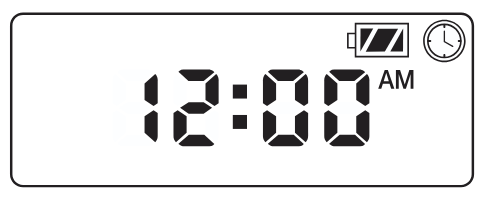
Ukusetha Idethi nesikhathi
- Phusha i inkinobho kuze kube
 isithonjana siyaboniswa.
 - All four digits will be displayed representing the year. Use the or buttons to change the year. Press the button to proceed to setting the month.
- All four digits will be displayed with the two digits on the left representing the month flashing. Use the or buttons to change the month. Press the button to proceed to setting the day.
- Only the two digits on the right side will be displayed and flashing, representing the day. Press the or buttons to change the day. Press the button to proceed with changing the hour. Press the button to proceed to setting the time.
- The AM/PM/24-hour time setting is shown flashing. Press the or button to change the time setting to AM, PM, or 24-hour time. Press the button to proceed to setting the hour.
- All four numbers are shown with the two numbers on the left flashing, representing the hour. Use the or buttons to change the hour. Press the button to proceed to setting the minutes.
- All four numbers are shown with the two numbers on the right flashing, representing the minutes. Use the or buttons to change the minutes. Pressing the button will advance to the year setting at Step 2.
- Cindezela inkinobho button to proceed to the next programming function or allow controller to return to idle mode.
Ukusetha Izikhathi Zokuqala Zokuchelela
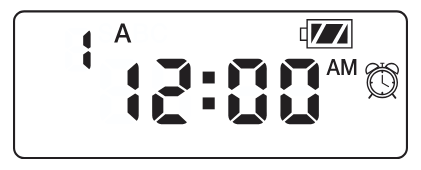
- Cindezela inkinobho inkinobho kuze kube isithonjana siyaboniswa.
- The start time will be displayed flashing, along with the program letter (A, B, or C) and the start time number (1, 2, 3, or 4) in the upper left of the display. Up to 4 different start times can be set for each program.
- Sebenzisa i- or buttons to change the start time for the program that is displayed. Each press of the button will change the start time in one-minute increments.
- Cindezela inkinobho button to add an additional start time to the program displayed. The start time number is shown in the upper left corner of the display.
- Cindezela inkinobho button to add start times to a different program.
- Cindezela inkinobho button to proceed to the next programming function or allow controller to return to idle mode.
NOTE: After programming the run time for the last station press the button to display the total run time for the program.
Ukusetha Izikhathi Zokusebenza
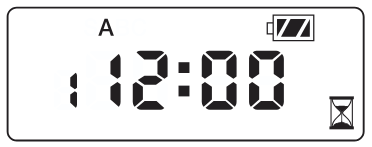
- Cindezela inkinobho inkinobho kuze kube isithonjana siyaboniswa.
- The run time will be displayed flashing. Also shown is the program letter (A, B, or C) and the active station number on the lower left side of the display. Press the or buttons to change the station run time from one minute to six hours.
- Cindezela inkinobho button to advance to the next station.
- Cindezela inkinobho button to add a run time to another program.
- Cindezela inkinobho button to proceed to the next programming function or allow controller to return to idle mode.
Ukubeka Izinsuku Zokuchelela
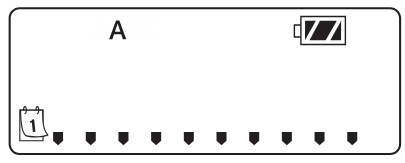
- Cindezela inkinobho inkinobho kuze kube isithonjana siyaboniswa.
- The program letter (A, B, or C) will be displayed.
- Arrows point at the specific days of the week on which watering will occur. Press the or buttons to scroll though the days.
- Cindezela inkinobho button to activate that day for the program displayed, or the button to cancel watering for that day. The arrow will show on the watering days for the active program.
- Cindezela inkinobho button to set days to water for a different program, if desired.
- Cindezela inkinobho button to proceed to the next programming function or allow controller to return to idle mode.
Ukukhetha Izinsuku Eziyinqaba/Zilingene emanzini
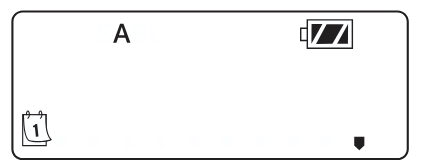
This feature uses numbered days of the month for watering instead of specific days of the week.
- Cindezela inkinobho inkinobho kuze kube isithonjana siyaboniswa.
- Cindezela inkinobho button until the cursor is above either ODD or EVEN on the display.
- Cindezela inkinobho button to select, or the button to cancel either ODD or EVEN days to water.
- Once ODD or EVEN mode is activated, it will be the only cursor shown on the display.
Selecting Interval Days to Water
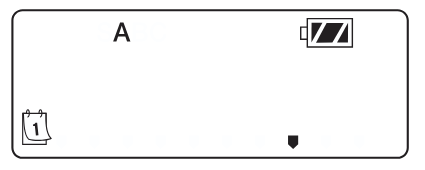
- Cindezela inkinobho inkinobho kuze kube isithonjana siyaboniswa.
- Cindezela inkinobho button until the cursor is above I-INT esibukweni.
- Cindezela inkinobho button and a 1 will be flashing, indicating the number of days between watering.
- Cindezela inkinobho or buttons to select the number of days between watering days (1 to 31).
Ukusetha Ukulungiswa Kwesizini
- Press the button until the is displayed.
- Press the or button to increase or decrease the seasonal adjustment value from the default 100% (down to a minimum of 10% or a maximum of 150%).
- The value programmed for seasonal adjustment will be applied to all irrigation programs and will immediately be reflected in the run times displayed. For example, uma izikhathi zokugijima zemizuzu engu-20 zihlelwa bese ukulungiswa kwesizini kuguqulwa kusuka ku-100% kuya ku-50%, izikhathi zokugijima eziboniswayo zizoba imizuzu engu-10.

Ukuvala Isistimu
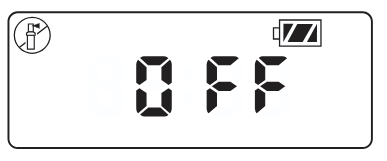
To turn your controller off, press the inkinobho kuze kube icon kanye VALIWE is displayed on screen. To return the controller to auto programming mode, press the button. The controller will immediately return to auto programming mode and will display the time and battery-life indicator.
Ukunisela Manuwali
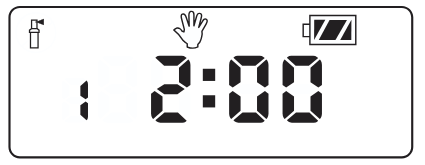
Ukunisela Ngemanuwali kuvumela umsebenzisi ukuthi ahlole isiteshi ngasinye noma uhlelo ngesikhathi esithile sokusebenza. Isimo senzwa yesimo sezulu (uma sisetshenziswa) sizoshaywa indiva kule modi.
- Make sure the controller is in idle mode. Press and hold the inkinobho kuze kube isithonjana siyaboniswa.
- The station number will be displayed in the lower left side of the display along with the run time.
- Sebenzisa i- futhi buttons to select the desired station and the and buttons to set the manual watering time for the station shown.
- To manually activate a program, press the button. The program letter (A, B, or C) will show on the screen. If a different program is needed, press the inkinobho kuze kube yilapho uhlelo olufunayo luboniswa.
- To stop the Manual Watering cycle, press the button until the time is reduced to zero.
- Cindezela inkinobho button to proceed to the next programming function or allow controller to return to idle mode.
QAPHELA:
- Ukucindezela i- or buttons when a station is running in Manual Watering mode will modify the irrigation time for that station.
- Ukucindezela i- button when a station is running in Manual Watering mode will stop irrigation on the current station and advance to the next station.
- Ukucindezela i- button when a station is running in Manual Watering mode will stop irrigation on the current station and revert to the previous station.
Ukusebenza kwenzwa
The NODE is compatible with Hunter Clik-type rain sensors, including Mini-Clik® , Freeze-Clik, and Wired Rain-Click® , as well as many other interrupt-type devices/sensors that do not require power. Simply connect the sensor to the NODE controller by cutting the yellow wire loop and connecting to the sensor wires.
NOTE: NODE is not compatible with Hunter Wireless Rain-Clik ® or other weather devices that require 24 VAC power.
When the sensor is activated, it will suspend irrigation and the isithonjana sizovela esibukweni.
IZICI ZOKUHLELA EZITHUTHUKILE
Yonke imisebenzi yokuhlela ethuthukisiwe iqalwa kusukela kumodi yokungenzi lutho, ebonisa isikhathi, usuku lweviki, kanye nenkomba yempilo yebhethri kusibonisi. Uma kukhona okukhanyayo esibukweni isilawuli sikwenye yezindlela zokuhlela. Ngemva kwesikhathi esifushane sokungasebenzi isilawuli sizobuyela kumodi yokungenzi-lutho.
I-Bypass yenzwa
- From the idle mode, press and hold the inkinobho kuze kube isithonjana siyaboniswa.
- The display will show the umbrella icon flashing and VULA.

- Cindezela inkinobho button to bypass the sensor. The display will show futhi VALIWE to indicate the weather sensor is bypassed. The icon will show on the display during normal operation, indicating the controller is in bypass mode.
- To reactivate the weather sensor, press and hold the inkinobho kuze kube icon is displayed. Press the button to return to normal sensor mode.
Kulula Ukubuyisa Inkumbulo
Lo msebenzi uvumela umsebenzisi ukuthi alondoloze uhlelo alukhethayo kumemori yaphakade kusilawuli, esingabuyiselwa noma kunini. Lena indlela enhle yokukhipha izinguquko ezenziwe, bese ubuyela emuva kushejuli yasekuqaleni yokuhlela.
Ukuze ulondoloze uhlelo:
- Make sure that the controller is programmed with the preferred programming schedule.
- From idle mode, press and hold the futhi button for five seconds to save the current program.
- The screen will show three dashed lines moving from left to right to indicate the current program is being saved to permanent memory. The display will flash KWENZIWE lapho inqubo iphelele.

Ukubuyisa uhlelo olulondoloziwe:
- From idle mode, press and hold the futhi inkinobho imizuzwana emihlanu.
- The screen will show three dashed lines moving from right to left to indicate the preferred program is being retrieved from memory.
The controller now has the preferred program as the current program. The display will flash KWENZIWE lapho inqubo iphelele.
QAPHELA: Qaphela lapho usebenzisa i-Easy Retrieve memory. Ukulondoloza idatha yohlelo kumemori usebenzisa i-Easy Retrieve kuzothatha ulwazi lwamanje lohlelo futhi kukhiphe noma yini egcinwe kumemori yaphakade. Lapho ulondoloza idatha yohlelo, qiniseka ukuthi idatha yohlelo lwamanje yilokho ofuna ukulondolozwa.
Setting Master Valve Operation
(NODE-200, NODE-400, & NODE-600 Only)
Amamodeli eziteshi eziningi ze-NODE (NODE-200, NODE-400, kanye ne-NODE-600) angahlelwa ngokusetshenziswa kwe-valve eyinhloko evalekile. Lapho wenza izinhlelo nge-master valve uzobe unikeza iSiteshi 1 njengevalvu eyinhloko, ulahlekelwe ukusetshenziswa kweSiteshi soku-1 ukuze kusebenze isiteshi sokuchelela.
- From the idle mode, press the inkinobho kuze kube isithonjana siyaboniswa.
- Program A will be displayed along with the active station number on the lower left. Make sure the active station showing is “1.” The run time will be shown.
- Cindezela inkinobho inkinobho kanye kanye MV icon will display on the screen and the time will disappear. Station 1 is now acting as the master valve and will not be available in other programming screens.
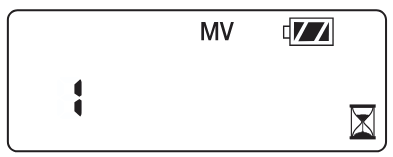
- When the master valve is activated, it will apply to all programs and the MV icon will stay displayed on the screen at all times.
Okungahleleleka Kuvaliwe (Kufika Ezinsukwini ezingama-99)
Lesi sici sivumela umsebenzisi ukuthi amise konke ukuchelela okuhleliwe ngesikhathi esimisiwe kusukela ezinsukwini ezingu-1-99. Ekupheleni kwenkathi yokuvalwa ehlelekayo, isilawuli sizoqala kabusha ukusebenza okuvamile.
- From idle mode, press the inkinobho kuze kube icon is displayed. Wait two seconds until OFF is shown on the display. The controller is now in System Off mode.
- Cindezela inkinobho button and a blinking “1” will be displayed, indicating the number of days the controller will stay off. Program the off days as desired, up to 99 days maximum.
- The display will show the number of days remaining in the VALIWE isikhathi.
- To interrupt the VALIWE period, press the button to return to the idle mode screen, showing the time of day and day of the week.
I-BATTERY-LIFE INkomba
Impilo yebhethri esele ingalinganiselwa kunkomba yempilo yebhethri eboniswa esibukweni. I-NODE ingasebenza isebenzisa ibhethri elilodwa lama-volt ayisishiyagalolunye noma isebenzisa amabhethri amabili ayisishiyagalolunye-volt. Ukusebenzisa amabhethri ayisishiyagalolunye-volt kuzokhipha cishe kabili impilo yebhethri yebhethri elilodwa lama-volt ayisishiyagalolunye. Ishadi lenkomba yempilo yebhethri elingezansi libonisa isilinganiso sempilo yebhethri esele.
 Full: 100–60% remaining battery life
 Med: 60–25% remaining battery life
 Low: 25–0% remaining battery life
 Shintsha ibhethri ngokushesha!
UKUSETHA KABUSHA ISILAWULI
Ukusetha kabusha isilawuli kuzosula idatha yohlelo lwamanje futhi kuqalise kabusha isilawuli. Ukusetha kabusha, nokho, akususi uhlelo olulondolozwe kumemori yaphakade kusetshenziswa isici sememori ethi Easy Retrieve (bona ikhasi 12) ukuze ulondoloze uhlelo oluncanyelwayo.
- From idle mode, press and hold the , , futhi okhiye.
- After two seconds the screen will go blank. Continue to hold the , , futhi okhiye.
- 12:00 will flash on the display. Release the keys.
- The controller may show a countdown from 10 to 1 on the display, and then 12:00 am will be shown flashing when the reset is complete. The controller can now be reprogrammed.
UMHLAHLANDLELA WOKUXOXA IZINKINGA

IMICIMBI
Ubukhulu: 3 ½”(89 mm) diameter, 2 ½”(64 mm) high
Okokufaka kwenzwa:Eyodwa
Umthombo wamandla: One nine-volt alkaline battery (use two for extended battery life). Activates DC latching solenoids operating 9-11VDC (Hunter PN 458200).
Izinga lokushisa lokusebenza: 0ºF ukuya ku-140ºF (-17ºC ukuya ku-60ºC)
Izimvume:
IP68
CE
FCC
I-C-Tick
Amadokhumenti / Izinsiza
 |
I-Hunter NODE Isilawuli Esisetshenziswa Ibhethri [pdf] Incwadi Yomnikazi I-NODE Isilawuli Esisetshenziswa Ibhethri, i-NODE, Isilawuli Esisetshenziswa Ibhethri, Isilawuli Esisebenzayo, Isilawuli |