

I-DigiTech Talker Advanced Vocal Synthesis Good
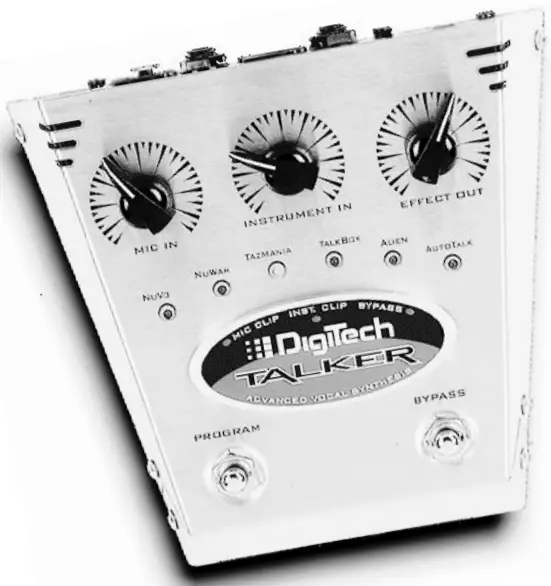
Isingeniso
Siyakuhalalisela futhi siyabonga ngokuthengaasing the DigiTech Talker.
This unique product features IVL Technology’s Advanced Vocal Synthesis which came about through research into physical modeling of the human voice. A radical new break-through in digital signal processing, the Talker actually allows an instrument and a voice to be combined to create expressive effects. The Talker also boasts an actual hard-wired bypass for the instrument and mic inputs to maintain a perfectly clean instrument signal when the effect is not in use.
The Talker has a retro-space-age look and is housed in a heavy duty stainless steel chassis that is both functional and attractive.
Ku-stage or in the studio, the DigiTech Talker is an extremely versatile effect with a wide variety of uses.

Use the Deglitch Talker with:
- Isiginci
- Izigubhu
- Amakhibhodi
- I-Bass
- Drum machines
- Abalandelanayo
- Pre-recorded Music
Using The Talker
The Talker combines separate inputs (for example a guitar & a vocal) to create unusual vocoder or talking effects. Plug your microphone and guitar into the Talker’s mic and instrument inputs.
Khetha noma i- amp, mixer or “both” effect outputs. Run cables to your amp and P.A. and set the Talker input levels.
Speak or sing into the microphone as you play chords or individual notes on your instrument to achieve the talking effect. Experiment with other devices: sing over a sequencer line, try a keyboard with a vocal or pre-recorded tracks combined with a drum machine.
Amathuba awapheli!
Press the Program switch with your foot to select between six distinctive program sounds. Press the Bypass switch to by pass the effect.
Qaphela: If using guitar as an input, a distortion or compression device may be plugged in before the Talker to increase upper harmonics and sustain. Run the output of the distortion box into the instrument input of the Talker. Other effects (like echo) should go after the Talker in the signal chain.
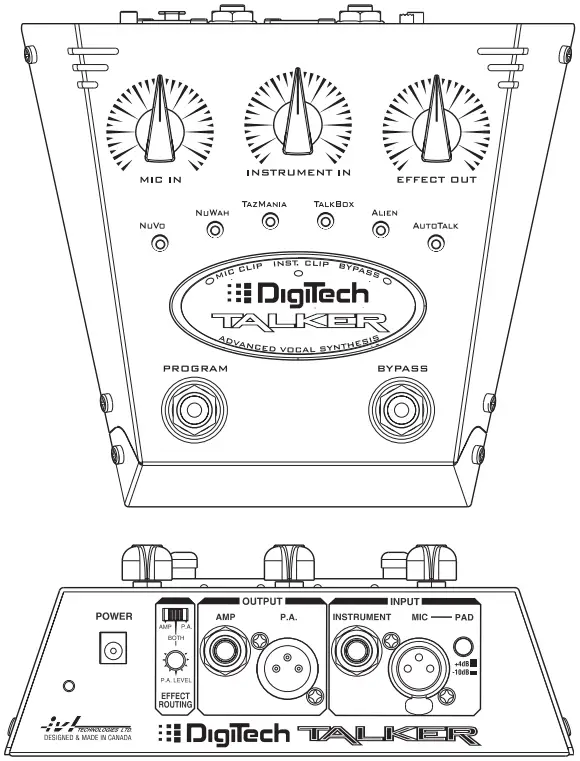
Qaphela: The Talker allows you to route your effect signal to a guitar amp and a mixer simultaneously. When the Talker effect is being used, the output of the Talker is all effect (100% “wet”). When the Talker is Bypassed, the mic input is passed through to the PA output, and the instrument input to the Amp output, which makes the Talker “invisible” to your recording or sound reinforcement setup. If you have selected the Both option for effects routing, you can balance the levels between the PA and the Amplifier with the PA Level knob.
Qaphela: If you are using a single output (Amp or PA only), and you don’t hear any effect sound, check that the Effects Routing Switch is set correctly.
IPHEPHA ELIPHAMBILI
Lawula Izincazelo
- Mic. In: adjusts the microphone input level.
- Instrument In: adjusts the instrument input level.
- Effect Out: controls the effect amount to the outputs.
Qaphela: The above controls have no effect on Bypass levels. - Program LEDs: indicate which Program the Talker is set to.
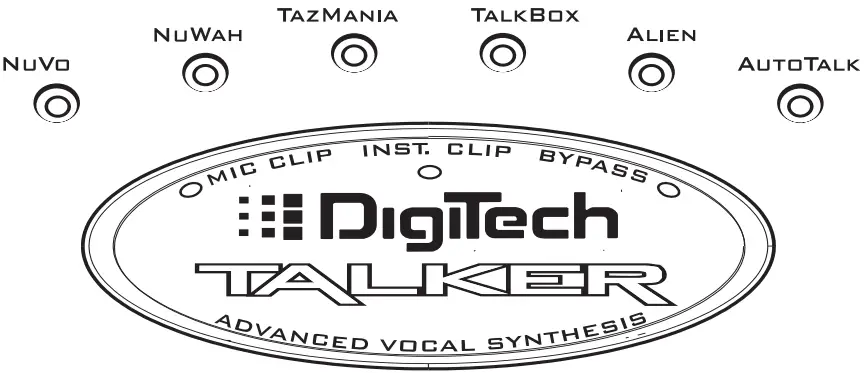
- Mic Clip LED: An LED flashing green with occasional orange means your input is set properly; red indicates distortion.
- Instrument Clip LED: An LED flashing green with occasional orange means your input is set properly; red indicates distortion.
- I-Bypass LED: A red LED means that the effect is bypassed.
- Ukushintsha Uhlelo: Toggles sequentially between the six Programs.
- I-Bypass Switch: Switches Bypass on or off.
In Bypass, the inputs are directly connected to their respective.
imiphumela: instrument in > amp out, microphone in > P.A. out.
This is a hardwire bypass, as if the Talker isn’t in the chain when bypassed. The mic bypass will be at microphone levels.
IPHAneli EMUVA
- Okokufaka kwamandla: a Harman Pro Group PS-750 power supply is included with your Talker.
- Effect Routing Switch
Amp: effect out to amplifier only (P.A. output muted).
P.A.: effect out to P.A. system (mixer) (Amp output is muted).
Kokubili: effect to both P.A. and ampi-lifier kanyekanye. - P.A. Level: Active when Effect Routing is in the Both position, this adjusts the level of effect to the P.A. output. This knob has no effect when Effect Routing is set to either Amp or P.A.
Okufakiwe: - Ithuluzi: unbalanced 1/4″ connector (mono) – instrument input.
- I-Mic: balanced XLR connector (mono) – microphone input.
- Iphedi: switchable Microphone input pad (+4dB/-10dB).
Okuphumayo: - Amp: unbalanced 1/4″ connector (mono) – connects effect to ampokokuphila.
- P.A.: balanced XLR connector (mono) – connects effect to P.A. system.
Talker Setup
Connect Talker to your system.
- Connect your microphone to the balanced XLR Mic In jack and select the -10 dBV or +4dBV setting with the Pad switch.
Qaphela: Many mics work at the -10 dBV setting.
- Connect your instrument to the unbalanced 1/4″ Instrument In jack.
- Connect the unbalanced 1/4″ Amp Output to your favorite guitar/instrument ampokokuphila.
- Ongakukhetha: Connect an XLR cable from PA to your mixer or PA ampokokuphila.
- Select the Effect Routing switch to Amp, P.A. or Both for depending which output(s) you want the effect sound to appear on.
- Power up the Talker by plugging the AC adaptor cable into the Power Input jack.
Qaphela: The Talker powers up in bypass mode with Nuvo preset selected (which takes approximately 5 seconds)
Ground loop note: When you use both the PA and Amp outputs, there is the possibility of hum due to ground loops between your amp and the PA system. If you experience hum in this setup, use only a proper audio ground lifting device such as one found in a DI box.
Amplifier distrotion note: If you prefer to use the the preamp distortion from your amplifier instead of running a distortion box before the Talker, you will hear less Talker effect unless you run the Talker into the effects loop of your amp. The effects loop adds preamplifier distortion before the Talker which makes the effect more distinct.
Setting the Bypass levels.
- Select By pass (the By pass LED should be on).
- Set your instrument and amp levels the way you normally do. If you have the P.A. output connected, adjust the levels on the P.A. to settings you normally use.
Qaphela: For maximum enjoyment, it’s important to set up the proper levels for the Talker effect.
Setting the Mic input level.
- Turn Bypass off (the Bypass LED should be off).
- Set the Mic level by singing or talking into the microphone at your
loudest performance volume while adjusting the Mic In knob. The Mic Clip LED should be green, just tickling the orange. If the LED is red, you have too much input. If the Mic level is still too hot press the pad switch to the +4 dBu setting.
Qaphela: Because the Talker defaults to the Nuvo pre-set on power up, you will not hear anything until you talk or sing and play at the same time. Also, keep in mind that the volume of your singing voice controls the volume of the Talker effect.
Setting the Instrument level.
- Bypass should still be off.
- Watch the Instrument Clip LED while you play. Adjust the Instrument In knob until the Clip LED is green, just tickling the orange. If the LED is red, you have too much input.
Qaphela: Once again, if you are in the Nuvo preset then you’ll hear output only when you talk and play at the same time.
Setting the levels between the Effect and the Bypassed sound.
- Sing or talk into the Mic while playing your instrument, to hear the Talker “effect”.
- Switch in and out of Bypass and adjust the Effect Out knob until you find the right balance between your instrument and the Talker. If the effect sound is louder than your instrument sound in Bypass, turn down the Effect Out knob until it is the same (or maybe a little louder for soloing purposes).
Qaphela: It is best not to adjust your instrument’s output level while doing this – use the Effect Out Knob for more or less volume.
Setting the balance between the Amp output and the PA output
When you have set up both an amplifier and a mixer as outputs, and you have chosen “Both” with the Effect Routing Switch, you may want to use the PA Level knob on the back panel to balance the relative volume of the effect signal going to the PA output with the bypassed mic volume. It can also be used to balance the level of the PA output compared to the Amp okukhiphayo.
Qaphela: This control has no effect on the Bypassed signal
Qaphela: The PA output when using the Talker effect is an amplified signal, and is capable of much higher levels than the bypassed mic signal. You may want to trim the effect level back with the PA Level knob to match your mixer’s input.
Izincazelo Zohlelo
- Nuvo: This is the most intelligible program. Play a chord and speak or sing into the mic and you will be able to hear the words clearly.
- NuWah: (Guitar effect only, no vocal needed). This is an automatic wah feature that is somewhat like an envelope follower but the wah is very human sounding.
- Taz Mania: (Use instrument and mic, or mic alone). This program uses white noise to generate a devilish voice. The gate feature is active so that the user can switch back and forth between the effect and the guitar sound without pressing the Bypass switch.
- Talk Box: This program features vocoder which has been EQ’d to sound more like the old Talk boxes such as the “Golden Throat”, Heil “Talk Box”, etc.
- Alien: This program features an old style vocoder or alien sounding effect.
- Auto Talk: This is an automatic vocoder-type effect. Play your guitar with the effect on (you’ll hear the normal guitar sound), then sing or say something into the mic. This will automatically switch into the Auto Talk effect. When you finish vocalizing, the Talker will automatically switch back to your guitar sound.
Some Suggested Applications
Guitar & Microphone With Distortion:
One way to set up when you are using guitar and some effects is to place your Talker after the distortion or compression effects. Using distortion with a guitar into the Talker can increase intelligibility and sustain. Other effects such as echo, reverb, phasor and flange, should be added after the Talker.
Drum Machine Loop:
Run the left and right outputs of a drum machine into the Mic Input and the Instrument Input of the Talker. Set the input levels and adjust the Effect Output. You may need a 1/4″ to XLR cable adapter for the Mic In. Try taking drums with different rhythms and panning them hard left and hard right to hear them modulate against each other.
Keyboard/Drum Machine:
Connect a synthesizer or sampler to the Instrument Input and a drum machine into the Mic Input to achieve a rhythmic keyboard effect. Try using a sustained string or pad type of keyboard sound. Also try modulating a sustaining bass sound or a sub-bass waveform with just the bass drum output of a drum machine or a recorded bass or bass drum track.
Bass/Vocal:
Same set-up as a guitar. For maximum effect use distortion or compression effects before the Talker Input.
Pre-recorded loop:
Run the stereo outputs of a CD or tape player into the Mic Input and the Instrument Input of the Talker. Set the Input levels and adjust the Effect Output. You may need a 1/4″ to XLR cable adapter for the Mic Input.
Recorded tracks:
If you have a multi-track recorder, experiment with using pre-recorded vocal or instrumental tracks as either the Mic or Instrument inputs, as well as against live mic or instrument input, to generate new effect tracks.
Qaphela: The general rule of thumb is that the sound source that has more sustained notes and a wider frequency signal should be in the Instrument input, and the source that has more rhythmic variation or expressive changes in volume and timbre should be in the Mic input.
Imininingwane
|
Microphone path |
Instrument path | |
| Signal/Noise (A weighted) | -91dB | -90 dB |
| Impendulo Yemvamisa (-3db) | 10 Hz kuya ku-14.5 kHz | 10 Hz kuya ku-14.5 kHz |
| Ibanga lokokufaka | -34 dBV-+15 dBV | -14 dBV-+15 dBV |
| Ibanga lokukhipha | -∞ to 11.3 dBV | -∞ to 11.3 dBV |
| THD+N: (A weighted) | 0.04% | 0.04% |
| Okokufaka Impedance: | I-20 kOhm | I-500 kOhm |
| Ukudlula | Inentambo eqinile | Inentambo eqinile |
| Connectors: Input | balanced XLR | unbalanced 1/4″ mono |
| Okukhiphayo | balanced XLR | unbalanced 1/4″ mono |
| Usayizi: | 8″ X 2.75″ X 7.25″ | |
| Isisindo: | 6 lb. / 2.7 Kg. | |
| Adapter O/P Rating: | 9.75 VAC @ 820 mA | |
| Use Only Harman Pro Group PS750 power adapter (as supplied with the Talker) | ||
Manual rework 1.1 February 11, 1999 Specifications subject to change without notice.
|
|
ISEXWAYISO |
|
|
UBUNGOZI BOKUSHAQUKA KAgesi UNGAVULI |


QAPHELA: I-RISQUE DE CHOC ELECTRIQUE – NE PAS OUVRIR.
ISEXWAYISO: UKUNCIPHA UBUNGOZI BOMLILO NOMA UKUSHAQEKA KUKAGESI UNGAKUDALULI LOKHU OKUSETSHENZISWA UKUVULA NOKUTHUTHUKISA.
Izimpawu eziboniswe ngenhla ziyizimpawu ezamukelwa emhlabeni wonke ezixwayisa ngezingozi ezingaba khona ngemikhiqizo kagesi.
The lightning flash with arrow point in an equilateral triangle means that there are dangerous voltagikhona ngaphakathi kweyunithi. Iphuzu lesibabazo kunxantathu olinganayo libonisa ukuthi kuyadingeka ukuthi umsebenzisi abhekisele kumanuwali yomnikazi.
Lezi zimpawu zixwayisa ngokuthi azikho izingxenye ezisebenzisekayo zomsebenzisi ngaphakathi kweyunithi. Ungayivuli iyunithi. Ungazami ukusevisa iyunithi ngokwakho. Thumela zonke izinsiza kubasebenzi abaqeqeshiwe. Ukuvula i-chassis nganoma yisiphi isizathu kuzovala iwaranti yomkhiqizi. Ungamanzisi iyunithi. Uma uketshezi luchithekile kuyunithi, luvale ngokushesha bese uluyisa kumthengisi ukuze uthole isevisi. Nqamula iyunithi ngesikhathi seziphepho ukuze uvimbele umonakalo.
Imiyalo yokuphepha
Isaziso Samakhasimende Uma Iyunithi Yakho Ifakwe Intambo Yamandla.
ISEXWAYISO: LESI SICELO KUMELE SIBE EMHLABENI.
Ama-cores ku-mains lead anemibala ngokuhambisana nekhodi elandelayo:
GREEN and YELLOW – Earth BLUE – Neutral BROWN – Live.
As colors of the cores in the mains lead of this appliance may not correspond with the coloured markings identifying the terminals in your plug, proceed as follows:
- Ingqikithi enombala oluhlaza nophuzi kufanele ixhunywe kutheminali kupulaki ephawulwe ngohlamvu E, noma ngophawu lomhlaba, noma olunombala oluhlaza, noma oluluhlaza nophuzi.
- Umongo onombala oluhlaza okwesibhakabhaka kufanele uxhunywe kutheminali ephawulwe ngo-N noma ngombala omnyama.
- Ingqikithi enombala onsundu kufanele ixhunywe kutheminali ephawulwe ngo-L noma ngombala obomvu.
This equipment may require the use of a different line cord, attachment plug, or both, depending on the available power source at installation.
Connect this equipment only to the power source indicated on the equipment rear panel. If the attachment plug needs to be changed, refer servicing to qualified service personnel who should refer to the table below. The green/yellow wire shall be connected directly to the unit’s chassis.
ISEXWAYISO: Uma umhlabathi wehluliwe, izimo ezithile zephutha kuyunithi noma ohlelweni lapho ixhunywe khona zingaholela kuvolumu yomugqa ogcwele.tage phakathi kuka-chassis nomhlabathi. Ukulimala okubi kakhulu noma ukufa kungase kubangele uma i-chassis nomhlabathi uthintwa kanyekanye.
Ukuhambisana ne-Fcc
Lesi sisetshenziswa sihloliwe futhi satholwa ukuthi sithobela imikhawulo yedivayisi yedijithali Yekilasi B, ngokuvumelana Nengxenye 15 Yemithetho Ye-FCC. Le mikhawulo iklanyelwe ukuhlinzeka ngokuvikeleka okufanele ekuphazanyisweni okuyingozi ekufakweni kwendawo yokuhlala. Lesi sixhobo sikhiqiza, sisebenzise futhi singakhipha amandla efrikhwensi yomsakazo futhi, uma singafakiwe futhi sisetshenziswa ngokuhambisana nemiyalelo, singadala ukuphazamiseka okuyingozi ezokuxhumana ngomsakazo. Nokho, asikho isiqinisekiso sokuthi ukuphazamiseka ngeke kwenzeke ekufakweni okuthile. Uma lesi sisetshenziswa sidala ukuphazamiseka okuyingozi emsakazweni noma kumabonakude, okunganqunywa ngokucisha nokuvula okokusebenza, umsebenzisi uyakhuthazwa ukuthi azame ukulungisa ukuphazamiseka ngesinyathelo esisodwa noma ngaphezulu kwezilandelayo:
- Hlela kabusha noma hambisa uthi olwamukelayo
- Khulisa ukuhlukana phakathi kwezinto zokusebenza nomamukeli okungase kubangele ukusebenza okungafunwa.
- Xhuma okokusebenza endaweni yokuphuma kuyisekethe ehlukile kuleyo lapho umamukeli axhumeke khona
- Xhumana nomthengisi noma uchwepheshe werediyo/TV onesipiliyoni ukuze uthole usizo.
- Le mishini yedijithali Yekilasi B ihlangabezana nazo zonke izimfuneko Zemithetho Yezisetshenziswa ZaseCanada Ezibangela Ukuphazamiseka.
- Complies with Canadian ICES-003 Class B Conforme au Regalements Canadians NMB0003 Class B.
I-Electromagnetic Compatibility
Le yunithi ihambisana Nezicaciso Zomkhiqizo eziphawulwe ku-Declaration of Conformity. Ukusebenza kungaphansi kwemibandela emibili elandelayo:
- lolu cingo angeke lungabangeli ukuphazamiseka okuyingozi, futhi.
- lolu cingo kufanele lwamukele noma yikuphi ukuphazamiseka okutholiwe, okuhlanganisa ukuphazamiseka okungase kubangele ukusebenza okungafuneki. Ukusebenza kwaleli yunithi ngaphakathi kwezinkambu ezibalulekile zikazibuthe kufanele kugwenywe.
- sebenzisa kuphela izintambo ezixhumene ezivikelekile.
Warning For Your Protection Please Read The Following:
Amanzi Nomswakama: Izinto ezisetshenziswayo akufanele zisetshenziswe eduze namanzi (isb. eduze kukabhavu, indishi yokuwasha, usinki wasekhishini, ubhavu wokuwasha, endaweni engaphansi emanzi, noma eduze nedamu lokubhukuda, njll). Kufanele kuqashelwe ukuze izinto zingawi futhi uketshezi lungachitheki endaweni ebiyelwe ngezimbobo.
IMITHOMBO YAMANDLA: Into esetshenziswayo kufanele ixhunywe kugesi kuphela wohlobo oluchazwe emiyalweni yokusebenza noma olumakwe entweni esetshenziswayo.
UKUGWAZA NOMA UKUHLANGANISA: Izinyathelo zokuqapha kufanele zithathwe ukuze izindlela zokubekwa phansi nokwehlukaniswa kokwehlukaniswa komsebenzi kunganqotshwa.
UKUVIKELWA KWENKAMBO YAMANDLA: Izintambo zokuphakela ugesi kufanele zihanjiswe ngendlela ukuze kungenzeki ukuthi zihanjwe phezu kwazo noma zimpintshwe izinto ezibekwe phezu kwazo noma ezimelene nazo, kuqashelwe ngokukhethekile izintambo kumapulaki, izinto ezisetshenziswayo, kanye nendawo lapho ziphuma khona entweni.
UKUSEBENZA: Ukunciphisa ubungozi bomlilo noma ukushaqeka kukagesi, umsebenzisi akufanele azame ukusevisa into edlula leyo echazwe emiyalweni yokusebenza. Zonke ezinye izinsiza kufanele zidluliselwe kubasebenzi abaqeqeshiwe.
ISEXWAYISO: To reduce the risk of fire replace only with same type fuse.
QAPHELA: Utilizer un fusible de recharge de meme type.
ISEXWAYISO: To reduce the risk of fire replace LAMP nengxenye enconyiwe yabakhiqizi (Bheka kuzincwadi zesevisi)
U.k. Mains Plug Warning
A moulded mains plug that has been cut off from the cord is unsafe.
Discard the mains plug at a suitable disposal facility. NEVER UNDER ANY CIRCUMSTANCES SHOULD YOU INSERT A DAMAGED OR CUT MAINS PLUG INTO A 13 AMP ISOkhethi Yamandla. Ungasebenzisi ipulaki kagesi ngaphandle kwekhava ye-fuse endaweni. Amakhava e-fuse ashintshwayo angatholwa kumthengisi wangakini. Amafuse okushintsha angu-13 amps futhi KUMELE kube yi-ASTA egunyazwe ku-BS1362.
|
IKHONIKI |
UMBALA WENTLANGO |
||
| L | Umugqa | Brown | Mnyama |
| N | Ukungathathi hlangothi | Okuluhlaza okwesibhakabhaka | Emhlophe |
 |
Umhlaba Grnd. | Okuluhlaza/Yel. | Okuhlaza |
Declaration Of Conformity
Igama Lomkhiqizi: IVL Technologies Ltd. per DigiTech specifications
Ikheli Lomkhiqizi: 6710 Bertram Place Victoria, B.C. Canada V8M 1Z6
umemezela ukuthi imikhiqizo: DigiTech Talker
hambisana nokucaciswa komkhiqizo okulandelayo:
I-EMC: EN 55022 (1987): CISPR 22 (1993) Isigaba B EN 50082-1 (1992)
Ulwazi Olwengeziwe:
Umkhiqizo lapha uhambisana nezidingo ze-EMC Directive 89/336/EEC (1989) njengoba ichitshiyelwe yi-CE Marking Directive 93/68/EEC (1993).
Inkampani IVL Technologies Ltd.
6710 Bertram Place Victoria, B.C.
Canada V8M 1Z6 October 6, 1997 Brian Gibson, Vice President of Engineering.
Oxhumana naye waseYurophu: Your local DigiTech Sales and Service Office or International Sales Office 3 Overlook Drive Unit #4 Amherst, New Hampshire 03031, USA Ucingo 603-672-4244 Ifeksi (603) 672 4246

Qaphela: Additional connection information is printed on the underside of the Talker case.
Ukwesekwa Kwamakhasimende
Please visit Digitech on the Web at www.digitech.com
Inkampani yeHarman International



Amadokhumenti / Izinsiza
 |
I-DigiTech Talker Advanced Vocal Synthesis Good [pdf] Umhlahlandlela Womsebenzisi Talker Advanced Vocal Synthesis Good, Advanced Vocal Synthesis Good, Vocal Synthesis Good, Synthesis Good |