1. Isingeniso
The Olvy 2-in-1 Jump Starter and Power Bank (Model QS001) is a versatile and essential device designed to provide reliable emergency starting power for a wide range of 12V vehicles, including cars, trucks, motorcycles, SUVs, vans, and heavy-duty engines. Beyond its powerful jump-starting capability, it also functions as a high-capacity portable power bank and a multi-mode LED flashlight, making it an indispensable tool for any driver.
Engineered for performance in extreme conditions, this device operates effectively in temperatures ranging from -20°C to +60°C. It incorporates 9 layers of intelligent protection to ensure maximum safety and peace of mind during use.

Image: The Olvy Jump Starter is designed to operate reliably in extreme temperatures, from -20°C to +60°C, ensuring functionality in diverse climates.
2. Izici zomkhiqizo
- Powerful Jump Starter: Delivers up to 1500A peak current to start 12V diesel and gasoline vehicles, including cars, trucks, motorcycles, SUVs, vans, and heavy-duty engines.
- Iphephile futhi Inokwethenjelwa: Equipped with 9 levels of intelligent protection, including reverse polarity, short circuit, overcurrent, overload, over-temperature, and over-discharge protection.
- All-Weather Operation: Designed to function in extreme conditions from -20°C to +60°C, ensuring reliable starts in cold or hot climates.
- Multi-functional Emergency Light: Integrated LED flashlight with 3 modes: bright light, strobe, and SOS signal for roadside safety and emergencies.
- I-Portable Power Bank: Dual USB and Type-C outputs with 8,000 mAh / 10,000 mAh capacity for charging smartphones, tablets, and other electronic devices on the go.

Image: The Olvy Jump Starter is suitable for a wide range of 12V vehicles, including sedans, motorcycles, SUVs, and even heavy-duty engines.
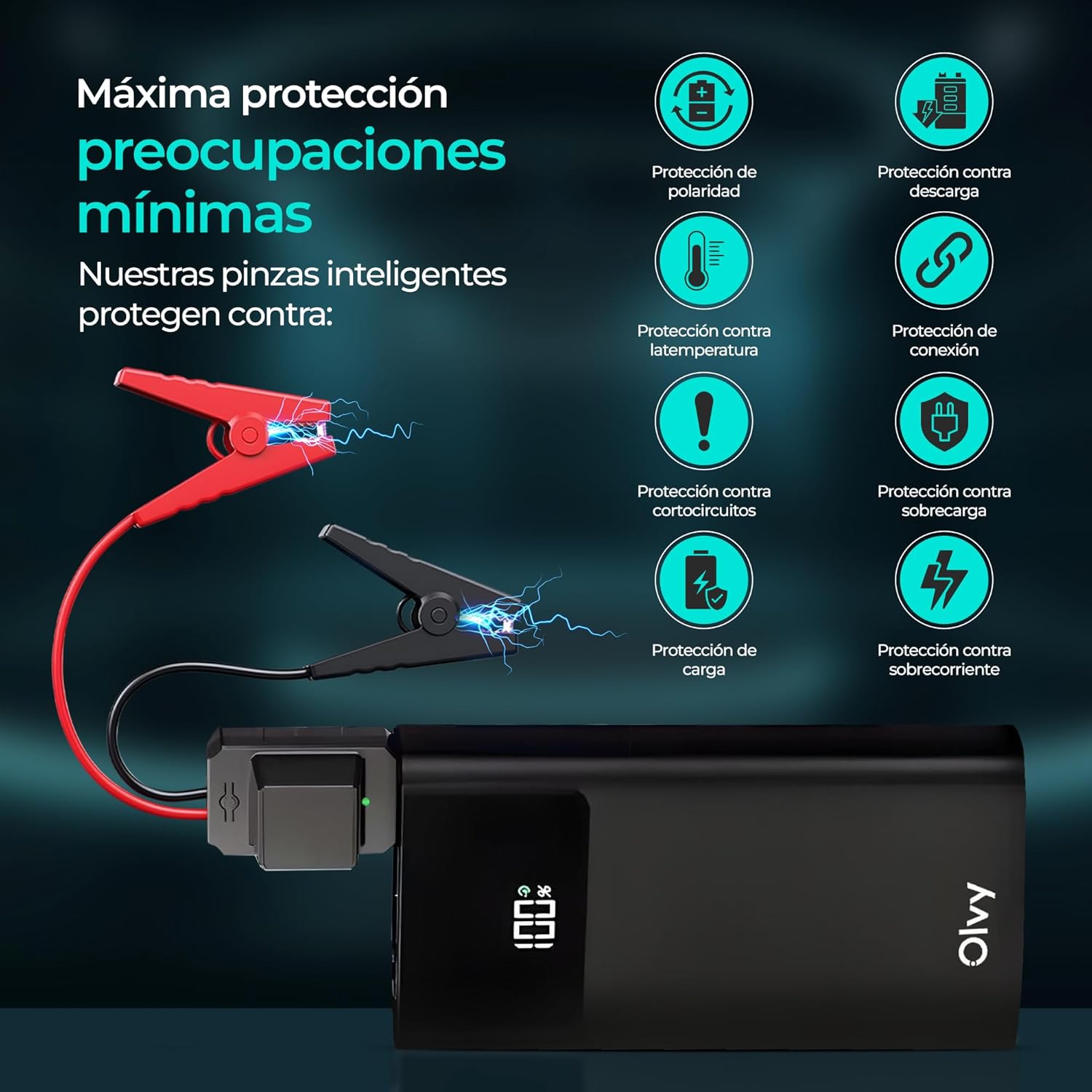
Image: The device features multiple intelligent protections, such as polarity protection, discharge protection, temperature protection, connection protection, short-circuit protection, overload protection, charge protection, and overcurrent protection.

Image: This compact and portable jump starter provides 1500A peak current and includes smart cables for safe and efficient operation.
3. Setha
3.1. Okuqukethwe Kwephakheji
Before first use, please ensure all items are present in the package:
- 1x Olvy Jump Starter and Power Bank
- 1x Smart Battery Clamps
- Ikhebuli ye-1x yokushaja ye-USB
- Isikhwama Sokugcina esingu-1x
- 1x Incwadi Yomsebenzisi

Image: The complete package includes the Olvy 2-in-1 Jump Starter, smart battery clamps, a USB charging cable, a storage bag, and a user manual.
3.2. Ukushaja Kwasekuqaleni
Fully charge the Olvy Jump Starter before its first use. Connect the provided USB charging cable to the device's Type-C input port and a suitable USB power adapter (not included). The LCD screen will display the charging progress. Disconnect once fully charged.
4. Iziqondiso Zokusebenza
4.1. Gxuma Ukuqala Imoto
- Ensure the jump starter is sufficiently charged (at least 50% recommended).
- Xhuma ibhethri elihlakaniphile clamps to the jump starter's dedicated port.
- Namathisela okubomvu (+) clamp kutheminali ephozithivu yebhethri lemoto.
- Namathisela okumnyama (-) clamp to the negative terminal of the vehicle's battery. Ensure a secure connection. The smart clamps will indicate a correct connection (e.g., a green light).
- Qala injini yemoto.
- Uma injini iqala, susa ngokushesha i-smart clamps from the vehicle battery, then disconnect them from the jump starter.

Image: Simple 4-step process for jump starting: 1. Connect the smart clamps to the jump starter. 2. Clamp to the car battery. 3. Start the car. 4. Disconnect the clamps.
4.2. Isetshenziswa Njengebhange Lamandla Aphathekayo
The Olvy Jump Starter can charge your electronic devices:
- Connect your device's USB or Type-C charging cable to the corresponding output port on the jump starter.
- I-jump starter izoqala ngokuzenzakalelayo ukushaja idivayisi yakho.
- Monitor the charging status on your device and the jump starter's LCD screen.

Image: The device doubles as a power bank with Type-C and USB outputs, offering 8,000 mAh capacity to charge mobile devices.
4.3. Ukusebenzisa i-Flashlight ye-LED
The integrated LED flashlight offers three modes for various situations:
- Ukukhanya Okukhanyayo: Press and hold the flashlight button to turn on the bright light.
- Imodi ye-Strobe: Press the button again to switch to strobe mode for increased visibility.
- Isiginali ye-SOS: Press the button a third time for the SOS signal, useful in emergencies.
- Cindezela bese ubamba inkinobho ukuze ucime ithoshi.
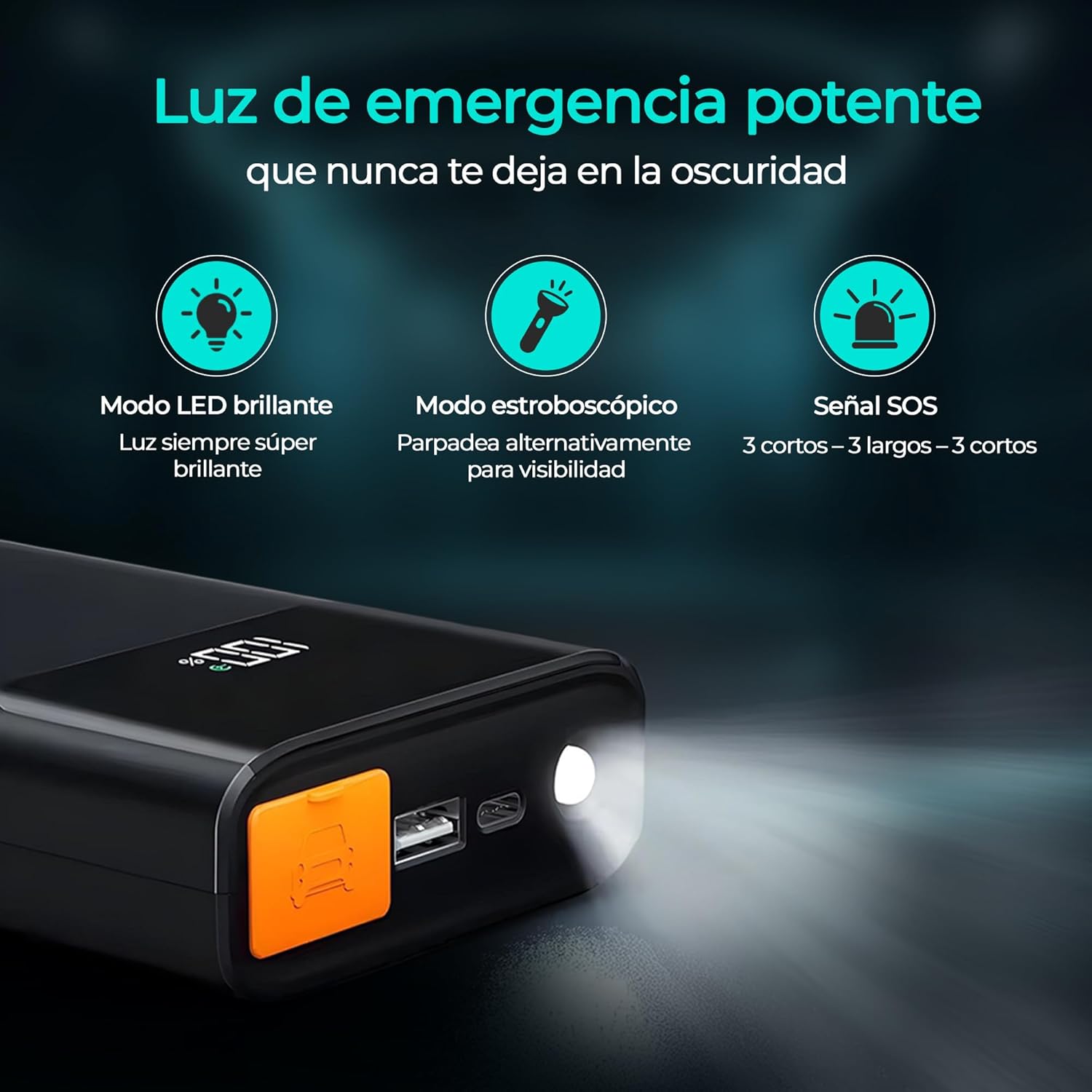
Image: The powerful emergency light features a super bright LED mode, an alternating strobe mode for visibility, and an SOS signal (3 short, 3 long, 3 short flashes).
5. Ulwazi Lokuphepha
Sicela ufunde futhi uqonde zonke izexwayiso nemiyalelo yokuphepha ngaphambi kokusebenzisa lo mkhiqizo. Ukwehluleka ukulandela le miyalo kungase kubangele ukushaqeka kukagesi, umlilo, kanye/noma ukulimala okubi kakhulu.
- Do not short-circuit the smart clamps.
- Ungawuvezi umkhiqizo emvuleni noma ezimeni ezimanzi.
- Ungawuqaqi umkhiqizo. Thumela bonke abasebenzi benkonzo abafanelekayo.
- Gcina endaweni lapho izingane zingafinyeleleki khona.
- Use only the provided smart clamps and charging cable.
- Ensure proper polarity when connecting to a vehicle battery (red to positive, black to negative). The smart clamps have built-in reverse polarity protection.
- Ungagxumi uqale ibhethri eliqandisiwe.
- Ungasebenzisi i-jump starter uma izintambo noma i-clamps zonakele.
- Susa i-clamps from the vehicle battery immediately after the engine starts.
6. Isondlo
- Gcina i-jump starter endaweni epholile, eyomile kude nokukhanya kwelanga okuqondile kanye namazinga okushisa aphezulu.
- Recharge the device every 3-6 months, even if not in use, to maintain battery health.
- Hlanza ingaphandle ngokuthambile, damp indwangu. Ungasebenzisi amakhemikhali anokhahlo noma izinto ezilumayo.
- Keep the smart clamps ihlanzekile futhi ayinayo ukugqwala.
7. Ukuxazulula izinkinga
7.1. Idivayisi Ayivuli
- Ensure the device is charged. Recharge if the battery level is low.
- Cindezela futhi ubambe inkinobho yamandla imizuzwana embalwa ukuze uqinisekise ukuthi akukhona nje ukucindezela okusheshayo.
7.2. Vehicle Not Starting
- Check that the smart clamps are securely connected to the vehicle battery terminals with correct polarity.
- Ensure the jump starter has sufficient charge.
- The vehicle battery might be severely discharged or damaged. Consult a professional mechanic.
- If the smart clamps indicate an error (e.g., red light), refer to the smart clamp's specific error codes in the full user manual.
7.3. Idivayisi Ayishaji
- Ensure the USB charging cable is properly connected to both the device and the power adapter.
- Try a different USB power adapter or charging cable.
8. Imininingwane
| Ibhrendi | Olvy |
| Imodeli | I-QS001 |
| I-Peak Yamanje | 1500 Amperes |
| Amandla ebhethri | 8000 mAh (10000 mAh variant also mentioned) |
| Ukwakhiwa Kweseli Yebhethri | I-Lithium ion |
| Voltage | 12 Volts (DC) |
| Izinga Lokushisa Lokusebenza | -20°C kuya +60°C |
| Ubukhulu | 19 x 12.7 x 9 cm |
| Isisindo | 1.5 kg |
| Okukhiphayo kwe-USB | Yebo |
| Uhlobo C okukhiphayo | Yebo |
9. Iwaranti kanye Nokusekela
For detailed warranty information and customer support, please refer to the warranty card included in your product package or visit the official Olvy webindawo. Gcina irisidi lakho lokuthenga njengobufakazi bokuthenga kwanoma yiziphi izimangalo zewaranti.


