1. Umkhiqizo Uphelileview
The Baseus BS1 NC Semi-in-Ear Noise Cancelling Earbuds offer a blend of comfort and advanced audio technology. Featuring Adaptive Hybrid Active Noise Cancellation (ANC), Hi-Res Audio with LDAC support, and a lightweight design, these earbuds are engineered for extended listening and clear communication. They are also equipped with a 6-microphone AI system for clear calls and IP55 water and dust resistance.

Image: Baseus BS1 NC Semi-in-Ear Noise Cancelling Earbuds and their charging case in black.
2. Okuqukethwe Kwephakheji
Qinisekisa ukuthi zonke izinto zikhona kuphakheji:
- Baseus Bass BS1 NC Semi-in-Ear Earbuds (Left and Right)
- Ikesi lokushaja
- Ikhebuli yokushaja ye-USB-C
- Quick Start Guide

Image: The complete retail package for the Baseus BS1 NC Earbuds, showing the earbuds, charging case, USB-C cable, and quick start guide.
3. Ukushaja ama-Earbud nekesi
Ukuze usebenze kahle, shaja ama-earbud kanye nesikhwama sokushaja ngokugcwele ngaphambi kokusebenzisa okokuqala.
3.1 Ukushaja ama-Earbuds
- Faka ama-earbud ekesini lokushaja. Qinisekisa ukuthi zihlezi kahle ezindaweni zazo (L kwesobunxele, R kwesokudla).
- Close the charging case. The earbuds will begin charging automatically.
3.2 Charging the Case
- Xhuma ikhebula lokushaja le-USB-C elinikeziwe embobeni yokushaja ekhesini.
- Xhuma enye ingxenye yentambo ku-adaptha yamandla ye-USB (ayifakiwe) noma imbobo ye-USB yekhompyutha.
- The LED indicator on the case will show the charging status:
- Okuluhlaza: 75% - 100% charged
- Okuphuzi: 25% - 75% charged
- Okubomvu: Below 25% charged
- A full charge for the case provides up to 40 hours of total playtime for the earbuds (with ANC off). A 10-minute charge can provide up to 2 hours of playback.

Image: The Baseus BS1 NC Earbuds resting in their open charging case, highlighting the 40-hour total playtime and rapid charging capabilities.
4. Ukumatanisa kanye Nokuxhumana
4.1 Ukumatanisa kokuqala
- Vula ikesi lokushaja. Ama-earbud azongena ngokuzenzakalelayo kumodi yokumatanisa.
- Kudivayisi yakho (i-smartphone, ithebhulethi, ikhompuyutha), vula i-Bluetooth.
- Cinga "Baseus Bass BS1 NC" in the list of available Bluetooth devices.
- Select "Baseus Bass BS1 NC" to connect. A voice prompt will confirm successful pairing.
4.2 Ukuxhuma kabusha okuzenzakalelayo
Once paired, the earbuds will automatically reconnect to the last connected device when removed from the charging case and within Bluetooth range.
4.3 Ukuxhumeka Kwamaphuzu Amaningi
The Baseus BS1 NC supports Baseus Smart-Connect (BSC) technology, allowing simultaneous connection to two devices. This enables seamless switching between audio sources without manual re-pairing.
To use multipoint connection:
- Hlanganisa ama-earbud nedivayisi yakho yokuqala.
- Nqamula ama-earbud kuzilungiselelo ze-Bluetooth zedivayisi yokuqala (ungawahlukanisi).
- Hlanganisa ama-earbud nedivayisi yakho yesibili.
- Reconnect the earbuds to the first device from its Bluetooth settings. The earbuds should now be connected to both devices.
Audio will automatically switch to the device playing content or receiving a call.
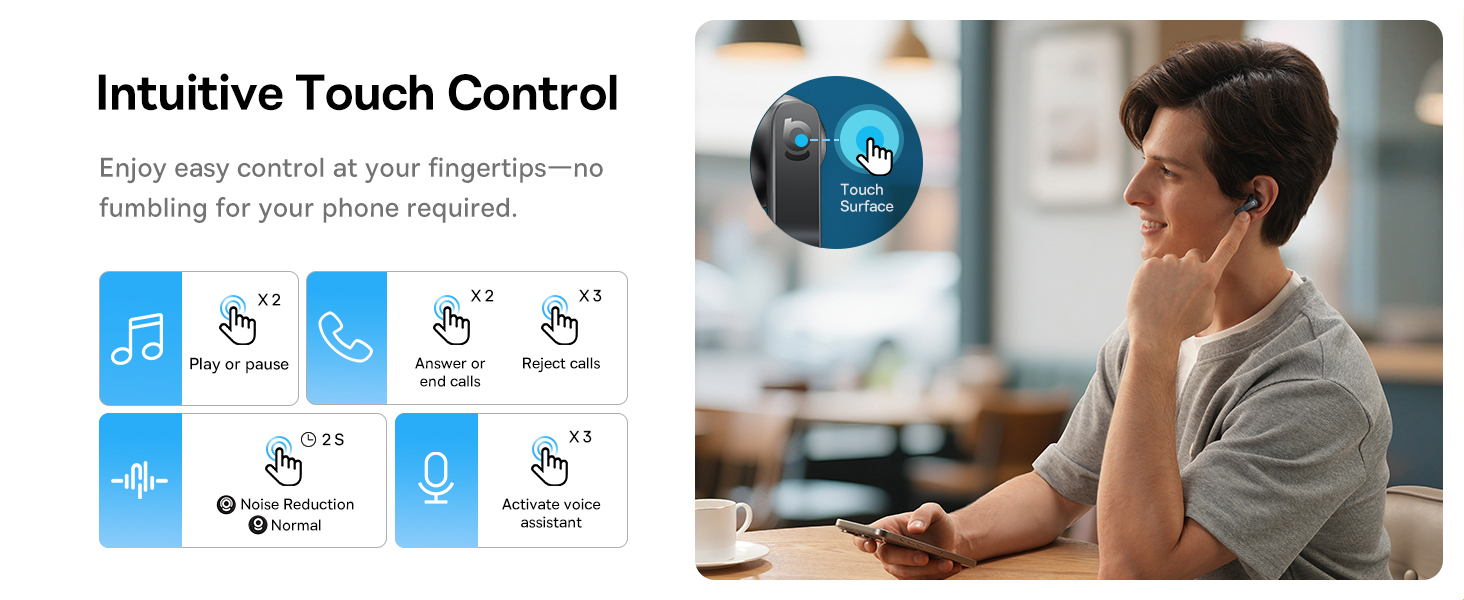
Image: A visual representation of the Baseus BS1 NC Earbuds connected to both a laptop and a smartphone, showcasing the instant multipoint connection feature.
5. Ukugqoka ama-Earbud
The Baseus BS1 NC earbuds feature a semi-in-ear design for comfortable, pressure-free wear. For optimal sound quality and noise cancellation, ensure a proper fit.
- Khomba ama-earbud angakwesokunxele (L) kanye nakwesokudla (R).
- Faka ngobumnene i-earbud endlebeni yakho.
- Adjust the earbud until it feels secure and comfortable. The stem should point slightly forward or downward.

Image: A person wearing the Baseus BS1 NC Earbuds, illustrating their ergonomic and lightweight design for all-day comfort.
6. Iziqondiso Zokusebenza
6.1 Izilawuli zokuthinta
The earbuds feature intuitive touch controls on their stems. The following are default functions, which may be customizable via the Baseus app:
| Isenzo | Umsebenzi |
|---|---|
| Double-tap (Left or Right Earbud) | Dlala/Misa kancane umculo, Phendula/Cisha ucingo |
| Triple-tap (Left or Right Earbud) | Reject call, Activate voice assistant |
| Cindezela bese ubamba (imizuzwana engu-2) | Switch Noise Control Mode (ANC/Normal/Transparency) |

Image: An illustration detailing the intuitive touch controls on the Baseus BS1 NC Earbuds for various functions like play/pause, call management, noise reduction, and voice assistant activation.
6.2 Izindlela Zokulawula Umsindo
The Baseus BS1 NC earbuds offer three noise control modes:
- Adaptive Hybrid ANC (Active Noise Cancellation): Reduces ambient noise for an immersive listening experience. Ideal for noisy environments.
- Imodi yokubonisa ngale: Allows you to hear your surroundings while still enjoying your audio. Useful for awareness in urban settings or conversations.
- Imodi Ejwayelekile: Standard audio playback without active noise cancellation or transparency features.
Switch between modes by pressing and holding the touch area on either earbud for 2 seconds.

Image: A cutaway diagram of a Baseus BS1 NC earbud in an ear, illustrating the semi-in-ear fit and the availability of Adaptive Noise Cancelling and Transparency Mode.
6.3 Hi-Res Audio with LDAC
These earbuds support LDAC technology, enabling high-resolution audio transmission for a detailed and rich sound experience. Ensure your device supports LDAC and activate it in your device's Bluetooth settings for the best audio quality.

Image: The Baseus BS1 NC Earbuds surrounded by sound waves, emphasizing features like Hi-Res Audio, SuperBass 2.0, and 13mm dynamic drivers for powerful sound.
6.4 6-Mic AI Clear Calls
The earbuds are equipped with 6 microphones and AI noise isolation technology to ensure your voice is clear during calls, even in noisy environments. Wind noise reduction further enhances call clarity outdoors.
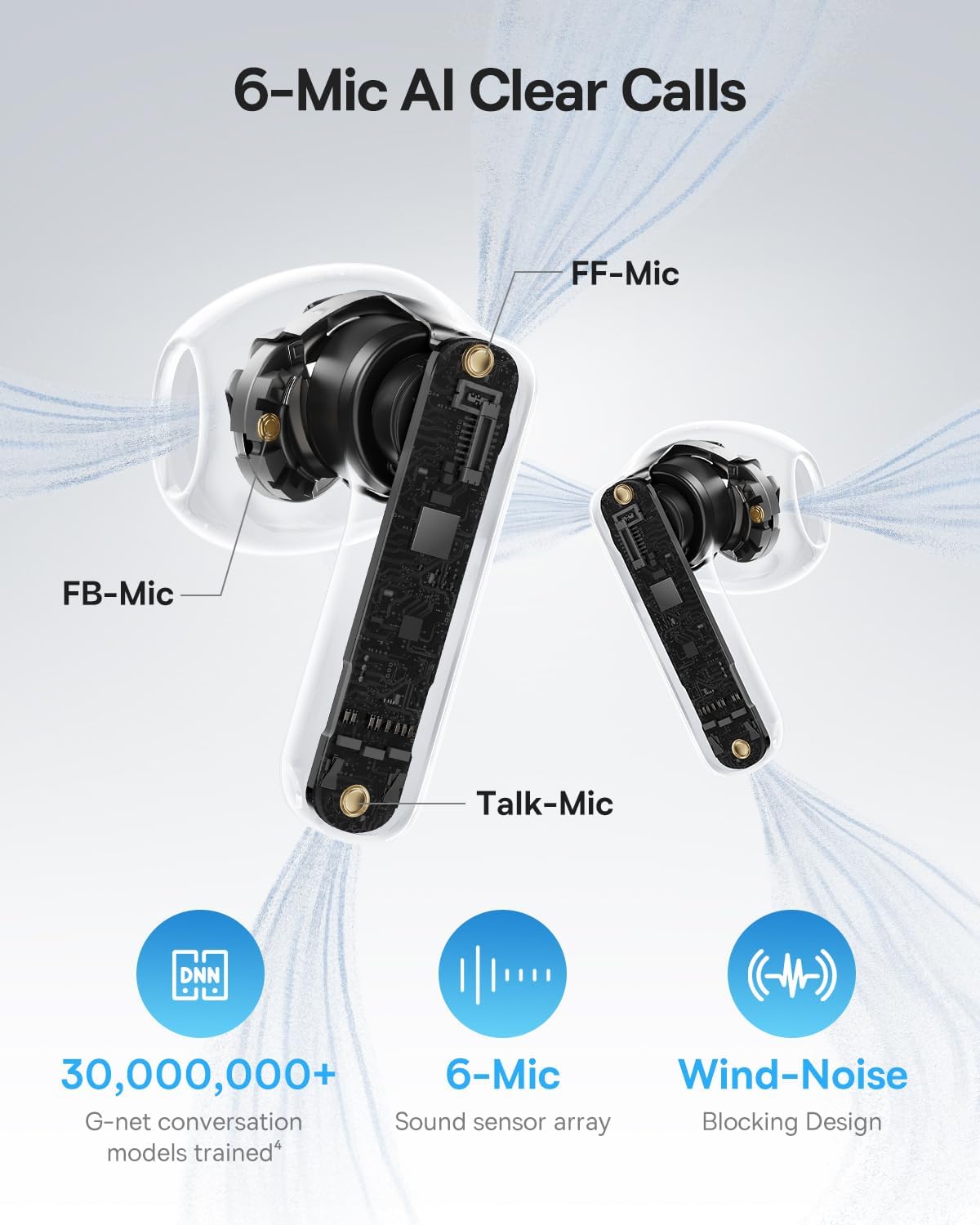
Image: A detailed diagram of the Baseus BS1 NC earbud, highlighting the placement of the FF-Mic, FB-Mic, and Talk-Mic, which contribute to the 6-Mic AI Clear Call technology and wind-noise blocking design.
6.5 I-Smart App Control
Download the dedicated Baseus app for enhanced control and customization options. The app allows you to:
- Adjust Bass Boost levels.
- Select from various EQ Modes.
- Control Spatial Acoustics settings.
- Sebenzisa isici esithi "Thola Ama-Earbud Akho".
Note: In guest mode, no account creation or permissions are required to customize features, but GPS access is needed to locate lost earbuds.

Image: A smartphone displaying the Baseus app interface, which offers various sound control options including Bass Boost, EQ Modes, Spatial Acoustics, and a "Find Your Earbuds" function.
7. Isondlo Nokunakekela
7.1 Ukuhlanza
- Hlanza njalo ama-earbud nekesi lokushaja ngendwangu ethambile, eyomile, engena-lint.
- Ungasebenzisi amakhemikhali anamandla, izihlanzi zokuhlanza, noma izihlanzi ezinamandla.
- Gently remove any earwax or debris from the earbud mesh and charging contacts using a small, soft brush or cotton swab.
7.2 Ukumelana Namanzi Nothuli (IP55)
The earbuds are rated IP55, meaning they are protected against limited dust ingress and low-pressure water jets from any direction. This makes them suitable for workouts and light rain exposure.
- Ungawacwilisi ama-earbud emanzini.
- Qinisekisa ukuthi ama-earbud omile ngaphambi kokuwabuyisela ebhokisini lokushaja ukuze uvimbele umonakalo koxhumana nabo bokushaja.
- Ikesi lokushaja alikwazi ukumelana namanzi.

Image: The Baseus BS1 NC Earbuds shown with water droplets, signifying their IP55 rating for dust and water resistance.
7.3 Isitoreji
Gcina ama-earbud kukesi lawo lokushaja uma lingasetshenziswa ukuze uwavikele futhi uwagcine eshajiwe.
8. Ukuxazulula izinkinga
If you encounter issues with your Baseus BS1 NC earbuds, refer to the following common solutions:
- Azikho Izinkinga Zomsindo/Zokuxhuma:
- Qinisekisa ukuthi ama-earbud ashajiwe.
- Verify Bluetooth is enabled on your device and "Baseus Bass BS1 NC" is selected.
- Try placing earbuds back in the case, closing it, and then reopening to reset the connection.
- Khohlwa idivayisi kuzilungiselelo zakho ze-Bluetooth bese ubhanqa kabusha.
- I-Earbud eyodwa ayisebenzi:
- Qinisekisa ukuthi womabili ama-earbud ashajiwe.
- Beka womabili ama-earbud ebhokisini, vala, bese uwavula kabusha.
- Hlanza oxhumana nabo bokushaja kuma-earbud kanye nangaphakathi kwekhava.
- Ikhwalithi Yomsindo Engalungile:
- Qinisekisa ukuthi ama-earbud ahlezi kahle ezindlebeni zakho.
- Hlanza i-earbud mesh ukuze ususe noma yiziphi izithiyo.
- Check your device's audio settings and ensure LDAC is enabled if supported.
- I-ANC ayisebenzi:
- Ensure ANC mode is activated via touch control or the Baseus app.
- Adjust the earbuds for a better seal in your ears.
9. Imininingwane
| Isici | Imininingwane |
|---|---|
| Igama Lemodeli | Baseus Bass BS1 NC |
| Ukulawula Umsindo | Adaptive Noise Cancellation, Environmental Noise Cancellation, Hybrid Noise Cancellation |
| Ubuchwepheshe bokuxhumana | I-Bluetooth 6.0, Engenantambo |
| I-Wireless Communication Technology | I-Bluetooth 6.0 |
| I-Bluetooth Range | 10 Amamitha |
| Uhlobo Lomshayeli Womsindo | I-Dynamic Driver |
| Usayizi Womshayeli Womsindo | 13 amamilimitha |
| Impendulo Yemvamisa | 40 khz |
| Ukubambezeleka komsindo | 60 amasekhondi |
| Impilo Yebhethri (Earbuds) | 7 Hours (ANC off) |
| Isikhathi sokudlala esiphelele (nekesi) | 40 Hours (ANC off) |
| Charging Time (Rapid Charge) | Amaminithi angu-10 amahora angu-2 ukudlala |
| Izinga Lokumelana Namanzi | IP55 (Ama-earbuds kuphela) |
| Uhlobo Lokulawula | Ukulawula Ukuthinta |
| Okubalulekile | Acrylonitrile Butadiene Styrene (ABS), Polycarbonate (PC) |
| Isisindo Sento (Ama-Earbud) | 4g i-earbud ngayinye |
| Product Dimensions (Earbuds) | 1.2 x 0.7 x 0.7 amayintshi |
| Amadivayisi Ahambisanayo | Devices with Bluetooth Audio Capability, including iOS, Android, Windows, Mac OS and Switch. |
10. Ividiyo Yomkhiqizo Esemthethweni
Watch the official product video for a visual guide on the Baseus BS1 NC Earbuds:
Video: An official product video from Baseus showcasing the features and usage of the Baseus BS1 NC Semi-in-Ear True Wireless Earbuds.
11. Iwaranti kanye Nokusekela
For warranty information, technical support, FAQs, and further assistance, please visit the official Baseus support center.
Refer to the Quick Start Guide included in your package for a direct link or visit the Baseus webindawo.
Note: Protection plans may be available for purchase separately.


