Isingeniso
This manual provides detailed instructions for the safe and efficient operation of your Bewinner MP3 Music Player with Camera, Model Bewinner6rb3g52470-11. Please read this manual thoroughly before using the device and retain it for future reference.
Umkhiqizo Uphelileview
The Bewinner MP3 Music Player is a versatile portable device designed for audio playback, photo and video capture, and other multimedia functions. It features a compact design, a responsive touchscreen, and expandable storage.

The Bewinner MP3 Music Player, featuring a digital display and integrated camera, shown alongside its USB-C charging cable.
Izici Eziyinhloko:
- Amandla Esitoreji Esikhulu: Supports up to 128GB memory card expansion, allowing storage of over 10,000 songs. Compatible with MP3, WMA, WAV, APE, FLAC, AAC LC, M4A, and OGG audio formats.
- Full HD 720P Digital Camera: Integrated camera for recording photos and videos in 720P resolution.
- Impilo ende yebhethri: 500mAh battery provides up to 48 hours of battery life after a 2-hour charge.
- I-Bluetooth 5.4 Ukuxhumana: For wireless pairing with headphones or speakers.
- Isixhumi esibonakalayo sesikrini sokuthinta esilungele umsebenzisi: Responsive 2.01-inch touchscreen for effortless navigation.
- Imisebenzi eminingi: Includes video playback (requires format conversion), FM radio, photo viewing, e-books, wallpapers, alarms, stopwatch, and voice recorder.
- Isipikha esakhelwe ngaphakathi: Allows sharing audio without external devices.

This image illustrates the compact size of the Bewinner MP3 Player, easily fitting into a pocket or held in one hand, highlighting its portability.
Setha
1. Ukushaja Idivayisi:
Before first use, fully charge the MP3 player. Connect the included USB-C cable to the device's charging port and the other end to a USB power adapter (not included) or a computer's USB port. The device typically charges in approximately 2 hours.
2. Installing a Memory Card:
The device supports microSD cards up to 128GB (not included with this model). Locate the memory card slot on the side of the player. Gently insert the microSD card with the gold contacts facing down until it clicks into place. To remove, push the card in slightly until it springs out.
3. Ukuvula/Ukuvala:
Press and hold the power button (usually located on the side or top) for a few seconds to turn the device on or off. A short press will typically turn the screen on or off.
Imiyalelo yokusebenza
1. Basic Navigation:
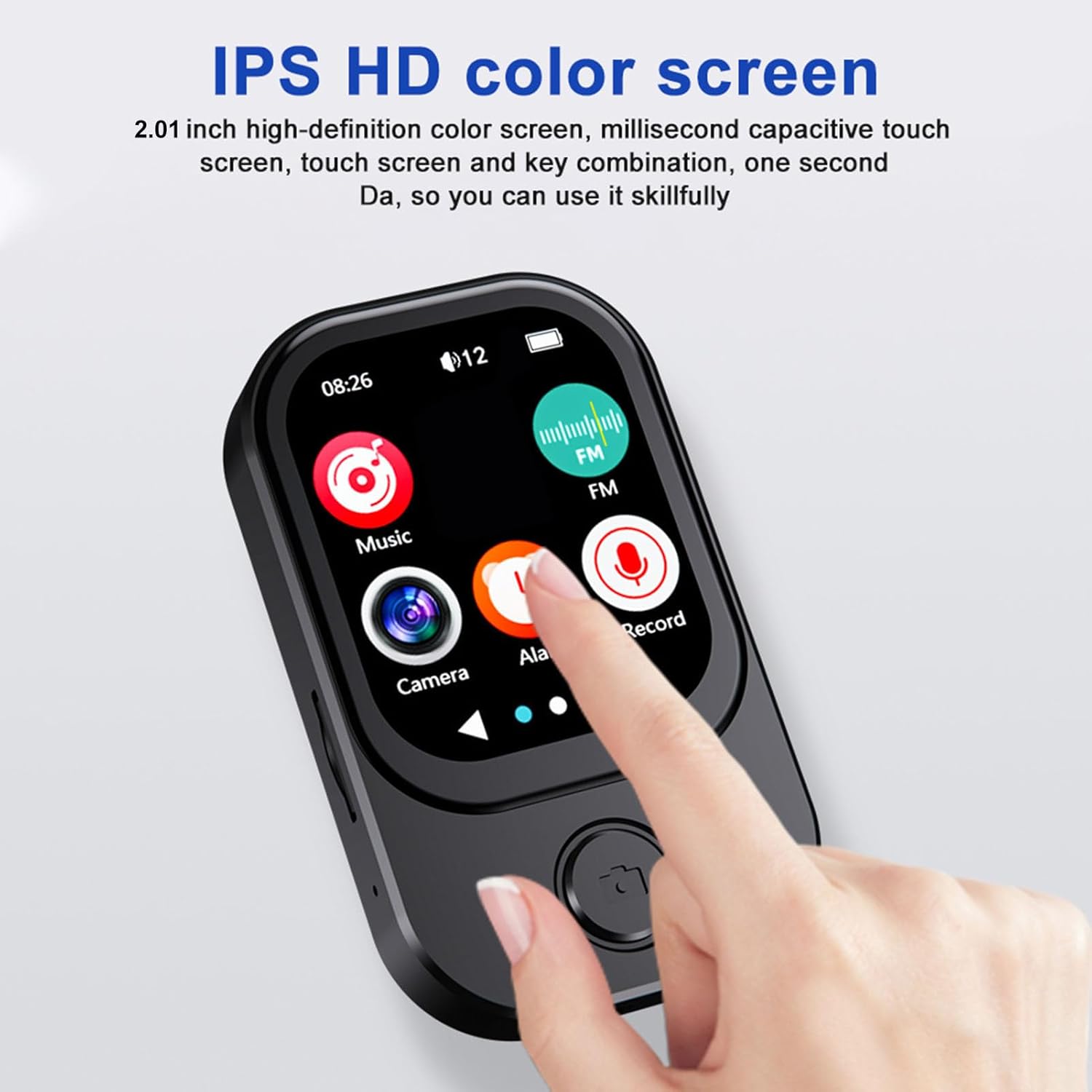
The Bewinner MP3 Player features a 2.01-inch touchscreen. Swipe left or right to navigate between application screens. Tap an icon to open an application. Use the back button (if present) or swipe gestures to return to the previous screen.

Lesi sithombe sihlinzeka ngemininingwane view of the MP3 player's 2.01-inch IPS HD color screen, showcasing its responsive touchscreen interface and intuitive icon layout for easy navigation.
2. Ukudlala Umculo:
- Tap the 'Music' icon on the home screen.
- Browse your music library by artist, album, genre, or folder.
- Thepha ingoma ukuze uqale ukudlala.
- Use the on-screen controls for play/pause, skip tracks, and volume adjustment.
Supported audio formats include MP3, WMA, WAV, APE, FLAC, AAC LC, M4A, and OGG.
3. Camera Function:
The device includes a 720P digital camera. The lens can rotate 90 degrees for flexible shooting angles.

Three distinct icons illustrate the versatile capabilities of the MP3 player's integrated camera: recording audio, capturing video, and taking still photographs.
- Tap the 'Camera' icon.
- Khetha phakathi kwemodi yesithombe noma yevidiyo.
- Tap the shutter icon to take a photo or start/stop video recording.
4. Ukuxhumana kwe-Bluetooth:
To pair with Bluetooth headphones or speakers:
- Go to 'Settings' and select 'Bluetooth'.
- Vula i-Bluetooth.
- Qinisekisa ukuthi idivayisi yakho ye-Bluetooth ikwimodi yokubhangqa.
- Select your device from the list of available devices to pair.
5. Eminye Imisebenzi:
- Ukhozi FM: Tap the 'FM' icon to access the radio. You may need to connect wired headphones (not included) to act as an antenna.
- Ukudlala ividiyo: The player supports video playback. Note that some video formats may require conversion to AVI (240x288 resolution) for optimal performance.
- Isiqophi Sezwi: Tap the 'Record' icon to start recording voice memos.
- E-books & Photo Viewer: Access these functions via their respective icons to view umbhalo files or images stored on the device.
A visual representation of the MP3 player's advanced features, including its 720p camera with a 90-degree rotating lens, IPS true retinal display, and icons for music, FM radio, camera, alarm, and record functions.
6. OTG Connection:
The device supports OTG (On-The-Go) connectivity, allowing direct connection to compatible mobile phones for file transfer. Use a suitable OTG cable (not included) to connect the MP3 player to your smartphone.

The MP3 player is shown connected to a mobile phone using an OTG cable, demonstrating its ability to transfer files directly to a smartphone for sharing or backup.
Isondlo
- Ukuhlanza: Sebenzisa indwangu ethambile, eyomile ukuhlanza idivayisi. Gwema ukusebenzisa izinto zokuhlanza uketshezi noma izinto eziqhumayo.
- Isitoreji: Gcina isidlali se-MP3 endaweni epholile, eyomile kude nokukhanya kwelanga okuqondile kanye namazinga okushisa aphezulu.
- Ukunakekelwa kwebhethri: Ukwelula impilo yebhethri, gwema ukukhipha ibhethri ngokugcwele njalo. Shaja idivayisi njalo, noma ingasetshenziswa isikhathi eside.
- Gwema Umthelela: Protect the device from drops and impacts, which can damage internal components or the screen.
Ukuxazulula inkinga
| Inkinga | Isixazululo Esingenzeka |
|---|---|
| Idivayisi ayivuli. | Ensure the battery is charged. Connect to a power source and try again. If unresponsive, perform a hard reset (refer to device specifications for reset method, if available). |
| Cannot hear audio. | Check volume levels. Ensure headphones or Bluetooth speakers are properly connected and functioning. Verify audio file ukuhambisana kwefomethi. |
| Ikhadi lememori alibonakali. | Ensure the memory card is inserted correctly. Try reinserting the card. Test with a different compatible memory card. Format the card if necessary (this will erase all data). |
| Camera not functioning. | Ensure sufficient storage space on the memory card. Check camera settings. Restart the device. |
| Izinkinga zokumataniswa kwe-Bluetooth. | Ensure both devices are in pairing mode and within range. Turn Bluetooth off and on again on both devices. Clear previous pairings if necessary. |
Imininingwane
| Isici | Imininingwane |
|---|---|
| Inombolo Yemodeli | Bewinner6rb3g52470-11 |
| Ubukhulu | Cishe 67.5 x 41 x 13.5mm / 2.7 x 1.6 x 0.5in |
| Isisindo | 3.74 amakhilogremu |
| Umbala | Mnyama |
| Ibhethri | Built-in 500mAh Lithium-ion Battery |
| Isikrini | 2.01 intshi IPS Isikrini |
| Inguqulo ye-Bluetooth | I-BT 5.4 |
| Ukulungiswa Kwesithombe | 1280x720 |
| Ukulungiswa kwevidiyo | 1280x720 |
| Ifomethi yevidiyo | AVI (Resolution 240x288 for playback) |
| Imbobo yokushaja | Uhlobo C |
| Imbobo yomsindo | 3.5 mm |
| Ukusekelwa Kwekhadi Lememori | Up to 128GB (microSD, not included) |
Iwaranti kanye Nokusekela
For warranty information or technical support, please refer to the product packaging or contact Bewinner customer service through their official channels. You can also visit the Bewinner Store on Amazon ukuthola izinsizakusebenza ezingeziwe.


