1. Isingeniso
This manual provides detailed instructions for the installation, operation, and maintenance of your PHORUS 48-inch Tropical Palm Leaf Ceiling Fan. Please read this manual thoroughly before installation and retain it for future reference. This ceiling fan is designed for both indoor and outdoor covered areas, offering a unique tropical aesthetic with modern functionality.
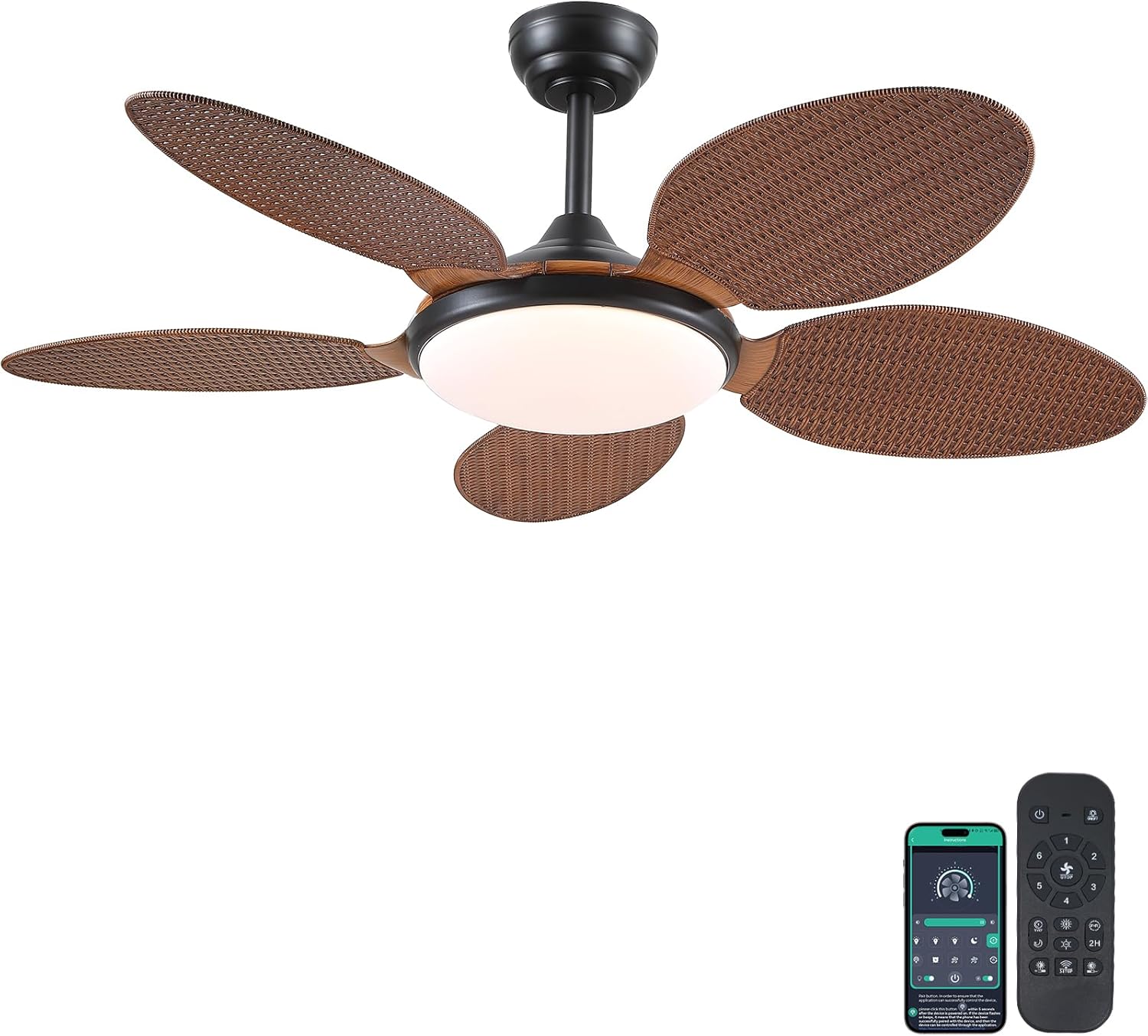
Image 1.1: PHORUS 48-inch Tropical Palm Leaf Ceiling Fan.
2. Ulwazi Lokuphepha
- Ensure the main power supply is disconnected before installation, maintenance, or cleaning.
- All electrical connections must comply with local codes and ordinances, as well as national electrical codes. If you are unfamiliar with electrical wiring, consult a qualified electrician.
- The mounting structure must be capable of supporting the weight of the fan (approximately 12.58 pounds) plus the dynamic load during operation.
- Do not bend the blade holders during installation or cleaning.
- Ensure there is adequate clearance between the fan blades and any obstacles.
- Le fan ifanele ukusetshenziswa ku-damp izindawo kodwa akufanele zivezwe ngokuqondile emanzini.
3. Okuqukethwe Kwephakheji
Qinisekisa ukuthi zonke izingxenye ezibalwe ngezansi zifakiwe kuphakheji yakho. Uma kukhona izingxenye ezingekho noma ezilimele, sicela uxhumane nokwesekwa kwamakhasimende.

Isithombe 3.1: Phezuview of included components and fan dimensions.
- Umhlangano Womzimba Wabalandeli
- 5 Palm Leaf Blades
- I-Canopy
- Downrods (4-inch and 8-inch options)
- Lamp Umthunzi
- Isilawuli kude
- Isamukeli Esikude
- I-Mounting Bracket
- Iphakethe Lehadiwe (izikulufo, ama-wire nuts, njll.)
- Incwadi Yeziqondiso
4. Ukusetha nokufakwa
Follow these steps carefully for proper installation. For a visual guide, please refer to the installation video provided below.
4.1. Umhlahlandlela Wevidiyo Wokufaka
Video 4.1: Detailed installation guide for the PHORUS 48-inch Palm Leaf Ceiling Fan with lights.
4.2. Ukufakwa Kwesinyathelo Ngesinyathelo
- Prepare the Fan Body: Attach the LED light board to the fan body assembly using the provided screws.
- Namathisela ama-Fan Blades: Secure each of the five palm leaf blades to the fan body. Ensure the correct side of the blade is facing upwards as indicated in the video.
- Hlanganisa i-Downrod: Insert the downrod through the canopy and secure it to the fan body. Feed the electrical wires through the downrod.
- Faka Ubakaki Wokukhweza: Secure the mounting bracket to your ceiling junction box. Ensure it is firmly attached and can support the fan's weight.
- Izixhumanisi zezintambo: Connect the fan's electrical wires to your household wiring. Typically, this involves connecting the black live wire, white neutral wire, and yellow ground wire. Refer to the wiring diagram in the installation video for precise connections.
- Lengisa Ifeni: Carefully lift the fan assembly and hang it onto the mounting bracket.
- Faka Isitholi Esikude: Place the remote receiver within the canopy, ensuring wires are not pinched. Connect the receiver to the fan and household wiring as per the diagram.
- I-Canopy evikelekile: Slide the canopy up to the ceiling and secure it to the mounting bracket with screws.
- Faka i-Lamp Umthunzi: Namathisela i-lamp shade to the bottom of the fan body.
The fan is equipped with 4-inch and 8-inch downrods to accommodate various ceiling heights. It can also be used with sloped ceilings up to 15 degrees.
5. Iziqondiso Zokusebenza
Your PHORUS ceiling fan can be controlled via the included remote control or a smart application on your mobile device.
5.1. Isilawuli kude Operation

Image 5.1: Remote control layout with function descriptions.
The remote control allows you to adjust the following settings:
- Vula/Vala: Turn the fan and light on or off.
- Isivinini saphephela: Select from 6 wind speeds (1-6).
- Khanyisa/Vala: Control the integrated LED light independently.
- Izinga lokushisa lombala: Adjust between 3 light colors: 3000K (Warm Light), 4500K (Natural Light), and 6000K (White Light).
- Ukulungiswa Kokukhanya: Dim or brighten the light from 10% to 100%.
- Umsebenzi wokuhlehlisa: Change the direction of the fan blades for summer (downdraft) or winter (updraft) modes. Press the F\R key and wait 5-8 seconds for the fan to stop completely and then automatically reverse.
- Isikhathi: Set a 2-hour timer for automatic shutdown.
Remote Code Pairing:
If your remote control is not responding, you may need to pair it with the fan. Follow these steps:
- Turn off the main power supply to the fan for one minute.
- Turn on the main power supply and simultaneously long-press the code key on the remote control for 3-5 seconds.
- The fan light will blink 2-3 times to indicate successful code matching.
Video 5.2: Instructions for remote code pairing.
5.2. I-Smart App Control
The fan supports control via a smart application. Scan the QR code in Image 5.1 or visit https://www.jasonghost.com/fanlamppro/ to download the "Fan Lamp Uhlelo lokusebenza lwe-Pro".
Video 5.3: Guide for setting up and using the smart app control.
The app provides comprehensive control over fan speeds, light settings (color temperature and brightness), and the reverse function, similar to the remote control. All settings will be remembered after power cycling.

Image 5.4: Customizable light effects and dimming range.

Image 5.5: Fan airflow modes (summer/winter) and 6-speed settings.
6. Isondlo
Ukugcinwa njalo kuqinisekisa ukusebenza kahle kanye nobude besikhathi somoya wophahla lwakho.
- Ukuhlanza: Periodically clean the fan blades and light cover with a soft, damp cloth. Do not use abrasive cleaners or solvents that could damage the finish.
- Qinisa ama-Fasteners: Check all screws and fasteners on the fan body and mounting bracket annually. Tighten any loose connections to prevent wobbling or noise.
- Uthuli: Dust the fan motor housing and canopy regularly to prevent dust buildup, which can affect performance.
7. Ukuxazulula izinkinga
Uma uhlangabezana nezinkinga ngomlandeli wakho, bheka izinkinga ezilandelayo nezisombululo:
| Inkinga | Imbangela Engenzeka | Isixazululo |
|---|---|---|
| Umlandeli akaqali | No power supply; Loose wire connections; Remote not paired. | Check circuit breaker/wall switch; Verify all wire connections are secure; Perform remote code pairing (refer to Section 5.1). |
| Ukukhanya akusebenzi | Loose wire connection; LED driver issue. | Check light wiring connections; Contact customer support if LED driver is suspected. |
| Umlandeli uyavevezela | Loose blades or mounting hardware; Unbalanced blades. | Ensure all blade screws and mounting bracket screws are tight; Use a balancing kit (not included) if necessary. |
| Isilawuli kude asiphenduli | Low battery; Remote not paired. | Replace AAA batteries (2 required, included); Perform remote code pairing (refer to Section 5.1). |
| Umsindo owedlulele | Loose screws; Motor issue. | Check and tighten all screws; Ensure blades are securely attached. If noise persists, contact customer support. |
8. Imininingwane
- Ibhrendi: PHORUS
- Imodeli: B0FC1SY1B2
- Umbala: 48" Dark Brown
- Okubalulekile: Ipulasitiki, i-acrylic
- Isitayela: I-Tropical
- Uhlobo Lwegumbi: Bedroom, Dining Room, Garage, Kids Room, Kitchen
- Ukusetshenziswa Kwangaphakathi/Ngaphandle: Indoor (suitable for damp izindawo)
- Umthombo wamandla: DC
- Izici ezikhethekile: Uhlelo lokusebenza luyasebenza, ukukhanya kwe-LED, ukusebenza okuthulile, ukulawulwa kude, isibali sikhathi
- Indlela yokulawula: Uhlelo lokusebenza, Isilawuli kude
- Inombolo Yemithombo Yokukhanya: 1
- Izingxenye ezifakiwe: Light Kit, Remote Control
- Isisindo Sento: 12.58 amakhilogremu
- Inombolo Yezinto: 1
- Wattage: 60 watts
- Uhlobo Olawulayo: Ukulawula Uhlelo Lokusebenza, Isilawuli kude
- Isibalo samayunithi: 1.0 Bala
- Uhlobo lokukhweza: Ceiling Mount
- Kudingeka Umhlangano: Yebo
- Usayizi: Medium (48 inches)
- Ukusetshenziswa Okunconyiwe Komkhiqizo: Ukujikeleza komoya
- Ubukhulu bomkhiqizo: 48 x 48 x 15.15 amayintshi
- Amabhethri: Kudingeka amabhethri angu-2 AAA (afakiwe)
9. Iwaranti kanye Nokusekela
PHORUS provides a one-year quality warranty for this product. We also offer free replacement service for any damage and quality problems encountered during the warranty period. If you have any questions or require assistance, please contact PHORUS customer support for a satisfactory answer within 24 hours.