1. Isingeniso
This manual provides detailed instructions for the setup, operation, and maintenance of your GEEKOM Air12 Lite Mini PC. Please read this manual thoroughly before using the device to ensure proper functionality and longevity.
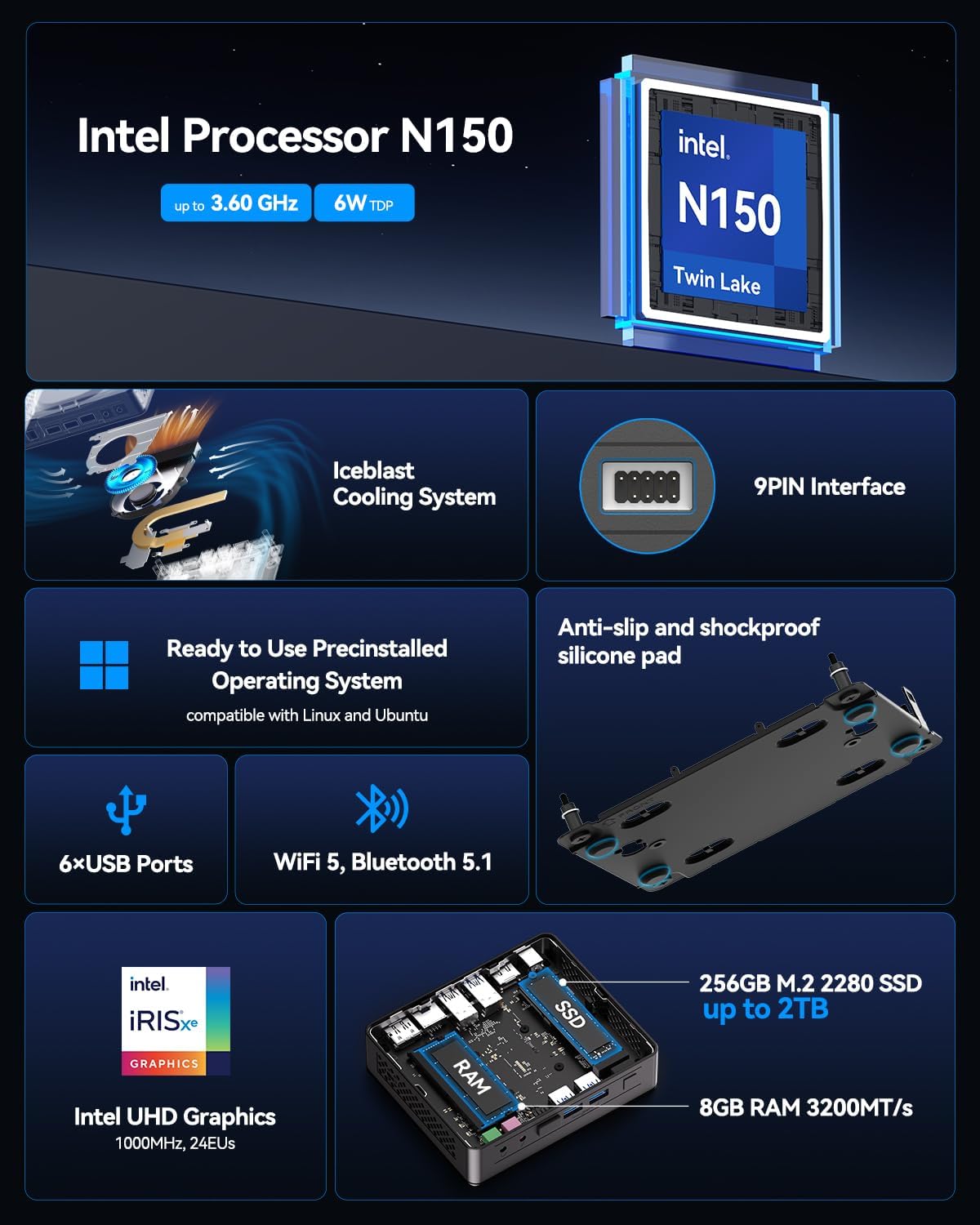
The GEEKOM Air12 Lite is a compact and efficient mini PC powered by the Intel 12th Gen Twin Lake N150 processor. It offers robust performance for various tasks, from office productivity to media streaming, and supports dual 4K displays. Its versatile connectivity, including multiple USB ports and a 9-pin serial interface, makes it suitable for both modern and legacy equipment.
2. Okuqukethwe Kwephakheji
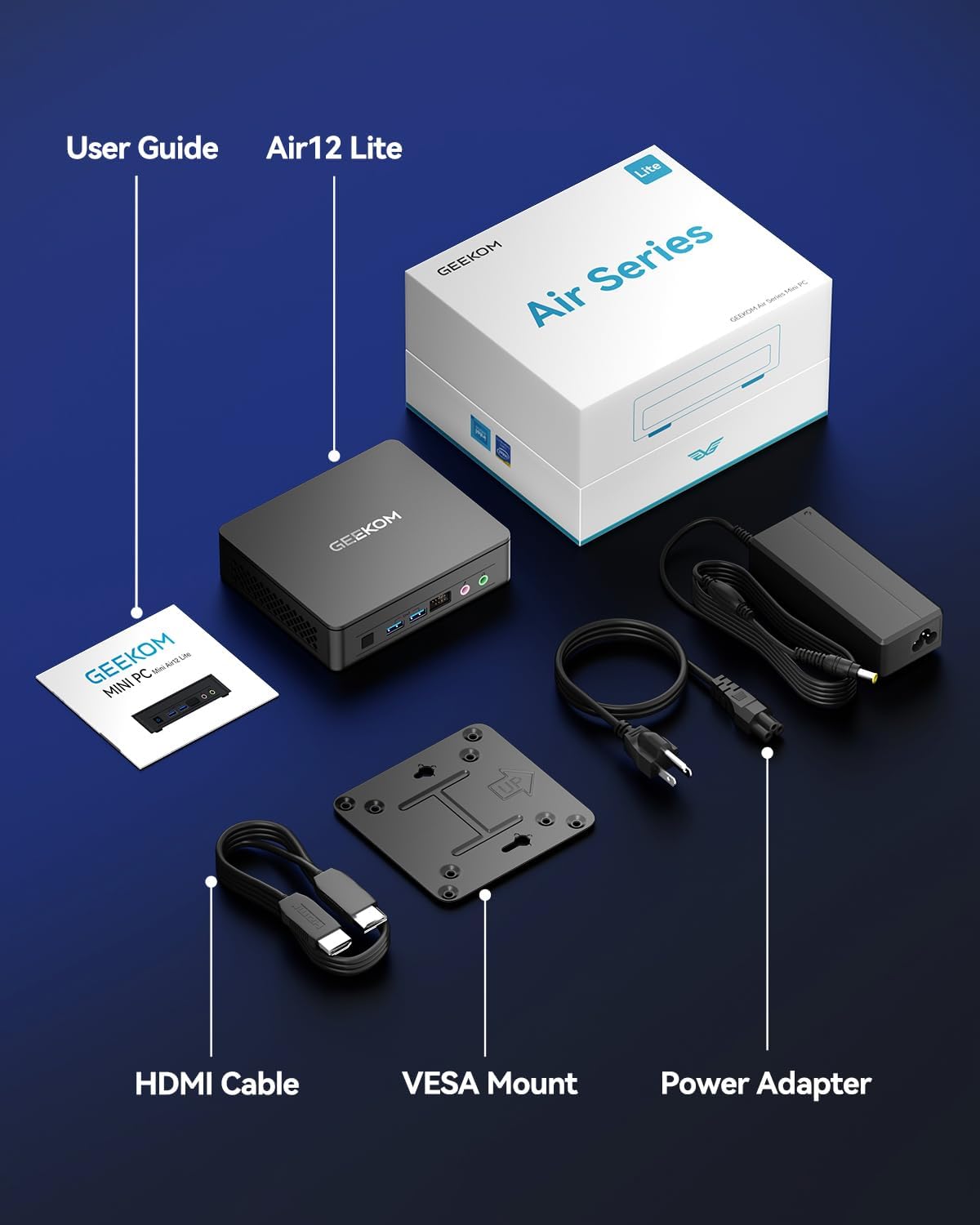
Qinisekisa ukuthi zonke izinto ezibalwe ngezansi zikhona ephaketheni lakho:
- 1 x GEEKOM Mini Air12 Lite
- 1 x Umhlahlandlela Womsebenzisi
- 1 x Ikhebula le-HDMI
- 1 x VESA Mount
- 1 x I-adaptha yamandla
3. Umkhiqizo Uphelileview
3.1 Iphaneli langaphambili
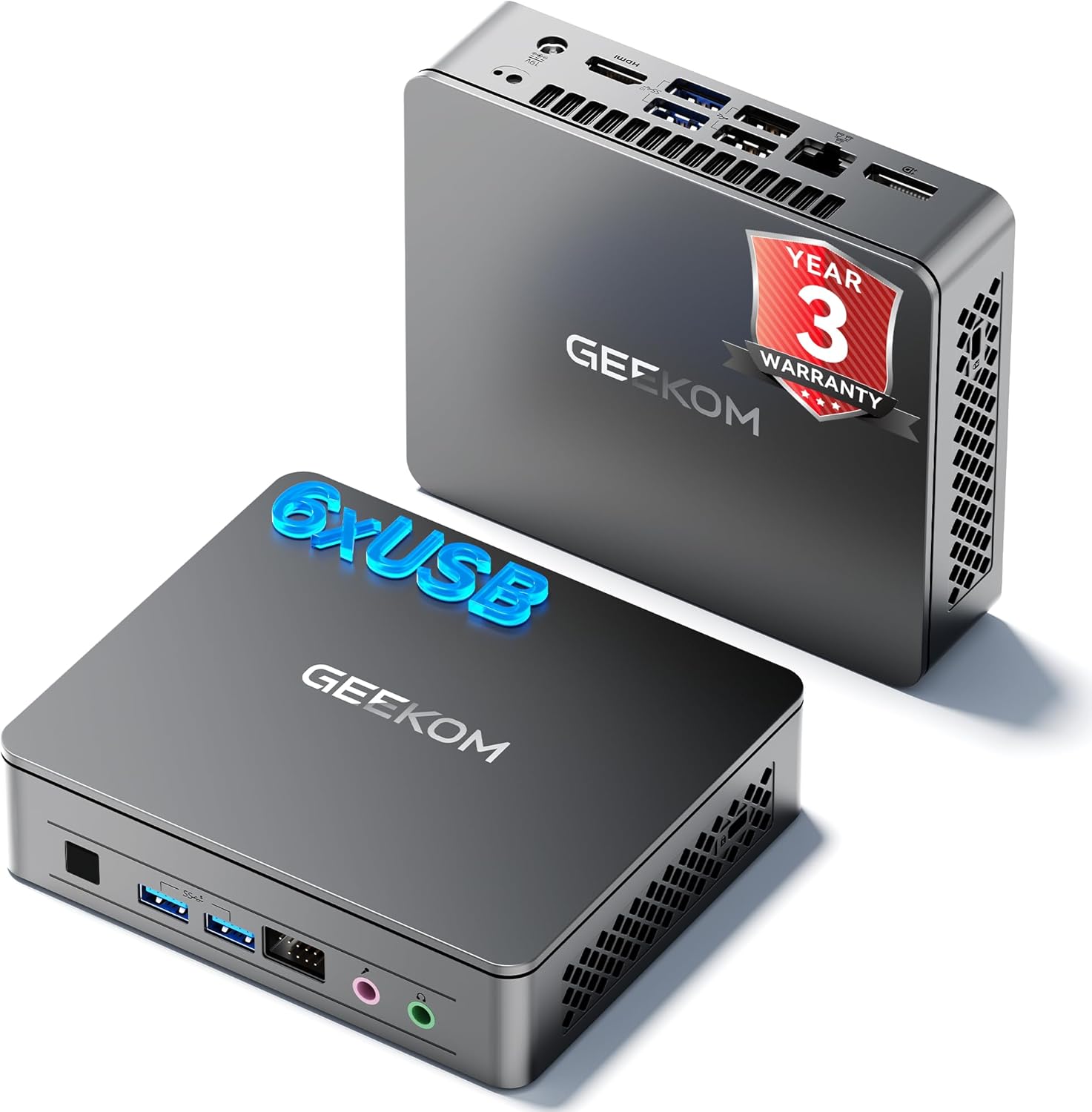
- Inkinobho yamandla: Cindezela ukuze uvule noma uvale idivayisi.
- USB 3.2 Gen 1 Type-A Port (x2): Okokuxhuma amadivayisi e-USB.
- 3.5mm I-Headphone Jack: Okokukhipha umsindo.
- 3.5mm Microphone Jack: Okokufaka komsindo.
- Front 9-pin Expansion Jack: For specialized peripheral connections.
3.2 Iphaneli yangemuva
- Power Input (DC IN): Xhuma i-adaptha yamandla lapha.
- Imbobo ye-HDMI 2.0: Ukuze kuxhunywe esibukweni.
- DisplayPort 1.4 (DP1.4): For connecting to a second display.
- USB 3.2 Gen 2 Type-A Port (x2): For high-speed USB devices.
- USB 2.0 Type-A Port (x2): Kumadivayisi e-USB ajwayelekile.
- Imbobo ye-Ethernet ye-RJ45: Ngoxhumano lwenethiwekhi enezintambo.
3.3 Iphaneli eseceleni
- Isifundi Sekhadi le-SD: Okokufunda amakhadi ememori e-SD.
- I-Kensington Lock Slot: Ukuvikela idivayisi.

4. Sethaphu Imiyalelo
- Xhuma Isibonisi: Connect your monitor(s) to the HDMI and/or DisplayPort on the rear panel using the provided HDMI cable or a compatible DisplayPort cable.
- Xhuma Amapheripherals: Connect your keyboard, mouse, and other USB devices to the available USB ports.
- Xhuma Inethiwekhi (Ongakukhetha): For a wired internet connection, connect an Ethernet cable to the RJ45 port. Alternatively, the device supports Wi-Fi.
- Xhuma Amandla: Plug the power adapter into the DC IN port on the rear panel, then plug the adapter into a power outlet.
- Vula: Cindezela inkinobho yamandla kuphaneli engaphambili ukuze uvule i-Mini PC.
- Ukusethwa Kwasekuqaleni: Follow the on-screen instructions to complete the operating system setup (e.g., Windows 11).
4.1 VESA Mount Installation
The GEEKOM Air12 Lite includes a VESA mount for attaching the Mini PC to the back of a compatible monitor or to a wall, saving desk space.
- Attach the VESA mount bracket to the back of your monitor using the provided screws, aligning with the VESA mounting holes.
- Slide the Mini PC onto the bracket until it clicks securely into place.
5. Iziqondiso Zokusebenza
5.1 Vula/Vala amandla
- Ukuvula: Cindezela inkinobho yamandla kanye.
- Ukuvala: From the operating system, select "Shut down". Alternatively, press and hold the power button for 5 seconds to force a shutdown (use only when necessary).
- Imodi Yokulala: Briefly press the power button to put the PC into sleep mode. Press again to wake it up.
5.2 Dual Display Setup
The Air12 Lite supports connecting two 4K displays simultaneously via its HDMI 2.0 and DisplayPort 1.4 outputs. This allows for an extended desktop experience.
- Connect your primary monitor to the HDMI port.
- Connect your secondary monitor to the DisplayPort.
- Once both monitors are connected and powered on, the operating system should automatically detect them.
- Adjust display settings (resolution, orientation, extension/duplication) through your operating system's display settings.

5.3 Ukuhambisana Kwesistimu Esebenzayo
The GEEKOM Air12 Lite comes with Windows pre-installed and is fully compatible with Ubuntu and other Linux distributions.
6. Isondlo
6.1 Ukuhlanza
- Qinisekisa ukuthi idivayisi ivaliwe futhi ayixhunyiwe ngaphambi kokuhlanza.
- Use a soft, dry cloth to wipe the exterior of the Mini PC.
- Ukuze uthole amamaki anenkani, kancane dampzu indwangu enamanzi noma isicoci esithambile esingaqhumi.
- Avoid spraying liquids directly onto the device or into any openings.
- Use compressed air to gently clear dust from ventilation grilles.
6.2 Uhlelo Lokupholisa
The Air12 Lite features GEEKOM's Iceblast cooling system. To ensure optimal performance and longevity:
- Ensure proper airflow around the device. Do not block ventilation openings.
- Operate the Mini PC in a well-ventilated area.
- Regularly check and clean dust from the vents to prevent overheating.

6.3 Component Upgrades
The Air12 Lite supports tool-free upgrades for certain components. Refer to the detailed exploded view for component locations.

7. Ukuxazulula izinkinga
- Awekho Amandla:
- Qinisekisa ukuthi i-adaptha yamandla ixhunywe ngokuphephile kokubili kwi-Mini PC kanye ne-outlet yamandla esebenzayo.
- Qinisekisa ukuthi indawo kagesi iyasebenza ngokuxhuma enye idivayisi.
- Zama enye indawo kagesi.
- Akukho Ukuboniswa:
- Check that the HDMI/DisplayPort cable is securely connected to both the Mini PC and the monitor.
- Ensure the monitor is powered on and set to the correct input source (HDMI/DisplayPort).
- Zama ukuxhuma kwimonitha ehlukile noma usebenzise ikhebula elihlukile.
- Ukusebenza Kanensa:
- Vala izinhlelo zokusebenza ezingadingekile ezisebenza ngemuva.
- Check for available operating system updates and install them.
- Ensure the Mini PC has adequate ventilation and is not overheating.
- Run a disk cleanup or defragmentation tool (if applicable to your storage type).
- I-Peripheral Ayitholakalanga:
- Ensure the peripheral is properly connected to the correct port.
- Zama ukuxhuma i-peripheral kwenye i-port ye-USB.
- Update or reinstall the drivers for the peripheral.
8. Imininingwane
| Isici | Ukucaciswa |
|---|---|
| Iphrosesa | Intel 12th Gen Twin Lake N150 (4 Cores / 4 Threads, up to 3.6GHz, 6MB Cache) |
| Izithombe | I-Intel UHD Graphics (Ihlanganisiwe) |
| RAM | 8GB DDR4 3200MHz SDRAM |
| Isitoreji | 256GB M.2 2280 SSD (PCIE x 4) |
| Isistimu esebenzayo | Windows (Pre-installed), compatible with Ubuntu/Linux |
| Okukhipha ividiyo | 1x HDMI 2.0, 1x DisplayPort 1.4 (Supports Dual 4K@60Hz) |
| Izimbobo ze-USB | 2x USB 3.2 Gen 1 Type-A (Front), 2x USB 3.2 Gen 2 Type-A (Rear), 2x USB 2.0 Type-A (Rear) |
| Amanye Amachweba | 1x 9-pin Serial Interface, 1x RJ45 Ethernet, 1x 3.5mm Headphone Jack, 1x 3.5mm Microphone Jack, 1x SD Card Reader |
| Ukuxhumana Okungenantambo | 802.11ax (Wi-Fi), Bluetooth 5.1 |
| Ubukhulu (LxWxH) | Cishe. 5.3 x 4.5 x 1.4 amayintshi (13.5 x 11.5 x 3.5 cm) |
| Isisindo | Cishe. 2.81 pounds (1.27 kg) |
9. Iwaranti kanye Nokusekela
GEEKOM provides a Iwaranti yonyaka ongu-3 for the Air12 Lite Mini PC from the date of purchase. This warranty covers failures caused by design or craftsmanship.
9.1 Ukwesekwa Kwamakhasimende
For technical assistance, warranty claims, or any other inquiries, please contact GEEKOM customer service:
- I-imeyili: shirley.li@geekom.tw
- Ku-inthanethi: Visit the official GEEKOM website or your Amazon order page to find seller contact options.
When contacting support, please provide your product model (Air12 Lite) and purchase details to expedite assistance.


