1. Ukuqalisa: Ukusetha Kokuqala
This section guides you through the initial setup of your new Motorola moto g56 5G smartphone.
1.1. I-Unboxing kanye Nokuqukethwe Kwephakheji
Ngaphambi kokuthi uqale, qiniseka ukuthi zonke izinto zikhona kuphakheji:
- Motorola moto g56 5G Smartphone
- Ikhebula le-USB (yokushaja nokudlulisa idatha)
- Phone Case (protective cover)
- Ithuluzi le-SIM Ejector
Note: A wall charger is not included and must be purchased separately. The device supports TurboPower 30W charging.
1.2. Ukufaka iSIM khadi
- Thola ithreyi ye-SIM khadi eceleni kwedivayisi yakho.
- Faka ithuluzi le-SIM ejector emgodini omncane kuthreyi bese ucindezela kancane kuze kube yilapho ithreyi iphuma.
- Beka ikhadi lakho le-Nano-SIM ethreyini izinto ezisagolide zibheke phansi. Qinisekisa ukuma okulungile.
- If using a microSD card for expanded storage, place it in the designated slot on the SIM tray.
- Cindezela ngokucophelela ithreyi uyibuyisele kudivayisi ize ichofoze endaweni.
1.3. Powering On and Initial Charge
- To power on your device, press and hold the Power button (located on the side) until the Motorola logo appears.
- For the first use, it is recommended to fully charge the device. Connect the USB cable to the phone's charging port and to a compatible 30W TurboPower charger (sold separately).
- Landela imiyalelo esesikrinini ukuze uqedele ukusetha kokuqala, okuhlanganisa ukukhetha ulimi, uxhumano lwe-Wi-Fi, ukungena ngemvume kwi-akhawunti ye-Google, kanye nezilungiselelo zokuphepha.
2. Operating Your Motorola moto g56 5G
This section covers the primary functions and features of your smartphone.
2.1. Isibonisi kanye Navigation
The moto g56 5G features a 6.72-inch FHD+ display with a 120Hz refresh rate for smooth visuals and a peak brightness of 1000 nits for clear visibility even in bright conditions.

Image: The Motorola moto g56 5G display, highlighting its FHD+ resolution, 120Hz refresh rate, 1000 nit brightness, and Dolby Atmos audio capabilities.
- Ukuthinta: Navigate the interface using standard Android gestures (swipe, tap, pinch-to-zoom).
- Isilinganiso Sokuvuselela: The 120Hz refresh rate provides a fluid scrolling and viewing experience. This can often be adjusted in display settings to optimize battery life.
- Umsindo: Enjoy immersive sound with stereo speakers and Dolby Atmos support.
2.2. Izici zekhamera
Capture detailed photos and videos with the advanced camera system.

Image: A visual representation of the Motorola moto g56 5G's camera capabilities, featuring a 50MP main sensor, ultrawide lens, and 32MP selfie camera, with people enjoying photography.
- Ikhamera Eyinhloko: 50MP sensor (Sony LYTIA) for high-resolution photos, even in challenging lighting conditions.
- Ultrawide Lens: An 8MP ultrawide lens allows you to capture a broader perspective in your shots.
- Ikhamera yesithombe ozishuthe sona: A 32MP front camera ensures clear and detailed self-portraits.
- Anti-Flicker Sensor: This sensor helps reduce flickering when photographing screens or under certain artificial lighting. Access this feature in the camera settings.
2.3. Software and Performance
The moto g56 5G runs on Android 15, offering a clean and intuitive user experience. It is powered by the MediaTek Dimensity 7060 processor for smooth performance.

Isithombe: I-overview of the Motorola moto g56 5G's performance, highlighting the MediaTek Dimensity 7060 5G processor, Android 15 operating system, and RAM expansion capabilities up to 24GB.
- I-Android 15: Enjoy the latest features and security updates from Android.
- Moto AI: Utilize intelligent features for organized content, notification summaries, and generative AI for wallpapers.
- 5G Ukuxhumana: Experience fast data speeds with 5G network support.
- Isitoreji: The device comes with 256GB of internal storage, expandable up to 2TB via a dedicated microSD card slot.
3. Isondlo Nokunakekela
Proper care ensures the longevity and optimal performance of your Motorola moto g56 5G.
3.1. Ukunakekelwa Kwebhethri
The 5200mAh battery provides extended usage. Follow these tips for optimal battery health:

Image: An illustration of the Motorola moto g56 5G's battery capabilities, including its 5100mAh capacity, TurboPower 30 fast charging, and an estimated 40 hours of usage on a single charge.
- Iyashaja: Use a compatible TurboPower 30W charger for fast charging. Avoid using non-certified chargers.
- Battery Health 2.0: This feature optimizes battery health and performance over time.
- Gwema Amazinga Okushisa Aphakeme: Do not expose your device to very high or very low temperatures, as this can degrade battery life.
3.2. Durability and Cleaning
Your moto g56 5G is built to withstand daily use with its robust design.

Image: The Motorola moto g56 5G highlighting its advanced protection features, including IP68/IP69 water and dust resistance, MIL-STD-810H military-grade certification, and Corning Gorilla Glass 7i for scratch protection.
- Ukumelana Namanzi Nothuli: The device is rated IP68/IP69, offering superior protection against dust and water immersion up to 1.5 meters for 30 minutes, and resistance to high-pressure jets.
- Military Standard: MIL-STD-810H certified for resistance to drops, shocks, humidity, and extreme temperatures.
- Ukuvikelwa Kwesikrini: Corning Gorilla Glass 7i provides reliable scratch protection for the display.
- Ukuhlanza: Use a soft, lint-free cloth to clean the screen and body. For stubborn marks, slightly dampen indwangu ngamanzi. Gwema amakhemikhali anokhahlo.
4. Ukuxazulula Izinkinga Ezivamile
Lesi sigaba sihlinzeka ngezixazululo zezinkinga ezivamile ongahlangabezana nazo.
- Idivayisi Ayivuli: Ensure the battery is charged. Connect the phone to a charger for at least 15 minutes, then try powering it on again. If it still doesn't turn on, perform a force restart by holding the Power button for 10-15 seconds.
- Ukusebenza Kanensa: Close unused apps, clear cache, or restart the device. Check for system updates as they often include performance improvements.
- Ukukhipha Ibhethri Ngokushesha: Reduce screen brightness, disable unnecessary features like Wi-Fi or Bluetooth when not in use, and identify power-hungry apps in battery settings.
- Izinkinga Zokuxhumana Kwenethiwekhi: Check if your SIM card is properly inserted. Try toggling Airplane Mode on and off. If issues persist, contact your mobile carrier.
- Ikhamera Ayisebenzi: Restart the phone. Clear the camera app's cache and data in settings. Ensure no other app is using the camera in the background.
5. Imininingwane Yezobuchwepheshe
Detailed technical specifications for the Motorola moto g56 5G.
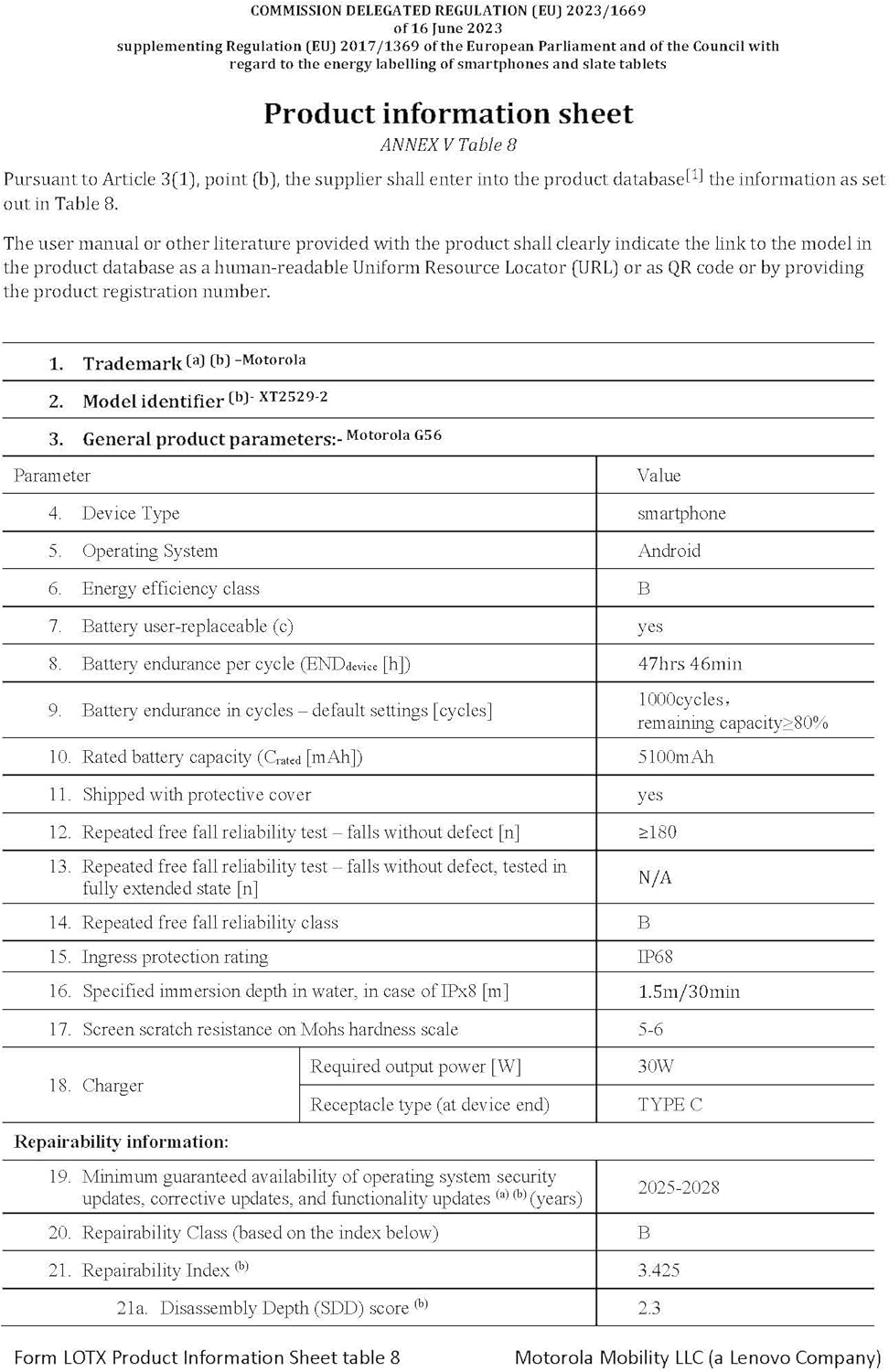
Image: The official product information sheet for the Motorola moto g56 5G, detailing its technical specifications, including battery life, IP rating, and repairability index.
| Isici | Ukucaciswa |
|---|---|
| Igama Lemodeli | imoto g56 5G |
| Isistimu esebenzayo | I-Android 15 |
| Imodeli ye-CPU | I-Mediatek Dimensity 7060 |
| Isivinini se-CPU | 2.6 GHz |
| RAM | 8 GB (expandable up to 24 GB with RAM extension) |
| Isitoreji Sangaphakathi | 256 GB (inganwetshwa kuze kufike ku-2 TB nge-microSD) |
| Usayizi Wokubonisa | 6.72 amayintshi |
| Bonisa Ukulungiswa | 1080 x 2400 (FHD+) |
| Isilinganiso Sokuvuselela | 120 Hz |
| Ikhamera Eyinhloko | 50 MP (Sony LYTIA) |
| Ikhamera Ebanzi Kakhulu | 8 MP |
| Ikhamera yangaphambili | 32 MP |
| Amandla ebhethri | 5200 mAh (Rated capacity 5100 mAh) |
| Iyashaja | TurboPower 30W (charger not included) |
| Ukumelana Namanzi/Uthuli | IP68/IP69 |
| Ukuqina Okujwayelekile | Isitifiketi se-MIL-STD-810H |
| Ukuvikelwa Kwesikrini | I-Corning Gorilla Glass 7i |
| Ubukhulu | 16.57 x 0.83 x 7.63 cm |
| Isisindo | awu 200g |
6. Iwaranti kanye Nokusekela
Motorola provides support and warranty for your device.
- Izibuyekezo zesofthiwe: Motorola guarantees a minimum of 3 years of operating system security updates, corrective updates, and functionality updates from the device's release date.
- Ulwazi Lwesiqinisekiso: Refer to the warranty card included in your product packaging or visit the official Motorola support webisayithi lemigomo nemibandela yewaranti enemininingwane eqondene nesifunda sakho.
- Ukwesekwa Kwamakhasimende: Ukuze uthole olunye usizo, usekelo lobuchwepheshe, noma imibuzo yesevisi, sicela uvakashele usekelo olusemthethweni lwe-Motorola webisayithi noma uthinte inombolo yocingo yesevisi yamakhasimende.


