1. Isingeniso
Thank you for choosing the Infiniity DM56 Sport Smartwatch. This device is designed to enhance your active lifestyle with advanced fitness tracking, health monitoring, and smart connectivity features. Equipped with a vibrant 1.43-inch AMOLED display, built-in GPS, and comprehensive health sensors, the DM56 is your reliable companion for both daily wear and intense workouts.
This manual provides detailed instructions on how to set up, operate, maintain, and troubleshoot your smartwatch to ensure optimal performance and longevity.

Isithombe 1.1: Ngaphambili view of the Infiniity DM56 Sport Smartwatch, showcasing its round AMOLED display and rugged design.
2. Yini EseBhokisini
Upon opening your Infiniity DM56 Sport Smartwatch package, please ensure all the following items are present:
- Infiniity DM56 Sport Smartwatch
- Ikhebula lokushaja
- Incwadi Yomsebenzisi (le dokhumenti)
3. Setha
3.1 Ukushaja i-Smartwatch
Before first use, fully charge your DM56 smartwatch. A full charge typically takes approximately 2 hours.
- Connect the magnetic charging cable to the charging contacts on the back of the smartwatch. Ensure the pins align correctly.
- Xhuma ingxenye ye-USB yekhebula lokushaja ku-adaptha yamandla ye-USB ejwayelekile (kunconywa i-5V/1A) noma imbobo ye-USB yekhompyutha.
- The watch display will show a charging indicator. Once fully charged, the indicator will change or disappear.
3.2 Ukumatanisa Nomakhalekhukhwini Wakho
To unlock the full potential of your DM56 smartwatch, you need to pair it with your smartphone via Bluetooth using the dedicated companion application. The DM56 is compatible with Android 5.0+ and iOS 11 and above.
- Landa uhlelo lokusebenza: Cinga the official Infiniity companion app (refer to the packaging or quick start guide for the exact app name) on the Google Play Store (for Android) or Apple App Store (for iOS) and install it.
- Nika amandla i-Bluetooth: Qinisekisa ukuthi i-Bluetooth ivuliwe ku-smartphone yakho.
- Vula uhlelo lokusebenza: Launch the companion app on your smartphone and follow the on-screen instructions to create an account or log in.
- Engeza Idivayisi: Within the app, navigate to the 'Add Device' or 'Pair Device' section. The app will search for available smartwatches.
- Select DM56: Select 'DM56' from the list of found devices. A pairing request may appear on both your phone and the watch. Confirm the pairing on both devices.
- Qedela Ukusethwa: Once paired, the app will guide you through initial settings, such as profile information, notification permissions, and data synchronization.
4. Ukusebenzisa i-Smartwatch
4.1 Ukuhamba Okuyisisekelo
The DM56 features a responsive touchscreen and physical buttons for intuitive control.
- Isikrini sokuthinta: Swayiphela phezulu, phansi, kwesobunxele, noma kwesokudla ukuze uzulazule kumamenyu nezaziso. Thepha ukuze ukhethe izinto.
- Izinkinobho Zomzimba: The watch has multiple buttons, typically labeled 'SPORT', 'SEL', 'BACK', and a dedicated 'GPS' button. Their functions may vary depending on the current screen or mode.
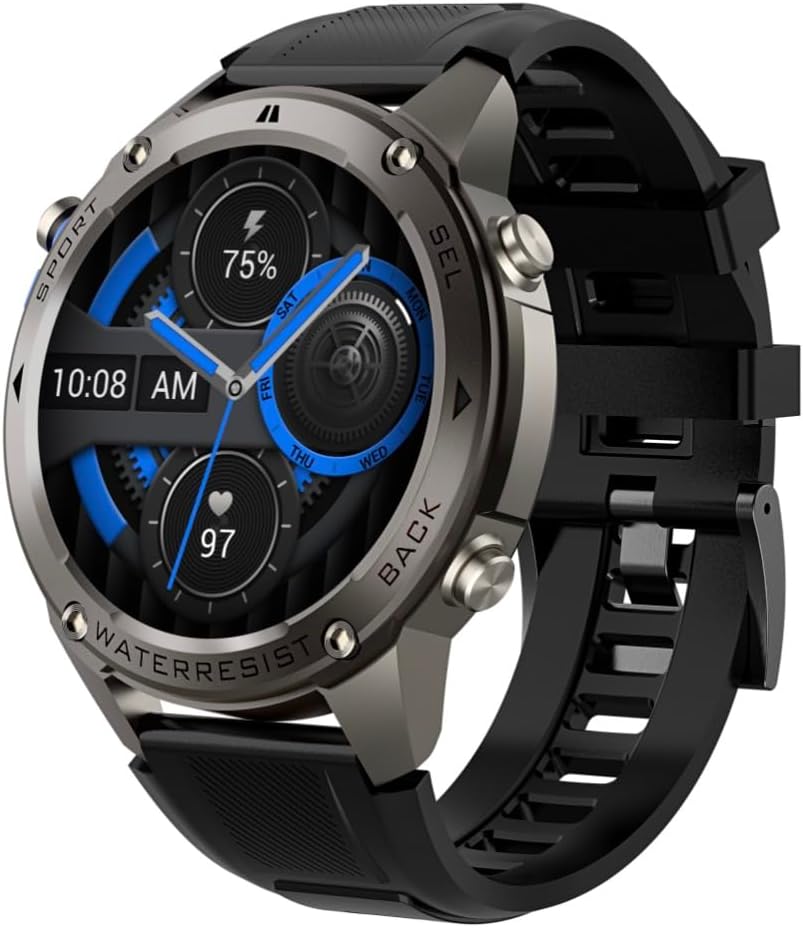
Isithombe 4.1: Uhlangothi view of the Infiniity DM56 Sport Smartwatch, highlighting the physical control buttons.
4.2 Izici zokubonisa
The 1.43-inch AMOLED display offers vibrant colors and deep blacks with a resolution of 466x466 pixels.
- Isibonisi Esihlala Sivuliwe: The DM56 supports Always-On Display functionality, allowing you to see the time and essential information at a glance without needing to raise your wrist or press a button. This feature can be configured in the watch settings.

Image 4.2: The Infiniity DM56 Sport Smartwatch display, showcasing a typical watch face with various data points.
4.3 Built-in GPS & Compass
The DM56 features dual-frequency GPS (L1+L5) and supports multiple satellite systems (GPS, GLONASS, BDS, Galileo, NAVIC, QZSS) for precise outdoor tracking. A built-in compass further aids navigation.
- Ukulandelwa kwe-GPS: When starting an outdoor activity (e.g., running, cycling), the watch will automatically attempt to acquire a GPS signal. Ensure you are in an open area for faster signal acquisition. Your route, distance, and pace will be recorded.
- Ikhampasi: Access the compass feature from the watch's menu to get real-time directional information.

Image 4.3: The Infiniity DM56 Sport Smartwatch from an angle, highlighting the dedicated GPS button on the side.

Isithombe 4.4: Ukuvala view of the GPS button on the Infiniity DM56 Sport Smartwatch, indicating its function.
4.4 All-Day Health Monitoring
The DM56 is equipped with the VC30F sensor for continuous health monitoring.
- Ukuqapha Kwezinhliziyo: Track your heart rate in real-time throughout the day. View your current heart rate on the watch face or in the dedicated heart rate app.
- Ukuqapha I-Blood Oxygen (SpO2): Linganisa amazinga akho okugcwala komoyampilo egazini.
- Ukulandelela Ukulala: The watch automatically monitors your sleep patterns, including deep sleep, light sleep, and awake times. View detailed sleep analysis in the companion app.
- Ukulandelela ingcindezi: Qapha amazinga akho okucindezeleka usuku lonke.
- I-Pedometer: Counts your daily steps, distance, and estimated calories burned.
Note: The Infiniity DM56 Smartwatch is NOT A MEDICAL DEVICE. All health monitoring data is for reference only and should not be used for medical diagnosis or treatment.
4.5 Izindlela Zezemidlalo
The DM56 offers over 170 customizable sports modes, with 14 built-in modes such as outdoor running, cycling, and swimming. You can add up to 10 additional modes manually via the companion app.
- Ukuqala Umsebenzi: Navigate to the 'Workout' or 'Sports' menu on the watch, select your desired activity, and tap to start.
- Phakathi Nomsebenzi: The watch will display real-time metrics such as duration, distance, heart rate, and calories burned.
- Ending Activity: Swipe or press the designated button to pause or end the activity. Your workout data will be saved and synchronized with the app.
4.6 Smart Notifications & Calls
Once paired with your smartphone, the DM56 can receive notifications and handle calls directly on your wrist.
- Izaziso: Receive alerts for incoming calls, SMS messages, and app notifications (e.g., social media, email). Configure which app notifications you want to receive in the companion app.
- Make/Answer Call: The DM56 allows you to make and answer calls directly from the watch, utilizing its built-in microphone and speaker. Ensure the watch is connected to your phone via Bluetooth.
5. Isondlo
5.1 Isilinganiso Sokungenwa Manzi
The DM56 has a 5ATM waterproof rating, meaning it can withstand water pressures equivalent to a depth of 50 meters. This makes it suitable for swimming, showering, and other water-based activities. However, it is not recommended for diving or high-pressure water activities.
- Avoid exposing the watch to hot water, steam, or strong detergents.
- Ngemva kokuchayeka emanzini anosawoti, hlambulula iwashi ngamanzi ahlanzekile bese ulomisa kahle.
5.2 Ukuhlanza nokunakekela
To maintain the appearance and functionality of your smartwatch:
- Hlanza njalo iwashi nebhande ngento ethambile, damp indwangu.
- Qinisekisa ukuthi abathintwayo abashajayo ngemuva kwewashi bahlanzekile futhi bomile ngaphambi kokushaja.
- Gwema ukusebenzisa izinto zokuhlanza abrasive noma izincibilikisi.
5.3 Ukuthuthukisa Impilo Yebhethri
The DM56 is powered by a 500mAh high-voltage battery, offering extended usage. To maximize battery life:
- Adjust screen brightness to a lower level.
- Limit the use of Always-On Display if not essential.
- Vala izaziso ezingadingekile.
- Khubaza ukuqapha izinga lokushaya kwenhliziyo okuqhubekayo uma kungadingeki amahora angama-24 ngosuku, izinsuku eziyi-7 ngesonto.
6. Ukuxazulula izinkinga
If you encounter issues with your Infiniity DM56 smartwatch, try the following common solutions:
- Iwashi elingavuliwe: Qinisekisa ukuthi iwashi lishajwe ngokugcwele. Ixhume kushaja bese ulinda imizuzu embalwa ngaphambi kokuzama ukuyivula futhi.
- Ayikwazi ukubhanqa nefoni:
- Qinisekisa ukuthi i-Bluetooth ivuliwe efonini yakho nasewashini.
- Qiniseka ukuthi iwashi lingaphakathi kwebanga le-Bluetooth lefoni yakho.
- Qala kabusha kokubili iwashi nefoni yakho.
- Sula i-Bluetooth cache efonini yakho (i-Android) noma ukhohlwe idivayisi bese uyibhanqa kabusha.
- Qinisekisa ukuthi uhlelo lokusebenza oluhambisanayo lubuyekezwe kunguqulo yakamuva.
- Idatha yezempilo enganembile:
- Qinisekisa ukuthi iwashi ligqokwa kahle esihlakaleni sakho, alikumpintshi kakhulu noma alixegi kakhulu.
- Hlanza inzwa ngemuva kwewashi.
- Note that environmental factors and individual physiology can affect readings. Remember, it is not a medical device.
- Izaziso azitholwanga:
- Hlola izilungiselelo zezaziso kuhlelo lokusebenza oluhambisanayo.
- Ensure the app has necessary permissions on your phone (e.g., notification access).
- Verify that the watch is connected to your phone.
- Impilo yebhethri emfushane: Refer to Section 5.3 for battery optimization tips.
Uma inkinga iqhubeka ngemva kokuzama lezi zinyathelo, sicela uxhumane nosekelo lwamakhasimende ukuze uthole usizo olwengeziwe.
7. Imininingwane
| Isici | Ukucaciswa |
|---|---|
| Inombolo Yemodeli | DM 56 |
| Bonisa | I-AMOLED engu-1.43-intshi, amaphikseli angu-466x466 |
| Izinzwa | Heart Rate (VC30F), Accelerometer (STK8321), Magnetometer (Compass), Barometer+Altitude (SPL07-03) |
| Ukuxhumana | I-Bluetooth 5.3 |
| Amandla ebhethri | 500mAh |
| Izinga elingangeni manzi | 5 ATM |
| Ukuhambisana | Android 5.0+ and iOS 11 and above |
| Isisindo sento | 3 amakhilogremu |
| Ubukhulu bephakheji | 4.25 x 4.25 x 2.8 amayintshi |
| Isistimu esebenzayo | I-Android Wear 2.7 (Qaphela: Lokhu kubhekisela ku-OS eyisisekelo, hhayi ukusebenza okugcwele kwe-Android Wear) |
| I-GPS | Built-in GPS (L1+L5 dual-frequency) |
| Isimo | Umjikelezo |
| Uhlobo Lwebhethri | Nonstandard Battery, Lithium Ion |
8. Iwaranti kanye Nokusekela
The Infiniity DM56 Sport Smartwatch comes with a standard manufacturer's warranty. Please refer to the warranty card included in your product packaging for specific terms and conditions, including warranty duration and coverage details.
For technical support, troubleshooting assistance beyond what is covered in this manual, or warranty claims, please contact Infiniity customer service through the contact information provided on the product packaging or the official Infiniity webindawo.
Sicela ugcine ubufakazi bakho bokuthenga ngezinjongo zewaranti.


