1. Umhlahlandlela wokusetha
The Sovol Zero 3D Printer is designed for ease of setup, with many components pre-assembled. Initial assembly typically takes 15-20 minutes. Follow the included quick start guide for detailed steps.
1.1 Auto-Leveling System
The printer features a Next-Gen 3.0 auto-leveling system that combines eddy current scanning with pressure sensing for unparalleled accuracy. This system automatically calibrates the print bed, ensuring a perfect first layer without manual intervention.

Image: The Sovol Zero 3D Printer initiating its auto-leveling sequence, demonstrating the rapid and precise calibration process.

Image: A visual representation of the Next-Gen 3.0 Auto-Leveling system, highlighting the eddy current scanning and pressure sensing technologies for precise bed mapping.

Image: An illustration demonstrating the achievement of a perfect first layer, a result of the advanced auto-leveling system.
1.2 I-Filament Iyalayisha
To load filament, ensure the hotend is preheated to the appropriate temperature for your material. Insert the filament into the extruder until resistance is met, then activate the load function from the printer's interface. It may require a few attempts to master the loading process initially.
2. Iziqondiso Zokusebenza
2.1 Ukuphrinta Okushesha Kakhulu
The Sovol Zero is a CoreXY 3D printer capable of speeds up to 1200mm/s, with a maximum acceleration of 40000mm/s². This high speed is achieved through optimized kinematics and robust construction.
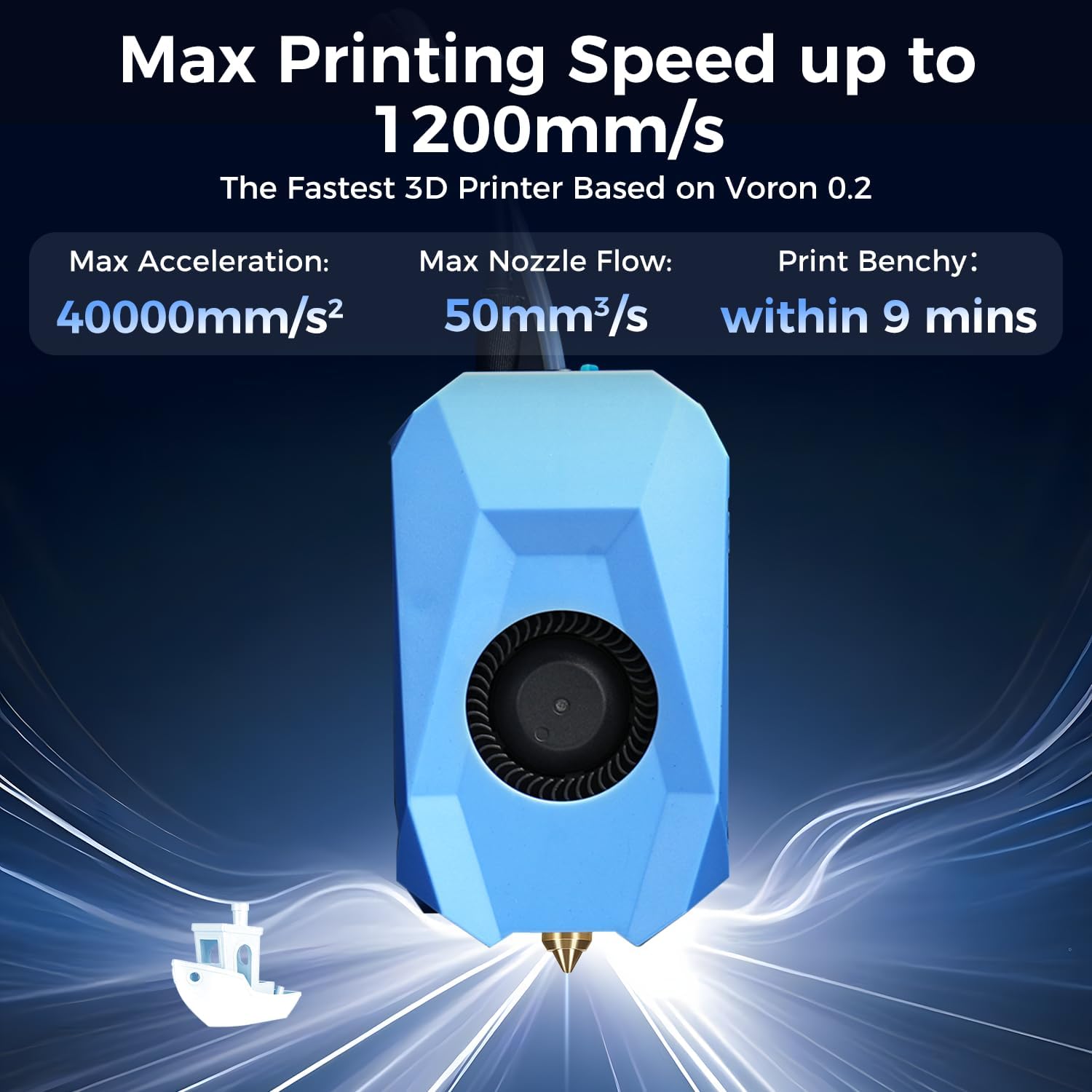
Image: A graphic illustrating the maximum printing speed of the Sovol Zero, reaching up to 1200mm/s, emphasizing its rapid performance.
2.2 Filament Compatibility and Temperature
The printer supports a wide range of filaments, including PLA, TPU, PETG, ABS, ASA, PA, PC, PLA-CF, PETG-CF, and HP-PLA. The nozzle can reach up to 350°C, and the AC heated bed can reach 120°C, enabling successful printing with high-temperature materials.

Image: A visual representation of the Sovol Zero's high-temperature capabilities, with the nozzle reaching 350°C and the heated bed reaching 120°C, suitable for various filament types.

Image: A circular chart displaying the multi-material compatibility of the Sovol Zero, listing various filament types it can print.
2.3 Built-in Camera and Connectivity
The integrated camera provides real-time monitoring of the printing process and supports time-lapse footage. The printer offers universal wireless connectivity via WiFi and LAN/WLAN, allowing for remote control and monitoring, including integration with Obico software. It also supports offline operation via a knob-controlled system and USB direct printing.

Isithombe: Ukuvala view of the Sovol Zero's built-in camera, positioned to monitor the print bed and ongoing print jobs.

Image: A composite image showing the knob-control offline operation system, universal wireless connectivity options (WiFi, LAN), and the user-driven firmware update interface of the Sovol Zero.
2.4 Slicer Software and Open Source
The Sovol Zero is compatible with OrcaSlicer, Cura-Ultimaker, and Cura-Sovol. It is an open-source printer, providing users with the freedom to customize and modify its hardware and software, including full Klipper compatibility.

Image: A conceptual image representing the open-source nature of the Sovol Zero 3D Printer, indicating its customizability and community support.

Isithombe: A enemininingwane view of the upgraded motherboard, highlighting its full Klipper compatibility and integrated motor drivers for stable signal transmission.
3. Isondlo
I-3.1 Air Filtration System
The Sovol Zero includes an air filtration system designed to effectively filter VOCs, particles, and other emissions produced during printing, ensuring a cleaner and safer indoor air environment.

Image: A diagram illustrating the air filtration system integrated into the Sovol Zero, showing airflow and filtration components.
3.2 Linear Rails and Damping
The XYZ axes feature full industrial-grade linear rails, which ensure smoother motion, superior control, and enhanced print quality. These rails offer greater rigidity and corrosion resistance for extended durability. The silicone damping pad effectively absorbs vibrations during high-speed operation, contributing to stability and improved print quality.

Isithombe: Kuqhume view diagram of the XYZ Full Linear Rails, showcasing their components and how they contribute to smooth and precise motion.

Image: A close-up of the silicone damping pad, illustrating its placement and function in absorbing vibrations for enhanced stability.
3.3 Ukuhlanza Okujwayelekile
Regularly clean the print bed with isopropyl alcohol to ensure proper adhesion. Inspect the nozzle for any clogs or wear and replace as needed. Keep the linear rails free of dust and debris to maintain smooth operation.
4. Ukuxazulula Izinkinga Ezivamile
4.1 First Layer Adhesion Problems
If your first layer is not adhering properly, ensure the print bed is clean and free of oils. Verify that the auto-leveling process completed successfully. Adjusting the Z-offset slightly can also help. The printer's adaptive area detection compensates for leveling based on the print model, which helps reduce preparation time.
4.2 Stringing or Blobs
Stringing or blobs can occur due to incorrect retraction settings or filament moisture. Ensure your filament is dry. The printer's pressure advance feature optimizes extruder control by compensating for extrusion lag, minimizing over- or under-extrusion. Input shaping mathematically adjusts the printer's acceleration commands to compensate for mechanical resonance, reducing ringing/ghosting artifacts.

Image: A graphic detailing advanced features like Adaptive Area Detection for leveling compensation, Pressure Advance for precise extrusion, and Input Shaping for reducing print artifacts.
4.3 Nozzle Clogging
If the nozzle is clogged, first try a cold pull. If the clog persists, the nozzle may need to be replaced. The all-metal hotend is designed to handle high temperatures up to 350°C, reducing the likelihood of heat creep related clogs.
4.4 Imisindo Engavamile
While the silicone damping pad reduces vibrations, unusual noises might indicate loose components or issues with the linear rails. Inspect all screws and ensure the printer is on a stable surface. Lubricate linear rails if necessary.
4.5 Persistent Issues
If you encounter issues that cannot be resolved using this guide, please contact Sovol customer support for further assistance. Provide detailed information about the problem, including any error messages or unusual behavior.
5. Imininingwane Yezobuchwepheshe

Image: A detailed table outlining the product specifications of the Sovol Zero 3D Printer.
| Isici | Imininingwane |
|---|---|
| Ubukhulu bomkhiqizo | 16.5 x 13.6 x 18.7 amayintshi (41.9 x 34.5 x 47.5 cm) |
| Isisindo sento | 46.5 pounds (21.1 kg) |
| Yakha ivolumu (W*D*H) | 152.4 x 152.4 x 152.5 mm³ (6x6x6 inches) |
| Isivinini Sokuphrinta Esiphezulu | 1200mm/s |
| Ukushesha kwe-Max | 40000mm/s² |
| Nozzle Temperature | Kufika ku-350°C (662°F) |
| Izinga Lokushisa Lombhede | Kufika ku-120°C (248°F) |
| Amafilamenti Asekelwayo | PLA, TPU, PETG, ABS, ASA, PA, PC, PLA-CF, PETG-CF, HP-PLA |
| Ukulinganisa okuzenzakalelayo | Inductive sensor + force sensor (Next-Gen 3.0) |
| I-Extruder | Planetary gear direct extruder |
| Ukuxhumana | WiFi (2.4G), WLAN, USB |
| Ukuhambisana Kwesistimu Esebenzayo | Win7/8/10/11/Linux Ubuntu 20.04+/Mac OS 10.10+ |
| Isekelwe File Ifomethi | STL, OBJ, STP, STEP, 3MF, AMF, GCODE |
| Isoftware yomsiki | OrcaSlicer, Cura-Ultimaker, Cura-Sovol |
| Umkhiqizi | I-Sovol |
5.1 Yini EseBhokisini
- Sovol Zero 3D Printer (1 unit)
- Umnikazi weFilament
- Ibhokisi Lamathuluzi
- I-Antenna
- Inzwa yeFilament

Image: The Sovol Zero 3D Printer alongside its essential accessories, including the filament holder, tool box, antenna, and filament sensor.
6. Iwaranti kanye Nokusekela
The Sovol Zero 3D Printer is manufactured by Sovol. For specific warranty information and support inquiries, please refer to the documentation provided with your purchase or visit the official Sovol website. The seller for this product is Sovol, and it is fulfilled by Amazon.
For technical assistance or troubleshooting beyond this manual, please contact Sovol customer service directly. Ensure you have your product model and purchase details ready for faster service.


