1. Isingeniso
This manual provides essential information for the proper setup, operation, and maintenance of your ZEISS DTI 6/20 Thermal Imaging Camera. Please read these instructions carefully before using the device to ensure optimal performance and longevity.
2. Yini EseBhokisini
Qinisekisa ukuthi zonke izingxenye ezilandelayo zifakiwe kuphakheji yakho:
- Ikhamera yokuthwebula eshisayo
- Lens (20 mm)
- Ibhande le-Neoprene
- Carrying case including shoulder strap
- Ikhebula le-USB
- Indwangu yokuhlanza i-Optics
- Ibhethri ye-lithium-ion
- Isiqondisi Esisheshayo
- Amanothi okuphepha
- Ikhadi lewaranti
- Idokhumenti ye-EULA
3. Umkhiqizo Uphelileview
The ZEISS DTI 6/20 is a high-resolution thermal imaging monocular designed for detailed observation in low-light conditions. It features advanced image processing and ergonomic design for ease of use.

Umfanekiso 1: I-engeli view of the ZEISS DTI 6/20 Thermal Imaging Camera. This image displays the overall design, including the objective lens, eyepiece, and the ZEISS branding on the side.
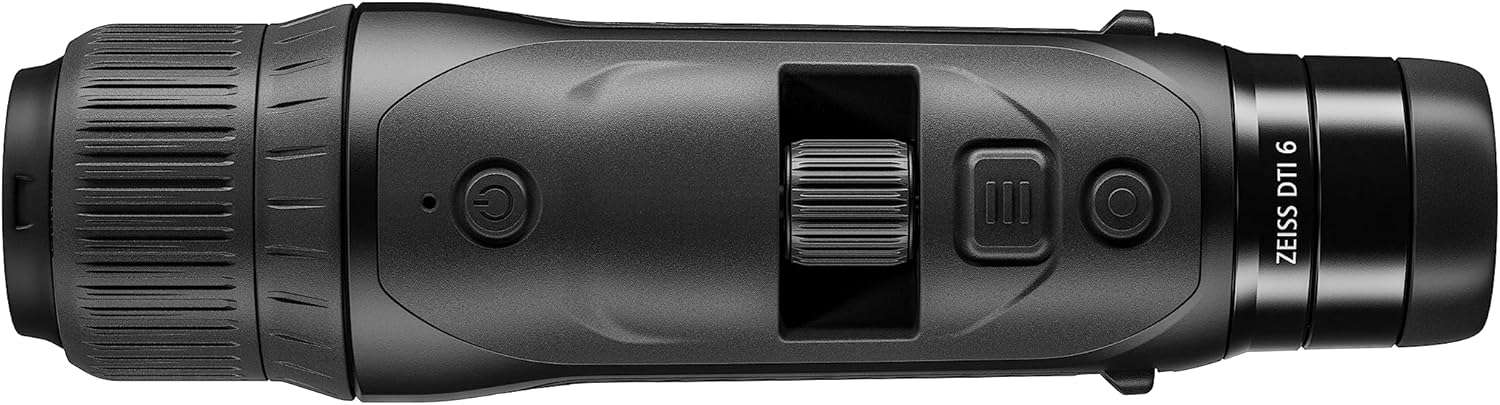
Umfanekiso 2: Phezulu view of the ZEISS DTI 6/20, highlighting the power button, scroll wheel for magnification control, and other operational buttons. The ergonomic placement of controls is visible.
Izici Eziyinhloko:
- ZSIP Pro Image Technology: Delivers sharp, high-contrast thermal images.
- Isibonisi Esinokulungiswa Okuphezulu: AMOLED display with 1024x768 resolution, paired with a 640x480 sensor and 12µm pixel pitch.
- Ukukhulisa: 1.5x optical magnification with up to 10x digital zoom, controlled by a scroll wheel.
- Ukwenza ngokwezifiso: 4 preset scene modes and up to 5 user-created layouts. Adjustable zoom settings, display brightness, and color palettes.
- Isitoreji Sangaphakathi: 16GB for capturing images and videos.
- Impilo Yebhethri: Up to 6.5 hours of continuous operation with a removable lithium-ion battery.
- Idizayini ye-Ergonomic: Suitable for both left and right-handed users, with controls positioned for natural access even with gloves.
- Ukuxhumana kohlelo lokusebenza: Seamless data transfer and live streaming to smartphones via the ZEISS Hunting App using Bluetooth, USB, or WLAN.
4. Setha
4.1 Ukufakwa kwebhethri
- Thola indawo yebhethri ocingweni.
- Vula ikhava yegumbi.
- Insert the provided lithium-ion battery, ensuring correct polarity.
- Vala ikhava yengxenye yebhethri ngokuphephile.
4.2 Amandla Okuqala Avuliwe
- Press and hold the power button (refer to Figure 2) until the ZEISS logo appears on the display.
- Allow the device to initialize. This may take a few seconds.
- Adjust the diopter on the eyepiece for clear focus according to your vision.
5. Iziqondiso Zokusebenza
5.1 Vula/Vala amandla
- Ukuvula: Cindezela bese ubamba inkinobho yamandla.
- Ukucisha: Press and hold the power button until the shutdown sequence initiates.
5.2 Magnification Control
Use the scroll wheel located on the top of the device (refer to Figure 2) to adjust the digital zoom level. Rotate the wheel forward to increase magnification and backward to decrease it.
5.3 Amamodi wesigcawu
The DTI 6/20 offers 4 preset scene modes optimized for different observation conditions. Access these modes through the device's menu to enhance image clarity based on your environment.
5.4 Ukwenza ngokwezifiso
The device allows for extensive personalization:
- User Layouts: Create and save up to 5 custom display layouts.
- Izilungiselelo zokubonisa: Adjust display brightness to suit ambient light conditions.
- Amaphalethi ombala: Select from various color palettes to optimize thermal contrast and target identification.
5.5 App Connectivity (ZEISS Hunting App)
Enhance your experience by connecting the DTI 6/20 to the ZEISS Hunting App on your smartphone.

Umfanekiso 3: A user operating the ZEISS DTI 6/20 thermal imaging camera in an outdoor environment, demonstrating its ergonomic handling and practical application.
- Ukudluliswa Kwedatha: Transfer images and videos from the device's 16GB internal storage to your smartphone via Bluetooth, USB, or WLAN.
- Ukusakaza bukhoma: Stream live thermal footage directly to your smartphone for shared viewing noma ukurekhoda.
- Further Customization: The app provides additional options for device settings and management.
6. Isondlo
6.1 Ukuhlanza
- Use the provided optics cleaning cloth to gently wipe the lenses. Avoid abrasive materials.
- For the device body, use a soft, damp indwangu. Ungasebenzisi amakhemikhali anokhahlo noma izincibilikisi.
- Qinisekisa ukuthi idivayisi icishiwe ngaphambi kokuhlanza.
6.2 Ukunakekelwa Kwebhethri
- Shaja ibhethri ngokugcwele ngaphambi kokulisebenzisa okokuqala.
- Store the device and battery in a cool, dry place when not in use for extended periods.
- Gwema ukubeka ibhethri esimweni esishisayo esishisayo.
7. Ukuxazulula izinkinga
7.1 Idivayisi Ayivuliwe
- Qinisekisa ukuthi ibhethri ifakwe kahle futhi ishajwe ngokugcwele.
- Try charging the battery for at least 30 minutes before attempting to power on again.
7.2 Image Appears Blurry
- Adjust the diopter on the eyepiece for your vision.
- Ensure the objective lens is clean and free from smudges or debris.
- Check the focus of the thermal image using the manual focus ring if available.
7.3 Connectivity Issues with ZEISS Hunting App
- Ensure Bluetooth or WLAN is enabled on both the device and your smartphone.
- Verify that the ZEISS Hunting App is updated to the latest version.
- Restart both the thermal camera and your smartphone.
8. Imininingwane
| Isici | Ukucaciswa |
|---|---|
| Ubukhulu bomkhiqizo | 9.06 x 2.44 x 2.68 amayintshi |
| Isisindo sento | Amakhilogremu amabili (ama-ounces angu-24.33) |
| Inombolo Yemodeli Yento | 527020-9911-000 |
| Ibhrendi | I-ZEISS |
| Igama Lemodeli | I-DTI 6/20 |
| Incazelo Yelensi Yesiqephu Seso | Plössl |
| Uhlobo lokugxila | Ukugxila Kwezandla |
| Umthombo wamandla | Isebenza Ibhethri (Lithium-ion) |
| Amadivayisi Ahambisanayo | I-smartphone |
| Incazelo Yobude Bendawo | 300 mm |
| Inkambu Ye View | 10 degrees |
| Isilinganiso Sokusondeza | 3x Optical, up to 10x Digital |
| Isixazululo Sensor | 640 x 480 with 12 micron pixel pitch |
| Bonisa Ukulungiswa | 1024 x 768 HD AMOLED |
| Isitoreji Sangaphakathi | 16GB |
| Isikhathi sokusebenza kwebhethri | Amahora angama-6.5 (ngokuqhubekayo) |
9. Iwaranti kanye Nokusekela
The ZEISS DTI 6/20 Thermal Imaging Camera is manufactured by ZEISS. For detailed warranty information, please refer to the included warranty card or visit the official ZEISS website. For technical support, service, or inquiries, please contact ZEISS customer service through their official channels.
Umkhiqizi: I-ZEISS


