Isingeniso
Thank you for choosing the Zeadio Handheld Stabilizer Versatile Grip Rig. This manual provides detailed instructions for the proper setup, operation, and maintenance of your stabilizer. Designed for use with smartphones, action cameras, DSLRs, and camcorders, this rig helps achieve stable, high-quality video footage.
Yini EseBhokisini
Carefully unpack your Zeadio Handheld Stabilizer and ensure all components are present:
- 1 x Zeadio Handheld Stabilizer Rig (main frame with handles)
- 1 x Shockproof Carrying Case with buckle
- 1 x Holder for Smartphone
- 1 x Cold Shoe Adapter

Image: All components of the Zeadio Handheld Stabilizer kit, including the main rig, smartphone holder, cold shoe adapter, and a shockproof carrying case, laid out for inspection.
Setha
1. Assembling the Stabilizer
- Unfold the stabilizer handles from the central mounting plate if they are in a compact position. Ensure they click securely into place.
- The stabilizer can be used in both single-hand and both-hand modes. For both-hand mode, ensure both handles are firmly attached to the central rig.
2. Attaching Your Device (Smartphone/Camera)
- Okwama-Smartphone: Attach the provided smartphone holder to one of the 1/4 inch screws on the central mounting plate. Tighten the screw securely. Insert your smartphone into the holder, ensuring it is centered and firmly gripped.
- For Cameras (DSLR, Camcorder, Action Camera): Use the 1/4 inch screws on the central mounting plate to attach your camera. Align the camera's tripod mount with a screw and rotate the camera clockwise until it is snug. Ensure the camera is balanced on the plate.

Isithombe: A enemininingwane view of the two universal 1/4 inch screws on the stabilizer's mounting plate, used for attaching cameras or accessories.
3. Attaching Accessories (Microphone, LED Light)
- The stabilizer features triple cold-shoe mounts. Use these to attach external accessories such as microphones, LED video lights, or monitors.
- Slide the cold shoe adapter (if needed for certain accessories) or the accessory's cold shoe mount into one of the available slots and tighten the locking mechanism.

Image: The Zeadio stabilizer in a low-angle shooting configuration, showcasing a camera, an external microphone, and an LED light mounted using the triple cold shoe slots.
Imiyalelo yokusebenza
1. Handheld Operation (Single-Hand and Both-Hand Modes)
- Both-Hand Mode: Hold both handles firmly. This mode provides maximum stability and control, significantly reducing camera shake for smooth video capture.
- Single-Hand Mode: For quick adjustments or specific angles, one handle can be used. This mode is suitable for dynamic shots where agility is prioritized.
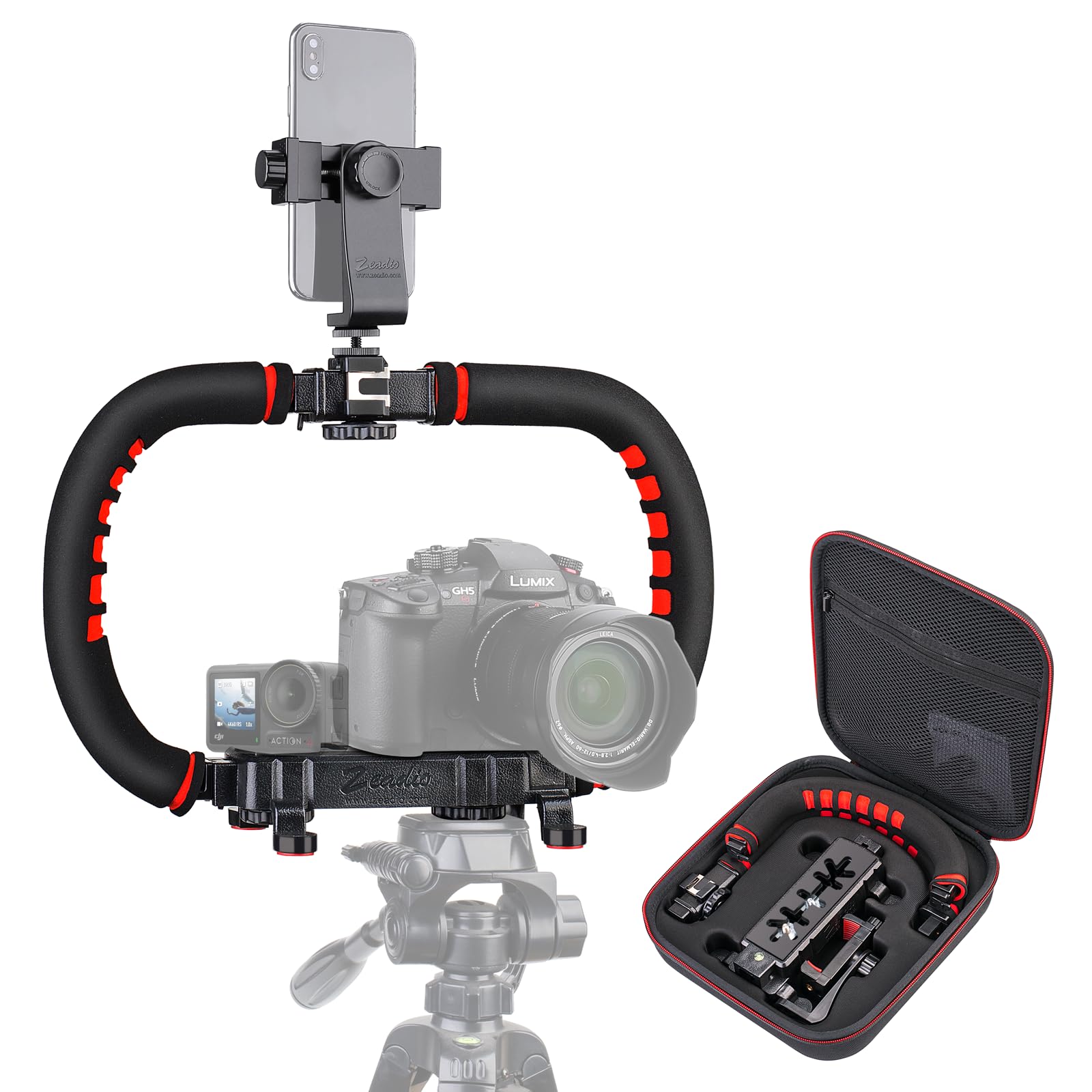
Image: The Zeadio Handheld Stabilizer in use, held by both hands, with a smartphone and action camera mounted. This setup is designed to minimize camera shake during filming.
2. Low-Angle Shooting
The stabilizer's design allows for effective low-angle shooting. You can place the rig directly on a flat surface or hold it close to the ground to capture unique perspectives.
3. Tripod and Slider Compatibility
The bottom of the central mounting plate features a built-in 1/4 inch threaded hole. This allows you to connect the stabilizer to a tripod, monopod, slider, or rail car for enhanced stability and versatile shooting options.

Image: The Zeadio Handheld Stabilizer attached to a tripod, supporting both a camera and a smartphone, demonstrating its capability for stable, stationary video capture.
Isondlo
- Ukuhlanza: Wipe the stabilizer with a soft, dry cloth after each use to remove dust and debris. For stubborn marks, use a slightly damp indwangu bese womisa kahle. Gwema amakhemikhali anamandla.
- Isitoreji: Store the stabilizer in its shockproof carrying case when not in use. Keep it in a cool, dry place away from direct sunlight and extreme temperatures.
- Ukuhlola: Periodically check all screws and connections to ensure they are tight. Do not overtighten.
Ukuxazulula inkinga
- Inkinga: Idivayisi izizwa ingazinzile noma ixega.
Isixazululo: Ensure all 1/4 inch screws and cold shoe mounts are securely tightened. Verify that your camera or smartphone is properly seated and balanced on the mounting plate. - Inkinga: Izibambo zizwakala zikhululekile.
Isixazululo: Check the locking mechanisms for the handles to ensure they are fully engaged. - Inkinga: Ubunzima bokunamathisela izesekeli.
Isixazululo: Ensure the accessory has a compatible cold shoe or 1/4 inch screw mount. Some accessories may require the included cold shoe adapter.
Imininingwane
| Isici | Imininingwane |
|---|---|
| Ibhrendi | Zeadio |
| Imodeli | Versatile Grip Rig |
| Umbala | Okubomvu |
| Amadivayisi Ahambisanayo | Camcorder, Camera, Cellphone, DSLR, Sport camera |
| Usayizi Ogoqiwe | 12 amayintshi (L) x 4 amayintshi (W) x 3 amayintshi (H) |
| Built-In Mounts | Double 1/4 Inch Screws, Triple Cold-Shoe Mounts, 1/4 Inch Threaded Hole (bottom) |
| Izesekeli ezifakiwe | Smartphone Holder, Cold Shoe Adapter, Carrying Case |
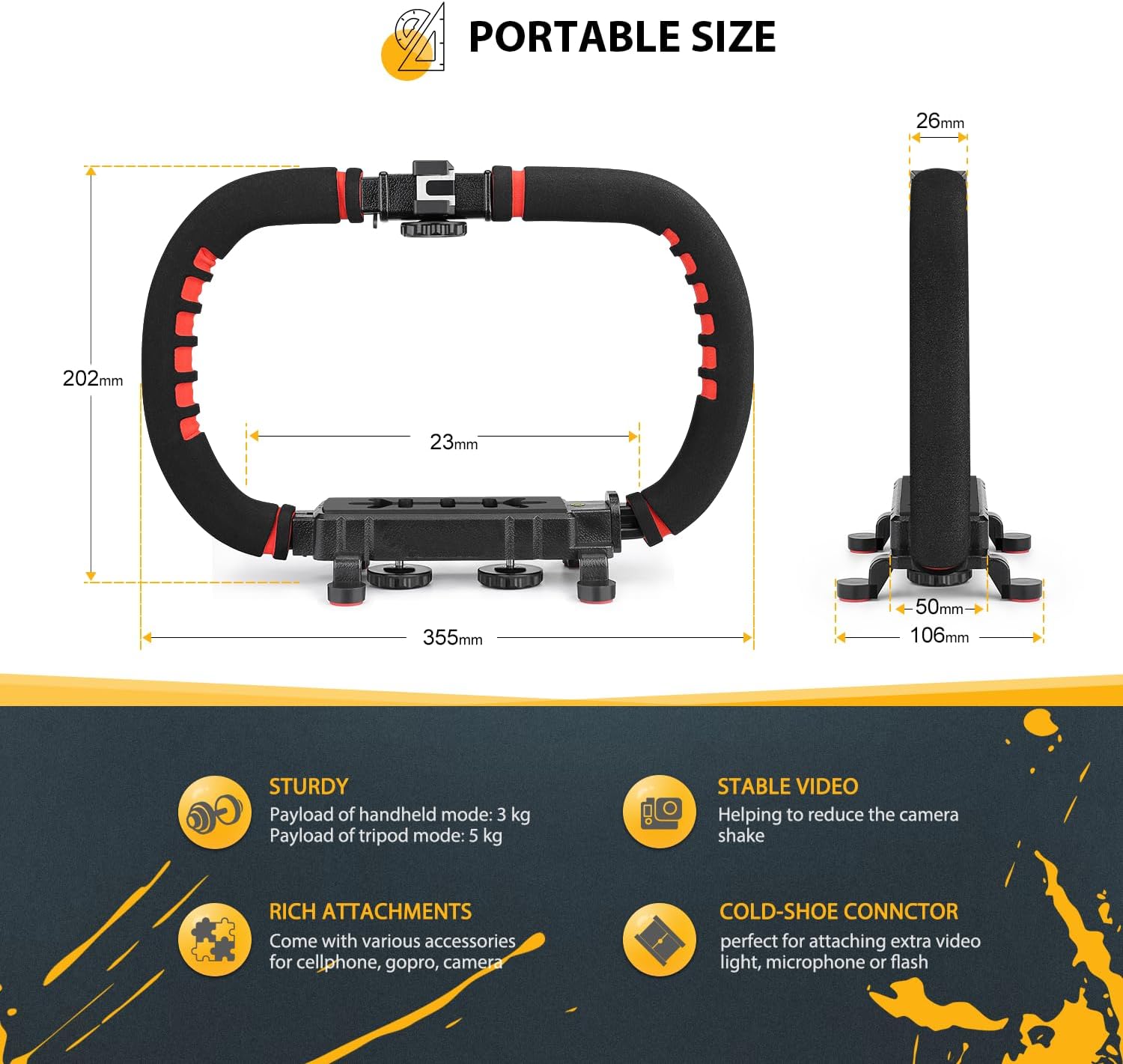
Image: A diagram illustrating the dimensions of the Zeadio Handheld Stabilizer and highlighting its key features and benefits.
Iwaranti kanye Nokusekela
The Zeadio Handheld Stabilizer Versatile Grip Rig comes with a Iwaranti Yonyaka ongu-1 from the date of purchase. This warranty covers manufacturing defects and ensures the product is free from material and workmanship flaws under normal use.
For warranty claims, technical support, or any inquiries regarding your product, please contact Zeadio customer service through the retailer where the product was purchased or visit the official Zeadio webindawo yolwazi lokuxhumana.


