1. Isingeniso
This manual provides essential instructions for the safe and effective use of your Radiomaster Pocket Crush 2.4GHz ELRS Hall Gimbal Transmitter. Please read this manual thoroughly before operating the device to ensure proper setup, operation, and maintenance. Retain this manual for future reference.
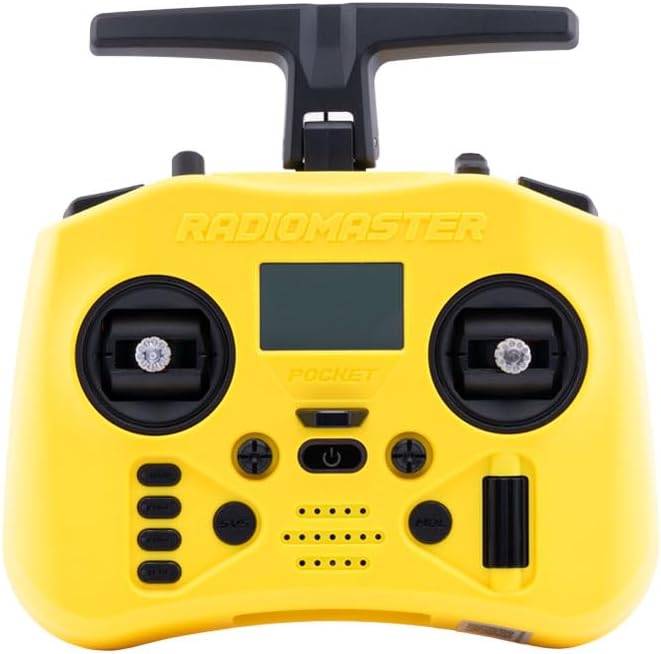
Umfanekiso 1.1: Ngaphambili view of the Radiomaster Pocket Crush Transmitter.
2. Yini EseBhokisini
Upon unboxing your Radiomaster Pocket Crush, verify that all the following items are included:
- 1 x Pocket Crush Radio Transmitter
- 1 x Isikhwama Sokuthwala Esenziwe Ngokwezifiso
- 1 x Ikhebula le-USB-C
- 1 x Isivikeli Sesikrini
- 1 x Ishidi Lesitika

Figure 2.1: Included items in the Radiomaster Pocket Crush package.
3. Setha
3.1 Ukufakwa kwebhethri
The Pocket Crush transmitter requires two 18650 batteries (not included) for operation. To install:
- Thola indawo yebhethri ngemuva kwe-transmitter.
- Vula ikhava yengxenye yebhethri.
- Insert two 18650 batteries, ensuring correct polarity as indicated inside the compartment.
- Vala ikhava yengxenye yebhethri ngokuphephile.

Figure 3.1: Battery compartment for 18650 batteries.
3.2 Antenna and Stick End Configuration
The transmitter features a foldable antenna and removable stick ends for portability and customization.
- I-Antenna: Unfold the antenna to its upright position before operation to ensure optimal signal transmission. Fold it down for compact storage.
- Stick Ends: The included stick ends are removable. You can replace them with preferred aftermarket stick ends if desired.

Figure 3.2: Removable stick ends and foldable antenna for portability.
3.3 Initial Power-On and Binding
After battery installation, press and hold the power button to turn on the transmitter. The display will illuminate. Refer to the specific firmware documentation (e.g., EdgeTX manual) for detailed instructions on initial setup, model creation, and binding procedures with your receiver.

Figure 3.3: Close-up of a Hall effect gimbal.
4. Iziqondiso Zokusebenza
4.1 Izilawuli Eziyisisekelo
The Radiomaster Pocket Crush features X5 Hall effect gimbals for precise control and various switches for auxiliary functions.
- Ama-Gimbals: Control primary flight surfaces (e.g., aileron, elevator, rudder, throttle).
- Ukushintsha: Utilize the various two-position and three-position switches for arming, flight modes, and other programmable functions.
- Izinkinobho: Navigate menus and confirm selections using the dedicated buttons below the display.

Umfanekiso 4.1: Uhlangothi view illustrating switches and ports.
4.2 Display Navigation
The monochrome LCD provides essential information and access to transmitter settings. Use the scroll wheel and menu buttons to navigate through the firmware interface. Consult the firmware manual for detailed menu structures and parameter adjustments.
4.3 I-External Module Bay
The Pocket Crush includes an external Nano-size module bay, compatible with RadioMaster Nano-size modules and TBS Nano Crossfire/Nano Tracer modules. This allows for expanded protocol support and increased range capabilities.

Figure 4.2: External Nano Module Bay with an installed module.
5. Isondlo
5.1 Ukuhlanza Nokugcina
- Keep the transmitter clean by wiping it with a soft, dry cloth. Avoid using harsh chemicals or solvents.
- Gcina i-transmitter endaweni epholile, eyomile, kude nokukhanya kwelanga okuqondile kanye namazinga okushisa aphezulu.
- When storing for extended periods, remove the 18650 batteries to prevent leakage.
5.2 Ukuvuselelwa kweFirmware
Regularly check for and install firmware updates for your transmitter. Firmware updates can improve performance, add new features, and fix bugs. Updates are typically performed via the USB-C port or an SD card. Refer to the official Radiomaster website or firmware documentation for the latest updates and instructions.
6. Ukuxazulula izinkinga
If you encounter issues with your Radiomaster Pocket Crush, consider the following troubleshooting steps:
- I-Transmitter Ayivuli: Ensure batteries are correctly installed and fully charged. Check for any physical damage to the battery contacts.
- Binding Issues: Verify that both the transmitter and receiver are in binding mode. Ensure the correct protocol is selected on the transmitter. Consult the receiver's manual for its specific binding procedure.
- Izilawuli ezingaphenduli: Check that the gimbals and switches are physically intact. Recalibrate gimbals if necessary through the firmware settings.
- Bonisa Izinkinga: If the display is blank or shows errors, try restarting the transmitter. Ensure the screen protector is properly applied and not obstructing the view.
- Amaphutha e-Firmware: If you experience unexpected behavior, consider performing a firmware re-flash or update. Back up your model settings before any firmware operations.
For persistent issues, refer to the comprehensive firmware documentation or contact Radiomaster customer support.
7. Imininingwane
Key technical specifications for the Radiomaster Pocket Crush Transmitter:
| Isici | Ukucaciswa |
|---|---|
| Ubukhulu bomkhiqizo | 4 x 3 x 2 amayintshi (cishe.) |
| Isisindo | 288 amagremu (cishe) |
| Imvamisa Yokusebenza | 2.400GHz-2.480GHz |
| Izinketho ze-RF zangaphakathi | I-ELRS 2.4GHz |
| Lawula Ibanga | >2km @ 20dBm |
| Isistimu esebenzayo | I-EdgeTX |
| Lawula Iziteshi | Ubuningi obungu-16 (kuncike kumuntu otholayo) |
| Bonisa | 128*64 Monochrome LCD |
| Ibhethri | Amabhethri amabili angu-18650 (awafakiwe) |
| Iyashaja | Ukushaja kwe-QC3 ye-USB-C eyakhelwe ngaphakathi |
| Uhlobo lwe-Gimbal | Hall-effect (upgradable to AG01 NANO CNC Hall effect gimbals) |
| I-Module Bay | Usayizi we-Nano (Uyahambisana namamojula we-RadioMaster we-Nano-size, i-TBS Nano Crossfire / i-Nano Tracer) |
| I-Firmware Engathuthukiswa | Nge-USB noma ikhadi le-SD elifakiwe |
8. Iwaranti kanye Nokusekela
Ukuze uthole ulwazi lwewaranti kanye nosekelo lobuchwepheshe, sicela ubheke i-Radiomaster esemthethweni website or contact your authorized dealer. Keep your proof of purchase for warranty claims. The manufacturer of this product is Greathobby RC.
9. Ulwazi Lokuphepha
Always operate your remote control equipment responsibly. Ensure you understand and comply with all local regulations regarding radio-controlled models. Never operate your transmitter in unsafe conditions or near people, animals, or property that could be harmed. Always perform pre-flight checks and ensure your model is functioning correctly before each use.


