1. Isingeniso
Thank you for choosing the Deli ET530 Digital Safe Box. This manual provides essential information for the proper installation, operation, and maintenance of your safe. Please read these instructions carefully before use to ensure optimal security and functionality.
2. Ulwazi Lokuphepha
- Keep override keys in a secure location away from the safe. Do not store them inside the safe.
- Ensure the safe is installed on a stable surface or securely mounted to a wall or floor.
- Ungabeki isisefo endaweni eshisa kakhulu noma emswakama.
- Replace batteries promptly when the low battery indicator appears to avoid lockout.
- Avoid sharing your access code with unauthorized individuals.
3. Okuqukethwe Kwephakheji
Qinisekisa ukuthi zonke izingxenye zikhona kuphakheji:
- 1 x Deli ET530 Digital Safe Box
- 2 x Security Override Keys
- 4 x AA Batteries (1.5V)
- 2 x Fixing Bolts for mounting
- 1 x Removable Shelf
- 1 x Custom Carpet Interior
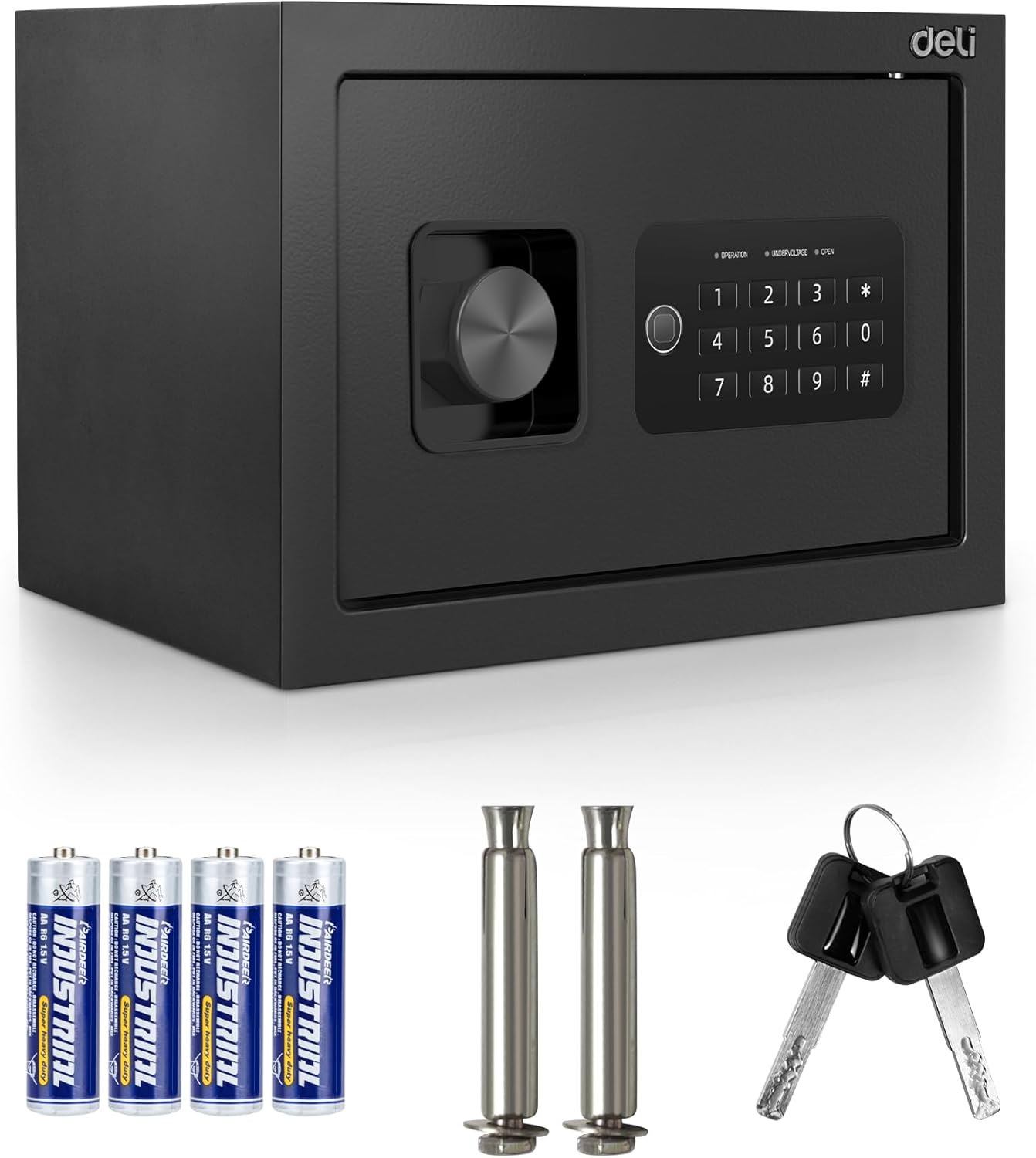
Image 3.1: Deli ET530 Digital Safe Box and its accessories.
4. Umkhiqizo Uphelileview
The Deli ET530 Digital Safe Box is designed to protect your valuables with a robust steel construction and a dual-key system. It features a digital keypad for electronic access and a manual override key system for emergency entry.
Izici Eziyinhloko:
- Ikhiphedi Yedijithali: Allows setting a personal user code for quick access.
- Dual Key System: Provides both electronic and mechanical key access.
- Anti-Saw Locking Bolts: Two 16mm steel locking bolts enhance security against forced entry.
- Ukwakhiwa Kwensimbi Eqinile: Offers protection against physical attacks.
- Ishalofu Elikhiphekayo: Allows for flexible storage arrangements inside the safe.
- Carpeted Interior: Protects stored items from scratches and damage.
- Imigodi Ebholwe Ngaphambili: Facilitates permanent mounting to floors or walls for added security.

Image 4.1: Internal features of the Deli ET530 Digital Safe Box.

Image 4.2: Anti-drilling and pry-resistant construction details.
5. Setha
5.1. Ukufakwa kwebhethri
- Thola indawo yebhethri ngaphakathi komnyango ophephile.
- Insert 4 AA (1.5V) batteries, ensuring correct polarity (+/-).
- Vala ikhava yengxenye yebhethri.
5.2. Ukusetha Ikhodi Yokuqala
Upon first use, or after a battery change, you will need to set your personal access code.
- With the safe door open, locate the red reset button on the inside of the door (refer to Image 4.1).
- Press the red reset button. The keypad will beep, and the 'OPERATION' light will illuminate.
- Faka ikhodi oyifisayo enamadijithi angu-3-8 kukhiphedi.
- Press the '#' key to confirm. The 'OPERATION' light will flash, indicating the code has been successfully set.
- Hlola ikhodi entsha ngomnyango ovuliwe ngaphambi kokuwuvala.
5.3. Ukukhweza i-Safe
For enhanced security, it is recommended to permanently mount the safe to a floor or wall.
- Khetha indawo efanelekile yokukhweza.
- Use the pre-drilled holes at the back or bottom of the safe as a template to mark drilling points on the wall or floor.
- Drill holes using an appropriate drill bit for your wall/floor material.
- Align the safe with the drilled holes and secure it using the provided fixing bolts.

Image 5.1: Pre-drilled anchor holes for mounting.
6. Iziqondiso Zokusebenza
6.1. Opening the Safe with Digital Keypad
- Enter your 3-8 digit personal code on the keypad.
- Press the '#' key. The 'OPEN' light will illuminate.
- Kungakapheli imizuzwana emi-5, phendula inkinobho ngokwewashi ukuze uvule umnyango wesiphephelo.

Image 6.1: Opening the safe using the electronic keypad.
6.2. Opening the Safe with Override Keys (Emergency Access)
In case of battery failure or forgotten code, the safe can be opened using the override keys.
- Locate the keyhole cover on the keypad panel.
- Remove the cover to expose the keyhole.
- Insert one of the override keys and turn it counter-clockwise.
- While holding the key turned, rotate the knob clockwise to open the safe door.
- Susa ukhiye uma umnyango usuvuliwe.

Image 6.2: Opening the safe using the override key.
6.3. Closing the Safe
- Vala umnyango ophephile ngokuqinile.
- Turn the knob counter-clockwise to engage the locking bolts.
6.4. Changing the User Code
To change your personal code:
- Vula umnyango ophephile.
- Press the red reset button on the inside of the door. The 'OPERATION' light will illuminate.
- Enter your new 3-8 digit code.
- Press the '#' key to confirm. The 'OPERATION' light will flash.
- Hlola ikhodi entsha ngomnyango ovuliwe ngaphambi kokuwuvala.
7. Isondlo
- Ukuhlanza: Sula ingaphandle lesisefo ngomshini othambile, damp indwangu. Gwema izinto zokuhlanza abrasive.
- Ukushintshwa Kwebhethri: Replace all 4 AA batteries when the 'UNDERVOLTAGE' indicator light illuminates. Always use new, high-quality alkaline batteries.
- Ukunakekela Okubalulekile: Keep override keys clean and dry. Do not force keys into the lock.

Image 7.1: Soft carpeted interior for item protection.
8. Ukuxazulula izinkinga
| Inkinga | Imbangela Engenzeka | Isixazululo |
|---|---|---|
| Safe does not open with code. | Incorrect code entered. Batteries are low or dead. Keypad is locked. | Re-enter code carefully. Replace batteries. Wait 3 minutes if keypad is locked due to multiple incorrect entries. Use override key. |
| Ikhiphedi ayiphenduli. | Amabhethri afile noma afakwe ngokungalungile. | Shintsha amabhethri, uqinisekise i-polarity efanele. |
| 'UNDERVOLTAGE' light is on. | Amabhethri aphansi. | Replace all 4 AA batteries immediately. |
| Safe door cannot be closed. | Obstruction in the door frame. Locking bolts are extended. | Remove any obstructions. Ensure the knob is turned to retract bolts before closing. |
9. Imininingwane
| Isici | Imininingwane |
|---|---|
| Inombolo Yemodeli | TM-5-ET530 |
| Ubukhulu bangaphandle (D x W x H) | 25 cm x 35 cm x 25 cm (9.8" x 13.8" x 9.8") |
| Ivolumu Yangaphakathi | Approximately 0.8 Cubic Feet |
| Isisindo | 8.7 kg |
| Okubalulekile | I-alloy Steel |
| Uhlobo lokukhiya | Digital Keypad and Key |
| Umthombo wamandla | 4 x AA (1.5V) Amabhethri |
| Izici ezikhethekile | Anti-Theft, Removable Shelf, Carpeted Interior |
| Uhlobo Lokukhweza | Floor Mount / Wall Mount (Pre-drilled holes) |

Image 9.1: Deli ET530 Digital Safe Box dimensions.
10. Iwaranti kanye Nokusekela
For warranty information and customer support, please refer to the documentation provided at the point of purchase or contact your retailer. You may also visit the official Deli website ukuze uthole olunye usizo.


