Isingeniso
This manual provides comprehensive instructions for the setup, operation, and maintenance of your Brother AX-15 Electronic Typewriter. Please read this manual thoroughly before using your typewriter to ensure proper function, optimal performance, and longevity of the device.
Umkhiqizo Uphelileview
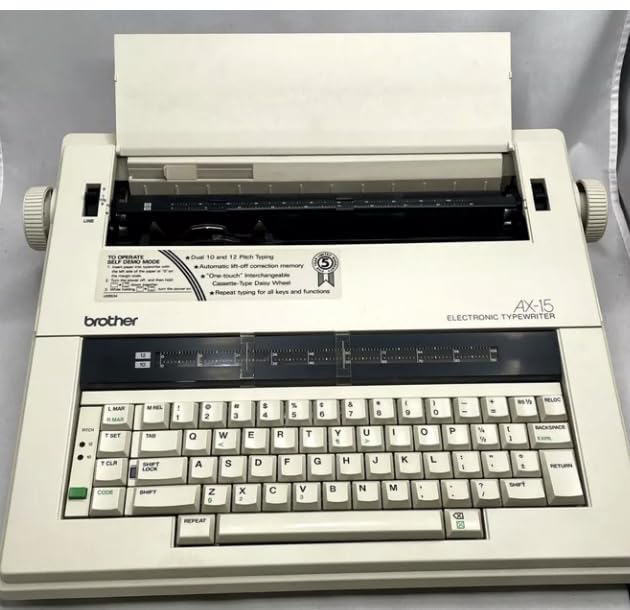
Image: The Brother AX-15 Electronic Typewriter, showcasing its full keyboard, paper feed mechanism, and control panel. Key features visible include the pitch selection (10 and 12), automatic lift-off correction memory, and the Brother brand logo.
1. Setha
1.1 Ukuqaqa
- Carefully remove the typewriter and all accessories from the packaging.
- Gcina iphakheji ukuze ithuthwe noma igcinwe esikhathini esizayo.
1.2 Ukuxhuma Amandla
- Ensure the typewriter's power switch is in the OFF position.
- Connect the power cord to the power input on the typewriter.
- Xhuma olunye uhlangothi lwentambo kagesi endaweni yokuxhuma kagesi ejwayelekile.
1.3 Ribbon and Correction Tape Installation
The Brother AX-15 uses a cassette-type daisy wheel and ribbon system for easy replacement.
- Open the ribbon cover, typically located at the top of the typewriter.
- Align the new ribbon cassette with the guides and press down gently until it clicks into place.
- Install the correction tape cassette in a similar manner, ensuring it is properly seated.
- Close the ribbon cover.
1.4 Ukulayishwa Kwamaphepha
- Place the paper against the paper guide on the left side of the platen.
- Turn the platen knob (usually on the right side) to feed the paper into the typewriter until it is securely in position.
- Adjust the paper bail rollers to hold the paper flat against the platen.
2. Iziqondiso Zokusebenza
2.1 Basic Typing
- Vula umshini wokubhala usebenzisa iswishi yamandla.
- Begin typing on the keyboard. The characters will appear on the paper.
- Sebenzisa i- ISIKHALA BAR for spaces and the BUYELA key to advance to the next line.
2.2 Pitch Selection
The Brother AX-15 supports dual 10 and 12 pitch typing, and potentially 15 pitch, allowing for different character densities per inch.
- Locate the pitch selection switch or button on the control panel.
- Select the desired pitch (e.g., 10 for larger characters, 12 for smaller characters).
2.3 Correction Functions
The typewriter features automatic lift-off correction memory for character, word, and line correction.
- To correct a single character, press the KULUNGILE key immediately after typing the incorrect character. The typewriter will lift off the error.
- For word or line correction, use the appropriate correction keys (if available) or repeatedly use the KULUNGILE key while backspacing over the error.
2.4 Bold Print
To emphasize text, the Brother AX-15 can produce bold print.
- Thola i- BOLD print function key.
- Cindezela inkinobho BOLD key before typing the text you wish to bold. Press it again to deactivate.
2.5 Repeat Typing
The typewriter supports repeat typing for all keys and functions.
- To repeat a character or function, press and hold the desired key. The action will repeat until the key is released.
3. Isondlo
3.1 Ukushintsha Iribhoni
When the print quality deteriorates, it is time to replace the ribbon cassette.
- Ensure the typewriter is turned off.
- Open the ribbon cover.
- Carefully remove the used ribbon cassette by lifting it out.
- Install a new ribbon cassette as described in Section 1.3.
3.2 Ukuhlanza
- Regularly dust the exterior of the typewriter with a soft, dry cloth.
- Use a small brush or compressed air to remove dust and debris from the keyboard and print head area.
- Avoid using liquid cleaners directly on the typewriter components.
4. Ukuxazulula izinkinga
This section addresses common issues you might encounter with your Brother AX-15 Electronic Typewriter.
4.1 AmaJam Amaphepha
- If paper jams, turn off the typewriter immediately.
- Carefully pull the paper out in the direction of the paper feed, avoiding tearing.
- Ensure paper is loaded correctly and not wrinkled before re-attempting.
4.2 Faint or Uneven Print
- Check if the ribbon cassette is correctly installed.
- The ribbon may be worn out and require replacement.
- Ensure the correct pitch setting is selected for the desired output.
4.3 Typewriter Not Responding
- Verify that the power cord is securely connected to both the typewriter and the electrical outlet.
- Hlola ukuthi iswishi yamandla isendaweni IVULIWE yini.
- If the issue persists, try plugging the typewriter into a different outlet.
5. Imininingwane
| Isici | Imininingwane |
|---|---|
| Imodeli | Brother AX-15 |
| Uhlobo | Umshini wokubhala we-elekthronikhi |
| Pitch Options | 10, 12, 15 (selectable) |
| Correction Memory | Automatic lift-off correction (character, word, line) |
| Uhlobo lweribhoni | Cassette-Type Daisy Wheel |
| Umkhiqizi | Mfowethu |
| ASIN | B0DBN7SC9Y |
| Usuku Lokuqala Olutholakalayo | Julayi 30, 2024 |
6. Iwaranti kanye Nokusekela
This Brother AX-15 Typewriter is a renewed product and comes with a New Machine Warranty. For specific details regarding the warranty period, coverage, and how to claim support, please refer to the documentation provided at the time of purchase or contact the seller directly. The seller, EBS - Hard to Find Office Supplies, can provide assistance with product-related inquiries and warranty claims.
For general inquiries or additional support, please refer to the contact information provided by your retailer or the renewed product provider.


