1. Isingeniso
This manual provides detailed instructions for the installation, operation, and maintenance of your EPEVER Tracer2210AN-G3 20A MPPT Solar Charge Controller. This device is designed to efficiently manage power flow from solar panels to various battery types, including lead-acid and lithium batteries.
Izici ezibalulekile zifaka:
- Advanced MPPT technology with efficiency no less than 99.5%.
- Automatic 12V/24V system voltage ukuqashelwa.
- Ivolumu yokufaka enkulu ye-PVtagkwe 100v.
- Support for Gel, AGM, Flooded, Sealed, and Lithium (LiFePO4, Li(NiCoMn)O2) batteries.
- Umklamo oyisisekelo ongemuhle ovamile.
- RS-485 communication bus interface with Modbus protocol for monitoring and parameter setting via mobile app or PC software.
- Charging power and current limitation function.
- Real-time energy statistics function and overheating power reduction.

Figure 1.1: EPEVER Tracer2210AN-G3 20A MPPT Solar Charge Controller with LCD display.
2. Ukusetha nokufakwa
Proper installation is crucial for optimal performance and safety. Follow the connection order carefully.
2.1 Connection Order
Connect the system components in the following sequence:
- Ibhethri: Xhuma ibhethri kusilawuli sokushaja.
- PV Panel: Connect the solar PV panel to the charge controller.
- Layisha: Connect the DC load to the charge controller.
To disconnect the system, reverse the order: Load → PV Panel → Battery.

Figure 2.1: Diagram illustrating the correct connection order for the solar charge controller, battery, PV panel, and DC load.
2.2 No-Battery Mode and Battery Mode
The Tracer-AN G3 series supports operation with or without a battery, depending on the inverter type and power requirements.

Figure 2.2: Connection diagrams for operating the solar charge controller in no-battery mode (top) and battery mode (bottom).
No-Battery Mode Warning: When operating without a battery, ensure the inverter is connected directly to the controller's battery terminals. For high-frequency inverters, PV input power must be greater than (load output power ÷ inverter conversion efficiency ÷ controller conversion efficiency). For power frequency inverters, PV input power must be greater than (load output power ÷ inverter conversion efficiency ÷ controller conversion efficiency ÷ 2).
2.3 Temperature Sensor Connection
Connect the remote temperature sensor probe to the designated port on the controller. This ensures accurate temperature compensation for charging parameters, optimizing battery life.
Video 2.1: Demonstrates the unboxing, overview of components, and basic installation steps for the Tracer-AN controller, including connecting the temperature sensor.
3. Iziqondiso Zokusebenza
The controller features an LCD display and buttons for easy configuration and monitoring.
3.1 Ukusetha Uhlobo Lwebhethri
To ensure proper charging, configure the battery type on the controller:
- Press and hold the "ENTER" button for 5 seconds under the battery voltage interface.
- Press the "SELECT" button when the battery type interface is flashing to cycle through available types.
- Press the "ENTER" button to confirm the selected battery type.

Figure 3.1: LCD display showing battery type selection options.
Izinhlobo Zebhethri Ezisekelwe:
- Lead-acid: Sealed (default), Gel, Flooded, User-defined.
- I-Lithium: LiFePO4 (4s/8s), Li(NiCoMn)O2 (3s/6s/7s), User-defined.
3.2 Setting Load Mode
The controller offers multiple load working modes. To set the load mode:
- Press and hold the "ENTER" button for 5 seconds under the load mode interface.
- Press the "SELECT" button when the load mode interface is flashing to cycle through options.
- Press the "ENTER" button to confirm the desired load mode.
Manual Control Mode: When you press the ENTER button, the load will open; press ENTER again, the load will close.
3.3 Load Working Modes
| 1** | Isikhathi 1 | 2** | Isikhathi 2 |
|---|---|---|---|
| 100 | Ukukhanya KUVULIWE/KUVALIWE | 2n | Ikhutshaziwe |
| 101 | Ukulayisha kuzosebenza ihora elingu-1 kusukela ekushoneni kwelanga | 201 | Ukulayisha kuzosebenza ihora elingu-1 ngaphambi kokuphuma kwelanga |
| 102 | Umthwalo uzobe uvuliwe amahora angu-2 kusukela ekushoneni kwelanga | 202 | Umthwalo uzosebenza amahora angu-2 ngaphambi kokuphuma kwelanga |
| 103-113 | Load will be on for 3 ~ 13 hours since sunset | 203-213 | Umthwalo uzobe uvuliwe amahora angu-3 ~ 13 ngaphambi kokuphuma kwelanga |
| 114 | Umthwalo uzobe uvuliwe amahora angu-14 kusukela ekushoneni kwelanga | 204 | Umthwalo uzosebenza amahora angu-14 ngaphambi kokuphuma kwelanga |
| 115 | Umthwalo uzobe uvuliwe amahora angu-15 kusukela ekushoneni kwelanga | 205 | Umthwalo uzosebenza amahora angu-15 ngaphambi kokuphuma kwelanga |
| 116 | Imodi yokuhlola | 2n | Ikhutshaziwe |
| 117 | Imodi eyenziwa mathupha (Ukulayisha okuzenzakalelayo KUVULIWE) | Ikhutshaziwe |
4. Izesekeli
The EPEVER Tracer2210AN-G3 controller supports various accessories for enhanced monitoring and control:
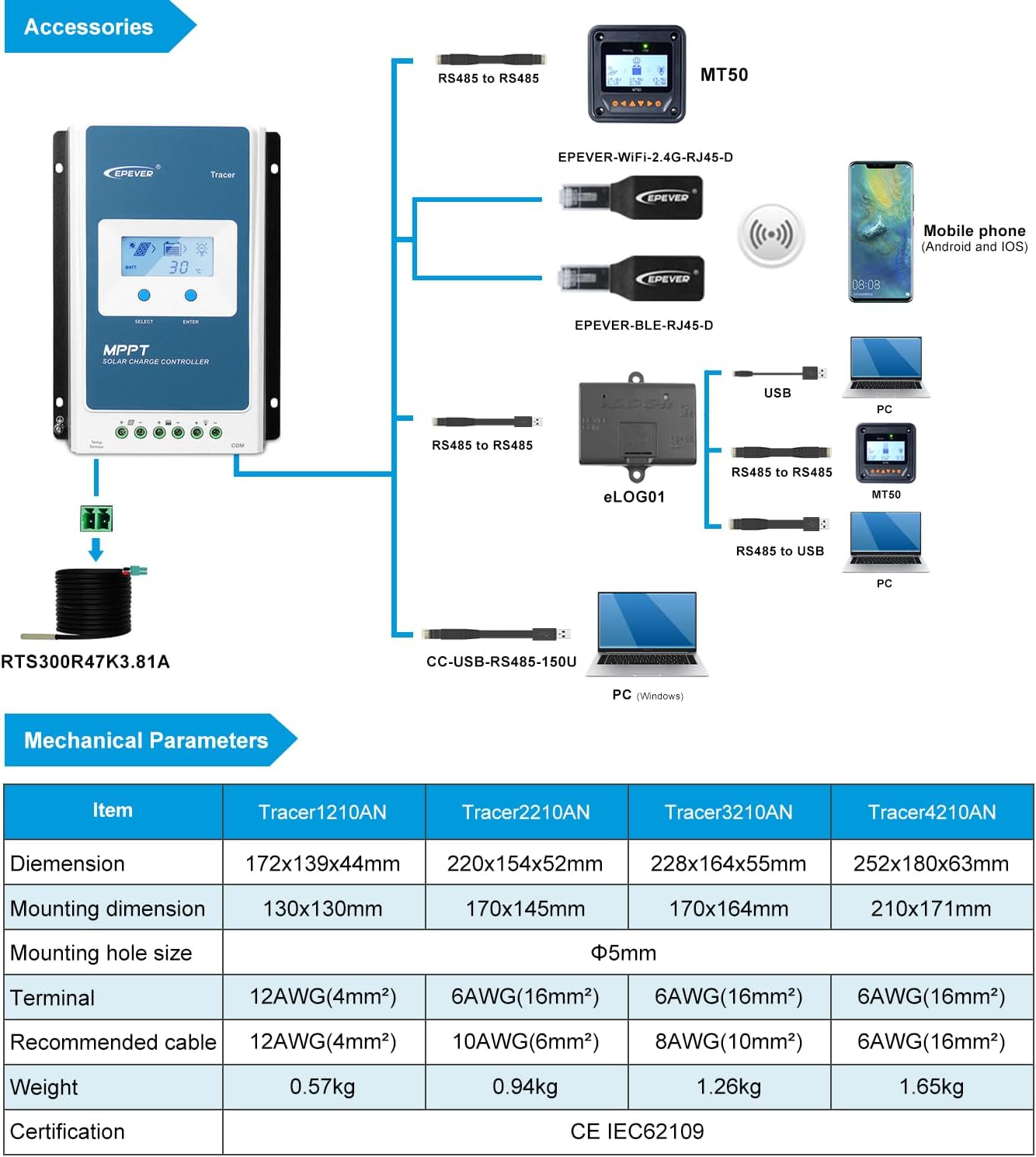
Figure 4.1: Diagram showing the EPEVER Tracer2210AN-G3 controller and compatible accessories.
- Remote Temperature Sensor (RTS300R47K3.81A): Acquires battery temperature for compensation of control parameters. Standard cable length is 3m.
- USB to RS485 Cable (CC-USB-RS485-150U): Used to monitor and set parameters via PC software (Solar Station PC software). Cable length is 1.5m.
- Remote Meter (MT50): Displays various operating data and system faults. Features easy-to-operate buttons and a numeric display.
- WiFi Serial Adapter (eBox-WiFi-01): For monitoring and setting parameters via mobile APP software through WiFi signals.
- RS485 to Bluetooth Adapter (eBox-BLE-01): For monitoring and setting parameters via mobile APP software through Bluetooth signals.
- Logger (eLOG01): Records real-time operating status of the controller.
Ividiyo 4.1: I-overview of the EPEVER G3 Version TracerAN MPPT Solar Charge Controller, highlighting its features and accessories.
5. Imininingwane
5.1 Amapharamitha kaMechanical
| Into | I-Tracer1210AN | I-Tracer2210AN | I-Tracer3210AN | I-Tracer4210AN |
|---|---|---|---|---|
| Ubukhulu | 172x139x44mm | 220x154x52mm | 228x164x55mm | 252x180x63mm |
| Ubukhulu bokukhweza | 130x130mm | 170x145mm | 170x164mm | 210x171mm |
| Usayizi wembobo yokukhweza | Φ5mm | |||
| Isikhumulo | 12AWG(4mm²) | 6AWG(16mm²) | 6AWG(16mm²) | 6AWG(16mm²) |
| Ikhebuli enconyiwe | 12AWG(4mm²) | 10AWG(6mm²) | 8AWG(10mm²) | 6AWG(16mm²) |
| Isisindo | 0.57kg | 0.94kg | 1.26kg | 1.65kg |
| Isitifiketi | CE IEC62109 | |||
5.2 Electrical Parameters (Tracer2210AN)
| Into | I-Tracer 1210AN | I-Tracer 2210AN | I-Tracer 3210AN | I-Tracer 4210AN |
|---|---|---|---|---|
| Ivolumu yegama lesistimutage | 12 / 24VDC Okuzenzakalelayo | |||
| Isilinganiso senkokhelo yamanje | 10A | 20A | 30A | 40A |
| Isilinganiso sokukhipha okwamanje | 10A | 20A | 30A | 40A |
| Ibhethri voltagibanga | 8 ~ 32V | |||
| Ubukhulu. I-PV evulekile yesifunda voltage | 100V① | 92V② | ||
| I-MPP voltagibanga | (Ibhethri voltage +2V)~72V | |||
| Ubukhulu. Amandla wokufaka we-PV | 130W/12V 260W/24V | 260W/12V 520W/24V | 390W/12V 780W/24V | 520W/12V 1040W/24V |
| Ukuzidla | ≤12mA | |||
| I-Discharge circuit voltage kwehle | ≤0.23V | |||
| Izinga lokushisa linxephezela Coefficient③ | -3mV / ℃ / 2V (Okuzenzakalelayo) | |||
| Ukugawula | I-negative evamile | |||
| RS485 interface | I-5VDC / 100mA | |||
| Isikhathi sangemuva se-LCD | 60S (Okuzenzakalelayo) | |||
| Izinga lokushisa lendawo yokusebenza④ | -25℃~+50℃ (100% input and output) | |||
| Ibanga lokushisa lesitoreji | -20℃~+70℃ | |||
| Umswakama ohlobene | ≤95%, NC | |||
| Indawo ebiyelwe | IP30 | |||
①When a lead-acid battery is used, the controller hasn't the low temperature protection.
②Okungenani izinga lokushisa lendawo yokusebenza
③Emazingeni okushisa emvelo angama-25 ℃
④When a lithium-ion battery is used, the system voltage can't be identified automatically.
6. Isondlo
To ensure the longevity and optimal performance of your EPEVER Tracer2210AN-G3 MPPT Solar Charge Controller, regular maintenance is recommended. Please refer to the full product manual for detailed maintenance procedures. Key maintenance aspects typically include:
- Periodically inspect all wiring and connections for tightness and corrosion.
- Ensure the controller's heat sink is free from dust and debris to maintain proper cooling.
- Verify that the ventilation around the controller is unobstructed.
- Check the battery terminals for any signs of wear or damage.
- Monitor the system's performance regularly via the LCD display or connected monitoring software/app to detect any anomalies.
7. Ukuxazulula izinkinga
If you encounter any issues with your EPEVER Tracer2210AN-G3 MPPT Solar Charge Controller, please refer to the comprehensive troubleshooting guide in the full product manual. Common issues and their solutions are typically covered, including:
- LCD display not lighting up or showing incorrect readings.
- Battery not charging or overcharging.
- Load not functioning correctly.
- Error codes or warning indicators on the display.
For complex issues or if problems persist, please contact customer support.
8. Iwaranti kanye Nokusekela
EPEVER products are backed by a manufacturer's warranty. For specific warranty terms and conditions, please refer to the warranty card included with your product or contact the seller.
Authorized Supplier: GolandCentury is an authorized supplier for the EPEVER brand. Our engineers are available to provide technical support and assistance with your solar system setup.
For technical inquiries or support, please reach out to GolandCentury's service centers.


