1. Isingeniso
The Cherub WMT-560 is a versatile, rechargeable clip-on device designed for musicians. It integrates a highly accurate tuner, a flexible metronome, and a practical tone generator into a single compact unit. Its fast response time and bright LCD display ensure clear visibility and efficient operation in various environments. The robust clamp design provides stable attachment to your instrument.
2. Umkhiqizo Uphelileview
2.1 Izingxenye nezilawuli
Familiarize yourself with the main components and controls of your WMT-560 unit:
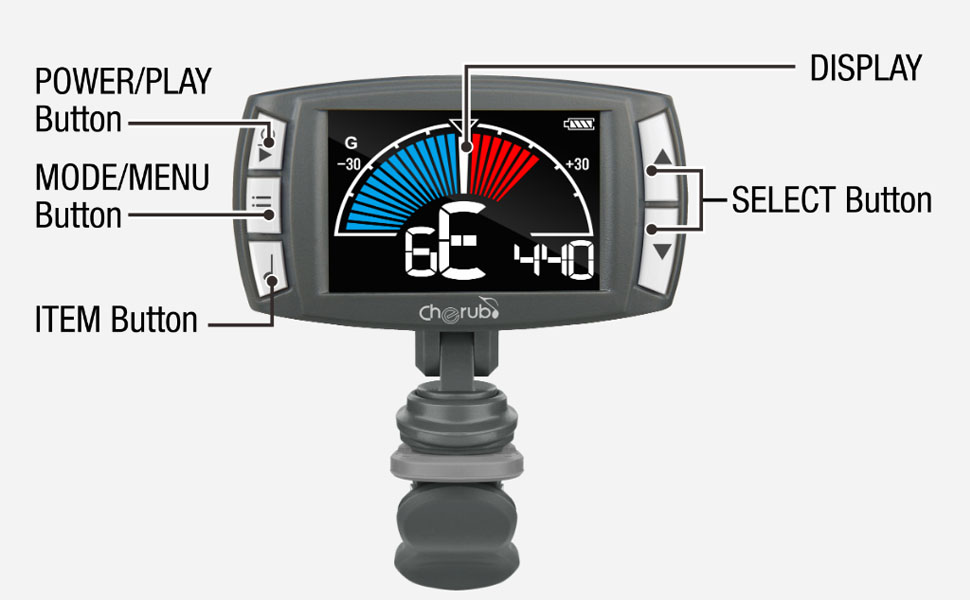
Image 2.1: Labeled diagram of the Cherub WMT-560, indicating the Power/Play button, Mode/Menu button, Item button, Select buttons (up/down), and the main display area.
- Power/Play Button: Used to turn the device on/off and to start/stop the metronome.
- Mode/Menu Button: Cycles through Tuner, Metronome, and Tone Generator modes. Also accesses menu settings within modes.
- Item Button: Used to select specific items or parameters within a menu.
- Select Buttons (Up/Down): Adjusts values (e.g., pitch, tempo) or navigates menu options.
- Bonisa: Shows tuning information, metronome settings, or tone generator pitch.
- Isiqeshana: Attaches the device securely to your instrument.
3. Setha
3.1 Ukushaja Idivayisi
The WMT-560 is equipped with an internal Li-Po battery. Before first use, or when the battery indicator shows low power, charge the device:
- Connect a standard USB-C cable to the charging port on the WMT-560.
- Connect the other end of the USB-C cable to a USB power source (e.g., computer, USB wall adapter).
- The display will indicate charging status. A full charge typically takes a few hours.
3.2 Attaching the Tuner
The WMT-560 features a newly designed clamp for stable attachment:
- Open the clip by pressing the levers.
- Attach the clip securely to the headstock of your guitar or other stringed instrument. Ensure the display is facing you for easy viewing.
- Adjust the angle of the display for optimal visibility.

Image 3.1: The Cherub WMT-560 tuner securely attached to the headstock of a guitar, demonstrating proper placement for tuning.
4. Amamodi Okusebenza
4.1 Vula/Vala amandla
Cindezela bese ubamba i Amandla/Dlala button for approximately 2 seconds to turn the device on or off.
4.2 Imodi yokushuna
The WMT-560 offers fast and accurate tuning for various instruments.
Ikhetha Imodi yokushuna
Cindezela inkinobho Imodi/Imenyu button repeatedly until 'Tuner' mode is displayed. The default tuning mode is Chromatic (C), but you can select specific instrument modes (Guitar, Bass, Ukulele, Violin) by pressing the Into inkinobho bese usebenzisa i- Khetha buttons to choose.
Tuning an Instrument
- Ensure the WMT-560 is securely clipped to your instrument's headstock.
- Pluck a single string on your instrument. The tuner will detect the pitch.
- The display will show the note name and a meter indicating whether the note is flat, sharp, or in tune.
- Adjust your instrument's tuning peg until the needle on the display is centered and the note name is correct. The display will typically turn green when in tune.

Image 4.1: The WMT-560 display in Tuner Mode, showing a note (G) and the tuning meter. A centered needle and green indication signify accurate tuning.
4.3 Metronome Mode
The built-in metronome helps you practice with precise timing.
Activating Metronome
Cindezela inkinobho Imodi/Imenyu button repeatedly until 'Metronome' mode is displayed. The display will show the current tempo (BPM) and beat pattern.
Adjusting Tempo and Beat
- Adjusting BPM: Sebenzisa i- Khetha buttons (Up/Down) to increase or decrease the Beats Per Minute (BPM) from 30 to 250.
- Thepha i-Tempo: Cindezela inkinobho Into button multiple times at your desired tempo. The WMT-560 will calculate and set the BPM automatically.
- Beat Pattern: Cindezela inkinobho Imodi/Imenyu button briefly to cycle through different beat patterns (e.g., 1/4, 2/4, 3/4, 4/4).
- Qala/Misa: Cindezela inkinobho Amandla/Dlala button to start or stop the metronome click.

Image 4.2: A hand demonstrating the use of the Item button, which is used for functions like Tap Tempo in Metronome mode.
4.4 Tone Generator Mode
The tone generator produces a reference pitch for ear training or manual tuning.
Using Tone Generator
- Cindezela inkinobho Imodi/Imenyu button repeatedly until 'Tone Generator' mode is displayed.
- Sebenzisa i- Khetha buttons (Up/Down) to choose the desired reference pitch (e.g., A4=440Hz).
- The WMT-560 will emit the selected tone.
5. Isondlo
5.1 Ukunakekelwa Kwebhethri
- Recharge the battery regularly to maintain optimal performance.
- Gwema ukukhipha ibhethri ngokugcwele njalo, ngoba lokhu kunganciphisa isikhathi sokuphila kwayo.
- Gcina idivayisi endaweni epholile, eyomile uma ingasetshenziswa isikhathi eside.
5.2 Ukuhlanza
Sula idivayisi ngendwangu ethambile, eyomile. Ungasebenzisi izinto zokuhlanza uketshezi noma izinto ezihuquzelayo.
6. Ukuxazulula izinkinga
| Inkinga | Imbangela Engenzeka | Isixazululo |
|---|---|---|
| Idivayisi ayivuli. | Ibhethri liphansi noma eliphelile. | Shaja idivayisi usebenzisa ikhebula le-USB-C. |
| Tuner not detecting pitch accurately. | Improper attachment; noisy environment; incorrect mode. | Ensure the tuner is securely clipped to the headstock. Move to a quieter area. Verify the correct instrument mode is selected. |
| Metronome click is not audible. | Ivolumu iphansi kakhulu noma ithulisiwe. | Check metronome settings for volume control. |
| Display is dim or unresponsive. | Ibhethri eliphansi; ukungasebenzi kahle kwedivayisi. | Shaja idivayisi. Uma inkinga iqhubeka, xhumana nokwesekwa kwamakhasimende. |
7. Imininingwane
- Ibanga Lokushuna: A0 (27.5Hz) - C8 (4186Hz)
- Izindlela zokushuna: Chromatic, Guitar, Bass, Ukulele, Violin
- Imvamisa ye-A4: 430-450Hz (adjustable)
- Metronome Tempo Range: 30-250 BPM
- Ibhithi: 0, 1, 2, 3, 4, 5, 6, 7, 8, 9
- Isigqi: ♩, ♪, ♫, ♬ (various subdivisions)
- Tone Generator Range: I-C4-B4
- Amandla: Built-in Rechargeable Li-Po Battery
- Imbobo yokushaja: I-USB-C
- Ubukhulu: Cishe 2.52 x 1.38 x 1.7 amayintshi
- Isisindo: Cishe ama-ounces angu-1.3
8. Iwaranti kanye Nokusekela
Cherub products are designed for reliability and performance. For warranty information, technical support, or service inquiries, please refer to the official Cherub webisayithi noma uthinte umdayisi wakho ogunyaziwe. Gcina irisidi lakho lokuthenga njengobufakazi bokuthenga izimangalo zewaranti.


