1. Ngaphezuluview
1.1 Incazelo Yomkhiqizo
The PNI GreenHouse SC1800C PRO Solar Inverter is a central component for small off-grid solar systems, suitable for areas with or without grid electricity. It provides a continuous output of 3000W with a pure sine wave, making it suitable for various household lighting installations and other small electronic motors, including refrigerators, pumps, tools, and charging devices for phones, laptops, and TVs.
1.2 Izici ezibalulekile
- Maximum photovoltaic panel input power: 2000 W.
- Ubuningi bokufaka kwe-DC voltage from photovoltaic panels: 30 - 120 VDC (Vmp).
- Maximum solar charge current: 30 A input from panels, 60 A output to batteries.
- Solar charging efficiency: 98%.
- MPPT solar charger type.
- Kukalwe isilinganiso voltage: 230v.
- Rated output power: 3000 W (under ideal conditions with proportional battery count and 100% charged batteries).
- Maximum apparent power: 6000 VA (peak, 0.5 seconds under ideal conditions).
- Umphumela voltage waveform: Pure sine wave.
- Output signal frequency: 50, 60 Hz.
- Okokufaka ivoltage: 230 V AC.
- Grid connection for backup.
- Compatible with 24V batteries: AGM, lead-acid, gel, flooded lithium-ion.
- Minimum battery start voltage: 23 V (cold start voltagfuthi).
- Integrated high-frequency inverter type (switching).
- Inverter efficiency: 90% ~ 93% (100% charged battery).
- Typical transfer time: 10 ms (UPS, VDE) 20 ms (APL).
- Line mode efficiency: > 95% (rated R load, fully charged battery).
- Hybrid operating modes: SBU – Solar/Battery/Utility, Solar Utility (UPS).
- AC charge voltage: 230v.
- Maximum AC charge current: 30 A.
- Automatic switching: Solar - Batteries - Grid.
- Umsebenzi wokonga amandla.
- Multiple protections.
- Isibonisi semisebenzi eminingi.
- Dedicated menu for advanced settings.
- Monitoring with PC software (USB cable included).
- Remote monitoring from mobile/PC (with optional WiFi USB dongle).
1.3 Okuqukethwe Kwephakheji
- PNI GreenHouse SC1800C PRO Solar Inverter
- Ikhebula le-USB
- Imaniwali yosebenzisayo
- PNI Smart Dongle-WLAN (for WiFi monitoring)
2. Ulwazi Lokuphepha
Sicela ufunde yonke imiyalelo nezixwayiso ngokucophelela ngaphambi kokufakwa nokusebenza. Ukwehluleka ukulandela le miyalelo kungabangela ukushaqeka kukagesi, umlilo, noma ukulimala okukhulu.
- Abasebenzi Abafanelekile: Ukufakwa nokugcinwa kokunakekelwa kufanele kwenziwe ngabasebenzi abaqeqeshiwe.
- Ingozi Yokuthuthumela Kagesi: Le divayisi isebenza ngesivinini esikhulutages. Do not open the casing unless specifically instructed.
- Ukuphepha Kwebhethri: Batteries can produce explosive gases. Ensure proper ventilation. Do not smoke or allow sparks or flames near batteries. Wear eye protection.
- I-Ventilation efanele: Install the inverter in a well-ventilated area to prevent overheating.
- Izimo Zemvelo: Avoid exposure to rain, snow, spray, or any liquids. Operate within the specified temperature range (-26 °C to 80 °C).
- Ukubeka phansi: Qinisekisa ukuthi i-inverter isekelwe kahle ngokuvumelana namakhodi kagesi endawo.
- Nqamula Amandla: Always disconnect all power sources (solar, battery, AC grid) before performing any wiring or maintenance.
3. Izingxenye Zomkhiqizo
3.1 PNI GreenHouse SC1800C PRO Solar Inverter

Umfanekiso 3.1: Ngaphambili view of the PNI GreenHouse SC1800C PRO Solar Inverter, showing the display and control buttons.

Umfanekiso 3.2: Ngemuva view of the PNI GreenHouse SC1800C PRO Solar Inverter, illustrating the various connection ports for solar panels, batteries, AC input, and AC output.
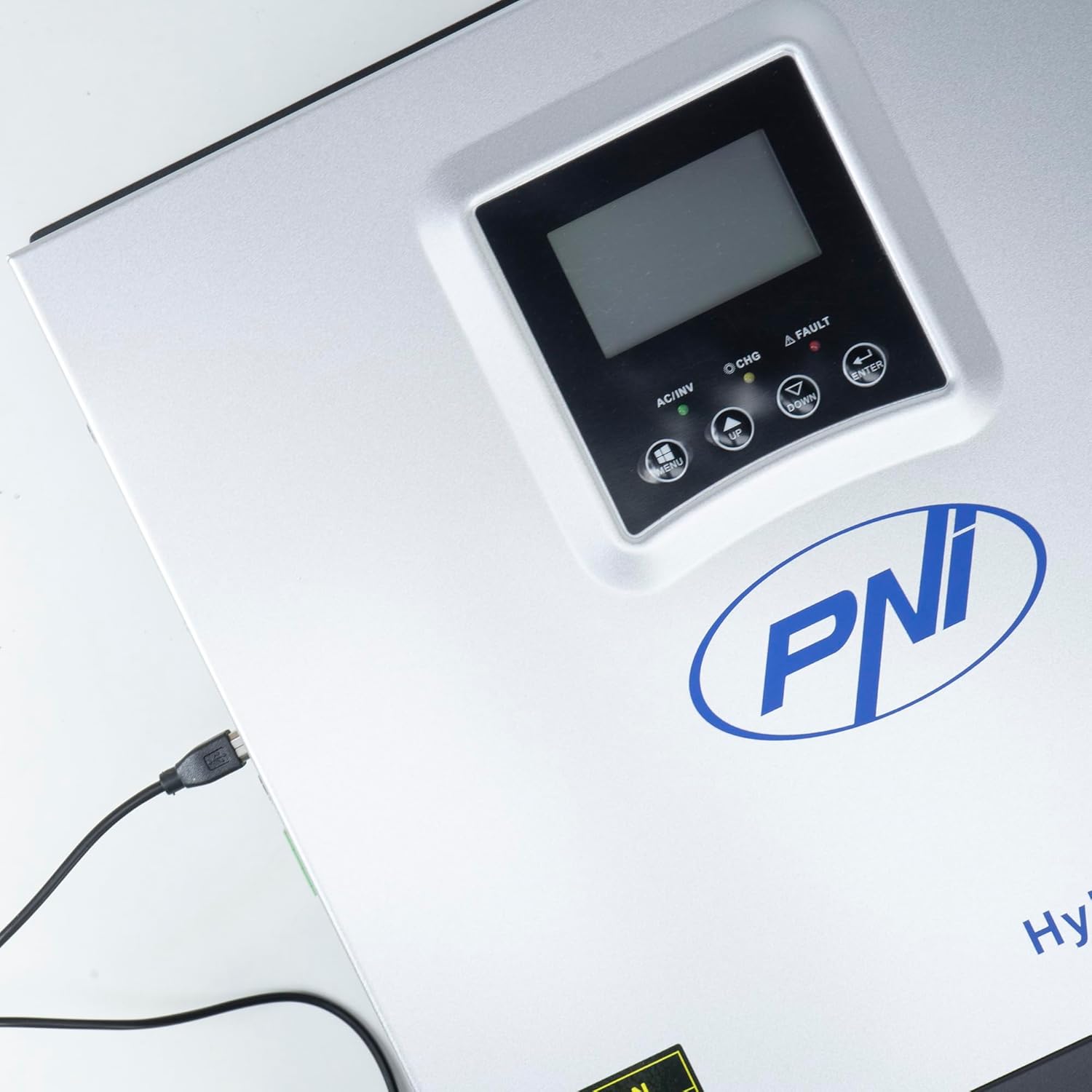
Figure 3.3: Close-up of the USB connection port on the inverter, used for PC monitoring.
3.2 PNI Smart Dongle-WLAN (Optional)

Figure 3.4: The PNI Smart Dongle-WLAN, an optional accessory for remote WiFi monitoring of the inverter.

Figure 3.5: The PNI Smart Dongle-WLAN connected to the inverter's dedicated port for WiFi communication.
4. Ukufakwa kanye nokusetha
4.1 Ukukhweza Udonga
The inverter is designed for wall mounting. Choose a location that is dry, well-ventilated, and protected from direct sunlight and moisture. Ensure sufficient clearance around the unit for proper airflow and heat dissipation. Use appropriate mounting hardware for your wall type.
4.2 Umdwebo Wokuxhumanisa Uhlelo

Figure 4.1: Basic application diagram showing the connections between solar panels, utility grid, generator, inverter, battery, and home loads. Note: Generator, PV modules, WiFi module, and battery are not included with the inverter unless specified.
4.3 Ukuxhunywa kwezintambo
Follow the diagram above and the labels on the inverter for correct wiring. Ensure all connections are secure and properly insulated. It is highly recommended that a qualified electrician performs all wiring.
- Uxhumano Lwephaneli yeSolar: Connect your solar panels to the designated PV input terminals. Observe correct polarity (positive to positive, negative to negative). The maximum DC input voltage 120 VDC.
- Uxhumano Lwebhethri: Connect the 24V battery bank to the battery terminals. Ensure correct polarity. The inverter supports AGM, lead-acid, gel, and flooded lithium-ion batteries.
- AC Input (Grid/Generator): Connect the AC utility grid or a generator to the AC input terminals. This provides backup power and can charge batteries.
- AC Output (Loads): Connect your household loads to the AC output terminals.
4.4 Ukwenyusa Amandla Okuqala
After all connections are made and verified:
- Turn on the battery breaker.
- Turn on the solar panel breaker (if applicable).
- Turn on the AC input breaker (if connected to grid/generator).
- Turn on the inverter's power switch.
- Observe the display for status indicators and initial readings.
5. Amamodi Okusebenza
The PNI GreenHouse SC1800C PRO offers intelligent energy management with several configurable operating modes:
- Solar Priority Mode (SBU): In this mode, the inverter prioritizes power consumption from solar energy. If solar power is insufficient, it will draw from batteries. The utility grid acts as a backup.
- Imodi Ebalulekile Yebhethri: The inverter prioritizes drawing power from the batteries. Solar energy will charge the batteries. The utility grid is used only when battery voltage drops below a set threshold.
- Utility Priority Mode (UPS): This mode prioritizes power from the utility grid. Solar energy will charge the batteries. The inverter switches to battery power only when the grid is unavailable, functioning as an Uninterruptible Power Supply (UPS).
These modes can be configured via the inverter's multifunction display and dedicated menu for advanced settings.
5.1 Ukuqapha
The inverter supports monitoring through:
- PC Software (USB): Connect the inverter to a PC using the provided USB cable and dedicated software for detailed monitoring and analysis of parameters.
- Remote Monitoring (WiFi - Optional): With the optional PNI Smart Dongle-WLAN, you can monitor the inverter remotely via a mobile application or web esibonakalayo.
6. Isondlo
Regular maintenance ensures optimal performance and longevity of your inverter. Always disconnect all power sources before performing any maintenance.
- Ukuhlanza: Hlanza ingaphandle le-inverter ngezikhathi ezithile ngendwangu eyomile. Qinisekisa ukuthi izikhala zokungenisa umoya azinawo uthuli kanye nemfucumfucu. Ungasebenzisi izihlanzi eziwuketshezi.
- Ukuhlola Ukuxhumana: Annually inspect all wiring connections (solar, battery, AC input/output) for tightness and signs of corrosion. Tighten any loose connections.
- Ukuhlolwa kwebhethri: If using lead-acid batteries, check electrolyte levels and terminal condition as per battery manufacturer guidelines.
- Ukuhlola Imvelo: Qinisekisa ukuthi indawo yokufaka ihlala ngaphakathi kwamazinga okushisa acacisiwe kanye nomswakama.
7. Ukuxazulula izinkinga
Lesi sigaba sinikeza isiqondiso sezinkinga ezivamile. Uma unezinkinga eziyinkimbinkimbi, xhumana nabasebenzi benkonzo abafanelekayo.
| Inkinga/I-alamu | Imbangela Engenzeka | Isixazululo |
|---|---|---|
| I-alamu Yebhethri Ephansi | Ibhethri voltagu-e ungaphansi kwevolumu ephansitage warning threshold. | Check battery charge level. Ensure solar panels are producing power or AC input is connected for charging. Reduce load. |
| Battery Disconnected Alarm | Battery cables are loose or disconnected. | Safely disconnect all power sources and check battery connections. Reconnect securely. |
| I-Overvoltage I-alamu | Okokufaka ivoltage (PV or AC) exceeds safe limits. | Verify solar panel array voltage or AC input voltage. Ensure it is within the inverter's specifications. |
| I-AC Overload Protection | Connected loads exceed the inverter's output capacity. | Reduce the total load connected to the inverter. Check individual appliance power consumption. |
| Awekho Amandla Okukhiphayo | Inverter off, low battery, overload, or fault. | Check if the inverter is powered on. Verify battery voltage. Check for overload or fault codes on the display. |
8. Imininingwane
| Isici | Ukucaciswa |
|---|---|
| Ibhrendi | I-PNI |
| Inombolo Yemodeli | PNI-SC1800P-DG |
| Amandla Alinganiselwe | 3000 W |
| Amandla Aphakeme | 6000 VA (0.5 seconds) |
| Ibhethri Voltage | 24 V |
| Ubukhulu. Amandla Wokufaka we-PV | 2000 W |
| UMax. I-PV Input Voltage (VMP) | 30 - 120 VDC |
| MPPT Solar Charge Current | 60 A (output to batteries) |
| Okokufaka kwe-AC Voltage | 230 V |
| Umkhiqizo we-AC Voltage | 230 V |
| I-Waveform ephumayo | I-Sine Wave |
| Imvamisa Yokuphuma | 50/60 Hz |
| Max. AC Charge Current | 30 A |
| Ukusebenza kahle kwe-Inverter | 90% ~ 93% |
| Izinga Lokushisa Lokusebenza | -26 °C kuya ku-80 °C |
| Ubukhulu (L x W x H) | 29 x 12 x 35 cm |
| Isisindo | 6.9 kg |
| Ukusetshenziswa Okulindile | ≈ 25 W (Energy saving mode ≈ 12.5 W) |
| Ukuxhumana | USB, Optional WiFi Dongle |
9. Iwaranti kanye Nokusekela
For warranty information and technical support, please refer to the documentation provided with your purchase or contact your retailer. Keep your proof of purchase for warranty claims.


