Yini EseBhokisini
The AVIOT TE-Q3 earbuds come with the following components:
- Ama-Earbuds (L / R)
- Ikesi lokushaja
- Silicone Ear Tips (XS/S/M/L sizes, M pre-installed)
- Ikhebula lokushaja le-USB Type-C
- Imaniwali yosebenzisayo

Image: Contents of the AVIOT TE-Q3 package, showing the earbuds, charging case, various sized ear tips, a USB Type-C cable, and the user manual.
Setha
1. Selecting the Right Ear Tips
Choosing the correct ear tip size is crucial for optimal sound quality and noise cancellation. Experiment with the included XS, S, M, and L silicone ear tips to find the best fit for your ears. A snug fit ensures proper seal and comfort.

Image: A selection of silicone ear tips in different sizes, from extra small to large, designed to provide a comfortable and secure fit for various ear canal sizes.
2. Ukumatanisa Kokuqala
- Vula ikesi lokushaja. Ama-earbud azongena ngokuzenzakalelayo kumodi yokumatanisa.
- Edivayisini yakho (i-smartphone, ithebhulethi, njll.), iya kuzilungiselelo ze-Bluetooth.
- Select "AVIOT TE-Q3" from the list of available devices.
- Uma usuxhumekile, uzozwa umyalo womsindo oqinisekisa ukubhanqa okuphumelelayo.
3. I-Multipoint Connection
The TE-Q3 supports multipoint connection, allowing you to connect to two devices simultaneously. To set this up:
- Connect the earbuds to your first device as described in "Initial Pairing."
- Khubaza i-Bluetooth kudivayisi yokuqala. Ama-earbud azophinde angene kwimodi yokubhangqa.
- Connect the earbuds to your second device.
- Re-enable Bluetooth on your first device. The earbuds should now be connected to both devices.
The earbuds will intelligently switch audio playback between the two connected devices.
Imiyalelo yokusebenza
Izilawuli zokuthinta
The AVIOT TE-Q3 earbuds feature intuitive touch controls for managing playback, calls, and ambient sound modes. The touch-sensitive area is located on the stem of each earbud.
- Ukuthepha okukodwa: Dlala/Misa umculo, Phendula/Cima izingcingo.
- Thepha kabili: Yeqela kuculo elilandelayo.
- Ukuthepha kathathu: Yenza kusebenze isilekeleli sezwi.
- Thepha bese ubamba: Toggle between Active Noise Cancellation (ANC) and Transparency Mode.
- Swayiphela Phezulu/Phansi: Adjust volume (up on right earbud, down on left earbud).
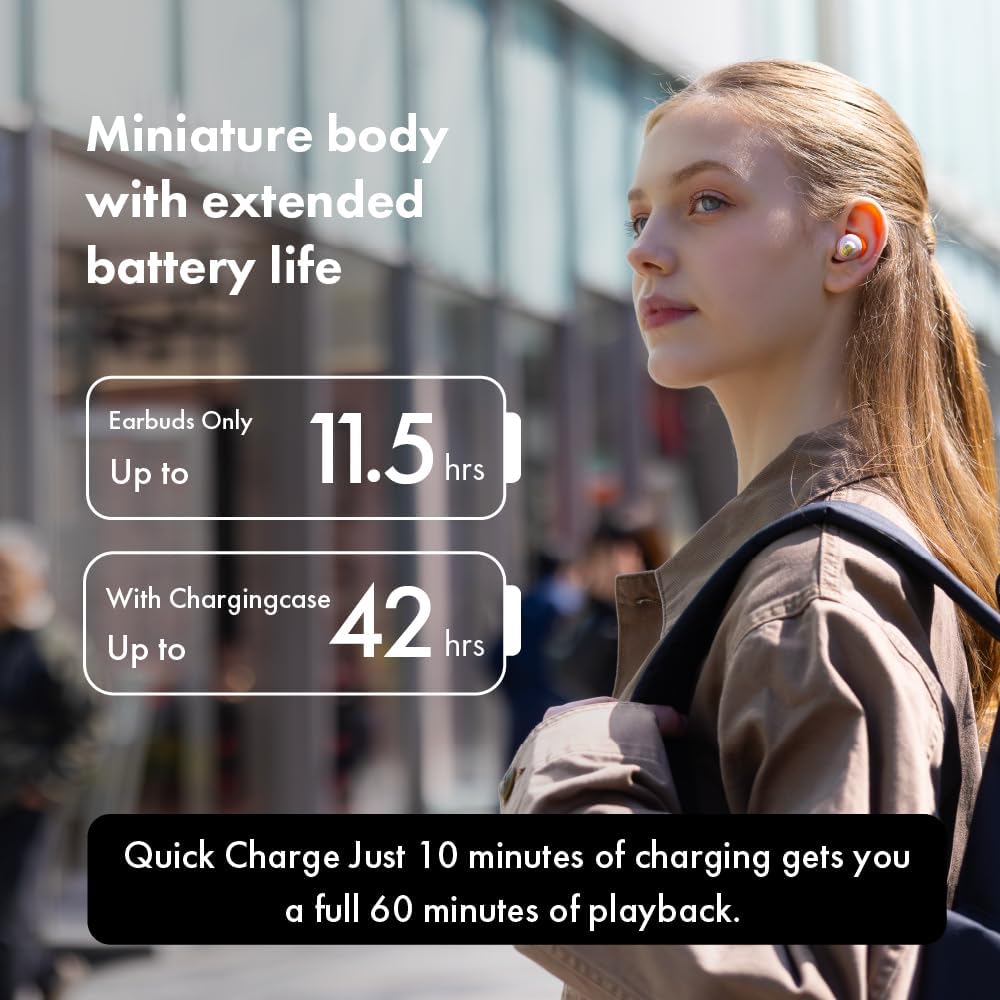
Image: A person demonstrating how to adjust the earbud in their ear, highlighting the touch control functionality on the stem.
Amamodi omsindo we-Ambient
The earbuds offer various ambient sound modes to suit your environment:
- I-Active Noise Cancellation (ANC): Yehlisa umsindo wangaphandle ukuze ukwazi ukulalela ngokujulile.
- Imodi yokubonisa ngale: Ikuvumela ukuthi uzwe okuzungezile ngenkathi ulalele umsindo, okuthuthukisa ukuqwashisa ngesimo.
- Imodi Ejwayelekile: Ukudlalwa komsindo okujwayelekile ngaphandle kokukhansela umsindo noma ukubeka izinto ngale.
Toggle between these modes using the touch controls or the dedicated AVIOT Sound Me app.
AVIOT Sound Me App
Download the "AVIOT Sound Me" app for advanced customization and features:
- Ukwenza ngokwezifiso kwe-EQ: Lungisa uchwepheshe womsindofiles ngokuthanda kwakho.
- Ukuvuselelwa kwe-Firmware: Keep your earbuds updated with the latest features and improvements.
- Thola Ama-Earbud Ami: Locate misplaced earbuds by emitting a sound.
- Easy Chat: Automatically lowers music volume and enhances vocals for conversations.
Isondlo
Ukuhlanza
Regularly clean your earbuds and charging case to maintain optimal performance and hygiene. Use a soft, dry cloth to wipe down the surfaces. For ear tips, remove them from the earbuds and clean with mild soap and water, then dry thoroughly before reattaching.
Ukumelana Namanzi
The AVIOT TE-Q3 earbuds are IPX4 waterproof, meaning they are resistant to splashing water from any direction. They are suitable for workouts and light rain, but should not be submerged in water.
Ukuxazulula inkinga
Izinkinga zokuxhumana
- Ama-earbud awamataniswa: Ensure the earbuds are fully charged and in pairing mode (blinking indicator light). Turn off and on Bluetooth on your device.
- Ukuxhumana okungapheli: Move closer to your device. Avoid obstacles between the earbuds and your device.
Izinkinga Zekhwalithi Yomsindo
- Ivolumu ephansi noma umsindo ongemuhle: Ensure ear tips are properly sealed in your ear canal. Clean any debris from the earbud nozzles.
- Sound is tinny or strange: This might be related to the "Adaptive Sound Leakage Compensation" feature. Try disabling it in the AVIOT Sound Me app settings.
Wearing Detection Malfunction
If wearing detection (auto-pause/play) stops working, try placing the affected earbud back into the charging case, closing it for a few seconds, and then taking it out again. This often resolves the issue.
Imininingwane
| Isici | Imininingwane |
|---|---|
| Igama Lemodeli | I-TE-Q3 |
| Ubuchwepheshe bokuxhumana | Okungenantambo (Bluetooth 5.3) |
| Uhlobo olungenantambo | 10 Amamitha |
| Ukulawula Umsindo | Ukukhansela Umsindo Okusebenzayo |
| Uhlobo Lomshayeli | I-10mm Dynamic Driver |
| Impilo Yebhethri (Earbuds) | Kufika emahoreni angama-11.5 (i-ANC ivaliwe) |
| Impilo Yebhethri (enekesi lokushaja) | Kufika emahoreni angama-42 (i-ANC ivaliwe) |
| Ukushaja Ngokushesha | Ukushaja imizuzu eyi-10 ukuze kudlale imizuzu engama-60 |
| Izinga Lokumelana Namanzi | IPX4 |
| Indlela Yokulawula | Thinta |
| Imakrofoni | I-Mic eyakhelwe ngaphakathi |
| Ukubhanqa kwe-Multipoint | Yebo |
| Okubalulekile | Silicone (ear tips) |
Iwaranti & Ukusekela
For warranty information and customer support, please refer to the official AVIOT webisayithi noma uxhumane nomthengisi wakho. Gcina ubufakazi bakho bokuthenga ngezimangalo zewaranti.
Ukuze uthole usizo olwengeziwe, ungavakashela i- AVIOT Store on Amazon.
Amavidiyo Omkhiqizo Osemthethweni
AVIOT TE-Q3 Wireless Noise Cancelling Earbuds - Overview
Ividiyo: I-official overview of the AVIOT TE-Q3 Wireless Noise Cancelling Earbuds, showcasing their design and key features.
AVIOT TE-Q3 Wireless Noise Cancelling Earbuds - Features Highlight
Video: A short video highlighting the main features of the AVIOT TE-Q3 earbuds, including noise cancellation and compact design.


