Imaniwali yosebenzisayo
AXIS M5000-G 5 Megapixel Network Camera
Model: M5000-G | Brand: AXIS
1. Isingeniso
This manual provides comprehensive instructions for the installation, operation, and maintenance of the AXIS M5000-G 5 Megapixel Network Camera. Please read this manual thoroughly before using the product to ensure proper functionality and safety.
The AXIS M5000-G is a high-performance network camera designed for surveillance applications, offering 5-megapixel resolution and PTZ capabilities for enhanced monitoring.
2. Ulwazi Lokuphepha
Qaphela izinyathelo zokuphepha ezilandelayo ukuze uvimbele umonakalo kumkhiqizo noma ukulimala kwakho:
- Ensure the power source matches the camera's requirements.
- Do not expose the camera to extreme temperatures or humidity.
- Avoid direct exposure to strong light sources, which may damage the image sensor.
- Ukufakwa kufanele kwenziwe ngabasebenzi abaqeqeshiwe ngokuhambisana namakhodi kagesi wendawo.
- Nqamula amandla ngaphambi kokuhlanza noma ukusevisa.
3. Okuqukethwe Kwephakheji
Qinisekisa ukuthi zonke izinto zikhona kuphakheji:
- AXIS M5000-G Network Camera Unit
- Mounting Kit (screws, anchors)
- Installation Guide (Quick Start)
- I-adaptha yamandla (uma ifakiwe)
Note: Specific components may vary based on region or package version.
4. Umkhiqizo Uphelileview
The AXIS M5000-G is a dome-style network camera designed for discreet and effective surveillance. It features a robust housing suitable for outdoor use and a PTZ (Pan-Tilt-Zoom) mechanism for flexible viewama-engeli.

Umfanekiso 4.1: Ngaphambili view of the AXIS M5000-G Network Camera. This image shows the camera's dome shape, with the lens visible through the dark transparent cover. The main body is white.
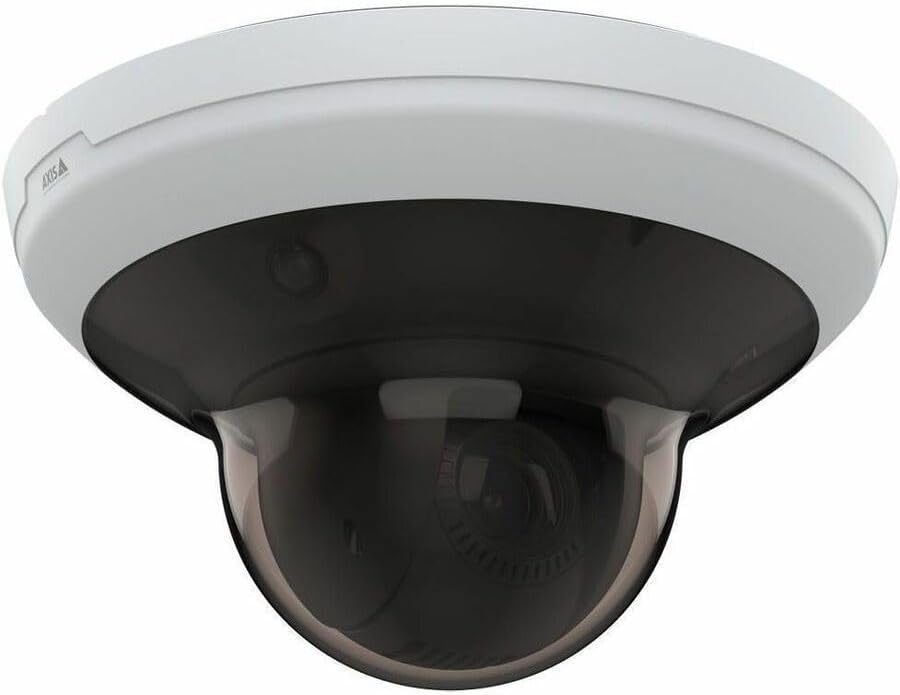
Umfanekiso 4.2: I-engeli view of the AXIS M5000-G Network Camera. This perspective highlights the camera's compact design and the subtle AXIS logo on the side of the white base.

Umfanekiso 4.3: Enye i-angle view of the AXIS M5000-G Network Camera. Similar to Figure 4.2, this image provides a slightly different angle, emphasizing the smooth contours of the camera's housing.
5. Ukusetha nokufakwa
The AXIS M5000-G is designed for wall mount installation and requires a wired connection for network and power.
5.1 Ukufaka Ikhamera
- Khetha Indawo: Select an outdoor location that provides the desired field of view and is within reach of a power source and network connection. Ensure the mounting surface is sturdy enough to support the camera's weight (approximately 5.7 pounds).
- Mark Drilling Points: Use the provided mounting template (if applicable) or the camera base to mark the drilling points on the wall.
- Dill Holes: Drill pilot holes at the marked points. Insert wall anchors if necessary.
- Vikela Isisekelo: Attach the camera's mounting base to the wall using the provided screws.
- Attach Camera Unit: Secure the main camera unit to the mounted base, ensuring it clicks into place or is fastened according to the quick start guide.
5.2 Connecting Power and Network
- Ukuxhuma kwamandla: Connect the provided power adapter to the camera's power input and then to a suitable electrical outlet. The camera operates on corded electric power.
- Uxhumano Lwenethiwekhi: Connect an Ethernet cable from your network router or switch to the camera's network port. The camera uses wired connectivity technology.
- Isinyathelo sokuqala: Allow the camera a few minutes to power on and establish a network connection.
6. Ukusebenzisa Ikhamera
The AXIS M5000-G camera is controlled primarily through a dedicated application or network video recorder (NVR) software.
6.1 Ukucushwa Kwasekuqaleni
- Ikhamera Yokuthola: Use the AXIS IP Utility or your network's device discovery tools to find the camera's IP address on your network.
- Ukufinyelela Web Isixhumi esibonakalayo: Vula a web isiphequluli bese ufaka ikheli le-IP lekhamera ukuze ufinyelele kuyo web esibonakalayo.
- Ngena ngemvume: Enter the default username and password (refer to the quick start guide or manufacturer's documentation for default credentials). Change default credentials immediately for security.
- Izilungiselelo Zenethiwekhi: Configure network settings (e.g., static IP, DHCP) as required by your network environment.
- Idethi nesikhathi: Set the correct date and time for accurate video timestamps.
6.2 Bukhoma View kanye noLawulo lwe-PTZ
- Phila View: Finyelela okuphakelayo kwevidiyo ebukhoma ngokusebenzisa web interface or a compatible surveillance application. The camera provides 1080p video capture resolution and 5 MP effective still resolution.
- Pan, Tilt, Zoom (PTZ): Utilize the PTZ controls within the application to adjust the camera's viewing angle and zoom level. This feature allows for dynamic monitoring of large areas.
- Izikhundla Ezisethiwe: Configure and save specific PTZ positions for quick navigation to frequently monitored areas.
6.3 Ukutholwa kokunyakaza kanye Nezaziso
- Motion Only Alert Type: Configure motion detection zones and sensitivity settings within the camera's interface.
- Alert Actions: Set up actions to be triggered upon motion detection, such as recording video, sending email notifications, or uploading images to an FTP server.
7. Isondlo
Regular maintenance ensures optimal performance and longevity of your AXIS M5000-G camera.
- Ukuhlanza Ilensi: Gently wipe the camera lens and dome cover with a soft, clean, lint-free cloth. For stubborn dirt, use a mild lens cleaning solution applied to the cloth, not directly to the lens.
- Ukuvuselelwa kwe-Firmware: Periodically check the AXIS website for firmware updates. Keeping the firmware updated ensures access to the latest features and security patches.
- Ukuhlolwa Kwekhebula: Regularly inspect all cables (power and network) for any signs of wear, damage, or corrosion, especially in outdoor installations.
- Ukuhlola Imvelo: Qinisekisa ukuthi indawo yekhamera ihlala ngaphakathi kwezinga lokushisa elibekiwe lokusebenza kanye nomswakama.
8. Ukuxazulula izinkinga
This section addresses common issues you might encounter with the AXIS M5000-G camera.
| Inkinga | Imbangela Engenzeka | Isixazululo |
|---|---|---|
| Akukho okuphakelayo kwevidiyo | Ugesi unqanyuliwe, inkinga yenethiwekhi, ikheli le-IP elingalungile. | Check power connection. Verify network cable is securely connected. Confirm camera's IP address and network settings. Restart camera. |
| Ikhwalithi yesithombe esibi | Dirty lens, low light, incorrect resolution settings. | Clean the lens. Ensure adequate lighting. Adjust video resolution settings in the camera's web esibonakalayo. |
| Izilawuli ze-PTZ aziphenduli | Network latency, software issue, camera malfunction. | Check network connection stability. Restart the camera and the control application. If issue persists, contact support. |
| Ukutholwa kokunyakaza akusebenzi | Incorrect sensitivity settings, detection zones not configured. | Review and adjust motion detection sensitivity. Ensure detection zones are properly defined in the camera's settings. |
9. Imininingwane
| Isici | Imininingwane |
|---|---|
| Igama Lemodeli | M5000-G Network Camera |
| Ibhrendi | I-AXIS |
| Ukusetshenziswa Kwangaphakathi/Kwangaphandle | Ngaphandle |
| Umthombo wamandla | I-Corded Electric |
| Ubuchwepheshe bokuxhumana | Inezintambo |
| Ukulungiswa kokuthwebula ividiyo | 1080p |
| Isixazululo Esisebenzayo | 5 MP |
| Uhlobo Lokukhweza | I-Wall Mount |
| Uhlobo Lwesaziso | Ukunyakaza Kuphela |
| Ubukhulu bento (L x W x H) | 11.9 x 12 x 8.4 amayintshi |
| Isisindo sento | 5.7 amakhilogremu |
| Umkhiqizi | I-AXIS COMMUNICATION INC |
10. Iwaranti kanye Nokusekela
For warranty information, please refer to the documentation included with your purchase or visit the official AXIS website. AXIS provides support resources, including FAQs, troubleshooting guides, and contact information for technical assistance.
You can typically find more information and support on the AXIS Store on Amazon noma isikhulu somkhiqizi webindawo.


