1. Isingeniso
Thank you for choosing the Havit H2038U RGB Wired Gaming Headset. This manual provides essential information for setting up, operating, and maintaining your headset. Please read it carefully to ensure optimal performance and longevity of your product.
Ulwazi Olubalulekile Lokuphepha:
- Gwema ukulalela isikhathi eside kakhulu uma uzwa umsindo omkhulu ukuze uvimbele ukulimala kokuzwa.
- Do not expose the headset to extreme temperatures, humidity, or corrosive substances.
- Keep the headset away from water and liquids.
- Ungazami ukuqaqa noma ukuguqula i-headset. Lokhu kuzosusa iwaranti.
2. Umkhiqizo Uphelileview
2.1 Okuqukethwe Kwephakheji
- Havit H2038U RGB Wired Gaming Headset
- Imakrofoni ekhiphekayo
- Incwadi Yomsebenzisi (le dokhumenti)
2.2 Izingxenye ze-Headset
The Havit H2038U headset features a comfortable over-ear design with soft earcups and an adjustable headband. It includes a detachable microphone for clear communication and integrated RGB lighting for an enhanced gaming experience.

Umfanekiso 2.1: Ngaphambili view of the Havit H2038U RGB Wired Gaming Headset. This image displays the white over-ear headphones with RGB lighting elements on the earcups and the adjustable headband.
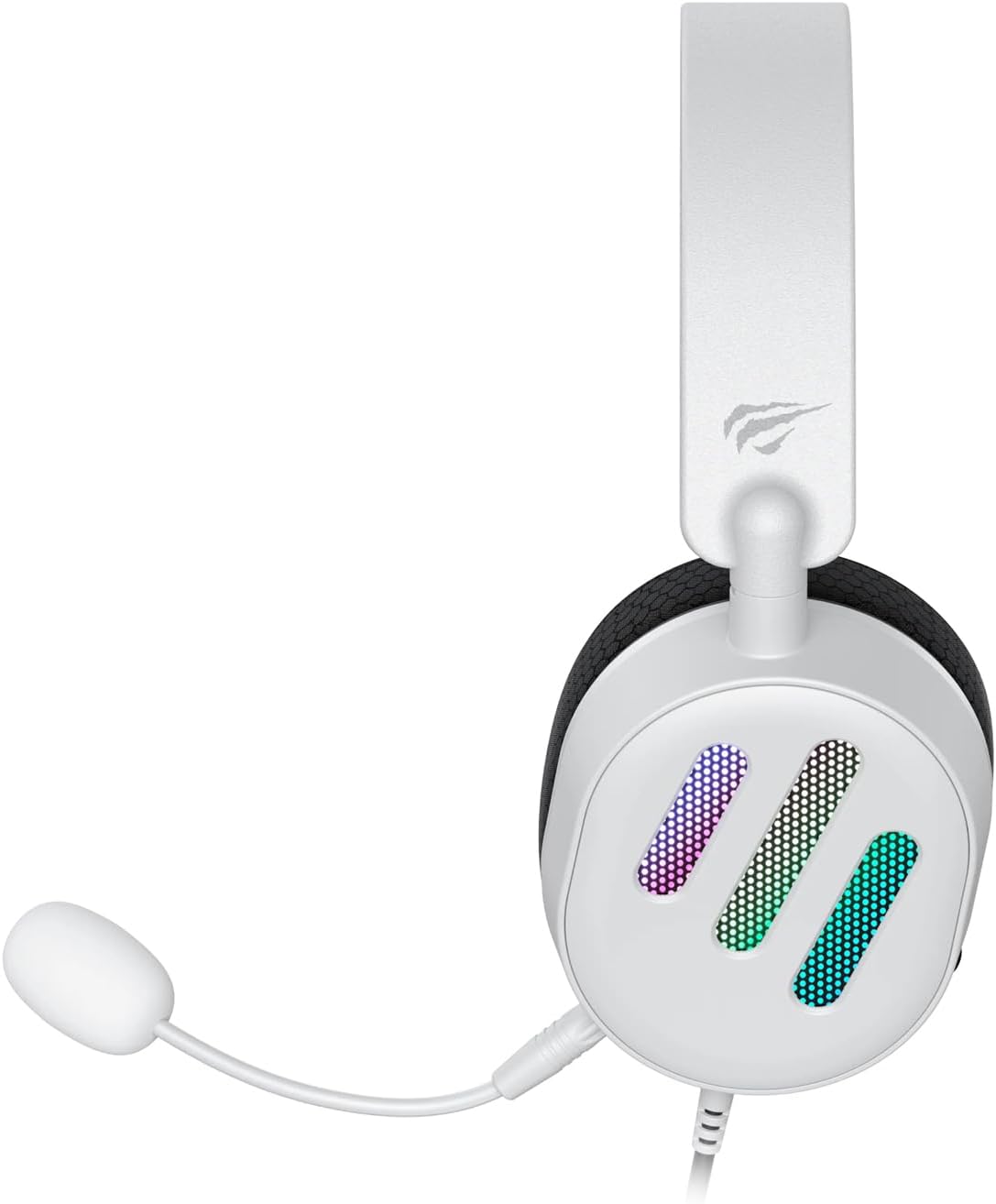
Umfanekiso 2.2: Side view of the Havit H2038U RGB Wired Gaming Headset, showing the detachable microphone connected to the left earcup. The volume control wheel is also visible on the earcup.

Umfanekiso 2.3: Phezulu view of the Havit H2038U RGB Wired Gaming Headset, highlighting the adjustable headband and the soft, breathable earcups.
3. Setha
The Havit H2038U headset utilizes a dual-connection system for full functionality: a 3.5mm jack for audio and a USB connection for RGB lighting and virtual 7.1 surround sound.

Umfanekiso 3.1: Eduze view illustrating the detachable microphone connection (3.5mm jack) and the USB connection for the Havit H2038U headset. This image also indicates 360-degree sound direction and 7.1 USB connectivity.
- Xhuma imakrofoni: Insert the detachable microphone into the 3.5mm microphone jack located on the left earcup until it clicks into place. Ensure it is securely connected.
- Connect for Audio: Plug the 3.5mm audio jack from the headset into the corresponding audio output port on your computer, gaming console, or mobile device.
- Connect for RGB Lighting and 7.1 Surround Sound: Plug the USB connector from the headset into an available USB port on your computer or gaming console. This connection powers the RGB lighting and enables the virtual 7.1 surround sound feature.
- Lungisa i-Headset Fit: Adjust the headband to ensure a comfortable and secure fit over your ears. The earcups should fully enclose your ears for optimal sound isolation.
- System Configuration (for PC):
- Okukhipha Umsindo: Go to your operating system's sound settings and ensure the Havit H2038U is selected as the default playback device.
- Okokufaka kwemakrofoni: In the sound settings, select the Havit H2038U as the default recording device.
- 7.1 Umsindo Ozungezile: If applicable, install any necessary drivers from the Havit official website to enable and configure the virtual 7.1 surround sound feature.
4. Iziqondiso Zokusebenza
4.1 Ukulawula ivolumu
The headset features an integrated volume control wheel, typically located on the left earcup or inline on the cable. Rotate the wheel to increase or decrease the audio volume.
4.2 Ukusetshenziswa kwemakrofoni
The detachable microphone can be positioned for optimal voice pickup. Adjust its flexible arm to bring the microphone close to your mouth, ensuring clear communication. For privacy, you may mute the microphone using software settings on your device if no physical mute button is present on the headset.
4.3 Ukukhanyisa kwe-RGB
The RGB lighting on the earcups is powered via the USB connection. Once connected, the lighting will activate automatically. Specific control options for lighting patterns or colors may be available through dedicated software, if provided by Havit.

Umfanekiso 4.1: The Havit H2038U RGB Wired Gaming Headset displayed with its active RGB lighting feature, showcasing the illuminated earcups.
4.4 Virtual 7.1 Surround Sound
When connected via USB, the headset supports virtual 7.1 surround sound. This feature enhances spatial audio awareness in games and media. Ensure relevant drivers are installed and configured through your system's sound settings or Havit's software for optimal experience.

Umfanekiso 4.2: An illustrative image demonstrating the virtual 7.1 surround sound capability of the Havit H2038U headset, enhancing immersive audio experiences.
5. Isondlo
5.1 Ukuhlanza
- Sebenzisa indwangu ethambile neyomile ukuze usule izindawo zangaphandle ze-headset.
- Uma ufuna ama-earcup, sula kancane nge-d encaneamp indwangu bese uvumela ukuba umoya wome ngokuphelele ngaphambi kokusetshenziswa.
- Ungasebenzisi amakhemikhali anokhahlo, izincibilikisi, noma izihlanzi ezinamaqabunga.
5.2 Isitoreji
When not in use, store the headset in a clean, dry place, away from direct sunlight and extreme temperatures. Avoid tangling the cables to prevent damage.
6. Ukuxazulula izinkinga
| Inkinga | Imbangela Engenzeka | Isixazululo |
|---|---|---|
| Awukho umsindo ovela kumahedisethi | 3.5mm jack not fully inserted; incorrect audio output selected; volume too low. | Ensure 3.5mm jack is fully connected. Check system sound settings to select Havit H2038U as default playback device. Increase volume using the headset's control wheel and system volume. |
| Imakrofoni ayisebenzi | Microphone not fully inserted; incorrect input device selected; microphone muted. | Ensure microphone is securely attached. Check system sound settings to select Havit H2038U as default recording device. Unmute microphone in software settings. |
| Ukukhanyisa kwe-RGB akusebenzi | USB cable not connected; faulty USB port. | Qinisekisa ukuthi ikhebula le-USB lixhunywe kahle echwebeni le-USB elisebenzayo. Zama ichweba le-USB elihlukile. |
| 7.1 Umsindo Ozungezile awusebenzi | USB cable not connected; drivers not installed/configured. | Ensure the USB cable is connected. Install and configure necessary drivers from the Havit official webindawo. |
7. Imininingwane
| Isici | Ukucaciswa |
|---|---|
| Imodeli | H2038U |
| Ubuchwepheshe bokuxhumana | Wired (3.5mm Jack + USB) |
| I-Earphone Form Factor | Ngendlebe |
| Impedance | 24 ohm |
| Impendulo Yemvamisa | 20Hz - 20KHz |
| Ukuzwela | 114db |
| Uhlobo Lokulawula | Volume Control, Push Button |
| Okubalulekile | Ipulasitiki |
| Isisindo sento | 550 g |
| Ubukhulu bomkhiqizo | 11.2 x 21.9 x 28.5 cm |
| Umbala | Emhlophe |
| Izici ezikhethekile | RGB Lighting, Detachable Microphone, Virtual 7.1 Surround Sound |
8. Iwaranti kanye Nokusekela
Havit products are designed for reliability and performance. For information regarding warranty coverage, technical support, or service, please refer to the warranty card included with your product or visit the official Havit webindawo. Gcina irisidi lakho lokuthenga njengobufakazi bokuthenga izimangalo zewaranti.
Ulwazi lokuxhumana:
- Official Havit Webindawo: www.havit.com (Sicela uhlole isifunda webamasayithi wosekelo oluthile)


