Isingeniso
Siyabonga ngokuthengaasing the Kogan MX10 Pro Cordless Stick Vacuum Cleaner. This manual provides important information regarding the safe operation, maintenance, and troubleshooting of your new appliance. Please read this manual thoroughly before use and retain it for future reference.
The Kogan MX10 Pro is designed for efficient cleaning of various surfaces, featuring powerful suction, a brushless motor, and a HEPA filtration system for a cleaner home environment.
Imiyalo yokuphepha
To reduce the risk of fire, electric shock, or injury, always observe basic safety precautions when using an electrical appliance.
- Funda yonke imiyalelo ngaphambi kokusebenzisa umshini.
- Ungasebenzisi ngaphandle noma ezindaweni ezimanzi.
- Ungavumeli ukusetshenziswa njengethoyizi. Ukunakwa okuseduze kuyadingeka lapho kusetshenziswa noma eduze kwezingane.
- Sebenzisa kuphela njengoba kuchazwe kuleli bhukwana. Sebenzisa kuphela okunamathiselwe okunconyiwe komkhiqizi.
- Ungasebenzisi ngentambo eyonakele noma ipulaki. Uma into esetshenziswayo ingasebenzi ngendlela efanele, iwisiwe, yonakele, ishiywe ngaphandle, noma iwiswe emanzini, yibuyisele esikhungweni sesevisi.
- Ungadonsi noma uphathe ngentambo, sebenzisa intambo njengesibambo, vala umnyango ngentambo, noma udonse intambo emaphethelweni abukhali noma emakhoneni. Ungagijimisi umshini phezu kwentambo. Gcina intambo kude nezindawo ezishisayo.
- Unganqamuli ngokudonsa intambo. Ukuze ukhiphe ipulaki, bamba ipulaki, hhayi intambo.
- Ungayibambi ipulaki noma umshini ngezandla ezimanzi.
- Ungafaki noma iyiphi into ezimbotsheni. Ungasebenzisi nanoma yikuphi ukuvulwa okuvinjiwe; gcina uthuli, i-lint, izinwele, nanoma yini enganciphisa ukugeleza komoya.
- Gcina izinwele, izingubo ezixegayo, iminwe, nazo zonke izingxenye zomzimba kude nezintuba nezingxenye ezihambayo.
- Ungacoshi noma yini evuthayo noma ebhemayo, njengogwayi, umentshisi, noma umlotha oshisayo.
- Ungasebenzisi ukucosha uketshezi oluvuthayo noma oluvuthayo, olufana nophethiloli, noma usebenzise ezindaweni lapho okungenzeka ukuthi bekhona.
- Sebenzisa ukunakekela okwengeziwe lapho uhlanza ezitebhisini.
- Ungasebenzisi ngaphandle kwenkomishi yothuli kanye/noma izihlungi endaweni.
- Vimbela ukuqala okungahlosiwe. Qinisekisa ukuthi iswishi isendaweni engasebenzi kuyo ngaphambi kokuxhuma kuphakethe lebhethri, ukucosha noma ukuphatha umshini.
- Shaja kabusha kuphela ngeshaja ecaciswe umenzi. Ishaja elungele uhlobo olulodwa lwephakethe lebhethri ingadala ingozi yomlilo uma isetshenziswa nelinye iphakethe lebhethri.
- Ngaphansi kwezimo ezihlukumezayo, uketshezi lungase lukhishwe ebhethrini; gwema ukuthintana. Uma ukuthintana kwenzeka ngengozi, geza ngamanzi. Uma uketshezi luthinta amehlo, ngaphezu kwalokho funa usizo lwezokwelapha. Uketshezi olukhishwe ebhethrini lungabangela ukucasuka noma ukusha.
Umkhiqizo Uphelileview & Izingxenye
Familiarize yourself with the parts of your Kogan MX10 Pro Cordless Stick Vacuum Cleaner.

Figure 1: Fully assembled Kogan MX10 Pro Cordless Stick Vacuum Cleaner, showing the main unit, extension wand, and motorized brush head.

Figure 2: Kogan MX10 Pro with icons indicating 25000Pa suction power, up to 45 minutes battery life, dust detection & adaptive suction, motorized roller brush, and touchscreen display.
Okuqukethwe Kwephakheji:
- Main Vacuum Unit (with dust bin and motor)
- Isandiso Wand
- Ikhanda Lebhulashi Elinezimoto
- Detachable Li-ion Battery (2000mAh)
- I-adaptha yamandla/Ishaja
- Idokhi Elibekwe Ngodonga
- Ithuluzi le-Crevice
- 2-in-1 Ithuluzi Lebhulashi
- Imaniwali yosebenzisayo
Setha
Ukuhlanganisa:
- Insert the extension wand into the main vacuum unit until it clicks securely into place.
- Attach the motorized brush head to the other end of the extension wand, ensuring it clicks securely.
- Insert the detachable Li-ion battery into the battery slot on the main unit until it locks.
Ukushaja Ibhethri:
- Connect the power adapter to the charging port on the battery or the wall-mounted dock.
- Plug the adapter into a power outlet. The LCD touchscreen will display the charging status.
- For first use, fully charge the battery (approximately 4-5 hours).
Wall-Mounted Dock Installation:
- Choose a suitable location near a power outlet for convenient storage and charging.
- Mark the drilling points for the dock on the wall.
- Gcoba izimbobo bese ufaka amapulaki odongeni (uma kunesidingo).
- Secure the wall-mounted dock using screws.
- Place the vacuum cleaner onto the dock for storage and charging.
Imiyalelo yokusebenza
Ivula/Vala:
- Press the power button on the handle to turn the vacuum cleaner on.
- Cindezela inkinobho yamandla futhi ukuze uyivale.
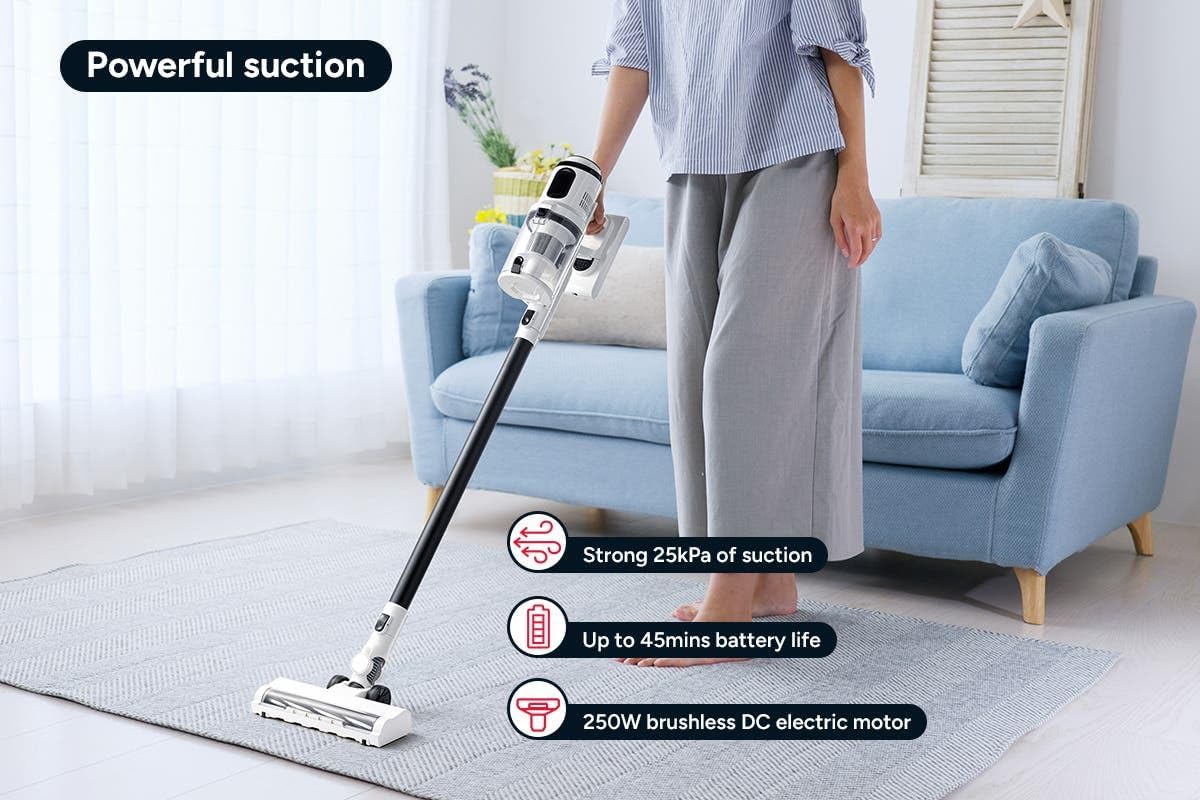
Figure 3: The Kogan MX10 Pro in use, highlighting its powerful 25kPa suction, long battery life, and efficient 250W brushless motor.
Suction Modes & LCD Touchscreen:

Figure 4: The LCD touchscreen provides real-time information on battery level, suction mode, and other operational indicators.
- The LCD touchscreen displays battery status, current suction level, and other relevant information.
- Tap the mode button on the touchscreen to switch between different suction modes (e.g., Eco, Standard, Max).
- The vacuum features dust detection, which automatically adjusts suction power based on the amount of dirt detected.

Figure 5: The brush head detecting dust on a hard floor, demonstrating the automatic suction adjustment feature.
Ukusebenzisa Okunamathiselwe:
- Motorized Brush Head: Ideal for carpets and hard floors, providing powerful agitation to lift dirt.
- Ithuluzi le-Crevice: Ilungele izikhala ezincane, amakhona, nezindawo okunzima ukufinyelela kuzo.
- Ithuluzi Lokuxubha Eliyi-2 Ku-1: Use the brush for dusting delicate surfaces or slide the brush back for upholstery and larger debris.
- To change attachments, press the release button on the current attachment and pull it off. Then, push the desired attachment onto the main unit or extension wand until it clicks.
Isondlo
Ukunakekela okuvamile kuqinisekisa ukusebenza kahle futhi kwelula isikhathi sempilo yesicoci sakho se-vacuum.
Ukuthulula i-Dust Bin:
- It is recommended to empty the dust bin after each use or when the MAX fill line is reached.
- Hold the main unit over a rubbish bin.
- Press the dust bin release button to open the bottom flap and allow debris to fall out.
- The ejection mechanism ensures dirt and dust are removed in a singular motion.

Figure 6: Demonstrating the easy bin emptying process by pressing the release button to open the dust bin flap.
Izihlungi Zokuhlanza:
The Kogan MX10 Pro features a cyclone filter system and a washable HEPA filter to ensure maximum performance and trap fine dust and allergens.

Figure 7: The HEPA filter captures up to 99.97% of fine dust and allergens.
- Twist and pull to remove the filter assembly from the dust bin.
- Separate the HEPA filter and the metal mesh filter.
- Rinse the HEPA filter and metal mesh filter under cold running water.
- Allow all filter components to air dry completely for at least 24 hours before reassembling and placing back into the vacuum. Important: Ensure all parts are completely dry before reinstallation to prevent damage.
Ukuhlanza Ikhanda Lebhulashi:
- Periodically check the brush head for tangled hair or debris.
- To remove the brush roll, locate the release tab on the side of the brush head and open it.
- Carefully pull out the brush roll.
- Sebenzisa isikele noma ithuluzi lokuhlanza ukuze usike futhi ususe noma yiziphi izinwele noma imicu ephithene.
- Slide the brush roll back into place and secure the release tab.
Ukuxazulula inkinga
| Inkinga | Imbangela Engenzeka | Isixazululo |
|---|---|---|
| I-vacuum ayivuli | Battery not charged; Battery not properly installed; Power button not pressed correctly. | Charge the battery fully; Ensure battery is securely clicked into place; Press the power button firmly. |
| Amandla okumunca aphansi | Dust bin full; Filters clogged; Blockage in nozzle, wand, or hose; Brush roll tangled. | Empty the dust bin; Clean or replace filters; Check for and remove any blockages; Clean the brush roll. |
| I-brush roll ayiphenduki | Brush roll tangled with hair/debris; Brush roll not properly installed; Obstruction in brush head. | Clean the brush roll; Reinstall brush roll correctly; Remove any obstructions. |
| Ibhethri ayishaji | Charger not properly connected; Power outlet not working; Damaged charger or battery. | Ensure charger is securely plugged into battery/dock and outlet; Test outlet with another device; Contact Kogan support if charger or battery is damaged. |
Imininingwane
| Isici | Imininingwane |
|---|---|
| Ibhrendi | Kogan |
| Imodeli | MX10 Pro (KAVACSTM10P) |
| Amandla Okumunca | 25kPa |
| Imoto | 250W Brushless Motor |
| Ibhethri | 2000mAh Detachable Li-ion |
| Izinga Lomsindo | 80db |
| Uhlobo Lwesihlungi | HEPA (Washable) |
| Izici ezikhethekile | Lightweight, Cordless, LCD Touchscreen, Dust Detection, Cyclone Filter System |
| Isisindo sento | 3.47 kg |
| Indawo enconyiwe | Isitezi Esiqinile, Ukhaphethi |
Iwaranti & Ukusekela
For warranty information, technical support, or any inquiries regarding your Kogan MX10 Pro Cordless Stick Vacuum Cleaner, please visit the official Kogan website or contact Kogan customer support directly.
You can find more information and contact details on the Kogan store page: Kogan Official Store


