
1. Umkhiqizo Uphelileview
The FERMAX Audio Duox Plus Veo Guard Unit Monitor 9320 is an advanced audio and video intercom system designed for security and communication within residential or commercial buildings. This unit serves as a central guard station monitor, enabling clear audio-visual communication with visitors and residents, and providing control over access points. Its intuitive touch and button controls ensure ease of use for security personnel.
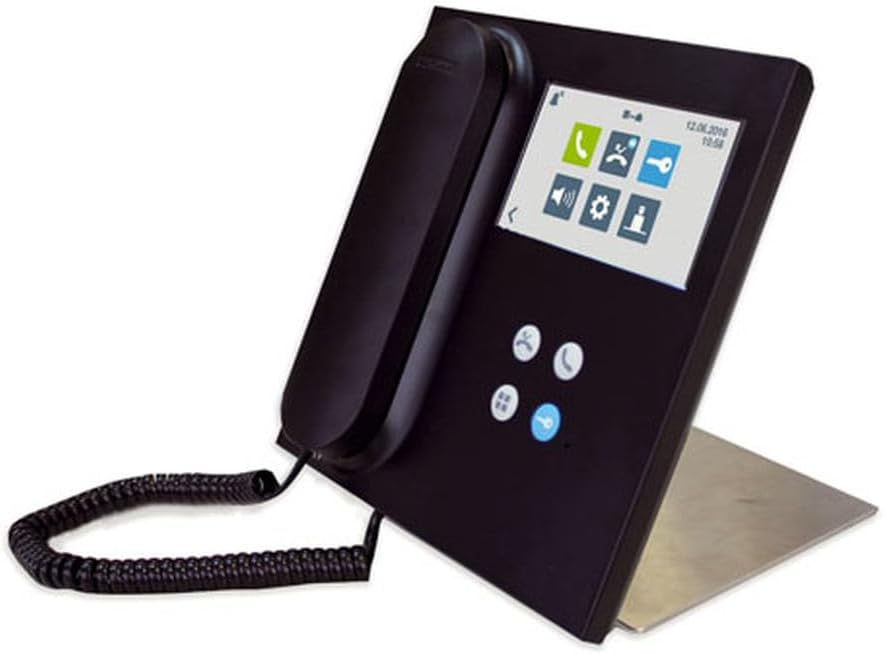
Figure 1: FERMAX Audio Duox Plus Veo Guard Unit Monitor 9320, showing the handset, screen, and control buttons.
2. Ukusetha nokufakwa
2.1 Ukuqaqa Iyunithi
Susa ngokucophelela zonke izingxenye ephaketheni. Qinisekisa ukuthi zonke izinto ezisohlwini lokupakisha zikhona futhi azilimele. Gcina iphakheji yokuqala ukuze uthuthe noma ugcine esikhathini esizayo.
2.2 Izinketho zokukhweza
The Veo Guard Unit Monitor 9320 supports both Intaba Yomnyango futhi Ngaphandle kweNtaba configurations. Choose a stable, flat surface for installation, ensuring adequate space for ventilation and cable management.
- Intaba Yomnyango: Ideal for integration into existing door entry panels or custom enclosures.
- Ngaphandle kweNtaba: Suitable for surface mounting on a desk or wall using the provided stand or mounting bracket.
2.3 Izintambo kanye nezixhumi
Connect the unit to the FERMAX Duox Plus system using the appropriate wiring diagrams provided in the separate installation guide. Ensure all connections are secure and correctly polarized to prevent damage. Power should only be applied after all connections are verified.
- Connect the Duox Plus bus lines (data and power).
- Connect the audio lines (if applicable for external speakers/microphones).
- Connect the power supply unit to a suitable electrical outlet.
2.4 Ukwenyusa Amandla Okuqala
Once all connections are made, plug in the power supply. The unit will perform a self-test and display the FERMAX logo, followed by the main interface. Allow a few moments for the system to initialize fully.
3. Iziqondiso Zokusebenza
3.1 Ukuzulazula kwe-User Interface
The monitor features a combination of Thinta screen and physical Inkinobho controls. The main screen displays various icons for different functions.
- Isikrini sokuthinta: Tap icons or swipe to navigate menus and select options.
- Izinkinobho Zomzimba: Use the dedicated buttons for common actions such as answering calls, opening doors, or navigating back.
3.2 Ukushaya nokwamukela izingcingo
To initiate a call, select the desired resident or apartment from the directory on the screen and press the call button. When a call is received, the monitor will ring and display the caller's video (if available). Lift the handset or press the answer button to establish communication.
3.3 Door Release Function
During an active call, press the dedicated door release button (often marked with a key icon) to unlock the connected entrance. Ensure the identity of the visitor is confirmed before releasing the door.
3.4 Izilungiselelo Zesistimu
Access the settings menu via the gear icon on the main screen. Here you can adjust volume, screen brightness, language, and other system preferences. Refer to the detailed system manual for advanced configuration options.
4. Isondlo
4.1 Ukuhlanza Iyunithi
Ukuhlanza isikrini sokuqapha kanye casing, use a soft, lint-free cloth slightly dampened with water or a mild, non-abrasive cleaning solution. Avoid using harsh chemicals, solvents, or abrasive materials, as these can damage the surface. Ensure the unit is powered off before cleaning.
4.2 Ukunakekelwa Okuvamile
- Gcina iyunithi kude nelanga eliqondile, ukushisa okukhulu, kanye nomswakama.
- Ungavimbeli ukuvuleka komoya.
- Gwema ukuwisa noma ukubeka iyunithi emithonjeni enamandla.
- Regularly check cable connections for looseness or damage.
5. Ukuxazulula izinkinga
This section addresses common issues you might encounter with your FERMAX Audio Duox Plus Veo Guard Unit Monitor 9320.
| Inkinga | Imbangela Engenzeka | Isixazululo |
|---|---|---|
| No power/Screen is blank | Power cable disconnected; Power supply failure; System fault. | Check power cable connection. Ensure power outlet is functional. Contact technical support if issue persists. |
| No audio during calls | Volume too low; Handset not properly seated; Wiring issue. | Adjust volume in settings. Ensure handset is correctly placed. Verify audio wiring connections. |
| Cannot open door | Door release not activated; Wiring issue to door lock; Lock malfunction. | Ensure call is active and door release button is pressed. Check wiring to the door lock. Consult a qualified technician for lock issues. |
| Isikrini esithintwayo asiphenduli | Temporary software glitch; Screen damage. | Restart the unit by disconnecting and reconnecting power. If unresponsive, contact support. |
For issues not listed here or if troubleshooting steps do not resolve the problem, please contact FERMAX technical support.
6. Imininingwane Yezobuchwepheshe
| Isici | Imininingwane |
|---|---|
| Imodeli | 9320 |
| Ibhrendi | FERMAX |
| Indlela Yokulawula | Thinta, Inkinobho |
| Uhlobo Lokukhweza | Door Mount, Outside Mount |
| Uhlobo lwesipika | Computer, Outdoor |
| Ukubala kweyunithi | 1.0 Bala |
| Ubukhulu bephakheji | 10.71 x 9.41 x 2.56 amayintshi |
| Ingangeni manzi | AMANGA |
| ASIN | B0C9K2RW3B |
| Usuku Lokuqala Olutholakalayo | Juni 27, 2023 |
7. Iwaranti kanye Nokusekela
7.1 Iwaranti Yomkhiqizo
The FERMAX Audio Duox Plus Veo Guard Unit Monitor 9320 is covered by a standard manufacturer's warranty. Please refer to the warranty card included with your product or visit the official FERMAX webisayithi ngemigomo nemibandela enemininingwane mayelana nokufakwa kwewaranti nobude besikhathi.
7.2 Ukwesekwa Kwezobuchwepheshe
For technical assistance, installation queries, or advanced troubleshooting, please contact FERMAX customer support. You can find contact information, FAQs, and additional resources on the official FERMAX webindawo:
Visit FERMAX Official Webindawo
When contacting support, please have your product model (9320) and ASIN (B0C9K2RW3B) readily available.


