1. Isingeniso
This manual provides essential instructions for the safe and efficient operation of your Motorola Six-Pocket Multi-Unit Charger. This charger is designed to simultaneously charge up to six compatible Motorola radios or batteries, ensuring your communication devices are always ready for use. Please read this manual thoroughly before using the charger.
2. Ulwazi Lokuphepha
Always observe the following safety precautions to prevent injury or damage to the charger or connected devices:
- Use only the power supply provided with the charger.
- Ungayibeki ishaja emvuleni noma emswakama.
- Ungayisebenzisi ishaja uma yonakele nganoma iyiphi indlela.
- Qinisekisa ukuthi kungena umoya ofanele eduze kweshaja ngesikhathi sokusebenza.
- Ungazami ukuqaqa noma ukuguqula ishaja.
- Gcina endaweni lapho izingane zingafinyeleleki khona.
3. Okuqukethwe Kwephakheji
Qinisekisa ukuthi iphakheji yakho iqukethe izinto ezilandelayo:
- Motorola Six-Pocket Multi-Unit Charger (PMLN7101A / PMLN7101 / PMLN8569)
- US/NA Power Supply
4. Setha
- Place the multi-unit charger on a flat, stable surface in a well-ventilated area.
- Connect the provided US/NA power supply to the charger's power input port.
- Plug the power supply into a standard electrical outlet. The charger is now ready for use.
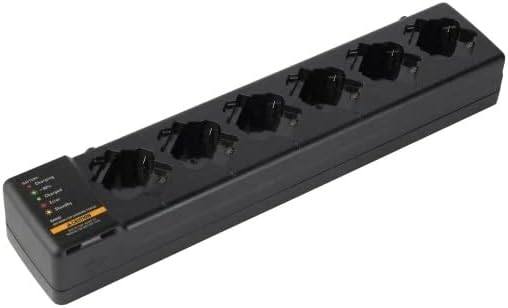
Umfanekiso 4.1: I-overhead view of the Motorola Six-Pocket Multi-Unit Charger, showing six charging pockets and an indicator panel on the left side.
5. Iziqondiso Zokusebenza
The charger is designed for use with compatible Motorola radios and batteries, including models SL300, TLK100, SL500, SL500E, and SLN1000.
5.1 Charging Radios or Batteries
- Qinisekisa ukuthi ishaja ivuliwe.
- Insert a compatible radio or battery into one of the six charging pockets. Ensure it is seated correctly.
- Observe the LED indicator for the corresponding pocket to determine the charging status.
5.2 Isimo Sesikhombi Se-LED
Each charging pocket features an LED indicator to provide real-time status:
- Okubomvu (Okuqinile): Ibhethri liyashaja.
- Okuluhlaza (Okuqinile): Ibhethri ishajwe ngokugcwele.
- Amber (Solid): Battery is charging to 90% capacity.
- Okubomvu (Okucwebezelayo): Error condition (e.g., battery fault, temperature issue). Remove the battery and reinsert. If the error persists, refer to the Troubleshooting section.
- Akukho Ukukhanya: Standby mode or no battery/radio inserted.
The indicator panel on the left side of the charger provides a legend for these LED statuses.
6. Isondlo
To ensure optimal performance and longevity of your charger:
- Gcina ishaja ihlanzekile futhi ingenazo uthuli kanye nemfucumfucu. Sebenzisa indwangu ethambile neyomile ukuze uyihlanze.
- Ungawasebenzisi amakhemikhali anokhahlo noma izinto zokuhlanza ezilimazayo.
- Gcina ishaja endaweni epholile, neyomile uma ingasetshenziswa.
- Hlola njalo intambo yamandla ukuze uthole noma yiziphi izimpawu zomonakalo.
7. Ukuxazulula izinkinga
| Inkinga | Imbangela Engenzeka | Isixazululo |
|---|---|---|
| Ishaja ayivuliwe. | No power to the outlet; power supply not connected; faulty power supply. | Check outlet with another device; ensure power supply is securely connected; try a different power supply if available. |
| LED indicator flashing red. | Battery fault; incorrect battery type; temperature outside operating range. | Remove and reinsert the battery; ensure battery is compatible; move charger to a room temperature environment. |
| Ibhethri ayishaji. | Battery not properly seated; dirty contacts; faulty battery. | Ensure battery is fully inserted; clean battery and charger contacts; try a different battery. |
8. Imininingwane
| Isici | Imininingwane |
|---|---|
| Izinombolo zemodeli | PMLN7101A, PMLN7101, PMLN8569 |
| Ibhrendi | Motorola Solutions |
| Ubukhulu bomkhiqizo | 3 x 4 x 15 amayintshi (7.62 x 10.16 x 38.1 cm) |
| Isisindo sento | 3.29 pounds (1.49 kg) |
| Umbala | Mnyama |
| Okokufaka Voltage | 240 volts |
| Okukhipha Umqtage | 7.4 volts |
| Imisakazo Ehambisanayo | SL300, TLK100, SL500, SL500E, SLN1000 |
9. Iwaranti kanye Nokusekela
Specific warranty information for this product was not provided in the available data. For detailed warranty terms and conditions, please refer to the documentation included with your purchase or visit the official Motorola Solutions website. For technical support or service inquiries, please contact Motorola Solutions customer service.


