1. Isingeniso
This manual provides essential instructions for the safe and efficient use of your KYOCERA ECOSYS MA5500ifx multifunction printer. Please read this manual thoroughly before operating the device and keep it for future reference. The KYOCERA ECOSYS MA5500ifx is an A4 monochrome multifunction system designed for printing, copying, scanning, and faxing.
2. Ulwazi Lokuphepha
Ngaso sonke isikhathi qaphela lezi zinyathelo zokuphepha ezilandelayo ukuze uvimbele ukulimala noma ukulimala ocingweni:
- Beka idivayisi endaweni ezinzile, ileveli.
- Qinisekisa ukuthi kungena umoya ofanele eduze kocingo.
- Ungavimbeli ukuvuleka komoya.
- Sebenzisa kuphela ugesi oshiwo kanye nevolumutage.
- Gcina uketshezi kude nocingo.
- Ungazami ukusevisa idivayisi ngokwakho. Thumela zonke izinsiza kubasebenzi abaqeqeshiwe.
3. Setha
3.1 Ukuqaqa nokubeka
Carefully remove the printer from its packaging. Ensure all packing materials and protective tapes are removed. Place the printer in a location with adequate space for operation and maintenance.

Isithombe 1: Ngaphambili view of the KYOCERA ECOSYS MA5500ifx multifunction printer, showing its compact design and paper trays.
3.2 Ukuxhuma Amandla
Connect the power cord securely to the printer and then to a grounded electrical outlet.
3.3 Ukuxhumeka kwenethiwekhi ne-USB
The printer supports both USB and Gigabit network interfaces. For network connectivity, connect an Ethernet cable to the printer's network port and to your network router or switch. For direct connection, use a USB cable to connect the printer to your computer.

Isithombe 2: Eduze view of the USB port on the side of the KYOCERA ECOSYS MA5500ifx, used for direct connection to a computer or for USB drive functionality.
3.4 Ukufakwa komshayeli
Upon connecting the printer to a computer via USB or network, drivers are often automatically detected and installed by the operating system. If not, download the latest drivers from the official KYOCERA support webindawo.
3.5 Ukucushwa Kwasekuqaleni
Turn on the printer. Use the 17.8 cm (7-inch) touchscreen control panel to configure initial settings such as language, date, time, and network parameters. The touchscreen has a 3-step tilt for ergonomic viewing.

Isithombe 3: Okuningiliziwe view of the KYOCERA ECOSYS MA5500ifx's touchscreen control panel, displaying various function icons like Copy, Send, Fax, and Job Box.
4. Iziqondiso Zokusebenza
4.1 Ukulayisha Iphepha
The printer features a 500-sheet paper cassette and a 100-sheet universal feeder, both supporting up to A4 size. Open the desired paper tray, load the paper, and adjust the guides. Ensure the paper type and size settings on the control panel match the loaded paper. The printer can also handle labels as print media.
4.2 Ukuphrinta Okuyisisekelo
From your computer, select the KYOCERA ECOSYS MA5500ifx as your printer. Adjust print settings as needed (e.g., single-sided or duplex). The printer offers monochrome printing at up to 55 pages per minute (ppm) with a resolution of up to 1200 x 1200 dpi.
4.3 Ukukopisha Imibhalo
Place your document on the scanner glass or in the automatic document feeder (ADF). The ADF supports up to 75 sheets (A4) with automatic duplex scanning. Select 'Copy' from the touchscreen, adjust settings like quantity, zoom, and duplex options, then press 'Start'. Maximum copy resolution is 600 dpi for black and white, and 1200 x 1200 dpi for color.

Isithombe 4: Eduze view of the automatic document feeder (ADF) input tray on the KYOCERA ECOSYS MA5500ifx, showing a document being loaded for scanning or copying.
4.4 Ukuskena Imibhalo
Place your document as described for copying. Select 'Send' or 'Scan' from the touchscreen. Choose your scan destination (e.g., email, network folder, USB drive). Configure scan settings such as resolution and file format, then press 'Start'. The scanner is a sheetfed type with duplex capability.
4.5 Ukuthumela ngefeksi
Place your document in the ADF. Select 'Fax' from the touchscreen. Enter the recipient's fax number using the numeric keypad or select from the address book. Adjust any necessary fax settings and press 'Start'.
4.6 Using the Touch Panel
The touch panel provides intuitive access to all printer functions. Navigate through menus by tapping icons and swiping. Common functions include Copy, Send, Fax, Job Box, and USB Drive access. The panel also features physical buttons for Status/Job Cancel, Copy, Send, Fax, Reset, Stop, and Start.
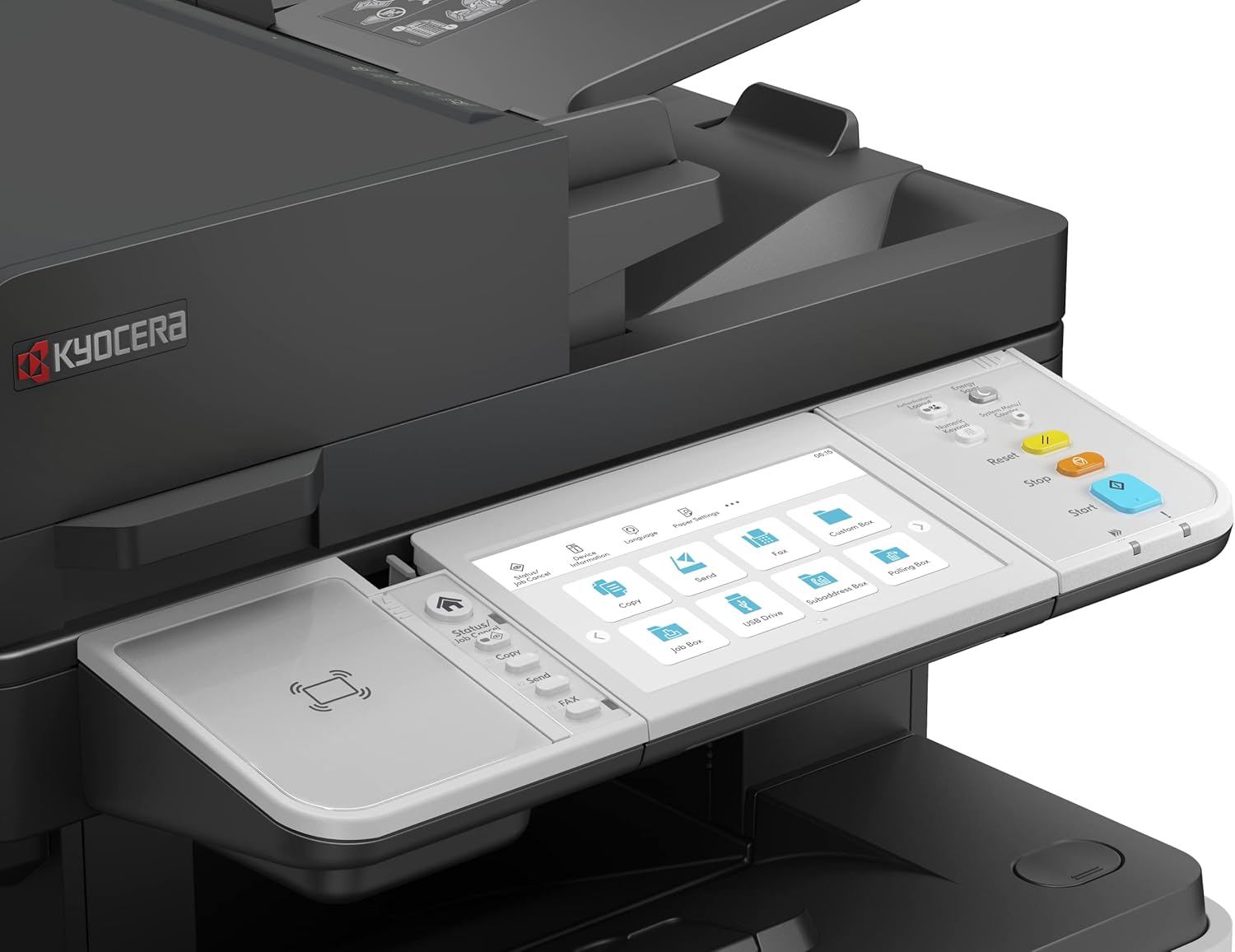
Isithombe 5: A wider view of the KYOCERA ECOSYS MA5500ifx control panel, highlighting the touchscreen interface with various function icons and the adjacent physical control buttons.
5. Isondlo
5.1 Ukuhlanza Idivayisi
Regularly clean the exterior of the printer with a soft, dry, lint-free cloth. For the scanner glass, use a mild glass cleaner applied to a cloth, not directly to the glass. Ensure the device is powered off before cleaning.
5.2 Ukushintsha ithoni
When the black ink (toner) cartridge is low or empty, a message will appear on the control panel. Follow the on-screen instructions or refer to the quick guide for safe replacement of the toner cartridge.
5.3 Ukuhlanzwa Kwendlela Yephepha
If paper jams occur frequently or print quality degrades, the paper path may need cleaning. Consult the full service manual for detailed instructions on cleaning specific components within the paper path.
6. Ukuxazulula izinkinga
This section addresses common issues you might encounter. For more complex problems, contact KYOCERA support.
6.1 AmaJam Amaphepha
If a paper jam occurs, the control panel will display an error message and indicate the location of the jam. Carefully open the designated covers and remove the jammed paper, ensuring no torn pieces remain inside. Close all covers securely.
6.2 Izinkinga Zekhwalithi Yokuphrinta
If prints are faded, streaky, or have spots, check the toner level. Ensure the correct paper type is selected in the print settings. Perform a print head cleaning or calibration from the maintenance menu on the control panel if available.
6.3 Izinkinga Zokuxhuma
If the printer is not responding, verify that the power cable and network/USB cables are securely connected. Restart the printer and your computer. Check network settings on the printer's control panel and ensure your computer is connected to the same network.
7. Imininingwane
| Isici | Ukucaciswa |
|---|---|
| Uchungechunge Model | I-ECOSYS MA5500ifx |
| Inombolo Yemodeli Yento | 110C0Z3NL0 |
| Ubuchwepheshe bokuphrinta | I-Laser |
| Okukhipha Iphrinta | I-Monochrome |
| Isivinini Sokuphrinta Esiphezulu (Monochrome) | 55 ppm |
| Isixazululo Esiphezulu Sokuphrinta Esimnyama Nomhlophe | 600dpi |
| Isixazululo Esiphezulu Sokuphrinta Kombala | 1200 x 1200 dpi |
| Isivinini Sekhophi Esikhulu (Mnyama & Mhlophe) | 55 ppm |
| Isixazululo Esiphezulu Sekhophi (Okumnyama Nomhlophe) | 600dpi |
| Max Copy Resolution (Color) | 1200 x 1200 dpi |
| Uhlobo Lweskena | I-Sheetfed |
| Duplex (Printing/Scanning) | Okuzenzakalelayo |
| Amandla Eshidi Lokufaka Okuphezulu | 100 (ADF) + 500 (Cassette) + 100 (Universal Feeder) |
| Umthamo Weshidi Lokukhiphayo | 100 |
| Inani lamathreyi | 2 (Okujwayelekile) |
| Indlela Yokulawula | Touch (Touch Panel) |
| Isikhombimsebenzisi se-Hardware | I-USB |
| Ubuchwepheshe bokuxhumana | USB, Network (Gigabit) |
| Amandla Okugcina Inkumbulo | 1.5 GB |
| Ubukhulu bomkhiqizo | 19.49 x 18.9 x 23.35 amayintshi (cishe.) |
| Isisindo sento | 54.3 pounds (approx.) |
| Izici ezikhethekile | Auto Document Feeder, Auto-Duplex, Double Sided Scanning, Network-Ready, Touch Screen, High Security (SSL, IPsec, TLS 1.3, Secure Boot, Run-time Integrity Check, Confidential Print) |
| Izingxenye Ezihlanganisiwe | Labels (as print media) |
8. Iwaranti kanye Nokusekela
For warranty information and technical support, please refer to the documentation included with your product or visit the official KYOCERA webisayithi. Ungathola futhi ulwazi olwengeziwe kanye nezinsiza zokusekela ku- Isitolo se-KYOCERA ku-Amazon.


