1. Isingeniso
The Radiolink CM210 is a compact and portable 2S 7.4V LiPo battery balance charger designed for various RC applications, including airplanes, transmitters, cars, boats, and gel blaster guns. It features multiple charging protections, fast charging capabilities, and a battery recovery function to ensure safe and efficient battery management.
Izici ezibalulekile zifaka:
- Multiple Charging Protection: Incorporates a software logic safety algorithm and over-temperature protection to prevent charging errors and reduce risks.
- Faster Charging & Battery Recovery: Offers a maximum output power of 20W and supports 1.5A fast charging. Includes trickle current recovery for over-discharged batteries, extending battery life.
- High Charging Efficiency: Achieves up to 82% efficiency with a voltage precision of 4.2±0.02V per cell when fully charged, preventing both overcharging and undercharging.
- Usayizi Ohlangene: Measuring only 40.5 x 21 x 15mm and weighing 9g, it is highly portable.
- Clear Charging Indicator: Provides an LED indicator to clearly show when the battery is fully charged.
2. Okuqukethwe Kwephakheji
Sicela uqinisekise ukuthi zonke izinto zikhona ephaketheni lakho:
- Radiolink CM210 Balance Charger
- Ikhebula lokushaja le-USB Type-C
- Incwadi Yokufundisa (le dokhumenti)
3. Isethaphu kanye Noxhumano
Follow these steps to set up and connect your CM210 charger:
3.1 Ukunika amandla Ishaja
- Insert the USB Type-C cable into the input port of the CM210 charger.
- Connect the other end of the USB cable to a suitable 5V power source, such as a USB wall adapter, power bank, computer USB port, or car charger.
- Upon successful connection, the red LED indicator on the CM210 will illuminate, indicating it is ready to charge.

Figure 1: Radiolink CM210 charger with its USB Type-C cable, ready for connection to a power source.

Figure 2: The CM210 charger can be powered by various USB sources including wall adapters, mobile power banks, car chargers, and computer USB ports.
3.2 Connecting the Battery
The CM210 charger is compatible with 2S LiPo batteries that feature a 3P PH2.54 balance connector.
- Carefully insert the balance port of your 2S LiPo battery into the charging port of the CM210. Ensure the connector is inserted correctly, aligning the pins. Reverse connection can damage the charger.
- Once the battery is connected, the green LED indicators on the charger will begin flashing, signifying that charging has started.

Figure 3: Illustration of correct and incorrect battery connection. Always ensure proper pin alignment to prevent damage.

Figure 4: The CM210 charger is designed for 2S LiPo batteries with a 3P PH2.54 balance connector, commonly used in RC models.
Video 1: Demonstrates the charging steps for the Radiolink CM210 balance charger, including connecting the power source and the battery.
4. Iziqondiso Zokusebenza
The CM210 charger automatically manages the charging process once the battery is connected. Observe the LED indicators for charging status.
4.1 Izincazelo zesikhombi se-LED
The CM210 uses a series of LED indicators to communicate its status and the battery's charge level:
| Isimo Sesikhombi se-LED | Incazelo |
|---|---|
| Wonke ama-LED aluhlaza akhanya kanye | Charger powered on, calibration done (factory default). |
| I-Red LED ihlala ivuliwe | Charger powered on, no battery connected. Battery needs to be connected. |
| I-LED ebomvu ikhanya ngesikhathi sokushaja | Charger detects an abnormality. Reconnect battery and cable to troubleshoot. |
| I-LED yokuqala eluhlaza iyakhanya | Ibhethri Voltageya <7.4v |
| I-LED yokuqala eluhlaza ihlezi ivuliwe, kanti eyesibili eluhlaza okotshani ikhanya | 7.4V < Battery Voltageya <7.8v |
| The front 2 green LEDs are always on, and the third green LED is flashing | 7.8V < Battery Voltageya <8.2v |
| The front 3 green LEDs are always on, and the fourth green LED is flashing | 8.2V < Battery Voltageya <8.4v |
| All 4 green LEDs are always on | Ibhethri seligcwele amandla. |
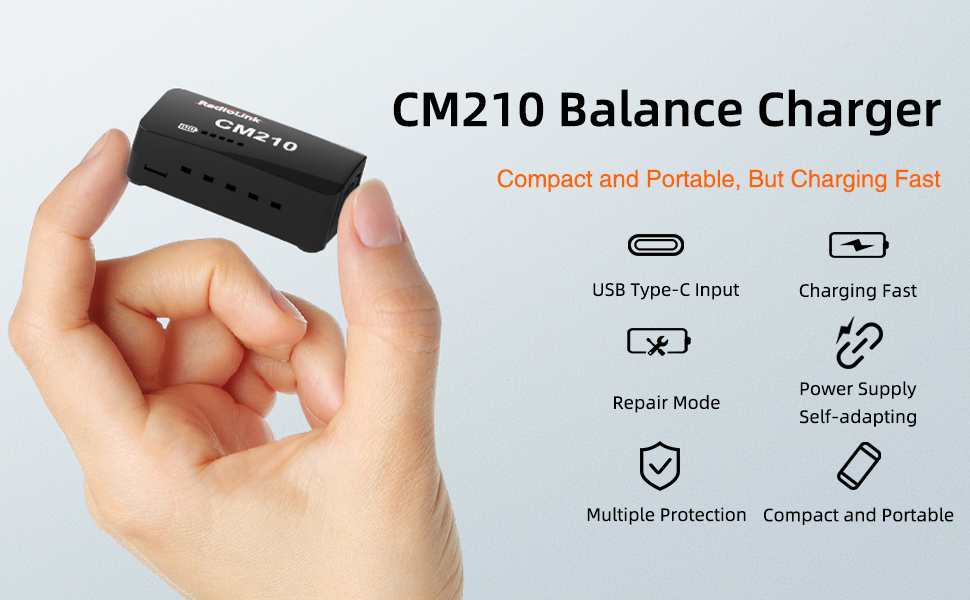
Figure 5: Detailed explanation of the CM210's LED indicator lights and their corresponding meanings for charging status and battery voltage.
Video 2: Illustrates the various LED indicator states of the Radiolink CM210 balance charger during the charging process, showing battery voltage levels and full charge indication.
4.2 Battery Recovery Mode
The CM210 features a trickle current recovery mode for over-discharged batteries. This function helps to safely bring deeply discharged LiPo batteries back to a recoverable voltage level before initiating standard fast charging, which can extend the overall lifespan of the battery.

Figure 6: Diagram showing the low voltage pre-charge and repair mode, where the charger applies a small current to recover deeply discharged cells before normal charging.
5. Ukugcinwa Nokuphepha
To ensure the longevity and safe operation of your Radiolink CM210 charger and batteries, please adhere to the following guidelines:
- Keep the charger clean and free from dust and debris. Use a dry, soft cloth for cleaning.
- Avoid exposing the charger to moisture, extreme temperatures, or direct sunlight.
- Do not attempt to disassemble or modify the charger. This will void the warranty and could lead to malfunction or injury.
- Always use the charger with compatible 2S LiPo batteries. Using incompatible batteries may cause damage or safety hazards.
- Store the charger and batteries in a cool, dry place away from flammable materials.
- Regularly inspect the USB cable and battery connectors for any signs of wear or damage. Replace if necessary.
- Ungalokothi ushiye amabhethri ashajayo enganakiwe.
6. Ukuxazulula izinkinga
If you encounter issues with your CM210 charger, refer to the LED indicator meanings in Section 4.1. Here are some common troubleshooting tips:
- Ishaja ayivuli: Ensure the USB Type-C cable is securely connected to both the charger and a functional power source. Try a different USB cable or power adapter.
- Red LED always on (no charging): This indicates no battery is connected. Ensure the battery's balance connector is fully and correctly inserted into the charger.
- Red LED flashing during charging: This signals an abnormality. Disconnect the battery and the power source, then reconnect them carefully. If the issue persists, the battery or charger may be faulty.
- Battery not charging to full capacity: Verify that the battery is a 2S LiPo type. Ensure the power source provides sufficient current (e.g., 1.5A or higher for fast charging).
- Ukushaja okungasheshi: Ensure your power source can deliver adequate current. The CM210 supports 1.5A fast charging, but a lower current power source will result in slower charging.
7. Imininingwane
| Isici | Imininingwane |
|---|---|
| Imodeli | CM210 |
| Isixhumi Sokufaka | I-USB Type-C |
| Okukhipha Umqtage (Ubukhulu) | 8.4V (for 2S LiPo) |
| Amandla Okukhipha Okuphezulu | 20W |
| Ukushaja Okuphezulu Kwamanje | 1.5A |
| Ukushaja Ngempumelelo | Kufika ku-82% |
| Voltage Ukunemba | 4.2V ± 0.02V per cell |
| Ubukhulu (L x W x H) | 40.5 x 21 x 15 mm (1.59 x 0.82 x 0.59 amayintshi) |
| Isisindo | 9 g (0.317 amaounces) |
| Umbala | Mnyama |
8. Iwaranti kanye Nokusekela
Radiolink products are designed for reliability and performance. For any technical assistance, troubleshooting, or warranty inquiries, please contact Radiolink's after-sales service. You can find support information on the Radiolink Direct store or through the online user instructions available on the product's sales page.
For further assistance, please visit the official Radiolink store: Radiolink Store


