1. Isingeniso
This manual provides essential information for the proper setup, operation, and maintenance of your Sharp 32FG6EA 32-inch HD Android TV. The Sharp 32FG6EA offers a wide range of connection options and features the Android TV operating system, providing a modern and intuitive television experience. It functions as an all-in-one entertainment hub, integrating Google Assistant for a smarter viewing experience. Users can quickly access entertainment, control smart devices, and obtain on-screen information using voice commands.
2. Ulwazi Lokuphepha
Sicela ufunde yonke imiyalelo yokuphepha ngokucophelela ngaphambi kokusebenzisa ithelevishini. Gcina le ncwadi ukuze uyibhekisele esikhathini esizayo.
- Ukunikezwa kwamandla kagesi: Ensure the TV is connected to a power source with the correct voltage. Ungagcwalisi kakhulu amapayipi kagesi.
- Ukungenisa umoya: Do not block ventilation openings. Allow adequate space around the TV for proper airflow to prevent overheating.
- Amanzi Nomswakama: Do not expose the TV to rain, moisture, or excessive humidity. Avoid placing objects filled with liquids on or near the TV.
- Ukuhlanza: Unplug the TV before cleaning. Use a soft, dry cloth. Do not use liquid cleaners or aerosol sprays.
- Ukubekwa: Place the TV on a stable, level surface. If wall-mounting, ensure the mount is securely installed and can support the TV's weight.
- Ukusevisa: Ungazami ukulungisa i-TV ngokwakho. Thumela bonke abasebenzi besevisi abafanelekayo.
3. Okuqukethwe Kwephakheji
Qinisekisa ukuthi zonke izinto zikhona ephaketheni:
- Sharp 32FG6EA 32-inch HD Android TV
- Isilawuli kude (ngamabhethri angu-2 AAA)
- Stand Type Base
- Incwadi Yeziqondiso
- Ikhebula Lamandla
4. Setha
4.1 Ukuqaqa
Carefully remove the TV and all accessories from the packaging. Retain the packaging materials for future transport or servicing.
4.2 Ukuhlanganisa Isitendi
If you are not wall-mounting the TV, attach the included stand base:
- Beka isikrini se-TV phansi endaweni ethambile, eyisicaba ukuze uvimbele umonakalo.
- Hlanganisa isisekelo sokuma nezimbobo zokufaka phansi kwe-TV.
- Vikela isitendi usebenzisa izikulufu ezinikeziwe. Qinisekisa ukuthi isitendi sinamathiselwe ngokuqinile.
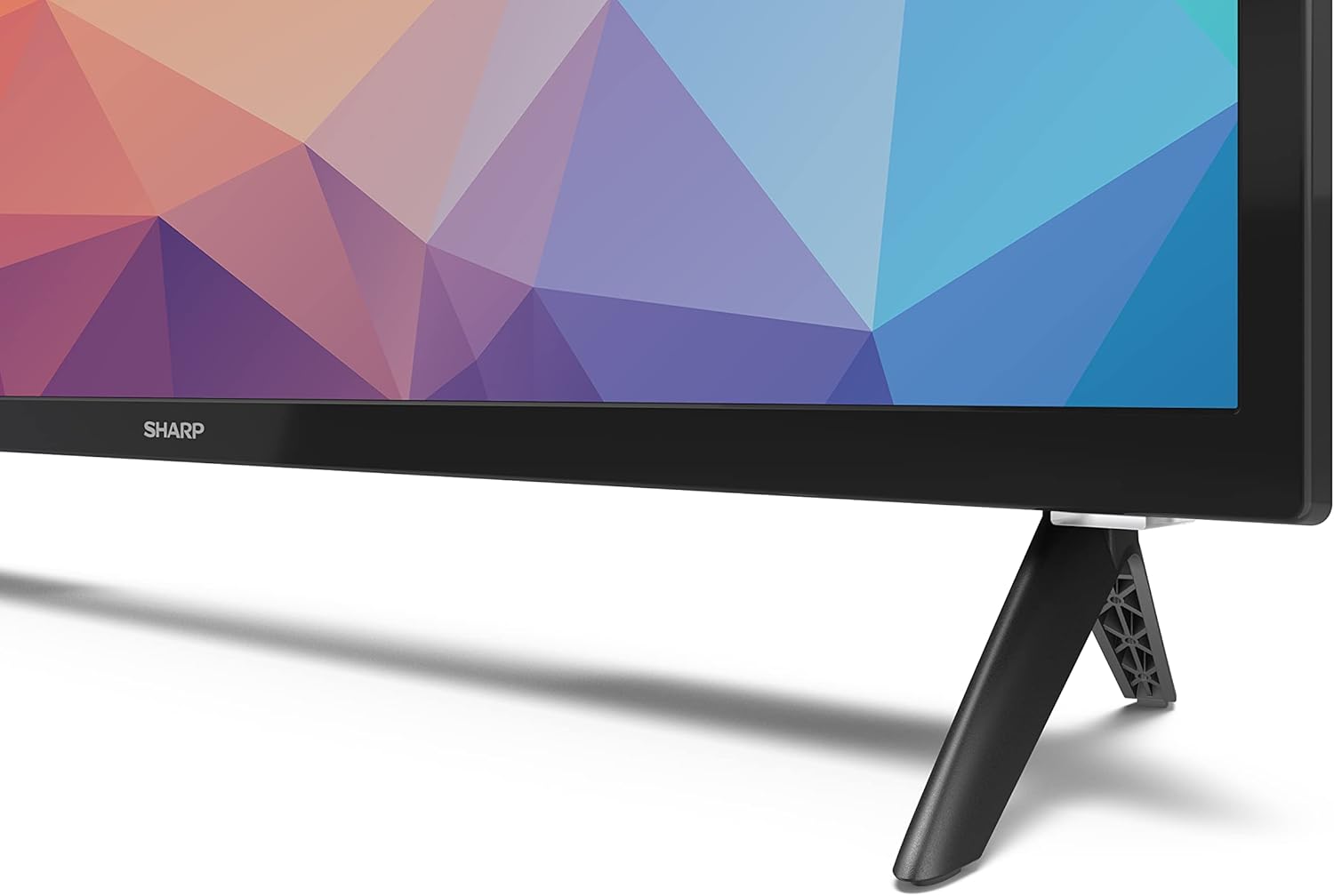
Image: Close-up of the TV stand attachment.
4.3 Ukukhweza Udonga
The Sharp 32FG6EA supports VESA wall mounts with dimensions of 75 x 75 mm. Wall mount hardware is not included. Follow the instructions provided with your wall mount kit.
4.4 Ukuxhumanisa Amadivayisi Angaphandle
Your TV features multiple ports for connecting various devices:
- I-HDMI: Connect Blu-ray players, game consoles, or set-top boxes to the 2 HDMI ports.
- I-USB: Connect USB storage devices for media playback to the 2 USB ports.
- I-Antenna/Ikhebula: Connect an antenna or cable TV source for broadcast channels.
- I-Ethernet: Ukuze uthole uxhumano lwe-inthanethi olunezintambo.
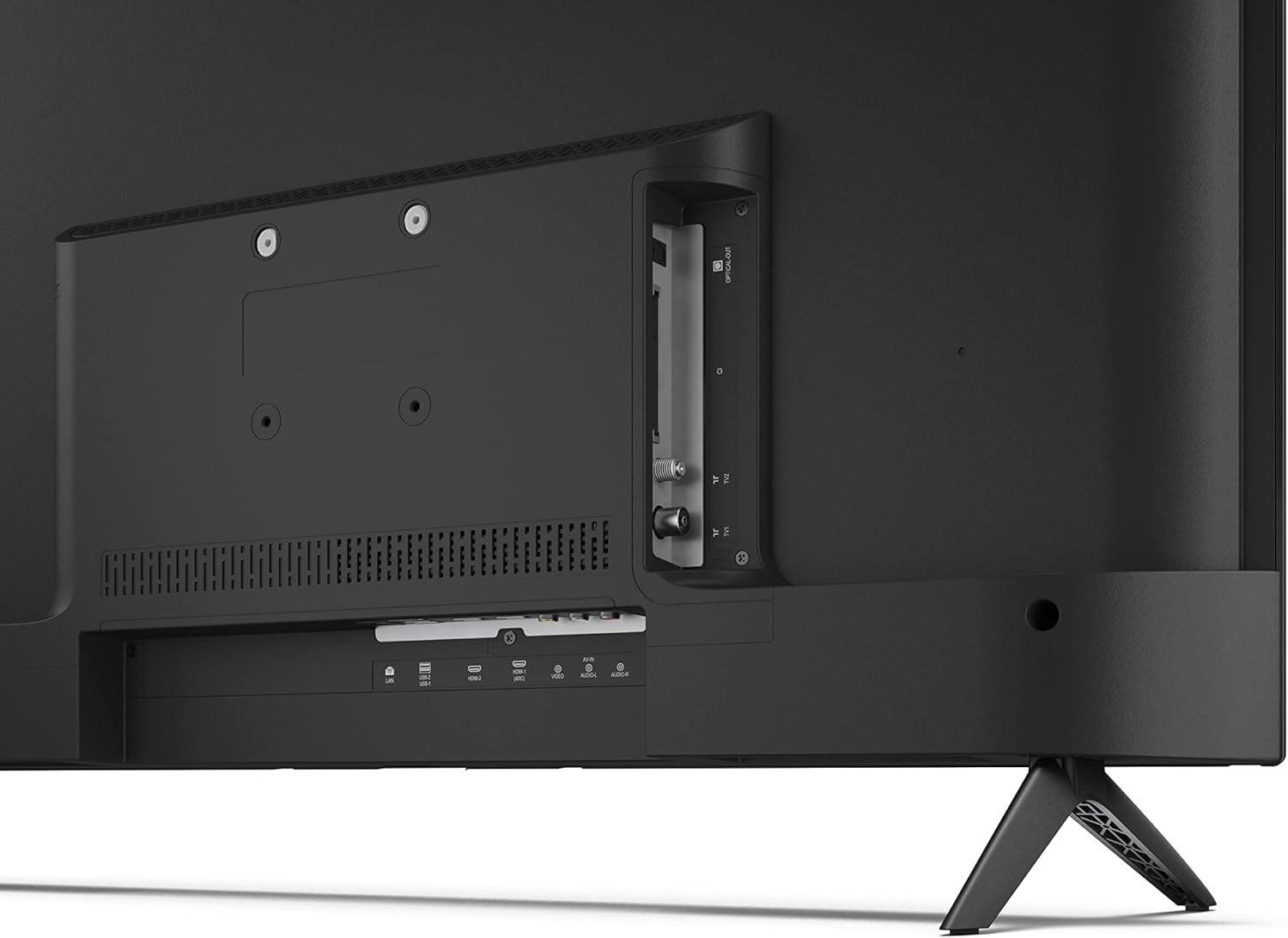
Isithombe: Emuva view of the TV with connection ports.
4.5 Ukuxhuma Amandla
After connecting all necessary devices, plug the power cable into the TV and then into a wall outlet.
4.6 Iseluleki Sokuqala Sokusetha
Uma ivuliwe okokuqala, i-TV izokuqondisa ngenqubo yokusetha yokuqala. Lokhu kufaka phakathi:
- Ukukhethwa kolimi.
- Ukuxhumeka kwenethiwekhi (i-Wi-Fi noma i-Ethernet).
- Google account sign-in (required for full Android TV features).
- Ukuskena isiteshi.
5. Ukusebenza
5.1 Isilawuli kude phezuview
Isilawuli kude esifakiwe sikuvumela ukuthi uzulazule ezicini ze-TV. Faka amabhethri amabili e-AAA kusilawuli kude ngaphambi kokusebenzisa.
- Inkinobho yamandla: Ivula noma ivale i-TV.
- Directional Pad (D-Pad) & OK Button: Zulazula kumamenyu futhi uqinisekise okukhethiwe.
- Inkinobho Emuva: Ibuyela esikrinini sangaphambilini.
- Inkinobho Yasekhaya: Ifinyelela isikrini sasekhaya se-Android TV.
- Ivolumu phezulu/Phansi: Ilungisa ivolumu yomsindo.
- Isiteshi Phezulu/Phansi: Ishintsha iziteshi ze-TV.
- Inkinobho Yomsizi we-Google: Yenza kusebenze isilawuli sezwi.
- Izinkinobho Ezinqamulelayo Zohlelo Lokusebenza: Dedicated buttons for popular streaming services like Netflix, Prime Video, and YouTube.
5.2 Android TV Interface Navigation
The Android TV home screen provides access to your installed apps, recommended content, and settings. Use the directional pad on your remote to navigate through the interface.
Umsizi we-5.3 we-Google
Press the Google Assistant button on your remote and speak into the microphone to:
- Cinga movies, shows, or information.
- Lawula amadivayisi ahlakaniphile ekhaya.
- Open applications.
- Adjust TV settings.
5.4 I-Chromecast eyakhelwe ngaphakathi
The TV includes Chromecast built-in, allowing you to cast content from compatible apps on your smartphone, tablet, or computer directly to the TV screen.
5.5 Ukuxhumana kwe-Bluetooth
Connect Bluetooth devices such as headphones or speakers to your TV for a personalized audio experience. Navigate to the TV's settings menu to pair new Bluetooth devices.
5.6 Izilungiselelo zomsindo
The TV supports Dolby Audio with 2 x 6 W RMS speakers. You can adjust audio settings, including sound modes and equalizer, through the TV's settings menu.
6. Isondlo
6.1 Ukuhlanza i-TV
To clean the TV screen and cabinet:
- Khipha intambo yamandla odongeni.
- Use a soft, lint-free cloth to gently wipe the screen and surfaces.
- Ukuze uthole amamaki anenkani, kancane dampzu indwangu enamanzi noma isicoci sesikrini esikhethekile (sebenzisa engutsheni, hhayi ngokuqondile esibukweni).
- Ungasebenzisi izinto zokuhlanza abrasive, wax, noma izincibilikisi.
6.2 Ukuvuselelwa Kwesoftware
I-Android TV yakho ingase ithole izibuyekezo zesofthiwe ngezikhathi ezithile ukuze ithuthukise ukusebenza futhi ingeze izici ezintsha. Qinisekisa ukuthi i-TV yakho ixhunywe ku-inthanethi ukuze uthole lezi zibuyekezo. Ungahlola izibuyekezo ngesandla kumenyu yezilungiselelo ze-TV.
7. Ukuxazulula izinkinga
Uma uhlangabezana nezinkinga nge-TV yakho, bheka izinkinga ezilandelayo nezisombululo:
- Awekho Amandla: Qinisekisa ukuthi ikhebuli yamandla ixhunywe ngokuvikelekile kukho kokubili i-TV ne-outlet esebenza odongeni. Zama i-outlet ehlukile.
- Asikho Isithombe/Umsindo: Check that the correct input source is selected. Verify all cables (HDMI, antenna) are properly connected.
- Isilawuli kude asisebenzi: Check the batteries and ensure they are inserted correctly. Point the remote directly at the TV's IR sensor.
- Ikhwalithi Yesithombe Engalungile: Check antenna/cable connections. Adjust picture settings in the TV menu. For streaming content, ensure a stable internet connection.
- Alukho Uxhumo Lwe-inthanethi: Verify Wi-Fi password or Ethernet cable connection. Restart your router and the TV.
- Apps Not Working: Ensure the TV's software is up to date. Try clearing the app's cache or reinstalling the app.
If problems persist, consult the Sharp support webisayithi noma xhumana nesevisi yamakhasimende.
8. Imininingwane
| Isici | Ukucaciswa |
|---|---|
| Inombolo Yemodeli | 32FG6EA |
| Ibhrendi | Ibukhali |
| Usayizi Wesikrini | Amayintshi angu-32 (81 cm idayagonali) |
| Bonisa Ubuchwepheshe | I-LED |
| Isixazululo | 720p (1366 x 768 pixels) |
| I-Aspect ratio | 16:9 |
| Isilinganiso Sokuvuselela | 50 Hz |
| Isistimu esebenzayo | I-Android TV 11 |
| Izici ezikhethekile | Android TV, Google Assistant, Chromecast built-in |
| Okukhipha umsindo | 2 x 6 W RMS, Dolby Audio |
| Izimbobo ze-HDMI | 2 |
| Izimbobo ze-USB | 2 |
| Ukuxhumana | I-Wi-Fi, i-Bluetooth, i-Ethernet |
| I-VESA Wall Mount | 75 x 75 mm |
| Ubukhulu obunesitendi (W x H x D) | 731 x 486 x 177 mm |
| Ubukhulu obungenaso Isitendi (W x H x D) | 731 x 433 x 68 mm |
| Ubukhulu bomkhiqizo (D x W x H) | 16 x 73 x 46.4 cm (approximate, with stand) |
| Isisindo | 3.9 kg |
| I-Energy Efficiency Class | E |

Image: TV dimensions diagram.

Image: Energy Label. For more details, visit Idatha ye-EPEL.
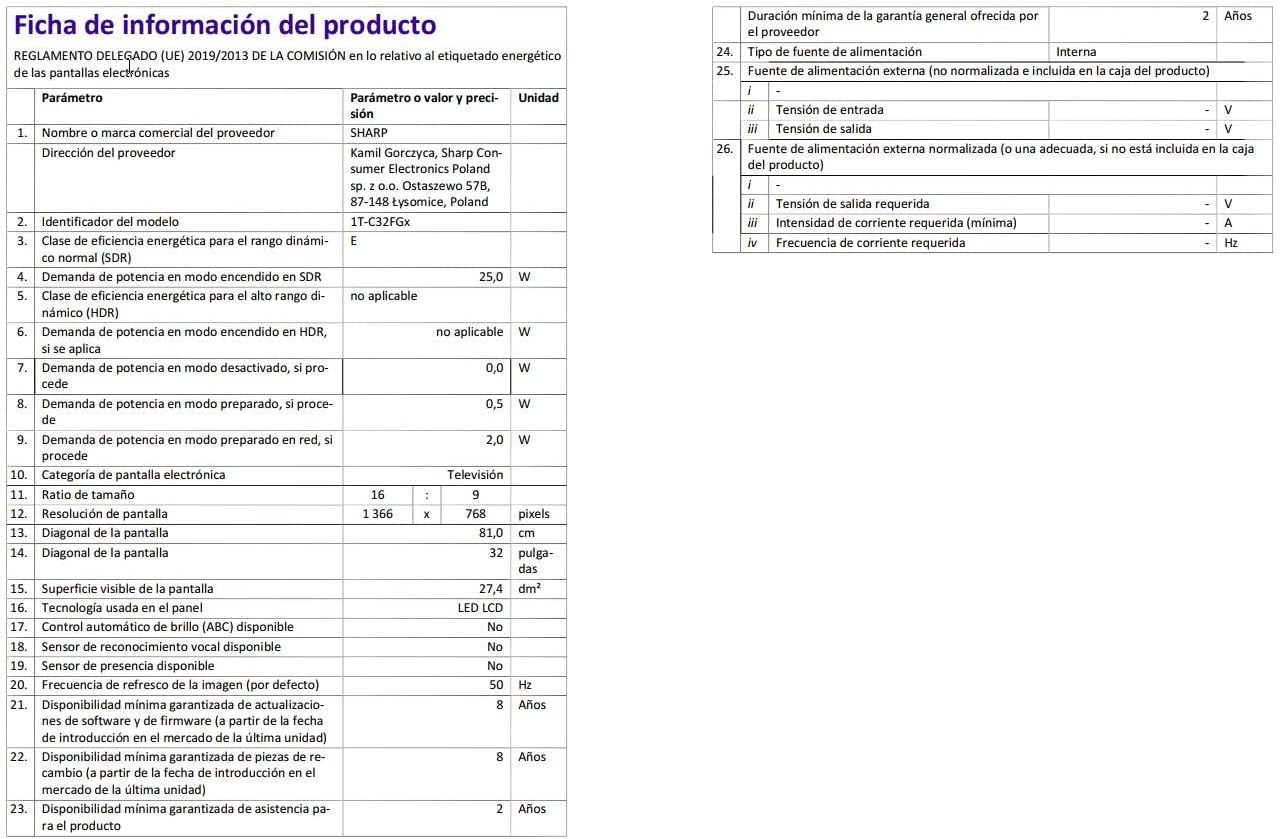
Image: Detailed product information sheet.
9. Iwaranti kanye Nokusekela
The Sharp 32FG6EA television comes with a minimum general warranty duration of 2 years from the provider.
For technical support, warranty claims, or further assistance, please refer to the contact information provided with your purchase documentation or visit the official Sharp support webindawo yesifunda sakho.


