1. Umkhiqizo Uphelileview
The Point Wired Mini Keyboard Pt-350 is a compact and versatile keyboard designed for both gaming and general typing. It features a high-quality build and a modern design, adhering to industry standards for reliable performance. This keyboard is an ideal choice for users seeking a durable and efficient input device.
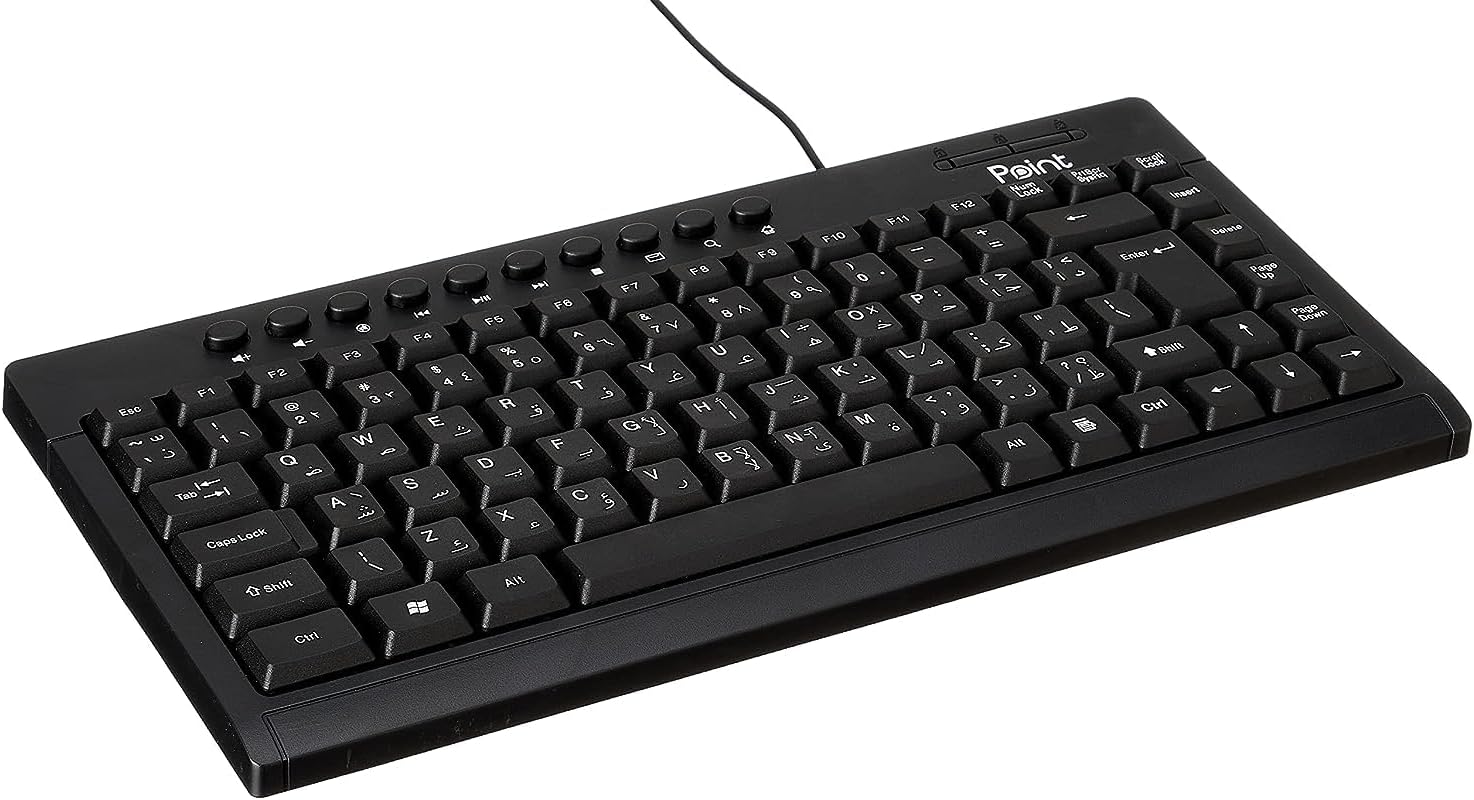
Umfanekiso 1.1: I-engeli view of the Point Wired Mini Keyboard Pt-350, showcasing umklamo wayo omncane kanye nokwakheka kokhiye.
Izici Eziyinhloko:
- Wired connectivity for stable performance.
- Compact design suitable for various setups.
- Durable construction from high-quality plastic materials.
- Designed for both gaming and typing applications.
2. Okuqukethwe Kwephakheji
Sicela uhlole iphakheji ngokucophelela ukuze uqinisekise ukuthi zonke izinto zikhona:
- Point Wired Mini Keyboard Pt-350
- Incwadi Yomsebenzisi (le dokhumenti)
3. Setha
Follow these steps to set up your Point Wired Mini Keyboard Pt-350:
- Khipha ikhibhodi: Susa ikhibhodi ngokucophelela ephaketheni layo.
- Identify the USB Connector: The keyboard comes with an integrated USB cable.
- Xhuma Kukhompyutha Yakho: Locate an available USB port on your computer (desktop PC, laptop, etc.). Insert the keyboard's USB connector firmly into the USB port.
- Ukufakwa Kwedrayivu (I-Plug & Play): The keyboard is plug-and-play compatible. Your operating system (Windows, macOS, Linux) should automatically detect and install the necessary drivers. This process usually takes a few seconds.
- Qinisekisa Ukusebenza: Once connected, open a text editor or any application that accepts text input and test the keys to ensure proper operation.

Umfanekiso 3.1: Phezulu-phansi view of the keyboard, illustrating the key layout and integrated cable for connection.
4. Iziqondiso Zokusebenza
The Point Wired Mini Keyboard Pt-350 operates like a standard computer keyboard. Below are general instructions and tips for use:
Ukuthayipha Okuyisisekelo:
- Simply press the desired keys to input characters, numbers, and symbols into your active application.
- Sebenzisa i- Shift key for uppercase letters and alternative symbols on keys.
- I I-CAPS Lock key toggles permanent uppercase typing.
- I I-Backspace key deletes characters to the left of the cursor.
- I Ngena key confirms input or moves to the next line.
Okhiye Bomsebenzi (F1-F12):
The function keys (F1 through F12) perform various tasks depending on the active program or operating system. Some common uses include:
- F1: Often opens help for the active program.
- F2: Renames a selected item.
- F5: Ivuselela a web page or document.
- F11: Toggles full-screen mode in many browsers.
Okhiye be-Multimedia:
The keyboard may include dedicated multimedia keys or secondary functions on the F-keys (accessed via the Fn key, if present). These typically control:
- Volume control (Mute, Volume Up, Volume Down)
- Media playback (Play/Pause, Stop, Previous Track, Next Track)
5. Isondlo
Ukugcinwa kahle kuqinisekisa ukuhlala isikhathi eside nokusebenza kahle kwekhibhodi yakho:
- Ukuhlanza: Regularly clean the keyboard to prevent dust and debris buildup. Use a soft, lint-free cloth slightly dampefakwe ngamanzi noma isixazululo esithambile sokuhlanza. Gwema amakhemikhali anokhahlo noma izinto ezilumayo.
- Ukususa Uthuli: Use compressed air to blow out dust and crumbs from between the keys.
- Gwema Ukuchitheka Gcina uketshezi kude nekhibhodi ukuze uvimbele ukulimala kwezingxenye zangaphakathi. Uma kwenzeka kuchitheka, nqamula ikhibhodi ngokushesha bese uyivumela yome ngokuphelele ngaphambi kokuxhuma kabusha.
- Isitoreji: Uma ingasetshenziswa, gcina ikhibhodi endaweni ehlanzekile neyomile kude namazinga okushisa aphezulu.
6. Ukuxazulula izinkinga
If you encounter issues with your Point Wired Mini Keyboard Pt-350, refer to the following common problems and solutions:
Ikhibhodi Ayiphenduli:
- Hlola uxhumano lwe-USB: Qinisekisa ukuthi ikhebula le-USB lixhunywe ngokuvikelekile embobeni ye-USB esebenzayo kukhompyutha yakho. Zama imbobo ye-USB ehlukile.
- Qala kabusha Ikhompyutha: Ukuqalisa kabusha okulula kuvame ukuxazulula izinkinga zokuxhuma.
- Hlola Kwenye Ikhompyutha: Connect the keyboard to another computer to determine if the issue is with the keyboard or your computer's setup.
- Hlola Umphathi Wedivayisi (Windows): In Windows, go to Device Manager and check if the keyboard is listed under 'Keyboards' and if there are any error symbols. You might need to update or reinstall the driver.
Keys Not Working or Sticky:
- Izihluthulelo Ezihlanzekile: Dust, crumbs, or liquid residue can cause keys to stick or malfunction. Refer to the Maintenance section for cleaning instructions.
- Ukulimala Emzimbeni: Inspect the keys for any visible physical damage.
Incorrect Character Output:
- Check Language Settings: Ensure your operating system's keyboard language settings match the physical layout of your keyboard.
- Driver Issue: Reinstalling the keyboard driver might resolve this.
Uma inkinga iqhubeka ngemva kokuzama lezi zinyathelo, sicela uxhumane nokwesekwa kwamakhasimende.
7. Imininingwane
Technical specifications for the Point Wired Mini Keyboard Pt-350:

Umfanekiso 7.1: Uhlangothi view of the keyboard, highlighting its profile and compact form factor.
| Isici | Imininingwane |
|---|---|
| I gama le-brand | Khomba |
| Imodeli | I-Pt-350 |
| Ubuchwepheshe bokuxhumana | Inezintambo |
| Amadivayisi Ahambisanayo | Ikhompyutha |
| Incazelo Yekhibhodi | Imisebenzi eminingi |
| Ukusetshenziswa Okunconyiwe | Imidlalo ye-PC |
| Izici ezikhethekile | Amageyimu |
| Umbala | Mnyama |
| Isitayela | Okwesimanje |
| Okubalulekile | Ipulasitiki |
| Ubukhulu bokuthumela | 34.5 x 26.4 x 3 cm |
| Isisindo | awu 800g |
| Idethi Yokuqala Etholakalayo | Septhemba 4, 2022 |
| ASIN | B0BD2DM9ZJ |
8. Iwaranti kanye Nokusekela
This product is covered by a standard manufacturer's warranty. Please refer to the warranty card included with your purchase for specific terms and conditions, including the warranty period and coverage details.
For technical support, troubleshooting assistance, or warranty claims, please contact Point customer service through the contact information provided on the product packaging or the official Point website. When contacting support, please have your product model (Pt-350) and purchase details ready.


