1. Isingeniso
This manual provides essential information for the safe and efficient operation of your Powertech MB3904 8 Step Intelligent Lead Acid and Lithium Battery Charger. Please read this manual thoroughly before use and retain it for future reference.
2. Ulwazi Lokuphepha
Ngaso sonke isikhathi qaphela izinyathelo zokuphepha ezilandelayo:
- Ensure the charger is disconnected from the power supply before making or breaking connections to the battery.
- Sebenzisa ishaja ezindaweni ezinomoya omuhle kuphela.
- Gwema ukushaja amabhethri afriziwe.
- Ungabeki ishaja emvuleni noma kumswakama oweqile.
- Gcina endaweni lapho izingane zingafinyeleleki khona.
- This charger is designed for 6V or 12V Lead Acid or LiFePO4 batteries only. Do not use with other battery types.
3. Okuqukethwe Kwephakheji
Qinisekisa ukuthi zonke izinto zikhona kuphakheji:
- Powertech MB3904 8 Step Intelligent Battery Charger Unit
- Ibhethri Clamp Connectors (Red and Black)
- Ring Terminal Connectors
- Intambo yamandla ye-AC
- Incwadi Yomsebenzisi (le dokhumenti)
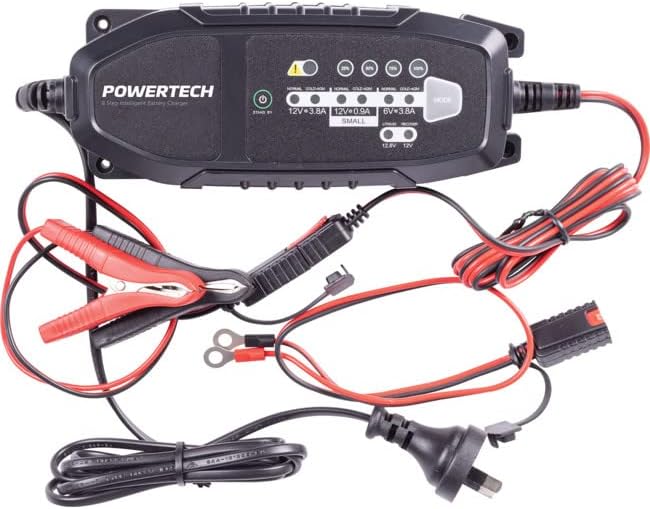
Image: The Powertech MB3904 battery charger unit shown with its various included accessories, including battery clamps, ring terminals, and the AC power cord.
4. Izici zomkhiqizo
The Powertech MB3904 charger offers advanced features for optimal battery maintenance:
- 8-Step Charging Process: Ensures thorough and efficient charging for various battery types.
- I-Multi-Voltage Ukuhambisana: Suitable for both 6V and 12V lead acid and LiFePO4 batteries.
- Ukuvikelwa Okuphelele: Includes overload, short circuit, reverse polarity, safety timer, and wrong battery protection.
- Izinkomba ze-LED ezinembile: Clearly display charge status and selected mode.
- Inkinobho yokukhetha imodi: Allows easy switching between charging modes.
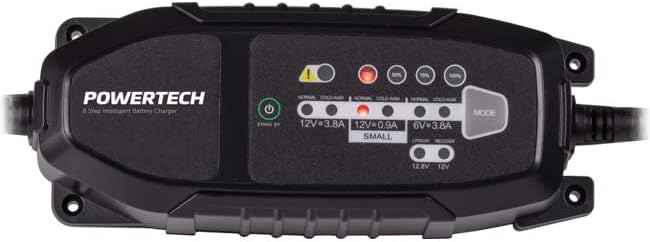
Isithombe: A phezulu phansi view of the Powertech MB3904 charger, highlighting the LED indicators for charge status and the 'MODE' button for selecting charging programs.
5. Setha
- Ukubekwa: Place the charger on a stable, flat surface in a well-ventilated area, away from direct sunlight or heat sources.
- Uxhumano Lwebhethri: Ensure the battery terminals are clean. Connect the red (+) clamp/ring terminal to the positive (+) battery terminal and the black (-) clamp/ring terminal to the negative (-) battery terminal. Ensure a secure connection.
- Ukuxhuma kwamandla: Plug the AC power cord into a suitable wall outlet. The charger will enter standby mode.
6. Iziqondiso Zokusebenza
6.1. Selecting Charging Mode
After connecting the battery and power, press the IMODE button to cycle through the available charging programs. The corresponding LED will illuminate to indicate the selected mode:
- 12V 3.8A (Normal): Standard charging for 12V lead acid batteries.
- 12V 3.8A (Cold/AGM): For charging 12V lead acid batteries in cold conditions or AGM batteries.
- 12V 0.9A (Small): For charging smaller 12V lead acid batteries.
- 6V 3.8A: For charging 6V lead acid batteries.
- Lithium (12.8V/12V): For charging 12V LiFePO4 batteries.
- Lungisa: A special mode for desulfation of deeply discharged lead acid batteries.
6.2. Inqubo yokushaja
Once a mode is selected, the charger will automatically begin the 8-step charging process. The progress LEDs (25%, 50%, 75%, 100%) will illuminate sequentially to indicate the battery's charge level. When the 100% LED is solid, the battery is fully charged.
6.3. Disconnecting the Charger
- Khipha intambo yamandla e-AC endaweni ephuma odongeni.
- Nqamula okumnyama (-) clamp/ring terminal from the negative (-) battery terminal.
- Nqamula okubomvu (+) clamp/ring terminal from the positive (+) battery terminal.
7. Isondlo
- Ukuhlanza: Clean the charger casing ngendwangu ethambile neyomile. Ungasebenzisi izihlanzi ezikhuhlayo noma izinyibilikisi.
- Isitoreji: Gcina ishaja endaweni epholile, neyomile uma ingasetshenziswa.
- Ukuhlolwa Kwekhebula: Periodically inspect the power cord and battery cables for any signs of damage. Do not use the charger if cables are damaged.
8. Ukuxazulula izinkinga
| Inkinga | Imbangela Engenzeka | Isixazululo |
|---|---|---|
| Charger not turning on. | No power from outlet; loose connection. | Check power outlet; ensure power cord is securely plugged in. |
| Error LED illuminated. | Reverse polarity; short circuit; wrong battery type. | Check battery connections for correct polarity; inspect cables for shorts; ensure battery type matches selected mode. |
| Ibhethri ayishaji. | Battery deeply discharged/damaged; incorrect mode selected. | Try "Repair" mode for lead acid batteries; test battery with a multimeter; ensure correct charging mode is selected. |
9. Imininingwane
- Imodeli: MB3904
- Okokufaka Voltage: 220-240V AC, 50/60Hz
- Okukhipha Umqtage: 6V / 12V DC
- Ukushaja Kwamanje: 0.9A / 3.8A
- Izinhlobo Zebhethri: Lead Acid (WET, MF, CA, EFB, GEL, AGM), LiFePO4
- Ukuvikelwa: Overload, Short Circuit, Reverse Polarity, Safety Timer, Wrong Battery
- Ubukhulu: Cishe 20.4 x 7.4 x 4.8 cm
- Isisindo: Cishe i-534 g
- Ukuthobela: CE
10. Iwaranti kanye Nokusekela
This Powertech product is covered by a standard manufacturer's warranty. For specific warranty terms and conditions, please refer to the warranty card included with your purchase or contact your retailer.
For technical support or service inquiries, please contact Jaycar Electronics customer service or visit their official webindawo. Gcina ubufakazi bakho bokuthenga ngezimangalo zewaranti.
I-Jaycar Electronics Webindawo: www.jaycar.com.au


