1. Isingeniso
This manual provides detailed instructions for the safe and efficient operation of your Pyle PWMA1299A 12-inch Portable Wireless Bluetooth Speaker System. Please read this manual thoroughly before using the device and retain it for future reference. This system is designed for versatile audio playback and amplification, featuring Bluetooth connectivity, USB/Micro SD card readers, FM radio, and microphone inputs.
2. Iziyalezo Zokuphepha
- Ungabeki le yunithi emvuleni noma emswakama ukuze uvimbele izingozi zomlilo noma zokushaqeka.
- Do not open the cabinet. There are no user-serviceable parts inside. Refer all servicing to qualified personnel.
- Qinisekisa ukungena komoya ngendlela efanele. Ungavimbi izimbobo zokungenisa umoya.
- Avoid placing the unit near heat sources such as radiators, heat registers, stoves, or other apparatus that produce heat.
- Vikela intambo yamandla ekuhanjweni ngayo noma ekuncinzweni, ikakhulukazi kumapulaki, ezintweni ezisetshenziswayo, kanye nendawo lapho ziphuma khona ezinsizeni.
- Khipha izinto ezisetshenziswayo ngesikhathi seziphepho zombani noma uma zingasetshenziswa isikhathi eside.
- Sebenzisa kuphela okunamathiselwe/izinsiza ezicaciswe umenzi.
- Dispose of batteries properly. Do not expose batteries to excessive heat.
3. Okuqukethwe Kwephakheji
Qinisekisa ukuthi zonke izinto zikhona kuphakheji:
- Pyle PWMA1299A Portable PA Speaker System
- (2) Amamakhrofoni aphathwayo angenantambo
- Ikhebula Lamandla
- Isilawuli kude

Image: The Pyle PWMA1299A speaker system, shown with its included two wireless handheld microphones and remote control. The speaker features a retractable handle and wheels for portability.
4. Izici zomkhiqizo
- Idizayini Ehlangene Nephathekayo: Features a convenient carry handle and rolling wheels for easy transport.
- Ukusakaza-bukhoma kwe-Bluetooth okungenantambo: Connects to smartphones, tablets, laptops, and other Bluetooth-enabled devices.
- Ibhethri Eyakhelwe Ngaphakathi Elishajwayo: Provides up to 3+ hours of operation on a single charge.
- Ukhozi FM: Integrated FM tuner with a digital LED display.
- USB Flash & Micro SD Memory Card Readers: Supports MP3 digital audio file ukudlala.
- Audio Recording Function: Allows recording audio directly to USB/Micro SD.
- Okokufaka kwemakrofoni: Includes 1/4'' microphone input and support for two wireless microphones.
- Aux (3.5mm) Input Jack: Okokuxhuma amadivaysi omsindo angaphandle.
- Full Range Stereo Sound: Equipped with a 12'' mid-range speaker and a 3'' tweeter for clear audio.
- Adjustable Audio Controls: Features Echo, Bass, and Volume adjustments.
- Karaoke Microphone Talk-Over Mode: Automatically lowers background music when microphone is in use.

Isithombe: Kuqhume view of the speaker's internal components, highlighting the 12-inch mid-range speaker and the 3-inch tweeter, which contribute to the system's sound reproduction.
5. Setha
5.1 Ukushaja Kwasekuqaleni
Before first use, fully charge the speaker's built-in rechargeable battery. Connect the power cable to the AC input on the rear panel of the speaker and plug it into a standard wall outlet (120/240V). The charging indicator light will illuminate. Charging typically takes several hours. Once fully charged, the indicator may change color or turn off, depending on the model. A full charge provides approximately 3+ hours of battery life.

Image: The rear control panel of the Pyle speaker, showing various inputs and controls, including the power input for charging the internal battery.
5.2 Ukuvula / Ukuvula
Locate the power switch on the rear panel of the speaker. Flip the switch to the "ON" position to power on the unit. The digital LED display will light up. To power off, flip the switch to the "OFF" position. It is recommended to turn off the power with the ON/OFF switch when not in use to prevent battery damage from standby mode.
6. Iziqondiso Zokusebenza
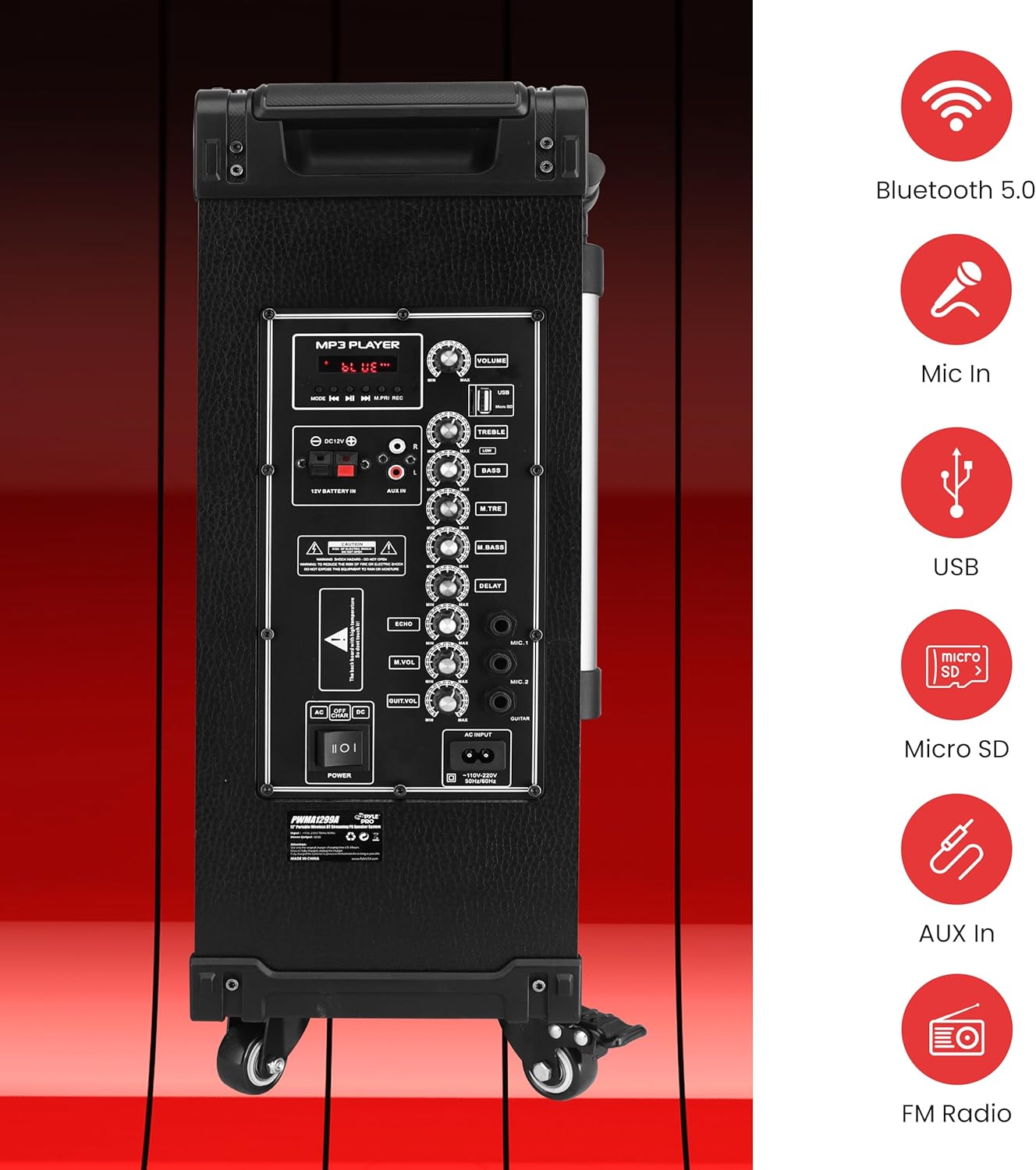
Isithombe: A enemininingwane view of the speaker's rear control panel, illustrating the layout of the MP3 player section, volume and tone controls, microphone inputs, and auxiliary connections.
6.1 Ukumatanisa kwe-Bluetooth
- Amandla kusipika.
- Press the "MODE" button on the control panel or remote control until "BLUE" appears on the digital LED display, indicating Bluetooth mode.
- Edivayisini yakho enikwe amandla i-Bluetooth (i-smartphone, ithebhulethi, njll.), vula i-Bluetooth bese usesha amadivayisi atholakalayo.
- Select "PYLE" from the list of devices.
- Once paired, the speaker will emit a confirmation tone, and you can begin streaming audio wirelessly. The Bluetooth wireless range is approximately 33+ feet.
The Pyle speaker supports Bluetooth version 5.0 for stable wireless connections.
6.2 USB/Micro SD Playback
- Insert a USB flash drive or Micro SD card into the corresponding slot on the control panel.
- The speaker will automatically switch to USB/SD mode and begin playing MP3 files. If it does not switch automatically, press the "MODE" button to select USB/SD mode.
- Use the playback controls (Play/Pause, Next, Previous) on the control panel or remote control to manage your music.
6.3 Umsakazo we-FM
- Press the "MODE" button until "FM" appears on the digital LED display.
- Press and hold the Play/Pause button to initiate an automatic scan for FM stations. The speaker will save all found stations.
- Use the Next/Previous buttons to navigate through the saved FM stations.
6.4 Ukusetshenziswa kwemakrofoni
The system includes two wireless handheld microphones and a 1/4'' wired microphone input.
- Amamakrofoni Angenantambo: Ensure the wireless microphones have fresh 'AA' batteries (2 per microphone). Power on the microphones. They should automatically connect to the speaker.
- Imakrofoni enentambo: Plug a 1/4'' microphone into the "MIC IN" jack on the control panel.
- Adjust the "MIC VOL" knob to control the microphone volume.
- Use the "ECHO", "M.BASS" (Mic Bass), and "M.TRE" (Mic Treble) knobs to fine-tune the microphone's sound.
- The Karaoke Microphone Talk-Over Mode automatically lowers background music when you speak into the microphone.
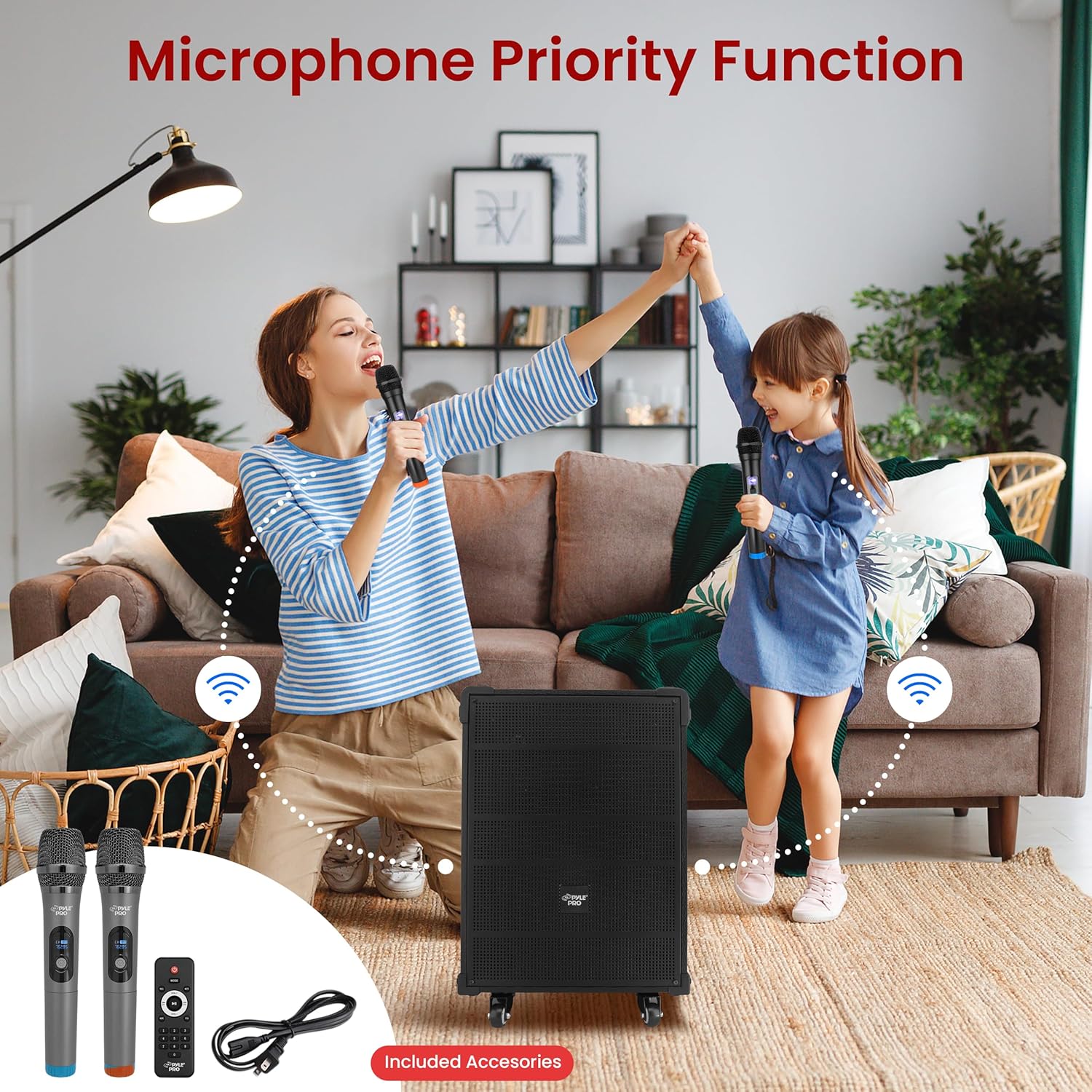
Image: Two individuals using the wireless microphones with the Pyle speaker system, demonstrating its use for vocal performances or public speaking.
6.5 Audio Recording Function
To record audio from the microphone or auxiliary input directly to a USB drive or Micro SD card:
- Ensure a USB drive or Micro SD card is inserted into the speaker.
- Connect your microphone or auxiliary device.
- Press the "REC" button on the control panel or remote control to start recording.
- Press "REC" again to stop recording. The recorded file will be saved to the USB drive or Micro SD card.
6.6 Aux (3.5mm) Input
Connect external audio devices (e.g., MP3 players, CD players) using a 3.5mm audio cable to the "AUX IN" jack on the control panel. Press the "MODE" button to select AUX input mode.
6.7 Iphaneli yokulawula iphelileview
The rear control panel features various knobs and buttons for adjusting audio settings:
- UMQONDO: Master volume control for overall sound output.
- I-PREBLE: Ilungisa impendulo yemvamisa ephezulu.
- I-BASS: Ilungisa impendulo yemvamisa ephansi.
- I-ECHO: Controls the echo effect for microphones.
- I-MIC VOL: Adjusts the volume of connected microphones.
- I-M.BASS: Adjusts the bass for microphones.
- M.TRE: Adjusts the treble for microphones.
- Ukubambezeleka: Controls the delay effect for microphones.
7. Isondlo
- Ukuhlanza: Sebenzisa indwangu ethambile neyomile ukuhlanza ingaphandle lesipikha. Ungasebenzisi izihlanzi ezirhabaxa noma izinyibilikisi.
- Ukunakekelwa kwebhethri: To prolong battery life, fully charge the unit before storing it for extended periods. Avoid completely draining the battery frequently.
- Isitoreji: Gcina isipikha endaweni epholile, neyomile kude nelanga eliqondile namazinga okushisa aphezulu.
8. Ukuxazulula izinkinga
| Inkinga | Imbangela Engenzeka | Isixazululo |
|---|---|---|
| Awekho amandla | Battery is depleted; Power cable not connected; Power switch is off. | Charge the battery; Ensure power cable is securely connected and plugged into a live outlet; Turn the power switch to "ON". |
| Akukho okukhipha umsindo | Volume is too low; Incorrect input mode selected; Audio cable not connected properly. | Increase the master volume; Press "MODE" to select the correct input (Bluetooth, USB, SD, FM, AUX); Check audio cable connections. |
| I-Bluetooth ayixhumi | Speaker not in Bluetooth mode; Device too far; Device already connected to another speaker. | Ensure speaker is in Bluetooth mode ("BLUE" on display); Move device closer to speaker; Disconnect from other Bluetooth devices. |
| Imakrofoni ayisebenzi | Microphone volume too low; Wireless microphone batteries depleted; Wired microphone not connected. | Increase "MIC VOL" knob; Replace 'AA' batteries in wireless microphones; Ensure wired microphone is securely plugged into "MIC IN". |
If you experience issues with charging, ensure the power cable is firmly connected to both the speaker and a working power outlet. If the issue persists, consult the support section.
Video: This video demonstrates the Pyle 12'' Portable Wireless Bluetooth Speaker system, showcasing its features and portability. It provides a visual overview of the product's design and functionality.
9. Imininingwane
| Isici | Imininingwane |
|---|---|
| Inombolo Yemodeli | I-PWMA1299A |
| MAX Power Output | 800 Watt |
| Uhlelo Lomsindo | 12'' Mid-Range Speaker + 3'' Tweeter |
| Impedance | 4 ohm |
| Isilinganiso se-S/N | 60db |
| Inguqulo ye-Bluetooth | 5.0 |
| I-Bluetooth Wireless Range | 33'+ Ft. |
| Ibhethri Elakhelwe ngaphakathi Elishajwayo | 12V/7AH Lead-Acid Battery |
| Impilo Yebhethri | Kufika emahoreni angu-3+ |
| Ukunikezwa kwamandla kagesi | 120/240V |
| Mic Nominal Current Drain | <100mAh |
| Microphone Battery Requirement | (2) x 'AA' Batteries (Each) |
| Ubukhulu bomkhiqizo (L x W x H) | 18.50'' x 11.22'' x 25.59'' inches |
| Isisindo sento | 28.3 amakhilogremu |
| I-UPC | 842893147017 |
10. Iwaranti kanye Nokusekela
Pyle products are designed for reliability and performance. For warranty information, technical support, or service inquiries, please refer to the official Pyle webisayithi noma uxhumane nomnyango wabo wesevisi yamakhasimende. Gcina irisidi lakho lokuthenga njengobufakazi bokuthenga izimangalo zewaranti.
Ukuze uthole izinsiza ezengeziwe nolwazi lomkhiqizo, vakashela ku Pyle Store on Amazon.


