1. Isingeniso
This manual provides comprehensive instructions for the installation, operation, and maintenance of your COUGAR Archon 2 RGB Mid Tower Case. Please read this manual carefully before beginning installation to ensure proper setup and to maximize the performance and longevity of your product.

Umfanekiso 1.1: I-engeli view of the COUGAR Archon 2 RGB Mid Tower Case, showcasing the tempered glass side panel and front RGB fans.
2. Izici zomkhiqizo
The COUGAR Archon 2 RGB Mid Tower Case is designed for PC enthusiasts seeking a balance of aesthetics, airflow, and functionality. Key features include:
- Elegant Design with Tempered Glass: A sleek black finish combined with a tempered glass side panel allows for a clear view of internal components and RGB lighting.
- Ukugeleza komoya okulungiselelwe: Supports multiple fan configurations and includes three pre-installed 120mm ARGB fans at the front for efficient cooling.
- Ukuhambisana Okubanzi: Accommodates Mini ITX, Micro ATX, and ATX motherboards.
- Ample Storage Options: Provides bays for both 3.5" HDDs and 2.5" SSDs.
- Convenient Front I/O: Features USB 3.0 and USB 2.0 ports for easy peripheral connectivity.
- Ukulawula Ukukhanyisa kwe-RGB: Integrated ARGB fans offer customizable lighting effects.

Umfanekiso 2.1: Ngaphambili view of the COUGAR Archon 2 RGB case, highlighting the three pre-installed ARGB fans.
3. Umhlahlandlela wokusetha
Follow these steps to properly install your components into the COUGAR Archon 2 RGB case.
3.1. Uhlu Lokuhlola Lokufaka Ngaphambili
- Ensure you have all necessary components: motherboard, CPU, RAM, GPU, power supply, storage drives, and appropriate tools (screwdriver, zip ties).
- Work on a clean, static-free surface. Consider using an anti-static wrist strap.
3.2. Evula Icala
- Carefully remove the tempered glass side panel by unscrewing the thumbscrews located at the rear of the case. Set the panel aside on a soft, flat surface to prevent scratches.
- Remove the opposite metal side panel by unscrewing its thumbscrews and sliding it backward.
3.3. Ukufakwa kwe-Motherboard
- Faka isivikelo se-I/O (uma singanamathiselwanga kusengaphambili ebhodini lakho le-motherboard) endaweni engemuva yebhokisi.
- Align your motherboard with the standoffs inside the case. Ensure all standoffs match the screw holes on your motherboard.
- Secure the motherboard using the provided screws. Do not overtighten.
3.4. Ukufakwa Kweyunithi Yokunikezela Ngamandla (i-PSU).
- Thola indawo yokukhweza ye-PSU ngezansi ngemuva kwekesi.
- Slide your PSU into the designated bay from the rear of the case, ensuring the fan faces downwards for optimal cooling (if the case has a bottom vent).
- Vikela i-PSU ngezikulufo ngemuva kwekesi.
3.5. Ukufakwa Kwedrayivu Yesitoreji
The Archon 2 RGB supports both 3.5" HDDs and 2.5" SSDs.
- For 3.5" HDDs: Locate the drive cage usually beneath the PSU shroud. Slide the HDD into the drive bay and secure it with screws.
- For 2.5" SSDs: Mount SSDs to the designated mounting points on the back of the motherboard tray or within the drive cage, securing them with screws.
3.6. Expansion Card (GPU) Installation
- Susa amakhava we-PCIe slot adingekayo ngemuva kwekesi.
- Insert your graphics card or other expansion cards into the appropriate PCIe slot on the motherboard.
- Secure the card with screws to the case.
3.7. Cable Management and Front Panel Connections
Route all power and data cables neatly behind the motherboard tray. Connect the front panel I/O cables (USB, audio, power switch, reset switch, LED indicators) to their respective headers on the motherboard according to your motherboard manual.

Figure 3.1: Dimensions of the COUGAR Archon 2 RGB case, useful for planning component fit and space.
4. Iziqondiso Zokusebenza
4.1. Ivula amandla
Once all components are installed and cables are connected, replace both side panels. Connect your monitor, keyboard, mouse, and power cable to the PSU. Press the power button on the top panel of the case to start your system.
4.2. Ukulawula Ukukhanyisa kwe-RGB
The pre-installed ARGB fans are typically controlled via a dedicated button on the case's front I/O panel or through your motherboard's RGB software (if connected to an ARGB header). Refer to your motherboard manual for software-based control options.
5. Isondlo
Ukugcinwa njalo kusiza ukuqinisekisa ukusebenza kahle kanye nobude besikhathi sezingxenye ze-PC yakho.
- Ukuhlanza Uthuli: Periodically clean dust filters (if present) and internal components using compressed air. Ensure the system is powered off and unplugged before cleaning.
- Ukuphathwa Kwekhebula: Ensure cables are neatly routed to avoid obstructing airflow.
- Ukuhlolwa kwabalandeli: Check fans for dust buildup or obstructions that could impede their operation.
6. Ukuxazulula izinkinga
Uma uhlangabezana nezinkinga, bheka izinyathelo ezilandelayo ezivamile zokuxazulula izinkinga:
- Isistimu Ayisebenzi:
- Check all power connections, including the PSU to the wall outlet, PSU to motherboard (24-pin and CPU 8-pin), and front panel power switch header.
- Qinisekisa ukuthi iswishi ye-PSU isesimweni 'SOKUBANISWA'.
- Fans Not Spinning / RGB Not Working:
- Verify fan power cables are securely connected to the motherboard or fan controller.
- Check ARGB headers for proper connection to the motherboard or RGB controller.
- Ensure RGB software or case button is correctly configured.
- Akukho okukhiphayo kokubonisa:
- Confirm the monitor cable is connected to the graphics card (not the motherboard integrated graphics, unless no dedicated GPU is present).
- Hlela kabusha amamojula ekhadi lehluzo kanye ne-RAM.
7. Imininingwane
Detailed specifications for the COUGAR Archon 2 RGB Mid Tower Case:
| Isici | Imininingwane |
|---|---|
| Igama Lemodeli | ARCHON 2 RGB |
| Uhlobo Lwekesi | Mid Mid |
| Ukuhambisana kwe-Motherboard | Mini ITX, Micro ATX, ATX |
| Ubukhulu (LxWxH) | 14.96 x 8.27 x 18.5 amayintshi (380 x 210 x 470 mm) |
| Isisindo sento | 11.37 pounds (5.17 kg) |
| Okubalulekile | Insimbi, Ingilazi Ethambile |
| Umbala | Mnyama |
| Abalandeli abafakwe ngaphambilini | 3 x 120mm ARGB fans (Front) |
| Ukusekelwa Kwabalandeli (Ngaphambili) | 3 x 120mm noma 2 x 140mm |
| I/O Amachweba | 1 x USB 2.0, 2 x USB 3.0, Audio In/Out |
| Uhlobo Lokufaka Ukunikezwa Kwamandla | Intaba Ephansi |
| Indlela Yokupholisa | Umoya |
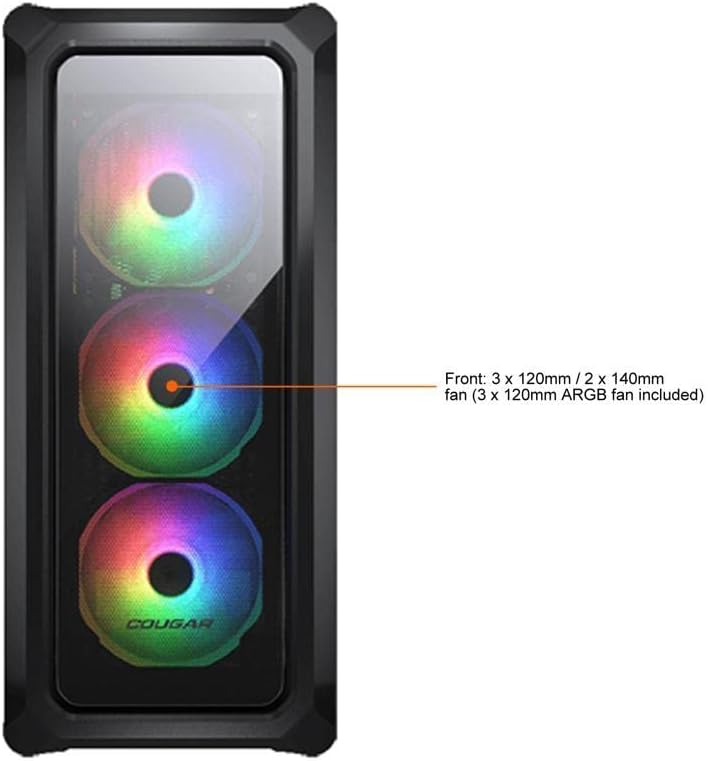
Figure 7.1: Front panel fan configuration and size options for the COUGAR Archon 2 RGB case.
8. Iwaranti kanye Nokusekela
For warranty information and technical support, please refer to the official COUGAR webisayithi noma uxhumane nomnyango wabo wesevisi yamakhasimende. Gcina ubufakazi bakho bokuthenga ngezimangalo zewaranti.
COUGAR Official Webindawo: cougargaming.com


