Isingeniso
This manual provides detailed instructions for the setup, operation, and maintenance of your Sharp Digital Alarm Clock, Model B08TG1QB2B. Designed for simplicity, this clock features a clear LED display, dual ascending alarms, and a battery backup system to ensure reliability.

Umfanekiso 1: Ngaphambili view of the Sharp Digital Alarm Clock, displaying the time 12:08 in green LED digits.
Izici Zomkhiqizo
- Idizayini esebenziseka kalula: Ukusebenza okulula okulungele bonke abasebenzisi.
- Isistimu ye-alamu ekabili: Set two independent alarms for different schedules.
- Ascending Alarm Volume: Alarm starts softly and gradually increases in volume for a gentle wake-up.
- Isipele Sebhethri: Igcina izilungiselelo zesikhathi kanye ne-alamu ngesikhathi sogesitages (requires 2x AA batteries, not included).
- Illuminated Green LED Digits: Isibonisi esicacile nesifundeka kalula.
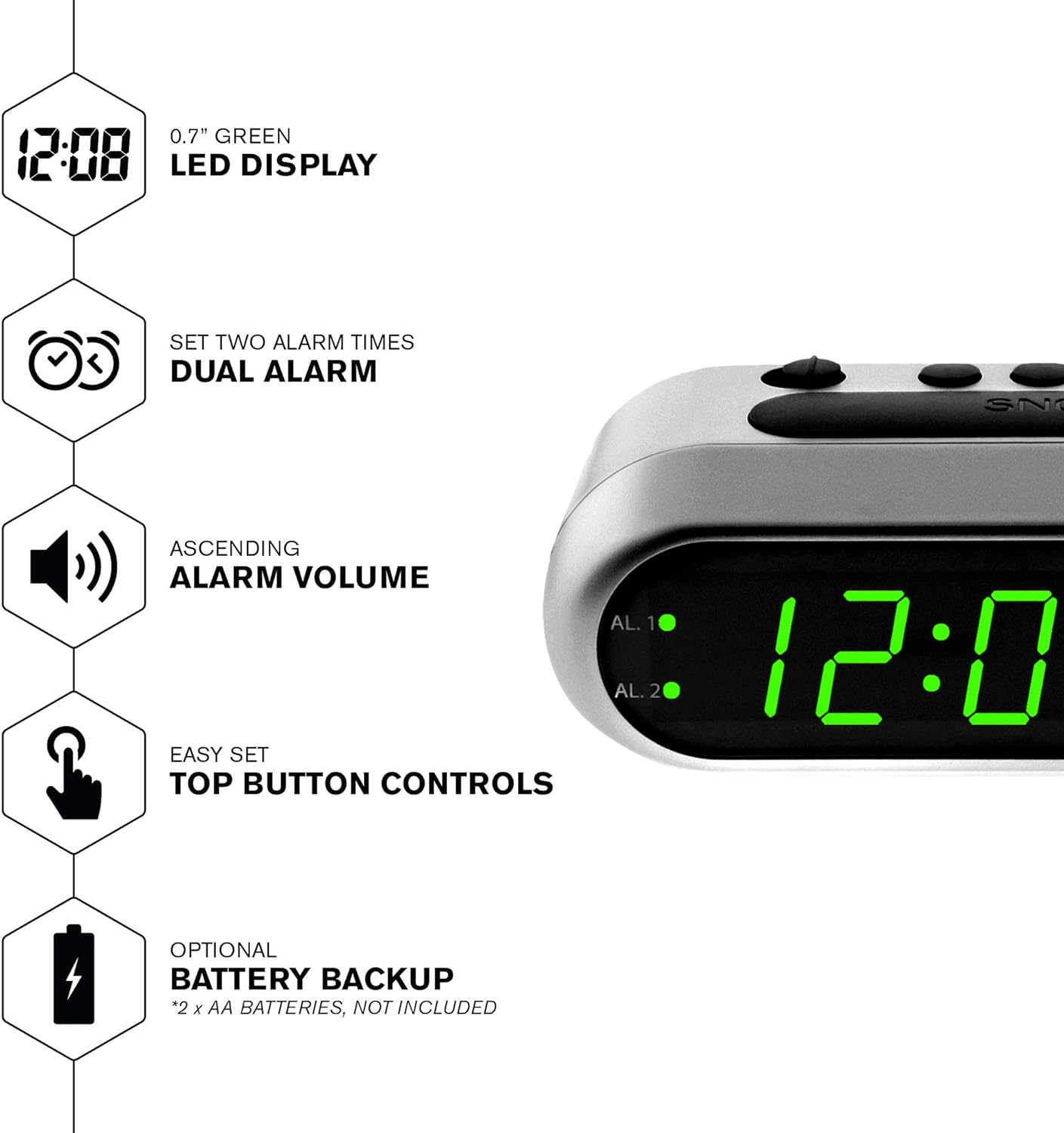
Umdwebo 2: Ngaphezuluview of the clock's main features, including the LED display, dual alarm, ascending volume, and battery backup.
Okuqukethwe Kwephakheji
- Sharp Digital Alarm Clock (Model B08TG1QB2B)
- Isixhumi Amandla se-AC
- Incwadi Yeziqondiso
Qaphela: 2x AA batteries for battery backup are not included and must be purchased separately.
Izilawuli nokubonisa
Familiarize yourself with the buttons and indicators on your alarm clock:
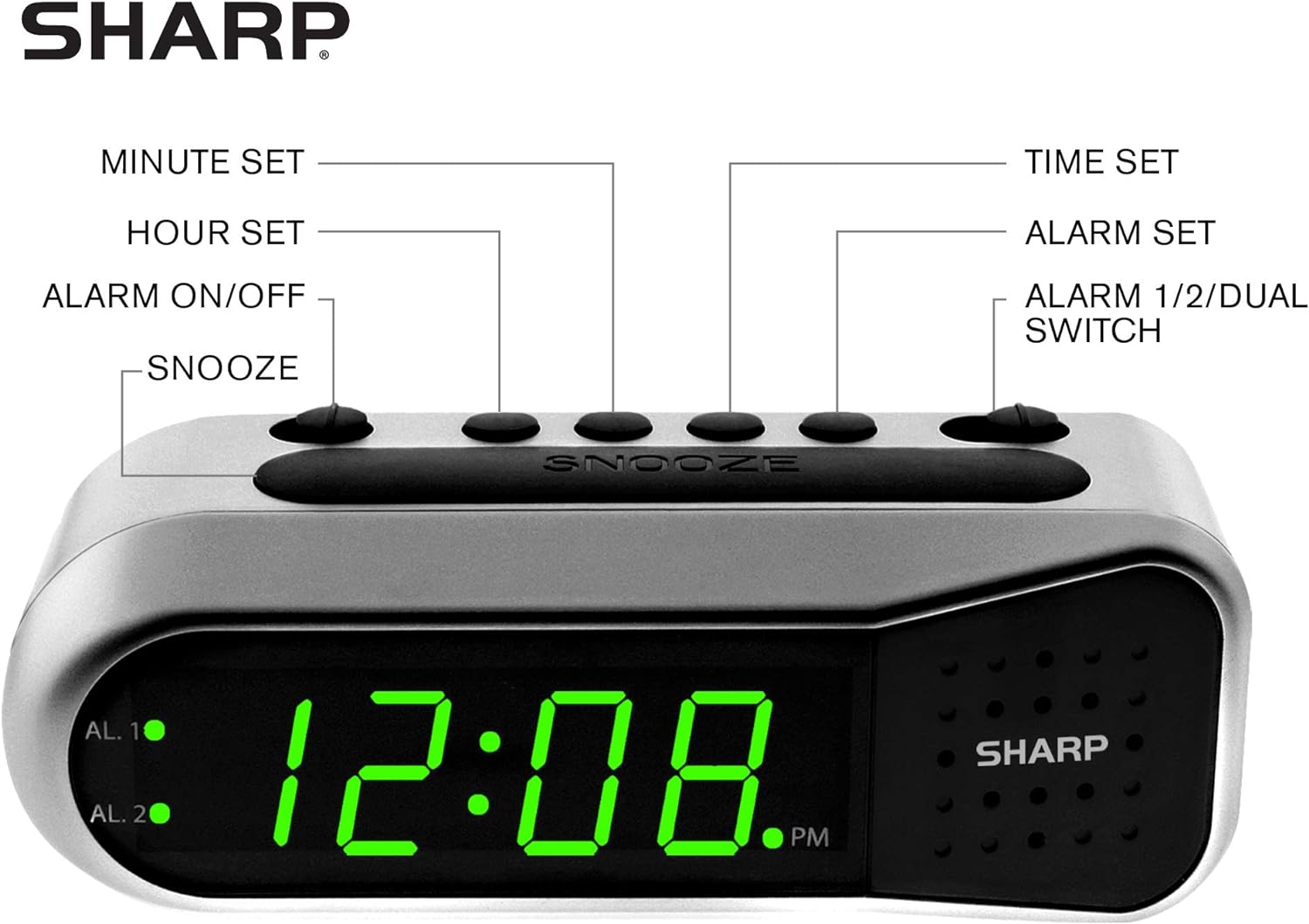
Figure 3: Labeled diagram of the clock's controls and display elements.
- Minute Set Button: Adjusts minutes for time and alarm settings.
- Hour Set Button: Adjusts hours for time and alarm settings.
- Alarm On/Off Switch: Activates or deactivates the selected alarm.
- Inkinobho Yokusnuza: Temporarily silences the alarm for a short period.
- Inkinobho Yokusetha Isikhathi: Ingena kwimodi yokusetha isikhathi.
- Inkinobho Yokusetha I-alamu: Ingena kwimodi yokusetha i-alamu.
- Alarm 1/2/Dual Switch: Selects which alarm (Alarm 1, Alarm 2, or both) is being set or activated.
- AL. 1 Indicator: Iyakhanya uma i-Alarm 1 isebenza.
- AL. 2 Indicator: Iyakhanya uma i-Alarm 2 isebenza.
- Inkomba ye-PM: Lights up when the displayed time is PM.
Setha
1. Ukuxhunywa kwamandla
Connect the AC power adapter to the DC input jack located on the back of the alarm clock. Plug the adapter into a standard electrical outlet. The display will illuminate.
2. Ukufakwa Kwesipele Sebhethri
The battery backup feature requires two (2) AA batteries (not included). These batteries maintain time and alarm settings during a power outage but do not power the display.
- Open the battery compartment cover on the bottom of the clock.
- Insert two (2) AA batteries, observing the correct polarity (+ and -) as indicated inside the compartment.
- Shintshanisa ikhava yengxenye yebhethri.
Qaphela: Replace batteries annually or when the clock experiences frequent power interruptions to ensure reliable backup.
3. Ukusetha Isikhathi Sokuqala
After connecting power, the display will show a default time (e.g., 12:00 AM). Set the current time:
- Cindezela bese ubamba i ISIKHATHI ESIBEKILE inkinobho. Izinombolo zehora zizokhanya.
- Esabambe ISIKHATHI ESIBEKILE, cindezela i IHORA ISETHIWE inkinobho ngokuphindaphindiwe ukuze ulungise ihora. Qaphela inkomba ye-PM ukuze uthole ukulungiselelwa okufanele kwe-AM/PM.
- Khipha i ISIKHATHI ESIBEKILE inkinobho.
- Cindezela bese ubamba i ISIKHATHI ESIBEKILE inkinobho futhi. Amadijithi amaminithi azokhanya.
- Esabambe ISIKHATHI ESIBEKILE, cindezela i IMIZUZU ISEthiwe inkinobho ngokuphindaphindiwe ukulungisa imizuzu.
- Khipha i ISIKHATHI ESIBEKILE inkinobho ukuze wonge isikhathi.
Imiyalelo yokusebenza
Ukusetha i-Alarm 1 noma i-Alarm 2
Your clock features two independent alarms. To set an alarm:
- Shelelezisa i- I-Alamu 1/2/Ezimbili switch to either AL. 1 or AL. 2, depending on which alarm you wish to set.
- Cindezela bese ubamba i ISILUNGISELELO SE-ALMU button. The hour digits for the selected alarm will flash.
- Esabambe ISILUNGISELELO SE-ALMU, cindezela i IHORA ISETHIWE button repeatedly to adjust the alarm hour. Ensure the correct AM/PM is selected.
- Khipha i ISILUNGISELELO SE-ALMU inkinobho.
- Cindezela bese ubamba i ISILUNGISELELO SE-ALMU button again. The minute digits for the selected alarm will flash.
- Esabambe ISILUNGISELELO SE-ALMU, cindezela i IMIZUZU ISEthiwe button repeatedly to adjust the alarm minutes.
- Khipha i ISILUNGISELELO SE-ALMU button to save the alarm time.
Activating/Deactivating Alarms
To turn an alarm ON or OFF:
- Shelelezisa i- I-Alamu 1/2/Ezimbili shintshela ku AL. 1 or AL. 2.
- Hambisa i I-ALMU IVULIWE / IVALIWE shintshela ku- ON position to activate the alarm. The corresponding AL. 1 or AL. 2 indicator light will illuminate.
- Hambisa i I-ALMU IVULIWE / IVALIWE shintshela ku- VALIWE position to deactivate the alarm. The indicator light will turn off.
To activate both alarms, set both alarm times and then slide the I-Alamu 1/2/Ezimbili shintshela ku OKUMBILI. Both AL. 1 and AL. 2 indicators will light up.
Umsebenzi wokusnuza
Uma i-alamu ikhala, cindezela enkulu SNOZA button on top of the clock. The alarm will temporarily stop and sound again after approximately 9 minutes.
Emisa i-Alamu
To stop the alarm completely after it sounds, slide the I-ALMU IVULIWE / IVALIWE shintshela ku- VALIWE position. The alarm will reset for the next day.
Isondlo
Ukuhlanza
Wipe the clock with a soft, dry cloth. Do not use abrasive cleaners or solvents, as they may damage the finish.
Ukushintshwa Kwebhethri
Replace the AA backup batteries annually or if the clock loses time during power interruptions. Refer to the "Battery Backup Installation" section for instructions.
Ukuxazulula inkinga
| Inkinga | Imbangela Engenzeka | Isixazululo |
|---|---|---|
| Clock display is blank. | Awekho amandla e-AC. | Ensure the AC adapter is securely plugged into the clock and a working electrical outlet. |
| I-alamu ayizwakali. | I-alamu ayenziwanga isebenze noma isethwe ngokungalungile. | Qinisekisa i- I-ALMU IVULIWE / IVALIWE switch iku- ON position and the alarm time is correctly set (check AM/PM). |
| Time is incorrect after power outage. | Backup batteries are dead or not installed. | Install fresh AA batteries or replace existing ones. Reset the time if necessary. |
| I-alamu ithule/inomsindo kakhulu. | Alarm volume is ascending, not fixed. | The alarm features an ascending volume. It starts faintly and gradually increases. This is normal operation. |
Imininingwane
- Imodeli: B08TG1QB2B
- Ibhrendi: Ibukhali
- Uhlobo lokubonisa: I-Digital LED (Green)
- Umthombo wamandla: AC Power Adapter (included), 2x AA Batteries (for backup, not included)
- Ubukhulu bomkhiqizo: 5.5" Ububanzi x 2.1" Ububanzi x 2.3" Ububanzi (cishe)
- Isisindo: 8.4 amakhilogremu
- Okubalulekile: Ipulasitiki
- Umbala: Isiliva Esixutshwe
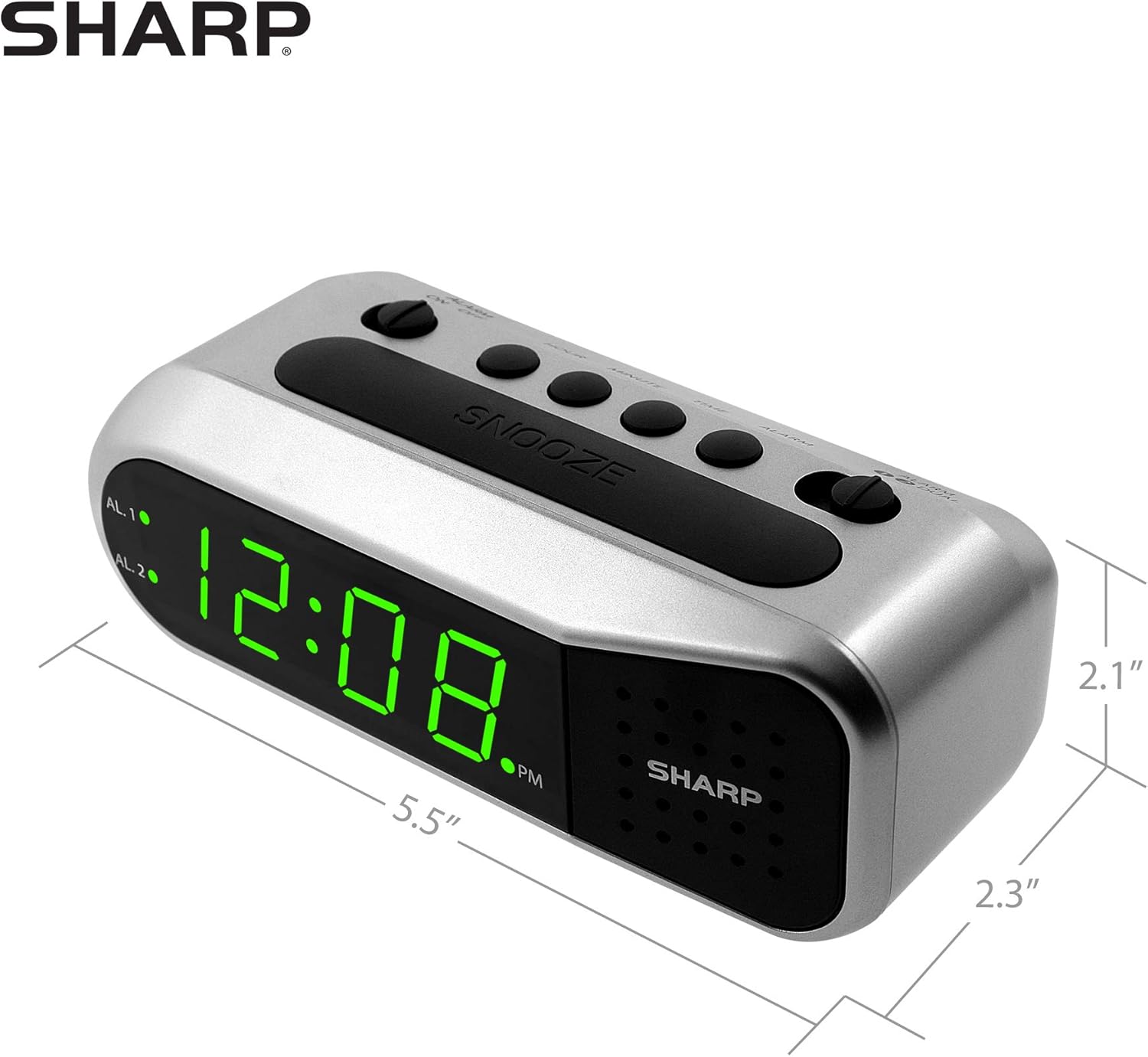
Figure 4: Dimensions of the Sharp Digital Alarm Clock.
Iwaranti kanye Nokusekela
For warranty information or technical support, please refer to the warranty card included with your product or visit the official Sharp webindawo. Gcina irisidi lakho lokuthenga njengobufakazi bokuthenga.
For further assistance, you may contact Sharp customer service through their official channels.


