ZKTeco MiniTA User Manual
Comprehensive guide for your ZKTeco MiniTA Touchless Face Recognition Attendance & Access Control Terminal.
1. Isingeniso
The ZKTeco MiniTA is an advanced touchless face recognition terminal designed for efficient attendance and access control. This device offers a hygienic and secure solution for various environments, including offices, schools, and commercial spaces. With its integrated WiFi, mobile app support, and free web/cloud-based software, the MiniTA provides a comprehensive and flexible management system.
2. Umkhiqizo Uphelileview
The MiniTA terminal is engineered for reliability and ease of use, featuring a compact design and robust functionality.
Izici Eziyinhloko:
- Ukusebenza kwe-Touchless: Promotes hygiene and reduces physical contact, ideal for high-traffic areas.
- Ukuxhumana kwe-WiFi: Enables wireless communication for flexible installation.
- Ukuhlanganiswa kohlelo lokusebenza lweselula: Seamless synchronization with mobile applications for remote monitoring and management.
- Mahhala WebIsofthiwe Esekelwe: Intuitive software for real-time data access and reporting.
- Visible Light Facial Recognition: Advanced recognition technology.
- Anti-spoofing Algorithm: Protects against fake faces from photos, videos, and 3D masks.
- Isikrini Sokuthinta esingu-2.8-intshi: For easy interaction and display.
- Ukusekelwa Kwezilimi Eziningi: Accommodates diverse user bases.
- Local Encrypted Data: Ensures employee privacy by storing user data locally.
Umkhiqizo Views:

Ngaphambili view of the ZKTeco MiniTA device, displaying a successful face verification.

Emuva view of the ZKTeco MiniTA, highlighting the various connection ports: Access control port, Power Port, and LAN port, along with the anti-tampshintsha.
3. Setha
Yini EseBhokisini:

The package includes the MiniTA device, back plate, adapter, various cables (LAN, access control, power), and screws for mounting.
- Idivayisi
- Ipuleti elingemuva
- I-adaptha
- Cables (LAN, Access Control, Power)
- Screws and holders
- Quick Start Guide
Hardware Requirements for Software Installation:
To ensure optimal performance of the accompanying software, please meet the following system requirements:
- Isistimu esebenzayo: Linux, Mac OS, and (64-bit only) Windows 8/8.1/10 / Server 2003/2008/2012/2014/2016
- CPU: Intel i3 quadcore or higher
- I-RAM: Ubuncane be-8GB
- Suggested Browser: Chrome 33+/ IE 11+/ Firefox 27+
Connectivity and System Integration:
The ZKTeco MiniTA integrates seamlessly into your existing network and access control infrastructure.
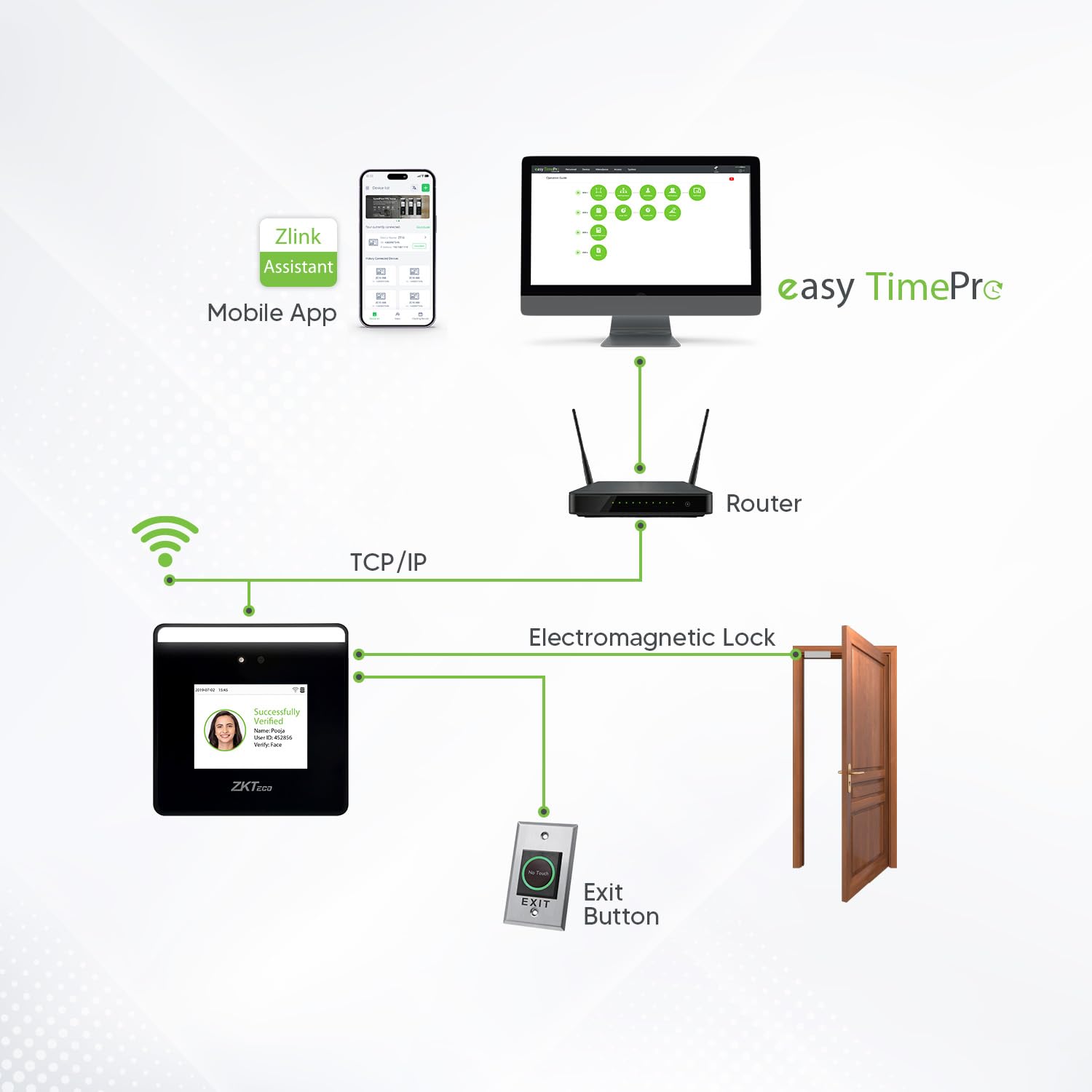
System diagram illustrating the MiniTA's connection to a router via TCP/IP, enabling communication with the mobile app and Easy TimePro software. It also shows integration with an electromagnetic lock and an exit button for access control.
4. Iziqondiso Zokusebenza
Ukuqashelwa kobuso:
The MiniTA utilizes advanced visible light facial recognition technology for quick and accurate identification.

The device offers enhanced recognition distance and a wider face detection angle for convenient use.

The system can recognize multiple faces simultaneously, streamlining the attendance process.

Anti-spoofing technology prevents unauthorized access using photos or videos.

Optimal face detection is achieved within +/- 30 degrees and approximately 2 meters distance.
Zlink Assistant Mobile App:
Manage your MiniTA device with ease using the Zlink Assistant mobile application.

The Zlink Assistant app provides one-touch maintenance and configuration. Download it from I-Google Play Isitolo or Apple App Store.
- Uhlu Lwedivayisi: Displays currently connected devices with details and allows easy disconnection. Previously connected devices are saved for quick reconnection.

- Ukuphathwa komsebenzisi: Retrieve, view, modify, delete, and add users in devices directly via the app. All updates synchronize in real-time.

- Credential Management: Remotely control devices to initiate credential enrollment for adding and modifying user credentials. An in-app guide assists through the process.

- View & Share Data: The Clocking Report module displays attendance data from connected devices, allowing data sharing and exporting.

Software Solutions:
ZKTeco offers various software options to manage your attendance and access control data.

ZKTime.Net 3.3 Desktop Based

easy TimePro Web Isekelwe

BioTime Cloud 2.0 Cloud Based
The Easy TimePro software offers additional features for comprehensive attendance management:
- Instant App Notification & Geo-Fencing Function
- Leave Management
- Device Online/Offline Notification
- Supports Third Party SMS Integration
- Privilege Options
- Mobile App with Outdoor Management for field employees.

Easy TimePro: Attendance in 1 Touch, available on Google Play and App Store.
- Automatic Mail Alerts: Mail notifications are sent to employees for attendance alerts in case of late, early leave, and absence.

- Auto-Synchronization: Multi-Location: Centralized management for multiple branch offices, head office, and R&D centers.

- Flexible Shift Scheduling: Supports multiple timetables, cross-day shifts (24 hours), shift cycles, auto shifts, and temporary schedules.

- Outdoor Management: Enable employees to give attendance from distant locations or work from home.

5. Isondlo
To ensure the longevity and optimal performance of your ZKTeco MiniTA device, regular maintenance is recommended:
- Ukuhlanza: Gently wipe the screen and device surface with a soft, dry cloth. Avoid using abrasive cleaners or solvents.
- Izibuyekezo zesofthiwe: Periodically check for and install software and firmware updates to ensure you have the latest features and security enhancements.
- Isipele Sedatha: Regularly back up your attendance and access data to prevent loss.
- Izimo Zemvelo: Operate the device within recommended temperature and humidity ranges to prevent damage.
6. Ukuxazulula izinkinga
If you encounter issues with your ZKTeco MiniTA, refer to the following common troubleshooting tips:
- Idivayisi Ayivuliwe: Ensure the power adapter is securely connected to both the device and a working power outlet. Verify the power source is active.
- Connectivity Issues (WiFi/LAN): Check your network cable connection if using LAN. For WiFi, ensure the device is within range of your router and the WiFi password is correctly entered. Restarting the device and router can often resolve temporary network glitches.
- Face Recognition Failure: Ensure the user's face is properly illuminated and positioned within the recognition area. Check for any obstructions on the camera lens. Re-enroll the user's face if recognition consistently fails.
- Software Configuration Difficulty: Refer to the detailed software manuals or contact customer support for guidance on complex configurations, especially for shift scheduling or data extraction.
- Data Synchronization Problems: Verify that the device and software are connected to the same network. Check network settings on both the device and the computer running the software.
- Device Password Locked/Used: If you receive a device that appears used or password-locked, contact customer support immediately for assistance. Do not attempt to reset without guidance.
For persistent issues, please contact ZKTeco customer support.
7. Imininingwane

Key specifications of the ZKTeco MiniTA device.
| Isibaluli | Inani |
|---|---|
| Ibhrendi | ZKTeco |
| Imodeli | MiniTA |
| Ubukhulu bomkhiqizo | 10 x 10 x 2.4 cm |
| Isisindo sento | 400 g |
| Bonisa | Isikrini sokuthinta esingu-2.8-intshi |
| Amandla obuso | 800 |
| Amandla Womsebenzisi | 800 |
| Ukuthengiselana | 150,000 |
| Uhlelo lokusebenza | I-Linux |
| I-Hardware yokukhweza | Adapter, Back plate, Cables, Device, Screws and holders |
| Kudingeka Amabhethri | Cha |
| Izwe azalelwe kulo | China |
| Usuku Lokuqala Olutholakalayo | 23 Novemba 2020 |
8. Iwaranti kanye Nokusekela
Ulwazi Lwesiqinisekiso:

The ZKTeco MiniTA comes with a 1-year warranty.
The ZKTeco MiniTA is backed by a Iwaranti yonyaka ongu-1 from the date of purchase, covering manufacturing defects. Please retain your purchase receipt for warranty claims.
Ukwesekwa Kwamakhasimende:

Dedicated customer support is available to assist you.
ZKTeco is committed to providing excellent customer service. Our expert customer care team offers:
- Comprehensive Call Support: Assistance from initial inquiries to post-purchase queries with dedicated pre-sales and after-sales support.
- Personalized Remote Assistance: Enjoy expert 1-on-1 remote guidance for seamless hardware and software configuration.
- Professional Training on Software: Unlock the full potential of your software platforms with step-by-step professional training and usage tips.
- Reliable Tech Support: Our responsive technical team is available all working days to quickly address and resolve any technical concerns.

Ulwazi lokuxhumana:
- Ukuphathwa kwamakhasinde: 080 6828 1333 / 8097538492
- I-imeyili: ecommerceindia@zkteco.com
- Amahora okusekela: Monday - Saturday, 9:30 AM - 6:30 PM
Imininingwane Yomngenisi:
ZKTeco Biometrics India Pvt Ltd, B-1, Khata no. 31, Devasandra Industrial Estate Whitefield Main Road, Beside Phoenix Mall, Mahadevapura, Bengaluru, Karnataka 560048


