Isingeniso
This manual provides comprehensive instructions for the setup, operation, and maintenance of your Trust Ymo Wireless Keyboard and Mouse Set. This set is designed for comfortable and efficient use with its German QWERTZ layout, quiet keys, and splash-proof design.

Image: The Trust Ymo Wireless Keyboard and Mouse Set, featuring a full-size German QWERTZ keyboard and a compact wireless mouse.
Okuqukethwe Kwephakheji
Sicela uqinisekise ukuthi zonke izinto zikhona kuphakheji:
- Trust Ymo Wireless Keyboard (German QWERTZ Layout)
- Trust Ymo Wireless Mouse
- I-USB Micro Receiver
- AAA Batteries (4 included)
- Incwadi Yomsebenzisi (le dokhumenti)

Image: The retail packaging for the Trust Ymo Wireless Keyboard and Mouse Set, indicating the contents.
Setha Imiyalelo
- Faka amabhethri:
Open the battery compartments on both the keyboard and the mouse. Insert the included AAA batteries, ensuring correct polarity (+/-). Close the compartments securely.
- Xhuma Isamukeli se-USB:
Locate the USB micro receiver, typically stored within the mouse's battery compartment or a dedicated slot. Plug the USB receiver into an available USB port on your computer (PC, Laptop, Mac, or Chromebook).
- Automatic Connection (Plug & Play):
The keyboard and mouse are designed for plug-and-play functionality. Your operating system (Windows, MacOS, Chrome OS) should automatically detect and install the necessary drivers. No additional software installation is required.

Image: A user setting up the Trust Ymo Wireless Keyboard and Mouse, illustrating the "Plug & Play" feature and the shared micro USB receiver.
Imiyalelo yokusebenza
Izici zekhibhodi
- German QWERTZ Layout: The keyboard features a standard German QWERTZ layout with a full numeric keypad for efficient data entry.
- Okhiye Abathule: The keys are designed for a soft and quiet keystroke, minimizing disturbance in shared environments.
- Multimedia and Function Keys: Access 13 dedicated office and multimedia buttons for quick control over volume, media playback, and common applications.
- Ukutsheka Okulungisekayo: The keyboard includes foldable feet to adjust the typing angle for ergonomic comfort.

Image: Close-up of the Trust Ymo keyboard, highlighting its quiet keys, adjustable feet, and multimedia function keys.
Izici zegundane
- Quiet Buttons: The mouse buttons are designed for silent clicking, reducing noise during use.
- Inkinobho ye-DPI: Adjust the mouse sensitivity (DPI) between 600 and 1400 DPI to suit your preference and task requirements.
- Ububanzi Obungenantambo: The mouse operates wirelessly with a range of up to 10 meters from the USB receiver.
- Idizayini ye-Ambidextrous: The mouse features a comfortable design suitable for both left-handed and right-handed users.
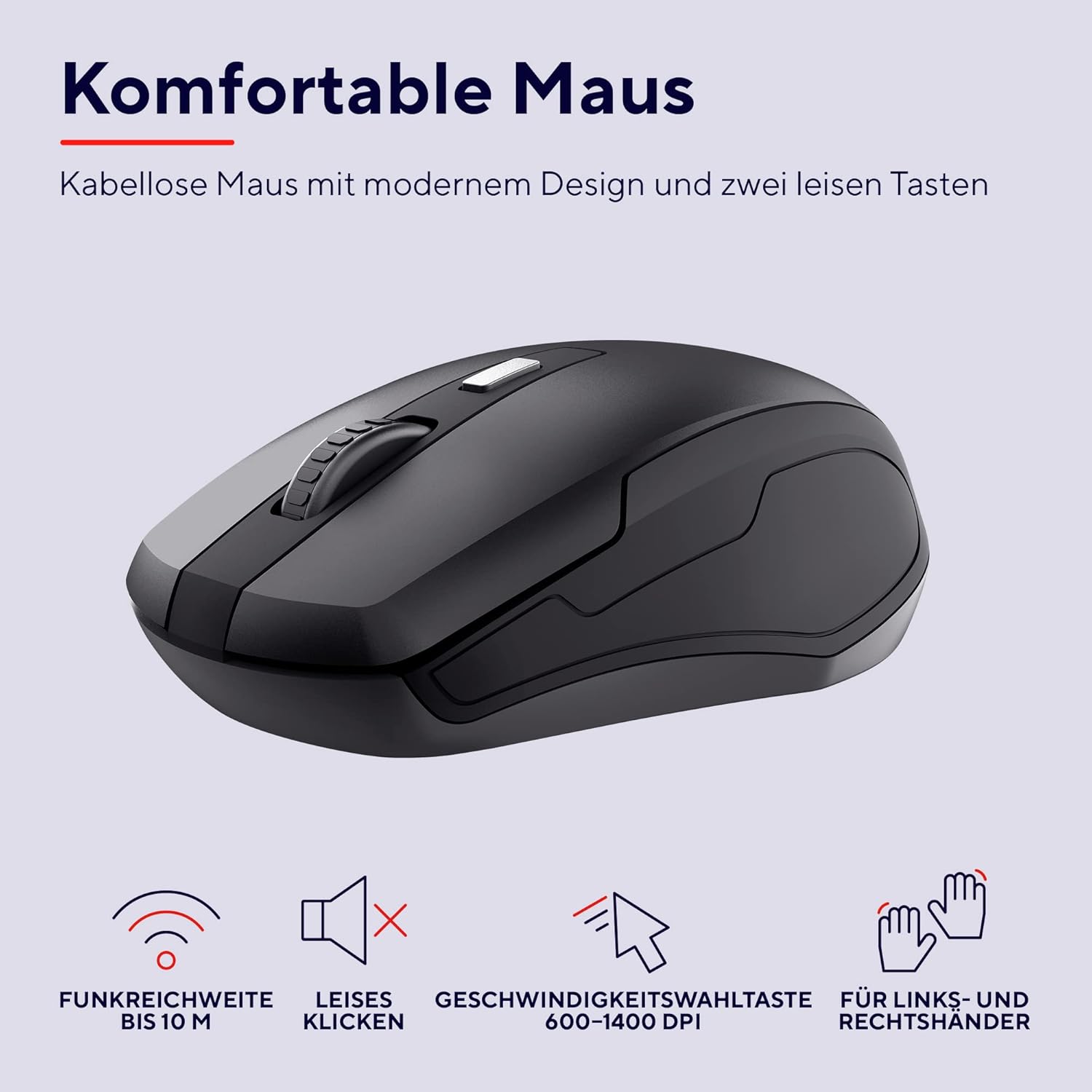
Isithombe: A enemininingwane view of the Trust Ymo wireless mouse, showing its ergonomic shape, quiet click functionality, and DPI adjustment button.
Isondlo
- Ukuhlanza: Sebenzisa indwangu ethambile neyomile ukuhlanza ubuso bekhibhodi negundane. Uma ungcolile, susa kancaneamp indwangu ingasetshenziswa, ukuqinisekisa ukuthi akukho uketshezi olungena ocingweni.
- Splash-Proof Feature: The keyboard is designed to be splash-proof, offering protection against accidental spills. However, it is not waterproof. Avoid submerging the keyboard in liquid. If a spill occurs, gently wipe away the liquid and allow the keyboard to dry completely before continued use.
- Ukushintshwa Kwebhethri: Replace batteries when performance degrades or the low battery indicator illuminates.

Image: A close-up of the Trust Ymo keyboard demonstrating its splash-proof design, with water droplets on the keys.
Ukuxazulula inkinga
- Alukho Uxhumo:
- Qinisekisa ukuthi umamukeli we-USB uxhumeke ngokuphephile embobeni ye-USB esebenzayo.
- Check if the batteries in both the keyboard and mouse are correctly installed and have sufficient charge.
- Zama ukuxhuma isamukeli se-USB endaweni ehlukile ye-USB kukhompuyutha yakho.
- Sondeza ikhibhodi negundane eduze kwesamukeli se-USB ukuze ukhiphe izinkinga zobubanzi.
- Lagging or Intermittent Performance:
- Replace the batteries in both devices.
- Ensure there are no large metallic objects or other wireless devices interfering with the signal between the receiver and the devices.
- Mouse Cursor Not Moving:
- Check the mouse batteries.
- Ensure the mouse sensor on the bottom is clean and unobstructed.
- Zama ukusebenzisa igundane endaweni ehlukile.
Imininingwane
| Ibhrendi | Themba |
| Inombolo Yemodeli | 24080 |
| Ubuchwepheshe bokuxhumana | Imvamisa Yomsakazo (Okungenantambo) |
| Isakhiwo Sekhibhodi | I-QWERTZ yesiJalimane |
| I-DPI yegundane | 600-1400 DPI (adjustable) |
| Uhlobo olungenantambo | Kufika kumamitha angu-10 |
| Umthombo wamandla | Battery Powered (4x AAA included) |
| Ukuhambisana | I-Windows, i-Mac OS, i-Chrome OS |
| Izici ezikhethekile | Splash-proof keyboard, Quiet keys and mouse buttons |
| Ubukhulu bomkhiqizo | 2 x 44.2 x 14.2 cm (Keyboard); 560 g (Total weight) |
Iwaranti kanye Nokusekela
Ukuze uthole ulwazi lwewaranti kanye nosekelo lobuchwepheshe, sicela ubheke i-Trust esemthethweni webisayithi noma thintana nomthengisi wangakini. Gcina ubufakazi bakho bokuthenga ngezimangalo zewaranti.
Ulwazi Lwezemvelo
The packaging for the Trust Ymo Wireless Keyboard and Mouse Set is made from recycled materials, reflecting a commitment to environmental sustainability. Please dispose of the product and its batteries responsibly according to local regulations.

Image: Illustration of the sustainable packaging used for the Trust Ymo set, made from recycled cardboard.


