1. Umkhiqizo Uphelileview
The Baseus W09 TWS Wireless Earphones (Model: Encok W09) are designed for convenient audio playback and communication. These in-ear earphones feature touch control and connect wirelessly via Bluetooth, offering a stereo bass sound experience.

Image 1: The Baseus W09 TWS Wireless Earphones securely placed within their charging case. The case is open, revealing both earbuds.
2. Setha
2.1 Ukushaja ama-Earphone kanye nekesi
Before initial use, ensure both the earphones and the charging case are fully charged. The charging case contains a built-in Lithium Ion battery.
- Faka ama-earphone ekesini lokushaja.
- Connect the charging case to a power source using a compatible charging cable (not specified, assume USB).
- Ukushaja okugcwele ngokuvamile kuthatha cishe amahora angu-1.5.
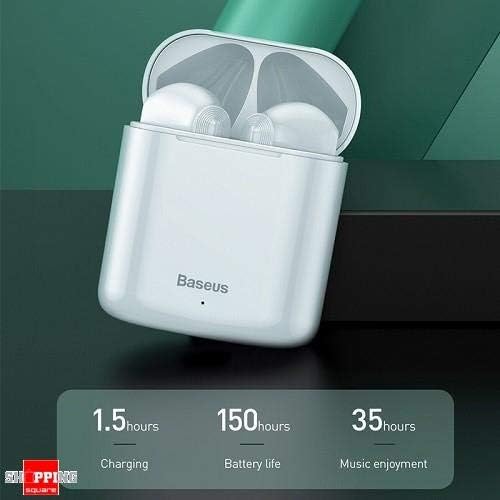
Image 2: The Baseus W09 charging case, illustrating its charging time of 1.5 hours, a standby battery life of 150 hours, and 35 hours of music enjoyment.
2.2 Ukumatanisa kwe-Bluetooth
The Baseus W09 earphones are designed for quick and instant connection.
- Qinisekisa ukuthi ama-earphone ashajiwe.
- Vula ikesi lokushaja.
- Susa ama-earphone ekesini lokushaja. Bazongena ngokuzenzakalelayo kumodi yokumatanisa.
- Edivayisini yakho (i-smartphone, ithebhulethi, njll.), vula i-Bluetooth bese usesha amadivayisi atholakalayo.
- Select "Baseus Encok W09" or a similar name from the list to connect.
- Uma usuxhunyiwe, uzozwa umyalo womsindo, futhi ama-earphone azolungela ukusetshenziswa.
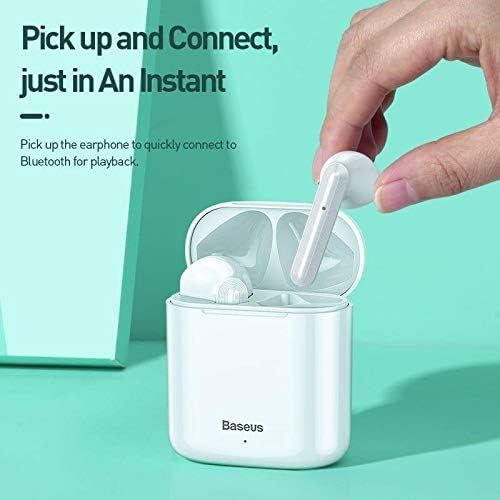
Image 3: A hand demonstrating the "Pick up and Connect" feature, showing an earphone being removed from its charging case, initiating quick Bluetooth connection.
3. Iziqondiso Zokusebenza
3.1 Ukugqoka Ama-Earphone
Gently insert each earphone into the corresponding ear canal (L for left, R for right). Adjust them for a comfortable and secure fit to ensure optimal sound quality and stability.
3.2 Imisebenzi Yokulawula Ukuthinta
The Baseus W09 earphones feature intelligent touch controls for various functions. Specific gestures may vary; please refer to the product packaging or the official Baseus website for detailed touch control instructions.
- Dlala/Misa kancane: Typically a single tap on either earphone.
- Phendula/Phendula ikholi: Usually a single tap during an incoming call.
- Ithrekhi Elandelayo / Yangaphambilini: Often a double or triple tap on a specific earphone.
- Yenza kusebenze umsizi wezwi: May involve a long press or specific tap sequence.
3.3 Impilo Yebhethri
The Baseus W09 earphones and charging case offer extended usage times:
- Music Enjoyment: Up to 35 hours (with charging case).
- Isikhathi sokulinda: Kufika emahoreni angu-150.
4. Isondlo
4.1 Ukuhlanza
- Use a soft, dry, lint-free cloth to clean the earphones and charging case.
- Ungasebenzisi izinto zokuhlanza abrasive, utshwala, noma izincibilikisi zamakhemikhali.
- Ensure no moisture enters the earphone speakers or charging ports.
4.2 Isitoreji
- Uma ingasetshenziswa, gcina ama-earphone ekesini lakho lokushaja ukuze uwavikele futhi uwagcine eshajiwe.
- Gcina endaweni epholile, eyomile kude nelanga eliqondile namazinga okushisa aphezulu.
5. Ukuxazulula izinkinga
If you encounter issues with your Baseus W09 earphones, try the following steps:
- Awukho Umsindo: Ensure earphones are charged, connected to your device, and volume is up on both the earphones and your device.
- Awukwazi ukubhanqa: Make sure Bluetooth is enabled on your device and the earphones are in pairing mode. Try turning Bluetooth off and on again on your device.
- Ukuxhumana Kwesikhashana: Ensure there are no obstructions between the earphones and your device. Try moving closer to your device.
- Izinkinga zokushaja: Check the charging cable and power adapter. Ensure the charging contacts on the earphones and case are clean.
- Setha kabusha: If issues persist, try resetting the earphones. Refer to the official Baseus website or product packaging for specific reset instructions.
6. Imininingwane
| Isici | Imininingwane |
|---|---|
| Ibhrendi | I-Baseus |
| Inombolo Yemodeli | Bheka W09 |
| Uhlobo | Endlebeni |
| Ubuchwepheshe bokuxhumana | Okungenantambo (Bluetooth) |
| Indlela Yokulawula | Thinta |
| Imakrofoni ifakiwe | Yebo |
| Ukukhansela Umsindo | Cha |
| Uhlobo Lwebhethri | I-Lithium Ion (ifakiwe) |
| Isikhathi sokushaja | Cishe. Amahora angu-1.5 |
| Music Enjoyment Time | Kuze kube amahora angama-35 (ngecala lokushaja) |
| Isikhathi sokulinda | Kufika emahoreni angu-150 |
| Iyahambisana ne | Wonke amadivayisi anikwe amandla i-Bluetooth |
| Umbala | Emhlophe |
| Ubukhulu bephakheji | 14.6 x 11 x 4 cm |
| Isisindo sento | 170 g |
7. Iwaranti kanye Nokusekela
For warranty information, technical support, or further assistance, please refer to the documentation included with your product or visit the official Baseus webindawo. Gcina ubufakazi bakho bokuthenga ngezimangalo zewaranti.


