1. Isingeniso
Siyabonga ngokuthengaasing the ICON 12-inch Bluetooth Speaker. This manual provides detailed instructions for the safe and efficient operation of your new speaker. Please read this manual thoroughly before use and retain it for future reference.
2. Okuqukethwe Kwephakheji
- ICON 12-inch Bluetooth Speaker
- Ikhebula Lamandla
- Imakrofoni engenantambo
- Isilawuli kude
- Imaniwali yosebenzisayo

Image: The ICON Bluetooth speaker shown with its included wireless microphone and remote control, highlighting the complete package contents.
3. Umkhiqizo Uphelileview
The ICON 12-inch Bluetooth Speaker is a versatile audio system designed for various applications, offering powerful sound output and multiple connectivity options. It features a built-in rechargeable battery for portability and integrated wheels and a retractable handle for easy transport.

Isithombe: Ngaphambili view of the ICON 12-inch Bluetooth Speaker, showcasing its robust design and blue illuminated woofer.

Isithombe: Emuva view of the ICON 12-inch Bluetooth Speaker, displaying the main control panel and retractable handle.
Izici Eziyinhloko:
- Powerful 6000W PMPO Output
- Bluetooth Connectivity for Wireless Streaming
- Ukudlala kwe-USB kanye nekhadi le-SD
- 3.5mm Okokufaka kwe-AUX
- Umsakazo we-FM owakhelwe ngaphakathi
- Okokufaka kwe-Microphone kanye ne-Guitar
- Rechargeable Battery for Extended Playtime
- Integrated Equalizer for Sound Customization
- TWS (True Wireless Stereo) Functionality for connecting multiple speakers
- LED Light Effects

Image: Visual representation of the ICON Bluetooth Speaker's key features, including excellent sound quality, Bluetooth compatibility, AUX input, rechargeable battery, FM radio, and equalizer.
4. Setha
4.1 Ukushaja Kwasekuqaleni
Before first use, fully charge the speaker's internal battery. Connect the power cable to the AC INPUT port on the rear panel and plug it into a standard wall outlet. The charging indicator will illuminate. Charging time may vary.
4.2 Iphaneli yokulawula iphelileview
Familiarize yourself with the control panel located on the rear of the speaker.
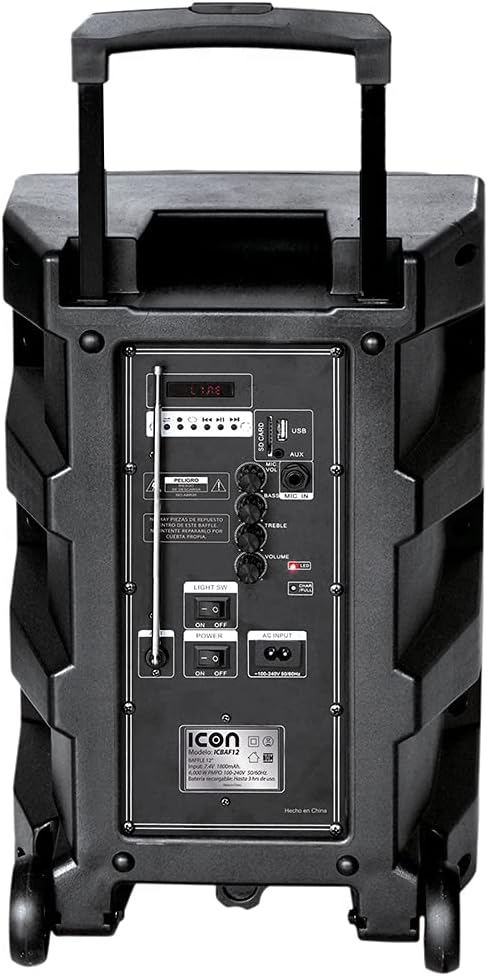
Isithombe: Ngemininingwane view of the ICON speaker's rear control panel, showing various inputs, volume, treble, and bass controls.
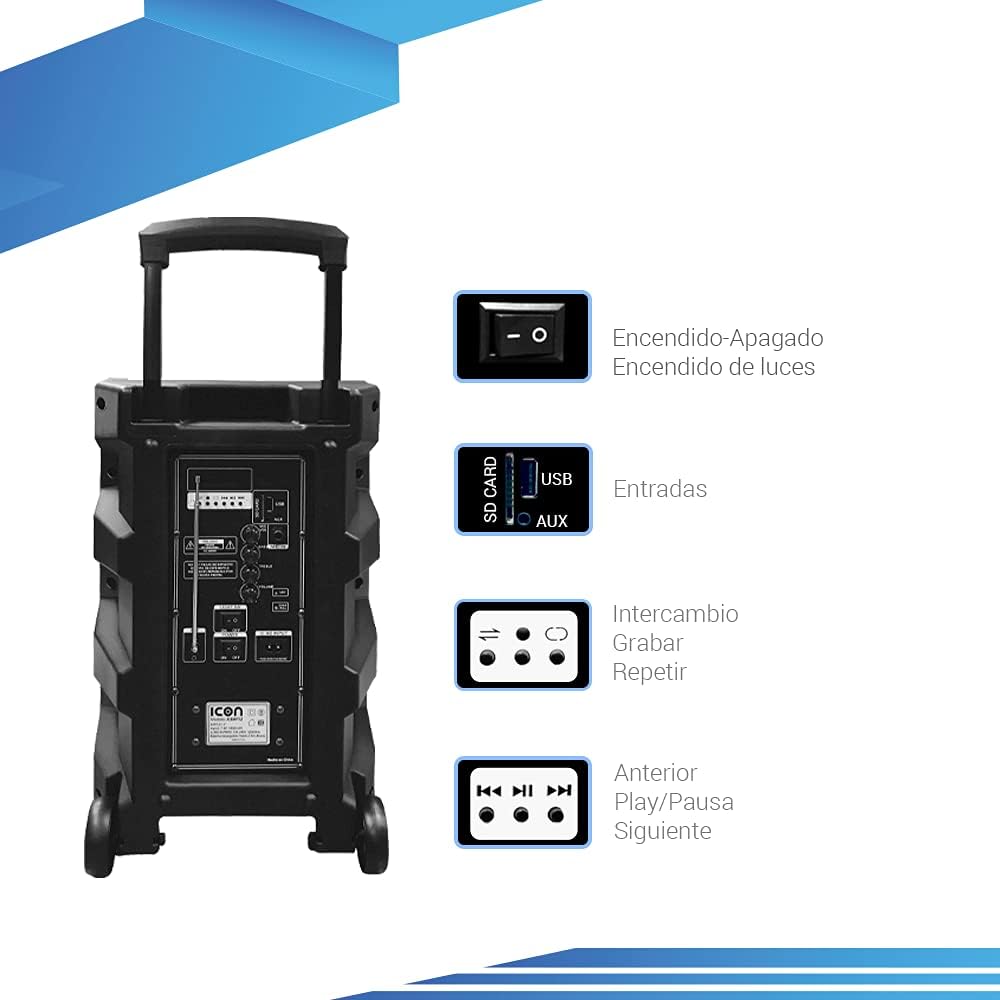
Image: Diagram illustrating key controls on the ICON speaker, including the power switch, light switch, input ports (SD Card, USB, AUX), and playback control buttons (Mode Switch, Record, Repeat, Previous, Play/Pause, Next).
- AMANDLA Shintsha: Turns the speaker On or Off.
- I-SW OKUKHANYA: Toggles the LED light effects On or Off.
- SD CARD / USB / AUX Inputs: For connecting external media or devices.
- I-MODE Switch: Cycles through input modes (Bluetooth, USB, SD, AUX, FM).
- Inkinobho YOKUREKHODA: Initiates recording (e.g., microphone input to USB/SD).
- Phinda Inkinobho: Repeats the current track or playlist.
- PREVIOUS / PLAY/PAUSE / NEXT Buttons: Standard media playback controls.
- I-VOLUME Knob: Ilungisa ivolumu eyinhloko.
- TREBLE / BASS Knobs: Adjusts high and low frequencies.
- MIC INPUT / GUITAR INPUT: For connecting microphones and guitars.
5. Iziqondiso Zokusebenza
5.1 Ukuvula / Ukuvula
To turn the speaker ON, flip the AMANDLA switch to the 'ON' position. To turn it OFF, flip the switch to 'OFF'.
5.2 Ukumatanisa kwe-Bluetooth
- Turn on the speaker. It will automatically enter Bluetooth pairing mode, indicated by a flashing Bluetooth icon on the display.
- Kudivayisi yakho yeselula (i-smartphone, ithebhulethi, ikhompuyutha ephathekayo), vula i-Bluetooth bese usesha amadivaysi atholakalayo.
- Select "ICON Speaker" (or similar name) from the list of devices.
- Once paired, the speaker will emit a confirmation sound, and the Bluetooth icon will stop flashing. You can now play audio wirelessly from your device.
5.3 Ukudlala Ikhadi le-USB/SD
- Faka idrayivu ye-USB flash noma ikhadi le-SD (elinomsindo we-MP3 files) echwebeni elifanele.
- The speaker will automatically switch to USB/SD mode and begin playing the first compatible track. If not, press the IMODE button to select USB/SD mode.
- Sebenzisa i- EDLULE, DLALA/YIMISA, futhi OLANDELAYO izinkinobho zokulawula ukudlala.
5.4 AUX Okokufaka
Connect an external audio device (e.g., MP3 player, computer) to the I-AUX input using a 3.5mm audio cable. Press the IMODE button until AUX mode is selected.
5.5 Ukusebenza komsakazo we-FM
- Cindezela inkinobho IMODE inkinobho yokushintshela kumodi yomsakazo we-FM.
- Cindezela bese ubamba i DLALA/YIMISA inkinobho yokuskena ngokuzenzakalelayo futhi ugcine iziteshi ze-FM ezitholakalayo.
- Sebenzisa i- EDLULE futhi OLANDELAYO izinkinobho zokuhamba phakathi kweziteshi ezigciniwe.
5.6 Microphone and Guitar Usage
Plug your microphone or guitar into the respective IMIC INPUT or UKUFAKWA KWESITATA jacks. Adjust the volume using the main UMQULU knob and any dedicated microphone/guitar volume controls if present.
5.7 Umsebenzi we-TWS (True Wireless Stereo).
The TWS function allows you to connect two ICON speakers wirelessly for a true stereo sound experience.
- Qinisekisa ukuthi zombili izipikha zivuliwe futhi azixhumekile kunoma iyiphi idivayisi ye-Bluetooth.
- On one speaker (this will be the master), press and hold the TWS button (if available, or a combination of buttons as per specific model instructions, often the 'Mode' button or a dedicated TWS button).
- The speaker will search for another TWS-compatible speaker. Once connected, you will hear a confirmation sound.
- Now, connect your mobile device to the master speaker via Bluetooth as described in section 5.2. Audio will play through both speakers in stereo.
6. Isondlo
6.1 Ukuhlanza
Wipe the speaker's exterior with a soft, dry cloth. Do not use abrasive cleaners, waxes, or solvents. Ensure no liquids enter the speaker's openings.
6.2 Ukunakekelwa Kwebhethri
- Ukwelula impilo yebhethri, gwema ukukhipha ibhethri ngokugcwele njalo.
- Recharge the battery regularly, even if the speaker is not in use for extended periods (e.g., every 3 months).
- Gcina isipikha endaweni epholile, neyomile uma singasetshenziswa.
6.3 Isitoreji
When storing the speaker for a long time, ensure it is turned off and disconnected from the power source. Store it in a clean, dry environment away from extreme temperatures and direct sunlight.
7. Ukuxazulula izinkinga
| Inkinga | Imbangela Engenzeka | Isixazululo |
|---|---|---|
| Isipikha asivuli. | Battery is depleted; Power cable not connected; Power switch is OFF. | Charge the speaker; Ensure power cable is securely connected; Flip POWER switch to ON. |
| Awukho umsindo. | Volume is too low; Incorrect input mode selected; Device not connected properly. | Increase volume; Press MODE button to select correct input; Reconnect device/re-pair Bluetooth. |
| Ukuxhumeka kwe-Bluetooth kwehlulekile. | Isipikha singekho kumodi yokumatanisa; Idivayisi ikude kakhulu; Ukugxambukela. | Ensure speaker is in pairing mode; Move device closer; Turn off other Bluetooth devices. |
| Umsindo ohlanekezelwe. | Volume too high; Audio source quality is poor. | Reduce volume; Try a different audio source. |
| Imakrofoni ayisebenzi. | Microphone not plugged in correctly; Microphone volume too low; Microphone batteries dead (if wireless). | Ensure microphone is fully inserted; Adjust microphone volume; Replace microphone batteries. |
8. Imininingwane
| Isici | Ukucaciswa |
|---|---|
| Inombolo Yemodeli | US-ICBAF12 |
| Amandla Okukhiphayo | 6000 Watts PMPO |
| Usayizi wesipika | 12 amayintshi |
| Ubuchwepheshe bokuxhumana | Bluetooth, USB, AUX, SD Card |
| Amadivayisi Ahambisanayo | I-laptop, i-smartphone |
| Umthombo wamandla | Rechargeable Battery, AC Input |
| Ubukhulu bomkhiqizo (L x W x H) | 38 x 36.5 x 54 cm |
| Isisindo Somkhiqizo | 7.62 kg |
| Izici ezikhethekile | Bluetooth, FM Radio, Microphone Input, Guitar Input, TWS Function, LED Lights |

Image: Packaging of the ICON Bluetooth Speaker, displaying key features and product dimensions (37.5 cm x 36 cm x 54 cm).
9. Iwaranti kanye Nokusekela
This product is covered by a limited warranty. Please refer to the warranty card included in your package for specific terms and conditions. For technical support, troubleshooting assistance, or warranty claims, please contact your retailer or the manufacturer's customer service department. Keep your purchase receipt as proof of purchase.
For more information, visit the official ICON store on Amazon: ICON Store


