Isingeniso
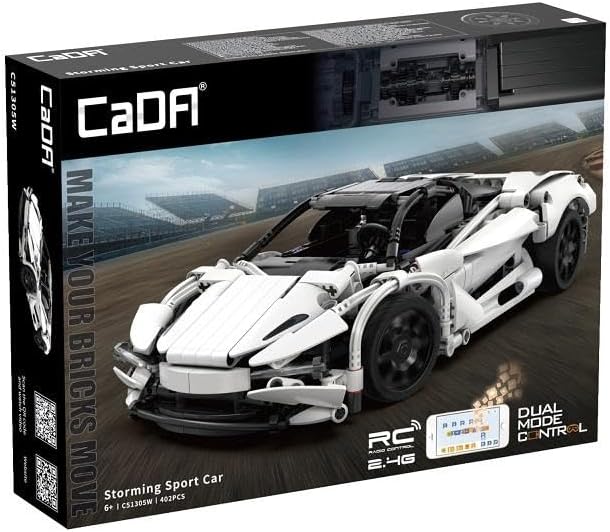
Siyabonga ngokuthengaasing the CaDA C51305W Storming Sport Car. This remote-controlled terminal block model offers an engaging building experience and high-speed remote control performance. This manual provides essential information for assembly, operation, and maintenance to ensure optimal performance and longevity of your model.
Ulwazi Lokuphepha
- Funda yonke imiyalelo ngaphambi kokuhlanganisa nokusebenza.
- This product contains small parts and is not suitable for children under 3 years old due to choking hazards.
- Adult supervision is recommended during assembly and operation, especially for younger users.
- Do not operate the vehicle near water, heat sources, or in direct sunlight for extended periods.
- Ensure all connections are secure before operating the vehicle.
- Use only the specified battery type (3.7V, 500mAh Lithium Battery) and charger. Improper battery use can lead to fire or injury.
- Do not modify the product or its components, as this may void the warranty and pose safety risks.
Okuqukethwe Kwephakheji
Sicela uqinisekise ukuthi zonke izingxenye zikhona ngaphambi kokuqala ukuhlanganiswa.
- 402 x Building Block Pieces
- 1 x 2.4 GHz Isilawuli kude
- 1 x 3.7V, 500mAh Lithium Battery
- 1 x Ikhebuli yokushaja ye-USB
- 1 x Incwadi Yeziqondiso (le dokhumenti)
- 1 x RC Kit (motors, receiver, etc.)
Iziyalezo Zomhlangano
Follow the step-by-step instructions provided in the included building guide to assemble your CaDA Storming Sport Car. The model consists of 402 precisely engineered parts.
Amathiphu e-General Assembly:
- Organize your pieces by color and type before starting.
- Pay close attention to the orientation of each piece as shown in the diagrams.
- Qinisekisa ukuthi konke ukuxhumana kuqinile futhi kuvikelekile.
- Test moving parts (e.g., wheels, steering) periodically during assembly to ensure smooth operation.
Integrating the RC Kit:
The RC kit components (motors, receiver, battery compartment) are integrated during the building process. Refer to the specific sections in the building guide for their placement and wiring.
- Ukufakwa kwezimoto: Install the drive motors into the designated chassis locations. Ensure wires are routed correctly to avoid pinching.
- Ukubekwa komamukeli: Secure the 2.4 GHz receiver unit in its compartment.
- Igumbi Lebhethri: Assemble the battery compartment and ensure it can securely hold the 3.7V, 500mAh Lithium Battery.
- Izintambo: Connect the motors and battery compartment to the receiver according to the wiring diagram in the building guide.


Imiyalelo yokusebenza
Ukushaja nokufaka ibhethri:
- Connect the 3.7V, 500mAh Lithium Battery to the USB charging cable.
- Plug the USB charging cable into a standard USB power adapter (not included).
- The charging indicator light will show the charging status (refer to charger instructions for specific light patterns). Charge until fully charged.
- Once charged, carefully insert the battery into the designated battery compartment within the car model, ensuring correct polarity.
Remote Control Operation (2.4 GHz):
- Install 2x AA batteries (not included) into the remote control, observing polarity.
- Turn on the power switch on the car model.
- Turn on the power switch on the remote control. The remote and car will automatically pair. A successful pairing is usually indicated by a solid light on both devices.
- Use the joystick/buttons on the remote control to steer and accelerate the car. Refer to the remote control diagram for specific functions.
App Control (Android/iOS):
The CaDA Storming Sport Car can also be controlled and programmed via a dedicated mobile application.
- Landa uhlelo lokusebenza: Cinga the official CaDA app on the Google Play Store (for Android 8.0 or later) or Apple App Store (for iOS 12.0 or later).
- Xhuma: Ensure Bluetooth is enabled on your mobile device. Open the CaDA app and follow the on-screen instructions to connect to your Storming Sport Car.
- Control and Program: The app provides various control modes, including joystick control, gravity sensing, and programmable sequences. Explore the app's features for an enhanced driving experience.
Isondlo
- Ukuhlanza: Use a soft, dry cloth to wipe down the model. Do not use water or chemical cleaners, as they may damage the electronic components or plastic parts.
- Isitoreji: Store the model in a cool, dry place away from direct sunlight and extreme temperatures. Remove batteries from both the car and remote control if storing for extended periods to prevent leakage.
- Ukunakekelwa kwebhethri: Do not overcharge or over-discharge the Lithium battery. If the battery will not be used for a long time, charge it to approximately 50% capacity before storage.
- Ukuhlola: Periodically check all connections and moving parts for wear or damage. Replace any broken or worn-out pieces as needed.
Ukuxazulula inkinga
| Inkinga | Imbangela Engenzeka | Isixazululo |
|---|---|---|
| Car does not respond to remote control. | Low battery in car or remote; Not paired; Interference. | Charge car battery, replace remote batteries; Re-pair car and remote; Move to an area with less interference. |
| Car moves slowly or erratically. | Low car battery; Obstruction in gears/wheels; Loose connections. | Recharge car battery; Check for and remove obstructions; Secure all wiring connections. |
| Ukuxhumeka kohlelo lokusebenza kuyahluleka. | Bluetooth off; App version outdated; Incompatible device. | Ensure Bluetooth is on; Update app to latest version; Verify device meets Android 8.0 / iOS 12.0 requirements. |
| Izingxenye azikho noma zilimele. | Manufacturing defect; Shipping damage. | Contact CaDA customer support for replacement parts. |
Imininingwane
- Ibhrendi: I-CaDA
- Inombolo Yemodeli: C51305w
- Itimu: Imoto
- Isikali: 1:14
- Inombolo yezingcezu: 402
- Lawula: 2.4 GHz Remote Control, Android/iOS App (from Android 8.0 / from iOS 12.0)
- Ibhethri: 3.7V, 500mAh Lithium Battery (for car)
- Ubukhulu bomkhiqizo (L x W x H): 14.96 x 2.95 x 11.02 amayintshi (kuhlanganisiwe)
- Isisindo Sento: Cishe amakhilogremu angu-2.2 (ikhilogram eli-1)
Iwaranti kanye Nokusekela
CaDA products are manufactured to high-quality standards. For warranty information, technical support, or to order replacement parts, please visit the official CaDA webisayithi noma uxhumane nomnyango wabo wesevisi yamakhasimende. Gcina irisidi lakho lokuthenga njengobufakazi bokuthenga.
CaDA Official Webindawo: www.cada.cn


