1. Isingeniso
This manual provides comprehensive instructions for the setup, operation, and maintenance of your Drawmer CMC2 Compact Monitor Controller. Please read this manual thoroughly before using the device to ensure proper functionality and to maximize its performance.
2. Ulwazi Lokuphepha
- Ukunikezwa kwamandla kagesi: Use only the factory-supplied 15V DC power supply. Using an incorrect power supply may damage the unit and void the warranty.
- Ukungenisa umoya: Qinisekisa ukuthi kunomoya owanele endaweni yonke. Ungavimbi izimbobo zokungenisa umoya.
- Umswakama: Ungayibeki iyunithi emvuleni, emswakameni, noma kumswakama omningi.
- Ukuhlanza: Nqamula ugesi ngaphambi kokuhlanza. Sebenzisa indwangu eyomile nethambile. Ungasebenzisi izihlanzi zoketshezi noma ama-aerosols.
- Ukusevisa: Thumela konke ukusevisa kubasebenzi abafanelekayo besevisi. Ungazami ukuvula noma ukulungisa iyunithi wena.
3. Okuqukethwe Kwephakheji
Qinisekisa ukuthi iphakheji yakho iqukethe izinto ezilandelayo:
- Drawmer CMC2 Compact Monitor Controller
- 15V DC Power Supply Unit
- Incwadi Yomsebenzisi (le dokhumenti)
4. Umkhiqizo Uphelileview
4.1 Izilawuli Zephaneli Yangaphambili
The front panel provides all primary controls for audio monitoring and source selection.

Umfanekiso 4.1: Ngaphambili view of the Drawmer CMC2 Compact Monitor Controller, showing all knobs and buttons for input selection, speaker selection, master volume, headphone control, and mix check functions.
- AUX INPUT Knob: Adjusts the level of the auxiliary input.
- SOURCE SELECT Buttons (I/P1, I/P2, AUX): Selects the active audio input source.
- SPEAKER SELECT Buttons (A, B, SUB): Activates the selected speaker outputs.
- MASTER VOLUME Knob: Controls the overall output level to the selected speakers.
- Inkinobho ye-MUTE: Mutes all speaker outputs.
- HEADPHONE Knob: Ilungisa ivolumu yokuphuma kwe-headphone.
- MIX CHECK Buttons (ØREV, MONO, DIM): Provides phase reverse, mono sum, and dim functions for mix analysis.
- AUX INPUT (3.5mm Jack): Front panel auxiliary input for portable devices.
- HEADPHONE Output (6.35mm Jack): Front panel headphone output.
4.2 Izixhumi zephaneli yangemuva
The rear panel houses all audio input and output connectors, along with the power input.

Umfanekiso 4.2: Ngemuva view of the Drawmer CMC2 Compact Monitor Controller, displaying the DC power input, speaker outputs (Mono/Sub, R-B-L, R-A-L), and inputs (R-2-L, R-1-L).
- DC=15V Input: Connect the supplied 15V DC power adapter here.
- Ukushintshwa Kwamandla: Toggles the unit's power on/off.
- SPEAKER OUTPUTS (MONO/SUB, R-B-L, R-A-L): Balanced XLR outputs for connecting up to two pairs of stereo monitors (A and B) and a mono subwoofer.
- INPUTS (R-2-L, R-1-L): Balanced XLR inputs for two stereo audio sources.
5. Setha
Follow these steps to set up your CMC2 controller:
- Ukuxhuma kwamandla: Connect the supplied 15V DC power adapter to the 'DC=15V' input on the rear panel. Plug the adapter into a suitable power outlet. Do not power on the unit yet.
- Okokufaka ukuxhumana:
- Connect your primary audio source (e.g., audio interface, mixer) to the 'INPUTS R-1-L' using balanced XLR cables.
- Connect a secondary audio source to the 'INPUTS R-2-L' using balanced XLR cables.
- For portable devices, connect to the front panel 'AUX INPUT' (3.5mm jack) or the rear panel RCA auxiliary inputs (if available on your model, refer to specific product documentation).
- Izixhumanisi zesipika:
- Connect your main studio monitors to the 'SPEAKER OUTPUTS R-A-L' using balanced XLR cables.
- If using a second pair of monitors, connect them to 'SPEAKER OUTPUTS R-B-L'.
- If using a subwoofer, connect it to the 'SPEAKER OUTPUTS MONO/SUB'.
- Uxhumano Lwezindlebe: If desired, connect your headphones to the front panel 'HEADPHONE' 6.35mm jack.
- Vula: Once all connections are secure, press the power switch on the rear panel to turn on the CMC2.
6. Iziqondiso Zokusebenza
This section details the functions of the CMC2's controls.
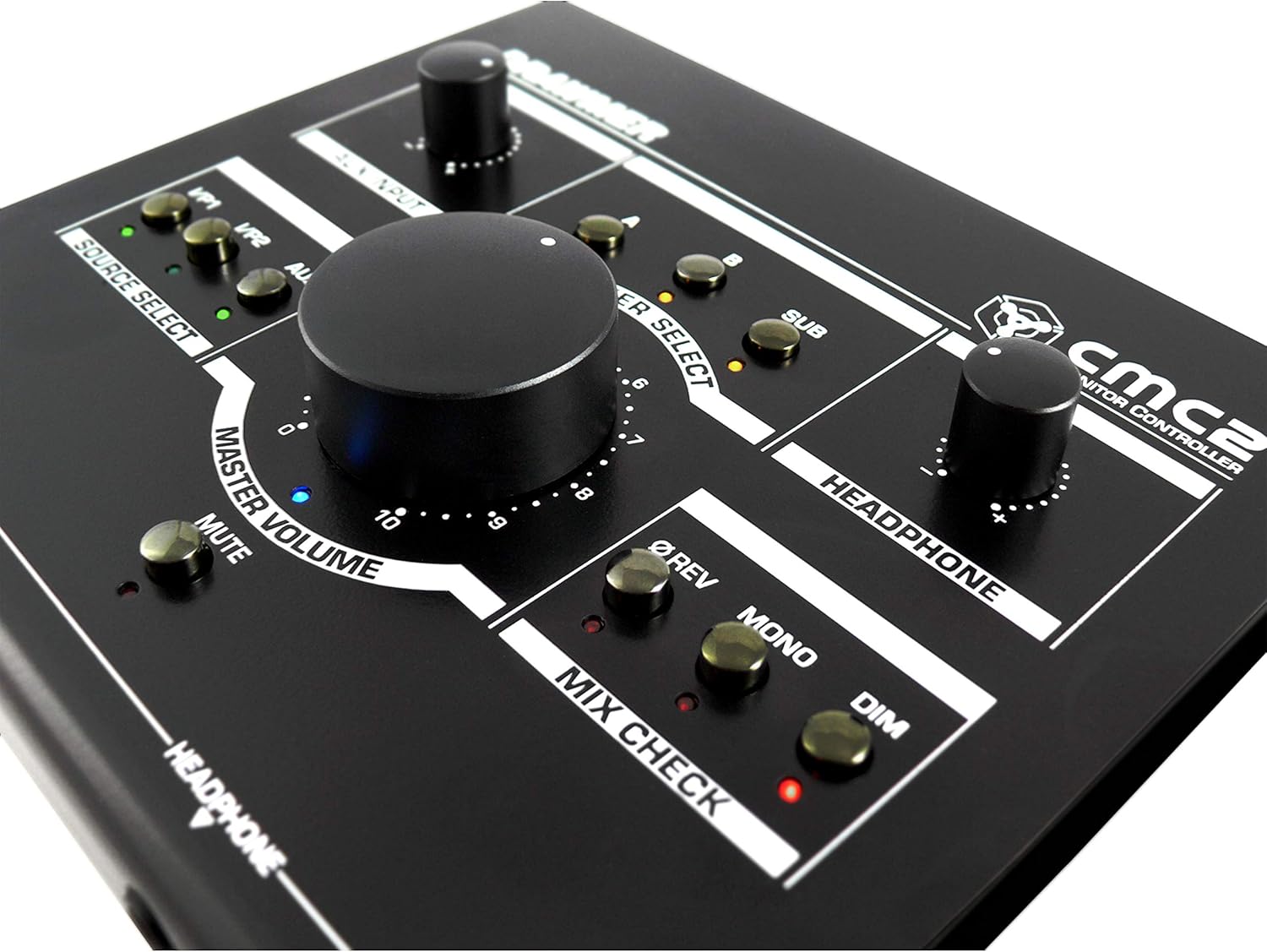
Umfanekiso 6.1: Vala-up view of the Drawmer CMC2 front panel, highlighting the master volume, source select, speaker select, headphone, and mix check controls.
6.1 Ukukhethwa Komthombo
- Cindezela inkinobho I/P1 button to select the audio source connected to Input 1.
- Cindezela inkinobho I/P2 button to select the audio source connected to Input 2.
- Cindezela inkinobho I-AUX button to select the auxiliary input (front panel 3.5mm jack).
- Only one source can be active at a time. The LED next to the selected button will illuminate.
6.2 Ukukhetha Isikhulumi
- Cindezela inkinobho A button to route the selected source to Speaker Output A.
- Cindezela inkinobho B button to route the selected source to Speaker Output B.
- Cindezela inkinobho SUB button to route the selected source to the Subwoofer Output.
- Multiple speaker outputs can be active simultaneously (e.g., A and SUB). The LEDs indicate active outputs.
6.3 Ukulawula ivolumu
- Zungezisa enkulu UMQULU WE-MASTER knob clockwise to increase the output level to the selected speakers, and counter-clockwise to decrease it.
- Zungezisa i- I-HEADPHONE knob to adjust the listening level for connected headphones.
- Zungezisa i- I-AUX INPUT knob to adjust the input level of the auxiliary source.
6.4 Mix Check Functions
- Cindezela inkinobho ØREV button to reverse the phase of the right channel, useful for checking phase compatibility.
- Cindezela inkinobho I-MONO button to sum the stereo signal to mono, allowing you to check for mono compatibility issues in your mix.
- Cindezela inkinobho I-DIM button to temporarily reduce the output volume by a fixed amount, useful for quick listening level changes without losing your main volume setting.
6.5 Thulisa Umsebenzi
- Cindezela inkinobho UMUTE button to instantly silence all active speaker outputs. The LED will illuminate when mute is active. Press again to unmute.
7. Isondlo
The Drawmer CMC2 is designed for reliable operation with minimal maintenance.
- Ukuhlanza: Keep the unit clean by wiping it with a dry, soft, lint-free cloth. Avoid abrasive cleaners or solvents.
- Imvelo: Operate the unit in a clean, dry environment, away from direct sunlight, heat sources, and excessive dust.
- Ukungenisa umoya: Qinisekisa ukuthi izikhala zokungenisa umoya azivaliwe ukuze kuvinjelwe ukushisa ngokweqile.
8. Ukuxazulula izinkinga
If you encounter issues with your CMC2, refer to the following common problems and solutions:
- Awekho Amandla:
- Ensure the 15V DC power adapter is securely connected to the unit and a working power outlet.
- Check that the rear panel power switch is in the 'ON' position.
- Akukho okukhipha umsindo:
- Verify that the correct input source (I/P1, I/P2, or AUX) is selected and its LED is illuminated.
- Ensure that at least one speaker output (A, B, or SUB) is selected and its LED is illuminated.
- Check that the MASTER VOLUME knob is turned up and the MUTE button is not active (LED off).
- Confirm all audio cables are securely connected to both the CMC2 and your speakers/audio sources.
- Test with different cables or audio sources to isolate the problem.
- Umsindo Ohlanekezelwe:
- Reduce the input level from your audio source.
- Lower the MASTER VOLUME on the CMC2.
- Hlola ukuthi amakhebula omsindo onakele yini.
- Headphone Output Not Working:
- Ensure headphones are fully plugged into the front panel jack.
- Adjust the HEADPHONE volume knob.
- Test with a different pair of headphones.
If the problem persists, contact Drawmer customer support or your authorized dealer for assistance.
9. Imininingwane
| Igama Lemodeli | I-CMC2 |
| Ibhrendi | Drawmer |
| Ukusetshenziswa Okunconyiwe | Ukuqapha Umsindo |
| Ubuchwepheshe bokuxhumana | XLR, RCA (Auxiliary) |
| Imodi Yokukhipha Umsindo | Isitiriyo |
| Uhlobo lwesipika | Gada |
| Ubukhulu bomkhiqizo | 13 x 9 x 3 amayintshi (33 x 22.86 x 7.62 cm) |
| Isisindo sento | 3 pounds (1.36 kg) |
| Umkhiqizi | Drawmer |
10. Iwaranti kanye Nokusekela
The Drawmer CMC2 Compact Monitor Controller is covered by a manufacturer's warranty. Please refer to the warranty card included with your product or visit the official Drawmer webindawo ngemigomo nemibandela yewaranti enemininingwane.
For technical support, service, or further inquiries, please contact your authorized Drawmer dealer or the Drawmer customer support team through their official channels.


