1. Isingeniso
The avedio links HDMI 2.1 Splitter 1 in 2 Out is designed to duplicate a single HDMI input signal to two HDMI output displays simultaneously. This device supports advanced video resolutions up to 8K@60Hz and 4K@120Hz, along with HDR10, HDR10+, Dolby Vision, and 3D. It is ideal for scenarios requiring identical content on multiple screens, such as home entertainment systems, gaming setups, or professional presentations. This manual provides comprehensive instructions for proper installation, operation, and maintenance of your HDMI splitter.
2. Izici zomkhiqizo
- 8K HDMI Splitter 1 In 2 Out (Mirror Only): Duplicates one HDMI input to two HDMI displays simultaneously, supporting up to 8K@60Hz resolution. Designed for mirror screen setups; does not support extended display.
- Amanani Okuvuselela Aphezulu: Supports 8K@60Hz, 4K@120Hz, 1080P@240Hz, HDR10, HDR10+, Dolby Vision, and 3D for ultra-smooth visuals without lag or tearing.
- Ukuhambisana Okubanzi: Compatible with most HDMI-enabled devices including PS5/PS4 Pro, Xbox Series X/S, Blu-ray players, laptops, PCs, and streaming boxes. Outputs to TVs, monitors, or projectors.
- I-Premium Build: Features the latest HDMI 2.1 chipset and a high-quality aluminum alloy casing for efficient heat dissipation and stable transmission. Supports up to 48Gbps bandwidth and advanced audio formats like Dolby Atmos, DTS-HD, and LPCM.
- Ukushintsha kwe-EDID: Includes a built-in EDID dial switch (Copy 1 / Copy 2 / Auto Mode) for flexible display output management.

Umdwebo 2.1: Ngaphezuluview of the avedio links 8K HDMI 2.1 Splitter and its key features.
3. Okuqukethwe Kwephakheji
Sicela uqinisekise ukuthi zonke izinto zikhona kuphakheji:
- 1x avedio links 8K HDMI Splitter (1 in 2 Out)
- I-adaptha yamandla engu-1x 5V
- 1x Incwadi Yomsebenzisi
4. Umkhiqizo Uphelileview

Umfanekiso 4.1: Phezulu view of the avedio links HDMI Splitter, showing its compact design and connected HDMI cables.
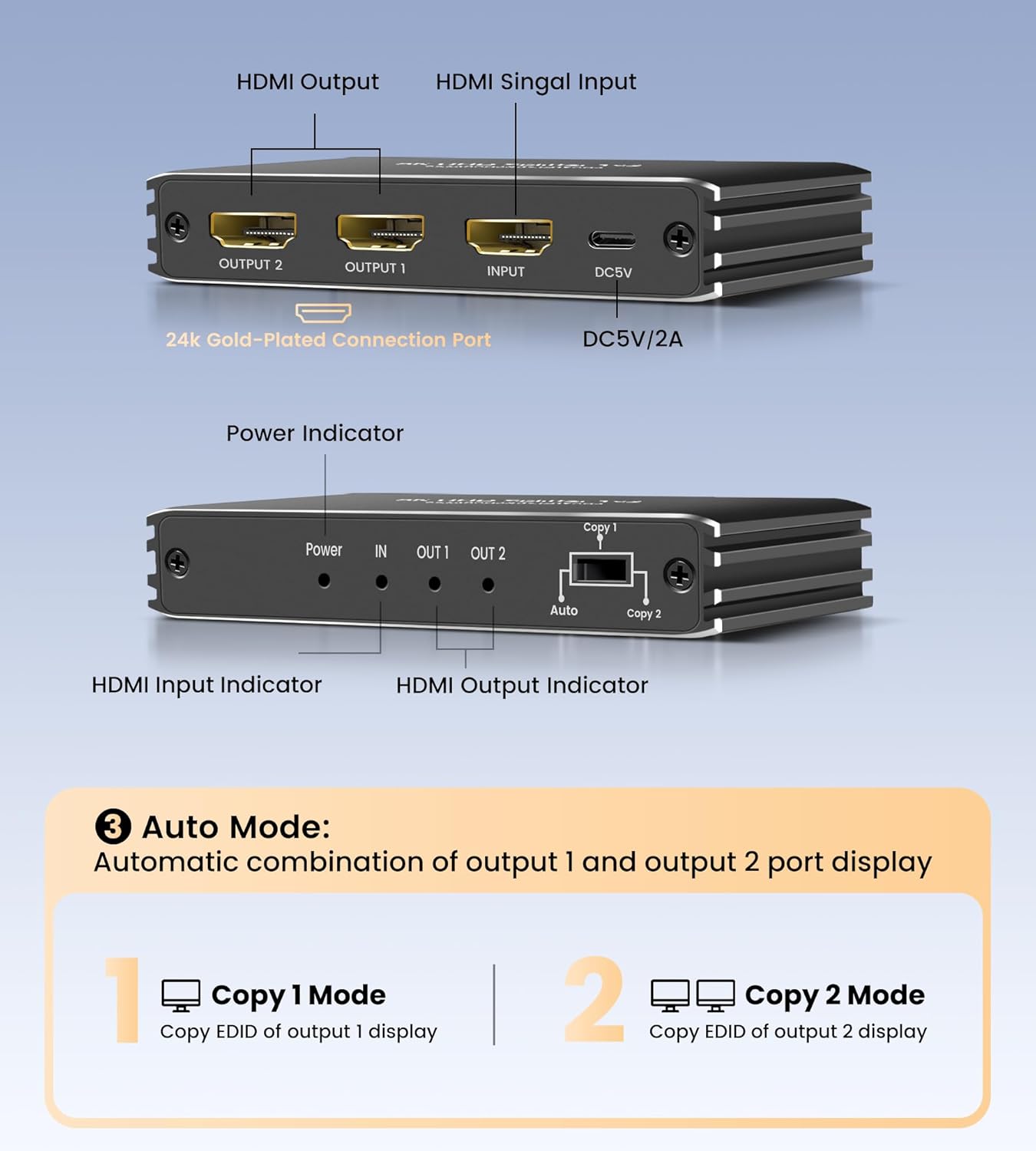
Figure 4.2: Front and rear panel diagram of the HDMI Splitter, indicating HDMI input, HDMI outputs, DC5V power port, power indicator, input indicator, output indicators, and the EDID switch.
Izincazelo Zembobo:
- OKOKUFAKA: HDMI input port for connecting the source device (e.g., PS5, Blu-ray player).
- OUTPUT 1 / OUTPUT 2: HDMI output ports for connecting to display devices (e.g., TV, monitor, projector).
- I-DC5V: Power input port for connecting the included 5V power adapter.
- Inkomba Yamandla: LED light indicating the device is powered on.
- INkomba: LED light indicating an active HDMI input signal.
- OUT 1 / OUT 2 Indicators: LED lights indicating active HDMI output signals to displays.
- EDID Switch (Copy 1 / Copy 2 / Auto): Selects the EDID mode for optimal compatibility.
5. Sethaphu Imiyalelo
Landela lezi zinyathelo ukuze usethe i-HDMI splitter yakho:
- Vala Amadivayisi: Ensure all source devices (e.g., PS5, PC) and display devices (TVs, monitors) are powered off before making connections.
- Xhuma Umthombo: Connect an HDMI cable (not included) from your source device's HDMI output to the INPUT port on the avedio links HDMI splitter.
- Xhuma Izibonisi: Connect HDMI cables (not included) from the UMPHUMELA 1 futhi UMPHUMELA 2 ports on the splitter to the HDMI input ports on your two display devices.
- Xhuma Amandla: Plug the included 5V power adapter into the I-DC5V port on the splitter, then plug the adapter into a standard electrical outlet. The Power indicator LED will illuminate.
- Amandla Kumadivayisi: Vula amadivayisi akho okubonisa kuqala, bese uvula idivayisi yakho yomthombo.
- Qinisekisa Uxhumo: The IN and OUT indicator LEDs on the splitter should illuminate, and the content from your source device should appear on both connected displays.
Inothi elibalulekile: This splitter is designed for mirroring. Both output displays will show the exact same content from the input source. It does not support extended display modes where each screen shows different content.

Figure 5.1: Illustration of the splitter duplicating content to two screens (mirror mode).

Figure 5.2: Clarification that the unit is a splitter for duplication, not a switcher or extender for different content.
6. Iziqondiso Zokusebenza
Ukusebenza Okuyisisekelo:
Once all connections are made and devices are powered on, the avedio links HDMI splitter will automatically detect the input signal and duplicate it to both connected displays. No additional configuration is typically required for basic mirroring.
Ukuphathwa kwe-EDID:
The EDID (Extended Display Identification Data) switch on the splitter helps manage compatibility between your source and display devices. EDID contains information about a display's capabilities (e.g., supported resolutions, refresh rates, audio formats). The splitter uses this information to ensure the source outputs a compatible signal.
- Imodi Yokuzenzakalela: (Default) The splitter automatically negotiates the best common resolution and audio format supported by both connected displays. This is recommended for most setups.
- Copy 1 Mode: The splitter copies the EDID information from the display connected to UMPHUMELA 1. The source device will then output a signal compatible with the display on OUTPUT 1, and this signal will be sent to both outputs. Use this if you want the source to prioritize the capabilities of the display connected to OUTPUT 1.
- Copy 2 Mode: The splitter copies the EDID information from the display connected to UMPHUMELA 2. The source device will then output a signal compatible with the display on OUTPUT 2, and this signal will be sent to both outputs. Use this if you want the source to prioritize the capabilities of the display connected to OUTPUT 2.
If you encounter display issues (e.g., no signal, incorrect resolution), try switching the EDID mode to see if it resolves the problem. Start with 'Auto' and then try 'Copy 1' or 'Copy 2' if necessary.
7. Ukuhambisana
The avedio links HDMI 2.1 Splitter offers broad compatibility with a wide range of HDMI-enabled devices:
Amadivayisi Okokufaka:
- Gaming Consoles: PS5, PS4 Pro, Xbox Series X/S, Xbox One, Nintendo Switch
- Media Players: Blu-ray players, DVD players, Apple TV, Roku, Fire TV Stick
- Computers: Laptops, Desktop PCs
- Other: TV boxes, Satellite receivers
Amadivayisi Okukhiphayo:
- Ama-HDTV
- Abaqaphi
- Amaphrojektha

Figure 7.1: Broad compatibility of the avedio links HDMI Splitter with various input and output devices.
8. Ukuxazulula izinkinga
If you experience issues with your avedio links HDMI splitter, please refer to the following common problems and solutions:
| Inkinga | Imbangela Engenzeka | Isixazululo |
|---|---|---|
| No signal on one or both displays. | Loose cable connections, incorrect EDID setting, power issue, incompatible resolution. |
|
| Flickering screen or unstable image. | Poor quality HDMI cables, cable length too long, signal interference, EDID conflict. |
|
| Resolution/refresh rate is lower than expected (e.g., 4K@60Hz instead of 4K@120Hz). | Cable limitations, display limitations, EDID setting, source device settings. |
|
| Audio issues (no sound, distorted sound). | EDID conflict, source audio settings, display audio settings. |
|
9. Imininingwane
| Isici | Incazelo |
|---|---|
| Imodeli | 1x2 8K@60Hz HDMI Splitter |
| Inguqulo ye-HDMI | I-HDMI 2.1 |
| Umkhawulokudonsa | 48Gbps |
| Izinqumo ezisekelwe | 8K@60Hz, 4K@120Hz, 1080P@240Hz and lower resolutions |
| Ukujula Kombala | RGB 4:4:4, YCbCr 4:4:4/4:2:2/4:2:0 |
| Ukusekelwa kwe-HDR | HDR10, HDR10+, Dolby Vision |
| Ukuhambisana ne-HDCP | I-HDCP 2.3 |
| Amafomethi Omsindo | Dolby Atmos, DTS-HD, LPCM, etc. |
| Ukuphathwa kwe-EDID | Auto, Copy 1, Copy 2 modes |
| Ukunikezwa kwamandla kagesi | I-DC 5V (nge-adaptha yamandla efakiwe) |
| Impahla Yezindlu | Ingxube ye-aluminium |
| Ubukhulu | 3.73 x 3.58 x 2.55 amayintshi (cishe.) |
| Isisindo sento | 4.5 ama-ounces (approx.) |
Ubude bekhebuli ye-HDMI Enconyiwe:
| Isixazululo | Input Cable Length (Max) | Output Cable Length (Max) | Total Cable Length (Max) |
|---|---|---|---|
| 8K@60Hz / 4K@120Hz | 1.5m / 4.9ft | 1.5m / 4.9ft | 3m / 9.8ft |
| 4K | 2.5m / 8.2ft | 2.5m / 8.2ft | 5m / 16.4ft |
| 1080P | 5m / 16.4ft | 5m / 16.4ft | 10m / 32.8ft |

Figure 9.1: Recommended HDMI cable lengths for optimal performance at various resolutions.
10. Isondlo
To ensure the longevity and optimal performance of your HDMI splitter, follow these maintenance guidelines:
- Ukuhlanza: Sebenzisa indwangu ethambile, eyomile ukuhlanza ingaphandle ledivayisi. Ungasebenzisi izinto zokuhlanza uketshezi noma ama-aerosol.
- Ukungenisa umoya: Qinisekisa ukuthi idivayisi ibekwe endaweni enomoya omuhle ukuvimbela ukushisa ngokweqile. Ungavali imigodi yomoya.
- Isitoreji: When not in use for extended periods, disconnect the power adapter and store the device in a cool, dry place away from direct sunlight and extreme temperatures.
- Ukuphatha: Phatha idivayisi ngokucophelela. Gwema ukuyilahla noma ukuyifaka emithonjeni enamandla.
- Amandla: Always use the provided 5V power adapter. Using an incorrect power supply may damage the device.
11. Iwaranti kanye Nokusekela
avedio links products are designed for reliability and performance. For warranty information and technical support, please refer to the contact details provided with your purchase or visit the official avedio links webindawo. Sicela ugcine ubufakazi bakho bokuthenga izimangalo zewaranti.
If you encounter any issues that cannot be resolved using the troubleshooting guide, please contact avedio links customer support for assistance.


