1. Isingeniso
The Roland TM-1 Dual Input Trigger Module is a compact and versatile device designed to integrate electronic sounds with acoustic drums. It allows drummers to enhance their acoustic kit with a wide range of electronic sounds, samples, and effects, suitable for various musical styles and performance environments. This manual provides essential information for setting up, operating, and maintaining your TM-1 module.
2. Izici Eziyinhloko
- Dual Trigger Inputs: Connect up to two single-trigger devices or one dual-trigger device.
- Idizayini Ehlangene Neqinile: Sturdy, floor-based unit ideal for live performance and studio use.
- Battery or USB Power: Operates on batteries for portability or via USB for studio integration.
- Onboard Sounds: Features 15 ready-to-play kits covering various genres.
- WAV Manager Application: Free editor app (Mac/Windows, iOS/Android) for sound customization, user sample import, and access to over 150 additional sounds.
- Built-in Footswitches: Two footswitches for triggering sounds, changing kits, and muting the module.
- Trigger-to-MIDI Conversion: Functions as a MIDI interface when connected to a computer via USB.
3. Setha
3.1 Ukuqaqa kanye Nokuhlola Kokuqala
Carefully remove the TM-1 module from its packaging. Verify that all components are present and undamaged. If any items are missing or damaged, contact your retailer.
3.2 Powering the TM-1
The TM-1 can be powered in two ways:
- Amabhethri: Insert a 9V alkaline battery (6LR61) into the battery compartment on the underside of the unit.
- I-adaptha ye-AC: Connect an optional BOSS PSA series AC adaptor to the DC IN jack.
- Amandla we-USB: Connect the TM-1 to a computer via a USB cable. The unit will draw power from the USB connection.

Isithombe: Emuva view of the TM-1 module, highlighting the DC IN, USB, Trigger In (1 & 2), Output, and Phones jacks. The power switch is visible, indicating USB or DC/Battery power options.

Image: Underside of the TM-1 module, revealing the battery compartment for a 9V alkaline battery.
3.3 Connecting Triggers and Pads
The TM-1 features two TRIGGER IN jacks (1 and 2). You can connect Roland RT-series acoustic drum triggers or various Roland trigger pads to these inputs. For dual-zone pads, use a stereo cable to connect to a single input.
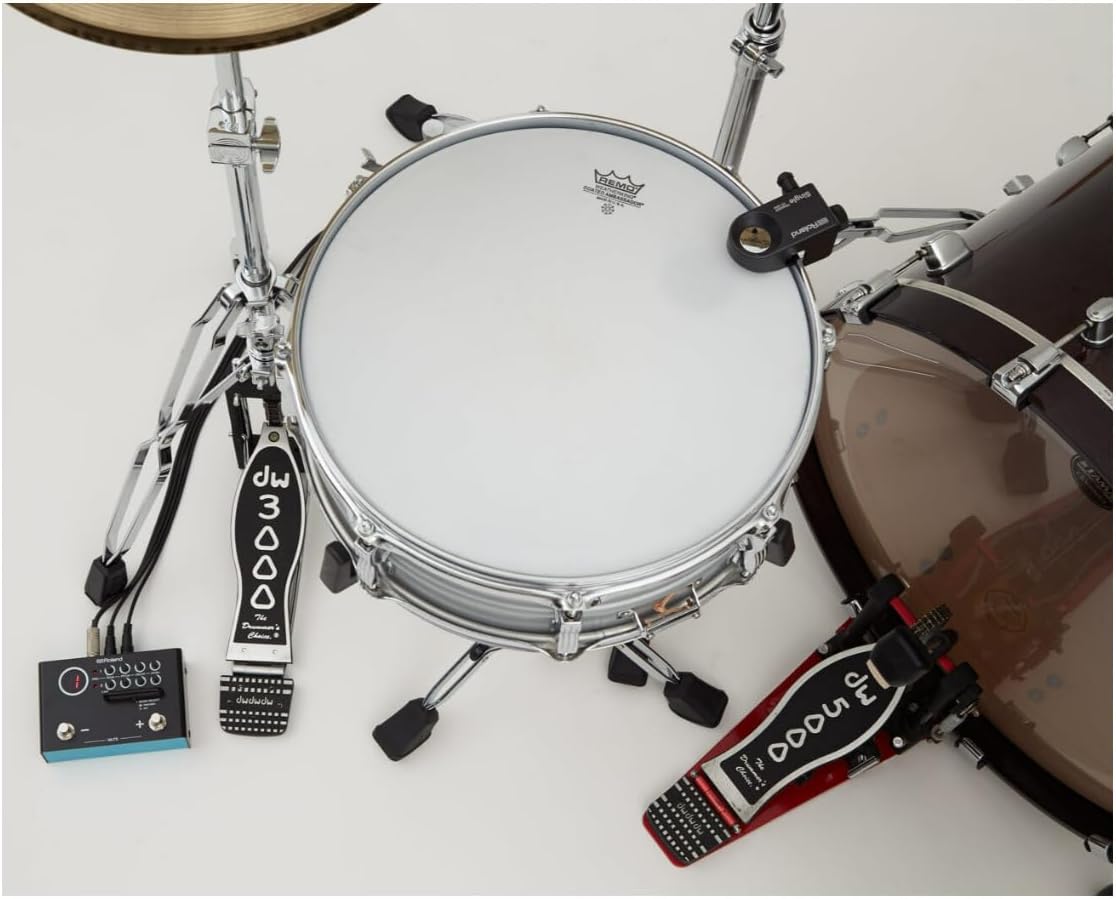
Isithombe: I-overhead view of the Roland TM-1 module positioned next to a drum kit, with cables connecting it to drum triggers on the snare and kick drum.

Isithombe: Ukuvala view of the Roland TM-1 module on the floor next to a drum kit, showing its connections to drum triggers and a foot pedal.
3.4 Uxhumano lomsindo
- Okukhiphayo: Connect the OUTPUT jack to your mixer, ampi-lifier, noma isixhumi esibonakalayo somsindo.
- Amafoni: Connect headphones to the PHONES jack for monitoring your sound.
4. Operating the TM-1
4.1 Izilawuli Zephaneli Yangaphambili

Image: Front panel of the TM-1 module, displaying the large LED display, Trigger 1 and 2 input indicators, and control knobs for SENS (Sensitivity), PITCH, DECAY, and LEVEL for each trigger. Also visible are the MODE SELECT switch (Preview/Kit) and the MUTE footswitches.
- Ukuboniswa kwe-LED: Shows the currently selected kit number or other status indicators.
- TRIG 1/2 Indicators: Light up when a trigger input is detected.
- SENS (Sensitivity) Knobs: Adjust the trigger sensitivity for inputs 1 and 2.
- PITCH Knobs: Adjust the pitch of the assigned sample for inputs 1 and 2.
- DECAY Knobs: Control the decay time of the assigned sample for inputs 1 and 2.
- LEVEL Knobs: Adjust the output volume of the assigned sample for inputs 1 and 2.
- MODE SELECT Switch: Toggles between Preview mode (for auditioning sounds) and Kit mode (for playing kits).
- Footswitches (- / + / MUTE): These multi-function footswitches allow you to navigate kits, trigger sounds, and mute the module during performance.
4.2 Using the TM-1 Editor App
The free TM-1 Editor app (available for Mac/Windows, iOS/Android) provides extensive control over the module's sounds and settings. Connect your TM-1 to your computer or mobile device via USB to access the editor.
- Ukwenza Ngokwezifiso Umsindo: Adjust parameters like sample gain, play type, dynamics, start offset, pitch, decay, and level for each trigger.
- SampLe Ngenisa: Load your own WAV samples into the module for personalized sounds.
- Additional Sounds: Access a library of over 150 extra sounds beyond the onboard kits.
- Kit Management: Create, save, and organize custom kits.
Ividiyo: Kuphelileview of the Roland TM-1 Hybrid Trigger Module, demonstrating its use with acoustic drums to enhance sounds, expand sonic possibilities with electronic pads, and customize sounds via mobile or desktop applications. It highlights features like triggering fatter kick and snare sounds, layering samples, and adjusting settings for the right kit sound every time.
Video: A user demonstration of the Roland TM-1 Dual Input Trigger Module, showcasing its compact design, battery operation, compatibility with Roland triggers and pads, and the functionality of its built-in footswitches. The video also highlights the TM-1 Editor app for sound customization and sample import, and its use as a trigger-to-MIDI converter.
4.3 Trigger-to-MIDI Conversion
When connected to a computer via USB, the TM-1 can function as a trigger-to-MIDI converter. This allows you to use your drum triggers to control software instruments or record MIDI data in your Digital Audio Workstation (DAW).
5. Isondlo
To ensure the longevity and optimal performance of your Roland TM-1, follow these maintenance guidelines:
- Ukuhlanza: Use a soft, dry cloth to clean the exterior. Avoid abrasive cleaners or solvents.
- Isitoreji: Gcina iyunithi endaweni epholile, eyomile ngaphandle kwelanga eliqondile namazinga okushisa aphezulu.
- Ukushintshwa Kwebhethri: If using batteries, replace them when the power indicator dims or the unit behaves erratically. Remove batteries if the unit will not be used for an extended period.
- Ukunakekelwa Kwekhebula: Ensure all cables are connected securely and are not kinked or strained.
6. Ukuxazulula izinkinga
If you encounter issues with your TM-1, refer to the following common problems and solutions:
- Awukho Umsindo:
- Check power connection (USB, AC adaptor, or fresh batteries).
- Ensure audio cables are correctly connected to OUTPUT and your sound system.
- Verify that the TM-1 is not muted using the footswitch.
- Check the LEVEL knobs for each trigger and the master volume of your sound system.
- Trigger Not Responding:
- Ensure the trigger cable is securely connected to the TRIGGER IN jack.
- Adjust the SENS (Sensitivity) knob for the corresponding trigger.
- Confirm the trigger itself is functioning correctly.
- Editor App Connection Issues:
- Ensure the USB cable is properly connected between the TM-1 and your device.
- Check for driver updates for the TM-1 on the Roland webindawo.
- Restart both the TM-1 and your computer/mobile device.
For further assistance, please visit the official Roland support webindawo.
7. Imininingwane
| Isici | Imininingwane |
|---|---|
| Igama Lemodeli | TM-1 |
| Ibhrendi | Roland |
| Umbala | EMNYAMA |
| Okubalulekile | Insimbi |
| Ubukhulu bento (L x W x H) | 17.52 x 17.44 x 18.9 amayintshi |
| Qalisa okokufaka | 2 (compatible with Roland RT-series triggers and pads) |
| Onboard Kits | 15 |
| Uhlelo lokusebenza lomhleli | WAV Manager (Mac/Windows, iOS/Android) with 150+ additional sounds and user sample import |
| Ukuxhumana | USB (for editor communication and trigger-to-MIDI conversion), DC IN, OUTPUT, PHONES |
| Ukunikezwa kwamandla kagesi | 9V Battery (6LR61) or BOSS PSA series AC Adaptor (sold separately), USB bus power |
8. Iwaranti kanye Nokusekela
For detailed warranty information and customer support, please refer to the warranty card included with your product or visit the official Roland website. Online resources, FAQs, and contact information for technical support are available to assist you with any questions or issues.


