1. Isingeniso
This manual provides comprehensive instructions for the setup, operation, maintenance, and troubleshooting of your Brinno BCC2000 Construction & Outdoor Security Time Lapse Camera Trio Bundle Pack. The BCC2000 is designed for long-term outdoor construction projects and security surveillance, offering up to 1-year battery life and 1080P video capture. This bundle includes the TLC2000 camera, an industrial clamp, and a weather-resistant case, providing a robust solution for capturing time-lapse videos in various environments.
2. Umkhiqizo Uphelileview
2.1 Okuqukethwe Kwephakheji
The Brinno BCC2000 bundle includes the following components:
- Professional Time Lapse Camera (TLC2000)
- Construction Power Housing (Weather-Resistant Case)
- I-Industrial Clamp I-Mount Kit
- 2 Imichilo
- Ikhadi le-SD
- 2 AA Amabhethri
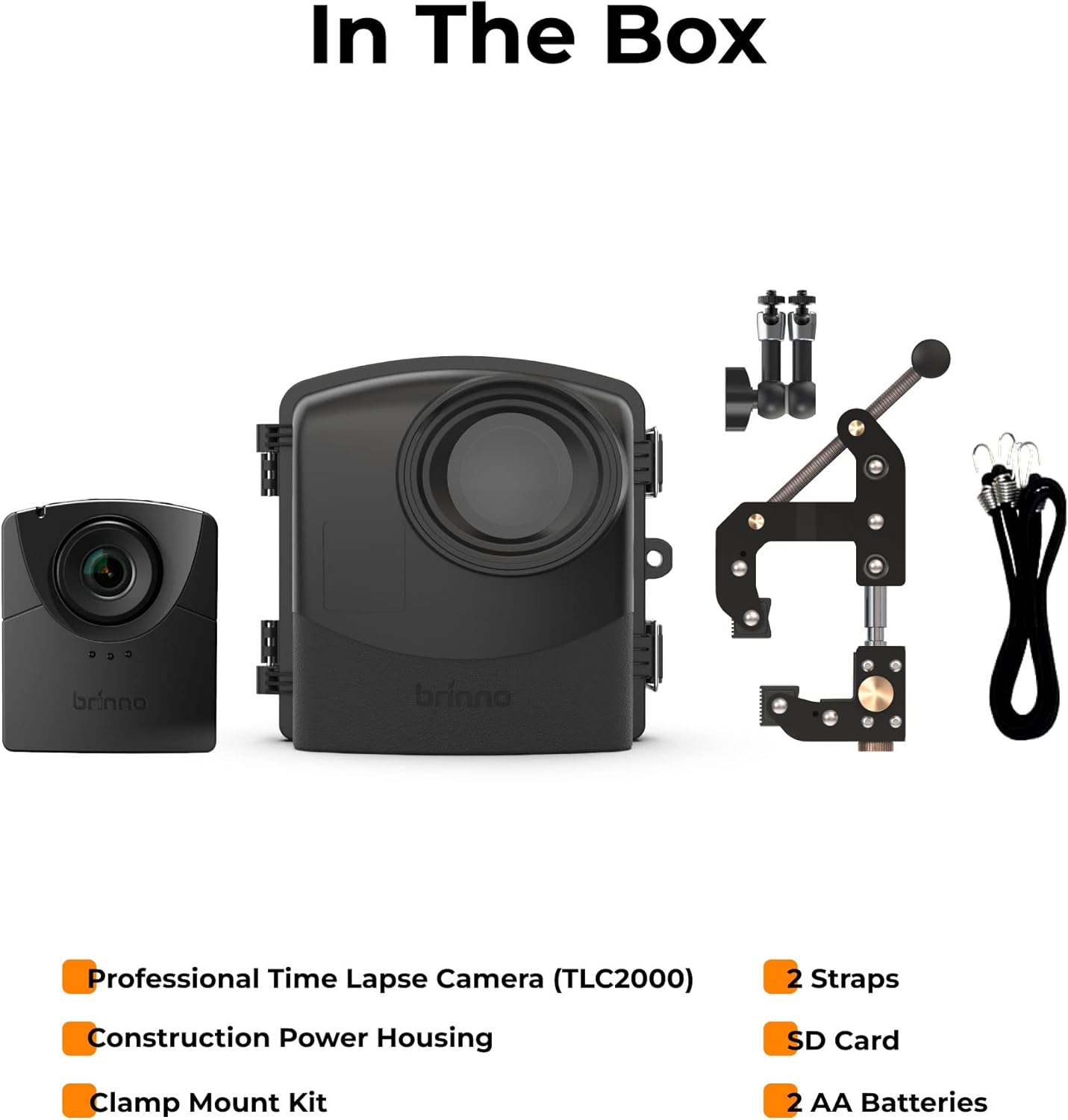
Figure 2.1: Components included in the Brinno BCC2000 bundle.
2.2 Izici ezibalulekile
- Impilo Yebhethri Enwetshiwe: Up to 1-year battery life for prolonged outdoor projects and security surveillance without the need for constant recharging or Wi-Fi. The spacious weather-resistant case accommodates 16 extra batteries for maximum duration.
- High-Quality Capture: Records 1080P time-lapse HDR videos, ready for immediate sharing. Features HDR & FHD sensors for optimal image quality.
- Ukumisa Ngokushesha: Designed for fast and easy deployment, ideal for job sites or remote areas.
- Ukuvikelwa Kwesimo Sezulu Sonke: The included weather-resistant case provides IPX5 waterproof protection, ensuring reliable operation in rain, snow, or heavy wind.
- Ukukhweza Okuhlukahlukene: The industrial clamp, made of stainless steel and rust-resistant materials, includes extension poles for adjusting to various surfaces (0.04 inch to 3.5 inch). A 360° rotating ball joint with 90° tilt allows for flexible camera positioning.
- Amalensi Ashintshekayo: The camera supports interchangeable lenses, allowing customization for wide-angle shots, close-ups, or specific details.
- Ukuhlela Okuguquguqukayo: Utilize the daily timer and schedule feature to optimize battery life and recording intervals.

Umdwebo 2.2: Ngaphezuluview of Brinno BCC2000 key features.
3. Setha
3.1 Battery and SD Card Installation
- Open the weather-resistant housing.
- Insert the provided 2 AA batteries into the TLC2000 camera.
- For extended operation, install up to 16 additional AA batteries into the designated compartments within the weather-resistant case.
- Insert the Micro SD card (up to 128GB supported) into the camera's SD card slot.
- Close the housing securely, ensuring all latches are fastened to maintain its waterproof seal.

Figure 3.1: Battery and SD card installation within the weather-resistant housing.
3.2 Ukufaka Ikhamera
- Attach the camera (within its housing) to the industrial clamp using the ball joint.
- Select a suitable mounting location, such as a pole, beam, or flat surface.
- Lungisa i-clamp's jaws to securely grip the chosen surface. The clamp can adjust from 0.04 inches (1mm) to 3.5 inches (90mm).
- Qinisa i-clamp firmly to prevent movement.
- Utilize the 360° rotating ball joint and 90° tilt feature to precisely angle the camera for your desired shot.

Figure 3.2: Versatility of the industrial clamp mount for different surfaces.

Figure 3.3: Brinno BCC2000 camera securely mounted outdoors.
4. Iziqondiso Zokusebenza
4.1 Powering On and Initial Settings
Once batteries and SD card are installed, the camera will power on. Follow the on-screen prompts to set the date, time, and language.
4.2 Recording Time-Lapse Videos
The BCC2000 is primarily designed for time-lapse recording. To begin recording:
- Navigate through the camera's menu using the control buttons.
- Select your desired recording interval (e.g., every 5 minutes, 1 hour).
- Set a daily timer or schedule if you wish to record only during specific hours or days to conserve battery life.
- Confirm your settings and initiate recording. The camera will automatically compile the captured images into an HDR time-lapse video.
4.3 Ukuvuselelwa kweFirmware
To ensure optimal performance and access to the latest features, it is recommended to regularly check for and upgrade the camera firmware to the latest version. Visit the official Brinno webisayithi lokulanda i-firmware kanye nemiyalelo.
5. Isondlo
5.1 Ukuhlanza
- Wipe the camera body and housing with a soft, damp indwangu.
- For the lens, use a specialized lens cleaning cloth and solution to avoid scratches.
- Ensure the housing seals are free from dirt or debris to maintain waterproof integrity.
5.2 Ukuphathwa Kwebhethri
While the BCC2000 offers extended battery life, regular monitoring of battery levels is advised for long-term projects. Replace batteries as needed to prevent interruption of recording.
5.3 Isitoreji
When not in use, store the camera and its components in a cool, dry place, away from direct sunlight and extreme temperatures. Remove batteries if storing for extended periods.
6. Ukuxazulula izinkinga
6.1 Izinkinga Ezivamile Nezixazululo
| Inkinga | Imbangela Engenzeka | Isixazululo |
|---|---|---|
| Ikhamera ayivuliwe | Amabhethri afile noma afakwe ngokungalungile | Hlola ukuma kwebhethri bese ushintshanisa ngamabhethri e-AA amasha. |
| Recording stops unexpectedly | Full SD card, low battery, or incorrect schedule settings | Check SD card storage, replace batteries, and review recording schedule. |
| Ikhwalithi yevidiyo embi | Dirty lens, incorrect settings, or outdated firmware | Clean the lens, adjust HDR/resolution settings, and update firmware. |
| Clamp engabambi ngokulondeka | Improper tightening or unsuitable mounting surface | Qinisekisa ukuthi i-clamp is fully tightened and the surface is within the specified grip range (0.04-3.5 inches). |
If you encounter issues not listed here, please refer to the Brinno support webisayithi noma xhumana nesevisi yamakhasimende.
7. Imininingwane
| Isici | Imininingwane |
|---|---|
| Inombolo Yemodeli | BCC2000 |
| Ubukhulu bomkhiqizo | 10.24 x 9.84 x 5.12 amayintshi |
| Isisindo sento | 4 amakhilogremu |
| Ukulungiswa kokuthwebula ividiyo | 1080p |
| Izindlela Zokudubula | Isikhathi seqile |
| Uhlobo Lwemidiya | Micro SD Card (up to 128GB recommended) |
| Amabhethri | 2 AA batteries required (included), supports additional 16 AA batteries in housing |
| Umbala | Mnyama |
| Umkhiqizi | Brinno |
| Idethi Yokuqala Etholakalayo | Disemba 5, 2018 |
8. Iwaranti kanye Nokusekela
Brinno is a reputable manufacturer with a long history in time-lapse technology, established in 2003 and specializing in time-lapse cameras since 2009. While specific warranty terms are not detailed in this manual, Brinno products are known for their durability and user-friendly design.
For detailed warranty information, technical support, or any product-related inquiries, please contact Brinno customer service directly through their official website. Ensure you have your product model number (BCC2000) and purchase details available when seeking support.


