Isingeniso
This manual provides detailed instructions for the proper setup, operation, and maintenance of your Integra CDC-3.4 6-Disc CD Carousel Changer. Please read this manual thoroughly before using the unit to ensure optimal performance and longevity. The Integra CDC-3.4 is designed for high-fidelity audio playback from compact discs, featuring a robust carousel mechanism for convenient disc management.
Ulwazi Lokuphepha Olubalulekile
Ukuze unciphise ingozi yokushaqeka kukagesi, umlilo, noma umonakalo kuyunithi, sicela uqaphele izinyathelo zokuphepha ezilandelayo:
- Funda imiyalelo: Funda yonke imiyalelo yokuphepha neyokusebenza ngaphambi kokusebenzisa umshini.
- Gcina Imiyalo: Gcina imiyalelo yokuphepha kanye nokusebenza ukuze uyisebenzise esikhathini esizayo.
- Lalela Izixwayiso: Namathela kuzo zonke izixwayiso ezintweni ezisetshenziswayo nakwiziqondiso zokusebenza.
- Landela imiyalelo: Landela yonke imiyalelo yokusebenza nokusebenzisa.
- Amanzi Nomswakama: Ungasebenzisi lesi sisetshenziswa eduze namanzi.
- Ukuhlanza: Hlanza kuphela ngendwangu eyomile.
- Ukungenisa umoya: Ungavimbi noma yiziphi izimbobo zokungenisa umoya. Faka ngokuhambisana nemiyalelo yomkhiqizi.
- Ukushisa: Ungafaki eduze kwanoma yimiphi imithombo yokushisa njengama-radiator, amarejista okushisa, izitofu, noma ezinye izinto ezisetshenziswayo (okuhlanganisa ampama-lifiers) akhiqiza ukushisa.
- Ukuvikelwa Kwentambo Yamandla: Vikela intambo yamandla ekuhanjweni ngayo noma ekuncinzweni, ikakhulukazi kumapulaki, ezintweni ezisetshenziswayo, kanye nendawo lapho ziphuma khona ezinsizeni.
- Khipha Ngesikhathi Seziphepho: Khipha lesi sisetshenziswa phakathi neziphepho zombani noma lapho singasetshenziswa isikhathi eside.
- Ukusevisa: Thumela zonke izinsiza kubasebenzi benkonzo abaqeqeshiwe. Ukuseviswa kuyadingeka lapho umshini wokusebenza ulimele nganoma iyiphi indlela, njengentambo yokuphakela amandla noma ipulaki lonakele, uketshezi luchithekile noma izinto ziwele emshinini, umshini uhlaselwe yimvula noma umswakama, awusebenzi ngendlela evamile. , noma ulahliwe.
Yini EseBhokisini
Carefully unpack your Integra CDC-3.4 and ensure all the following items are present:
- Integra CDC-3.4 CD Player
- Intambo yamandla
- Basic manual (this document)
- RCA Cable (for analog audio connection)
- RI Cable (for system remote integration)
- Remote Control (RC-778C)
- 2 AAA Amabhethri (okulawula kude)
Setha
1. Ukubekwa
Place the Integra CDC-3.4 on a stable, level surface with adequate ventilation. Ensure there is sufficient space around the unit for proper airflow to prevent overheating. Avoid placing it near heat sources or in direct sunlight.
2. Connecting Audio Cables
The CDC-3.4 offers multiple audio output options. Choose the connection type that best suits your audio receiver or ampophilayo:
- Analog Audio Output (RCA): Connect the supplied RCA cable from the ANALOG OUTPUT (L/R) jacks on the CDC-3.4 to the corresponding analog audio input jacks on your receiver/ampokokuphila.
- Digital Coaxial Output: For a digital audio connection, use a coaxial digital cable (not supplied) to connect the COAXIAL jack on the CDC-3.4 to a digital coaxial input on your receiver/ampokokuphila.
- Digital Optical Output: For an optical digital audio connection, use an optical digital cable (not supplied) to connect the OPTICAL jack on the CDC-3.4 to a digital optical input on your receiver/ampokokuphila.
3. Connecting RI Cable (Remote Interactive)
Uma umamukeli wakho/amplifier supports Integra's RI (Remote Interactive) system, connect the supplied RI cable from the REMOTE CONTROL (RI) jack on the CDC-3.4 to the RI jack on your receiver/amplifier. This allows for integrated control functions between the components.
4. Amandla okuxhuma
After all audio and control cables are connected, plug the supplied power cord into the AC INLET on the rear of the CDC-3.4, and then plug the other end into a wall outlet.
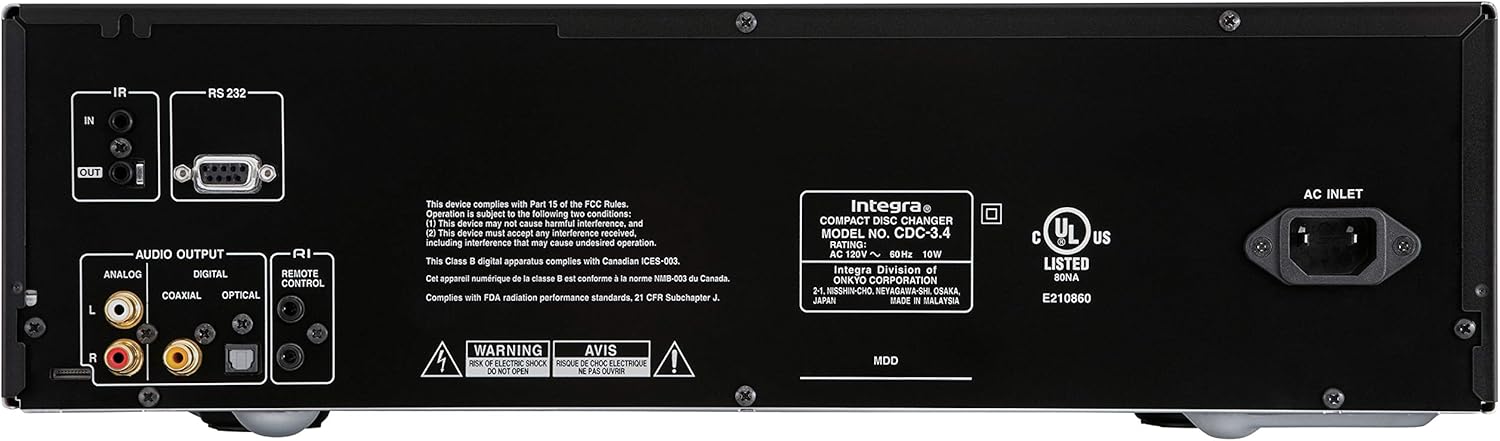
Figure 1: Rear panel connections of the Integra CDC-3.4.
Imiyalelo yokusebenza
1. Vula/Vala
Cindezela inkinobho Okulindile/Kuvuliwe button on the front panel or the On button on the remote control to turn the unit on or off.
2. Loading Discs
The CDC-3.4 is a 6-disc carousel changer. To load discs:
- Cindezela inkinobho Vula/Vala button on the front panel or remote to open the disc tray.
- Place a CD onto an empty disc well, ensuring it is seated correctly. The disc wells are numbered 1 through 6.
- You can swap up to 5 discs while the 6th disc continues to play.
- Cindezela Vula/Vala futhi ukuvala itreyi.
3. Disc Selection
To select a specific disc for playback:
- On the front panel, use the Khetha Idiski buttons (1-6) to directly choose a disc.
- On the remote control, use the numbered buttons (1-6) to select a disc.
4. Izilawuli zokudlala
Use the following buttons on the front panel or remote control for playback:
- Play/Pause (►/▐▐): Iqala noma imisa kancane ukudlala.
- Stop (■): Imisa ukudlala.
- Skip (◀◀/►►): Skips to the previous or next track.
- Search (◀◀◀/►►►): Fast forwards or reverses within a track (hold down).
5. Izindlela Zokudlala
- Okungahleliwe: Cindezela inkinobho Ngokungahleliwe button to play tracks in a random order.
- Phinda: Cindezela inkinobho Phinda button to repeat the current track, current disc, or all discs.

Figure 2: Front panel controls of the Integra CDC-3.4.

Figure 3: Integra RC-778C Remote Control.
Isondlo
Ukuhlanza Iyunithi
To clean the exterior of the unit, use a soft, dry cloth. For stubborn stains, slightly dampen the cloth with water or a mild, non-abrasive cleaner. Do not use harsh chemicals, solvents, or abrasive cleaning pads, as these can damage the finish.
Ukunakekelwa Kwediski
Handle CDs by their edges to avoid fingerprints and scratches. Store discs in their cases when not in use. If a disc is dirty, wipe it gently from the center outwards with a soft, lint-free cloth. Do not use abrasive materials or solvents.
Isondlo Sangaphakathi
The Integra CDC-3.4 contains no user-serviceable parts. Do not attempt to open the casing or perform any internal maintenance. Refer all servicing to qualified service personnel.
Ukuxazulula inkinga
If you experience issues with your Integra CDC-3.4, please consult the table below before contacting support.
| Inkinga | Imbangela Engenzeka | Isixazululo |
|---|---|---|
| Awekho amandla | Intambo yamandla ayixhumekile ngokuphephile. | Qinisekisa ukuthi intambo yamandla ixhunywe ngokuqinile kuyunithi kanye nokuphuma odongeni. |
| I-outlet yodonga ayisebenzi. | Hlola i-outlet ngenye idivayisi. | |
| Awukho umsindo | Audio cables not connected correctly. | Check all audio cable connections between the CDC-3.4 and your receiver/ampokokuphila. |
| Incorrect input selected on receiver/ampokokuphila. | Select the correct input source on your receiver/ampokokuphila. | |
| Disc not playing or reading | Idiski lingcolile noma liklwebekile. | Clean the disc with a soft, lint-free cloth. Try another disc. |
| I-Disc ifakwe ngokungalungile. | Ensure the disc is placed correctly in the disc well with the label side up. | |
| Isilawuli kude asisebenzi | Batteries are depleted or inserted incorrectly. | Shintsha amabhethri ngamabhethri e-AAA amasha, uqinisekisa ukuhlukahluka okulungile. |
| Ukuvinjwa phakathi kwesilawuli kude neyunithi. | Ensure there is a clear line of sight between the remote and the unit's IR sensor. |
Imininingwane
| Isici | Imininingwane |
|---|---|
| Inombolo Yemodeli | I-CDC-3.4 |
| Amandla eDisc | 6 Discs (CD Carousel Changer) |
| Digital to Analog Converters (DACs) | Dual High Quality Wolfson 192 kHz / 24-bit |
| overampling | 128 times oversampling |
| Signal Path Technology | Vector Linear Shaping Circuitry (VLSC) for Noise-free Signal Path, Proprietary Direct Digital Path |
| Imiphumela yomsindo | Analog (RCA L/R), Digital Coaxial, Digital Optical |
| Izindlela Zokulawula | RS232, IR (Infrared), RI (Remote Interactive) |
| Ubukhulu bomkhiqizo (W x H x D) | Cishe 17.1 x 9.8 x 21 amayintshi (43.4 x 24.9 x 53.3 cm) |
| Isisindo sento | 15.2 pounds (6.9 kg) |
| Izidingo zamandla | I-AC 120V ~ 60Hz |
| Izesekeli ezifakiwe | Remote Control, RCA Cable, RI Cable, Power Cord, AAA Batteries |
Iwaranti kanye Nokusekela
Iwaranti yomkhiqizi
The Integra CDC-3.4 typically comes with a manufacturer's warranty, which may vary by region. Please refer to the warranty card included with your product or visit the official Integra (Onkyo) website for specific warranty terms and conditions. It is recommended to retain your proof of purchase for warranty claims.
Ukwesekwa Kwamakhasimende
For technical assistance, troubleshooting beyond this manual, or warranty inquiries, please contact Integra customer support. You can find contact information, including phone numbers and online support resources, on the official Onkyo/Integra webindawo.


