1. Isingeniso
The Radiolink SUI04 is a compact and high-precision ultrasonic sensor designed for obstacle avoidance and altitude holding in multirotor drones and robotic applications. This sensor functions as a transmitting and receiving hybrid unit, providing accurate distance measurements to facilitate autonomous navigation and enhance operational safety.
Izici ezibalulekile zifaka:
- Ukugwema Izithiyo: Enables drones to detect and avoid obstacles in horizontal directions, and provides altitude hold capabilities for downward sensing.
- Ukunemba Okuphezulu: Offers 0.4cm detection precision, capable of identifying small obstacles.
- Ukubambezeleka Okuphansi: Features an extreme fast response time with latency as low as 30ms.
- Idizayini Ehlangene: Weighing only 0.017 Lb (8g with wires) and measuring 20x22x19mm, it is easy to integrate into various platforms.
- Ukuhambisana: Suitable for Radiolink PIXHAWK, Mini PIX, and TURBO PIX flight controllers, with automatic I2C port identification.
The SUI04 sensor is ideal for applications in agriculture, training, and rescue operations, ensuring enhanced safety during outdoor flights and maneuvers.

Image 1.1: The Radiolink SUI04 Ultrasonic Sensor module, showing its compact design and transducer.
2. Ukusetha nokufakwa
Follow these steps for proper installation and connection of your SUI04 Ultrasonic Sensor:
2.1 Okuqukethwe Kwephakheji
Qinisekisa ukuthi iphakheji yakho iqukethe izinto ezilandelayo:
- 1x SUI04 Ultrasonic Sensor
- 1x PIXHAWK (I2C slot) cable
- 1x Mini Pix (I2C slot)/I2C cable
- 1x Packing bag

Image 2.1: Contents of the SUI04 package, including the sensor and connection cables.
2.2 Ukufakwa ngokomzimba
The SUI04 sensor is lightweight and small, making it easy to mount on your drone or robot. Ensure it is securely attached in a position that provides a clear line of sight for ultrasonic waves, free from obstructions.
2.3 Ukuxhunywa kukagesi
The SUI04 connects to compatible flight controllers via an I2C interface. It automatically identifies the I2C port.
- For PIXHAWK Flight Controllers: Use the provided PIXHAWK (I2C slot) cable to connect the SUI04 sensor to an available I2C port on your PIXHAWK flight controller.
- For Mini PIX Flight Controllers: Use the provided Mini Pix (I2C slot)/I2C cable to connect the SUI04 sensor to an available I2C port on your Mini PIX flight controller.

Image 2.2: Diagram illustrating how to connect multiple SUI04 sensors to a Pixhawk flight controller.

Image 2.3: Diagram illustrating how to connect the SUI04 sensor to a MiniPix flight controller.
2.4 Initial Configuration (Example for Pixhawk 2.4.8)
For Pixhawk 2.4.8 flight controllers, users have reported success with the following parameters:
- RNGFND1_TYPE: 2
- RNGFND1_ADDR: I-112 (0x70)
It is recommended to verify the I2C address using an I2C scanner if issues arise. Consult your flight controller's documentation for specific parameter settings related to ultrasonic rangefinders.
3. Izimiso Zokusebenza
The SUI04 sensor operates by emitting ultrasonic sound waves and measuring the time it takes for the echo to return. This time-of-flight measurement is then used to calculate the distance to an object.
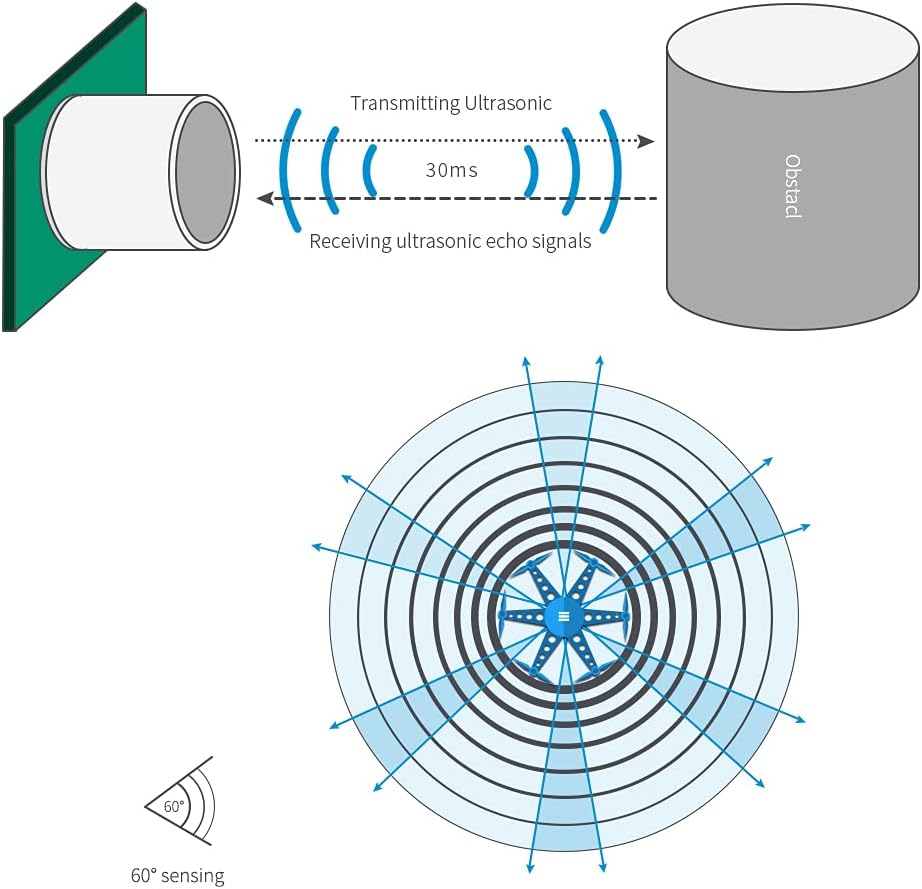
Image 3.1: Illustration of the ultrasonic sensing principle, showing sound wave transmission and reception.
3.1 Ukugwema Izithiyo
When integrated with a compatible flight controller, the SUI04 enables autonomous obstacle avoidance. Multiple sensors can be installed to provide comprehensive coverage:
- Horizontal Avoidance: Sensors mounted on the sides of the drone detect obstacles in the flight path.
- Upward Avoidance: Sensors facing upwards can detect overhead obstacles.
- I-Altitude Hold: A downward-facing sensor assists in maintaining a stable altitude by detecting the ground or surfaces below.
The system supports installing up to 6 sensors on a single drone for all-direction obstacle avoidance, enhancing safety during flight, especially for beginners.

Image 3.2: Diagram showing a drone utilizing SUI04 sensors for obstacle avoidance in six directions.
4. Isondlo
The Radiolink SUI04 Ultrasonic Sensor is designed for durability and requires minimal maintenance. To ensure optimal performance:
- Gcina Uhlanzekile: Periodically inspect the sensor's transducer surface for dirt, dust, or debris. Gently clean with a soft, dry cloth if necessary. Avoid using liquids or abrasive materials.
- Hlola Ukuxhumana: Njalo hlola zonke izixhumo zamakhebula ukuze uqinisekise ukuthi zivikelekile futhi azinamonakalo.
- Ukucatshangelwa kwemvelo: While the sensor operates within a wide temperature range (-20°C to 80°C), avoid prolonged exposure to extreme conditions or direct moisture.
5. Ukuxazulula izinkinga
If you encounter issues with your SUI04 Ultrasonic Sensor, consider the following troubleshooting steps:
- No Detection or Inaccurate Readings:
- Ensure the sensor's path is clear of obstructions.
- Verify that the sensor is securely connected to the flight controller's I2C port.
- Check for any physical damage to the sensor or cables.
- "Bad Lidar Health" Error (Pixhawk):
- This issue has been reported by users and may be resolved with a firmware update for your flight controller. Contact Radiolink support or check their official resources for the latest firmware.
- Configuration Difficulties:
- Double-check the flight controller parameters. For Pixhawk 2.4.8, ensure RNGFND1_TYPE isethwe ku 2 futhi RNGFND1_ADDR ku I-112 (0x70).
- If the I2C address is uncertain, use an I2C scanner tool with an Arduino to confirm the sensor's address.
- Izinkinga zokuhambisana:
- Note that the SUI04 sensor is primarily designed for and confirmed to work with Pixhawk 2.4.8, Mini PIX, and TURBO PIX flight controllers. It may not be compatible with newer versions like Pixhawk 4 without specific firmware or configuration adjustments.
- Physical Defects:
- Upon receiving the product, inspect for any manufacturing defects such as unattached covers or poor solder joints, which can affect functionality.
6. Imininingwane
Detailed technical specifications for the Radiolink SUI04 Ultrasonic Sensor:

Image 6.1: Visual representation of the SUI04 sensor's key parameters.
| Ipharamitha | Inani |
|---|---|
| Okokufaka Voltage | 4.5-5.5V (Ivolumu ephezulutage NOT Supported) |
| Okwamanje | 18mA@5V |
| Amandla | 90mA |
| Isixhumi esibonakalayo esiphumayo | I-I2C |
| Umjikelezo Womsebenzi | 30ms |
| Detecting Precision | 0.4cm (0.16") |
| Ithola Imvamisa | 40 ± 1.0KHz |
| I-Angle ye-Beam | 60° (transceiver) |
| Izinga Lokushisa Lokusebenza | -20°C kuya ku-80°C |
| Detected Distance | 40cm-450cm (15.75" ~ 177.17") |
| Fade Area | 40cm (15.75"), read as 0 fade area by FC |
| Ubukhulu (LxWxH) | 20 x 22 x 19mm (0.79" x 0.87" x 0.75") |
| Weight (with wires) | 8g (0.28oz) |

Image 6.2: Detailed dimensions of the SUI04 sensor module.
7. Iwaranti kanye Nokusekela
Radiolink is committed to providing quality products and customer satisfaction. While specific warranty periods may vary by region and retailer, Radiolink offers comprehensive after-sales support.
7.1 Ukwesekwa Kwezobuchwepheshe
For technical assistance, troubleshooting, or inquiries regarding your SUI04 Ultrasonic Sensor, please contact Radiolink's after-sales service. You can typically find support resources through the official Radiolink website or the retailer where the product was purchased. Radiolink also provides user manuals and FAQ troubleshooting files on their product pages.
7.2 Product Documents
Incwadi yomsebenzisi esemthethweni ngefomethi ye-PDF iyatholakala ukuze uyilande:


