1. Umkhiqizo Uphelileview
The Lexmark MS521dn is a high-performance monochrome laser printer designed for office environments. It offers fast printing speeds, two-sided duplex printing, and robust security features to meet the demands of large workgroups. With a 2.4-inch LCD display, managing print jobs and system information is intuitive and straightforward.
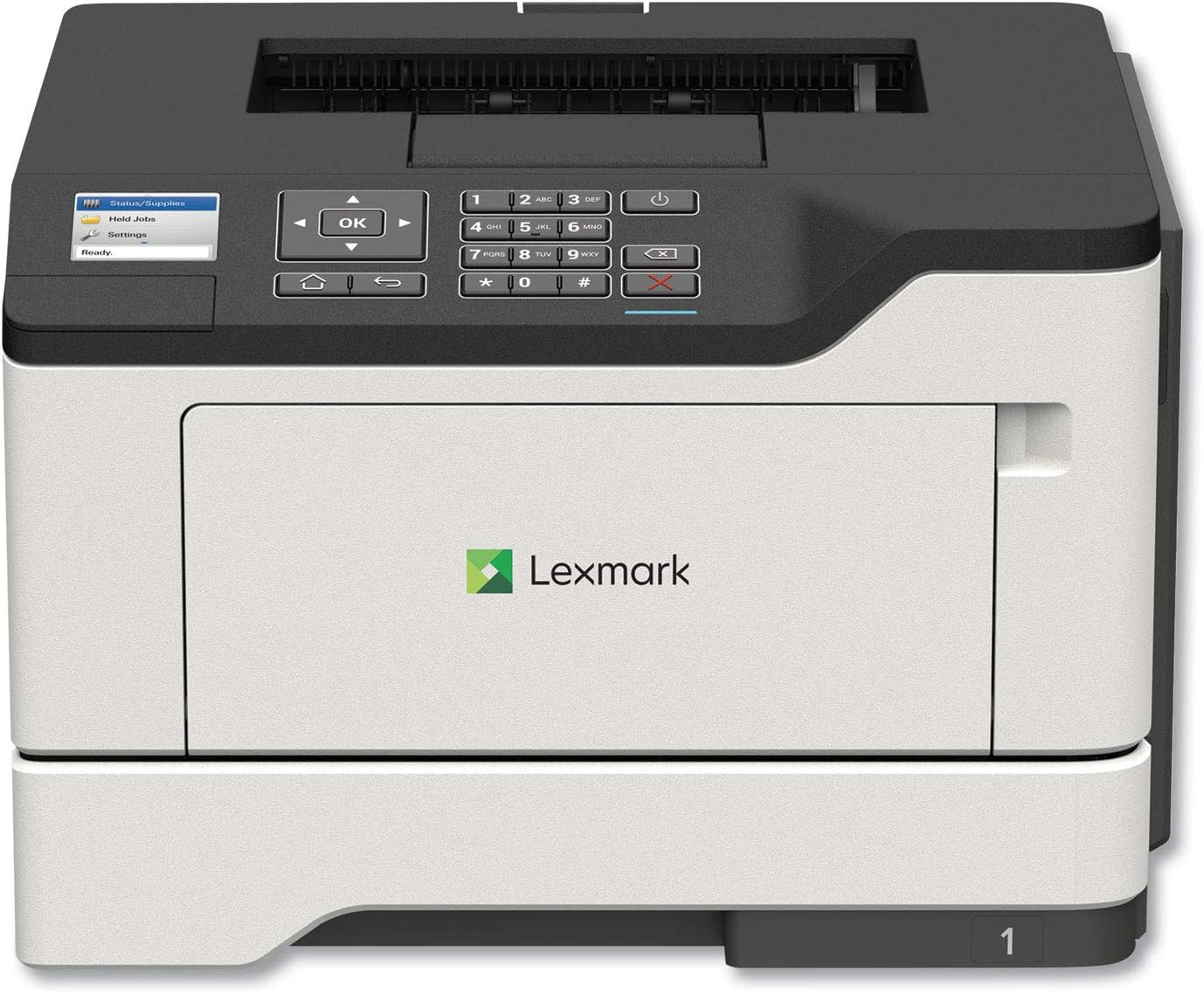
Isithombe: Ngaphambili view of the Lexmark MS521dn Monochrome Laser Printer, showcasing umklamo wayo ohlangene kanye nephaneli yokulawula.
Izici ezibalulekile zifaka:
- Ukusebenza okuphezulu: Print speeds up to 46 pages per minute with a 1-GHz dual-core processor and 512 MB of memory.
- Ukuphrinta kwe-Duplex: Standard two-sided printing for paper saving.
- Ukuphepha Okuqinile: Comprehensive security architecture to protect information on the device and network.
- Isixhumi esibonakalayo esisebenziseka kalula: 2.4-inch color LCD for easy configuration and monitoring.
- Ukuphathwa Kwemidiya Okuhlukahlukene: Supports various media types and sizes, from A6 to legal, with a 100-sheet multipurpose feeder.
- Ukusebenza kahle kwamandla: Designed to reduce power consumption in active and sleep modes, meeting ENERGY STAR 2.0 requirements.
2. Setha
Follow these steps to set up your Lexmark MS521dn printer and install the toner cartridge:
- Khipha Iphrinta: Carefully remove the printer from its packaging. Remove all packing materials, tapes, and protective films.
- Xhuma Amandla: Xhuma intambo kagesi kuphrinta bese uyibeka endaweni yokukhipha ugesi engaphansi komhlaba.
- Faka i-Toner Cartridge:
- Vula umnyango wokungena wangaphambili wephrinta.
- If replacing an old cartridge, gently pull it out.
- Unpack the new toner cartridge from its box and protective bag.
- Gently shake the new cartridge from side to side to distribute the toner evenly.
- Align the cartridge with the guides inside the printer and push it in until it clicks into place.
- Vala umnyango wokungena wangaphambili.
- Xhuma kunethiwekhi/ikhompyutha:
- For network connectivity, connect an Ethernet cable from your router or network switch to the printer's Ethernet port.
- For direct connection, use a USB cable to connect the printer to your computer.
- Faka Isofthiwe: Insert the provided Software and documentation CD into your computer's CD/DVD drive and follow the on-screen instructions to install the printer drivers and software. Alternatively, download the latest drivers from the official Lexmark support webindawo.
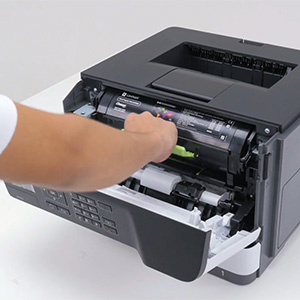
Image: A hand demonstrating the installation of a toner cartridge into the printer's front compartment.
Video: Official Lexmark guide on replacing the toner cartridge for the MS521dn printer. This video demonstrates the step-by-step process of opening the printer, removing the old cartridge, unpacking and preparing the new cartridge, and inserting it correctly.
3. Iziqondiso Zokusebenza
The Lexmark MS521dn is designed for straightforward operation. Here are basic instructions for common tasks:
3.1. Ukuphrinta Okuyisisekelo
- Qinisekisa ukuthi iphrinta ivuliwe futhi ixhunywe kukhompyutha noma kunethiwekhi yakho.
- Load paper into the main paper tray or the multipurpose feeder. Adjust the paper guides to fit the paper size.
- Kusuka kukhompyutha yakho, vula idokhumenti noma isithombe ofuna ukusiphrinta.
- Khetha File > Phrinta (noma umyalo olinganayo kuhlelo lwakho lokusebenza).
- Choose the Lexmark MS521dn from the list of available printers.
- Adjust print settings as needed (e.g., number of copies, paper size, print quality, duplex printing).
- Chofoza Phrinta.
3.2. Ukusebenzisa Iphaneli Yokulawula
The 2.4-inch color LCD display and control panel allow you to manage printer settings and monitor status:
- Izinkinobho Zokuzulazula: Use the arrow keys and OK button to navigate through menus.
- Status/Supplies: Check toner levels, paper tray status, and printer errors.
- Izilungiselelo: Configure network settings, paper handling options, print quality, and security features.
- Held Jobs: Access and manage print jobs held in the printer's memory.
4. Isondlo
Regular maintenance ensures optimal performance and longevity of your Lexmark MS521dn printer.
4.1. Ukufaka Ikhatriji Yethoni Esikhundleni
When the printer indicates low toner or print quality degrades, it's time to replace the toner cartridge. Refer to the "Setup" section (Step 3) for detailed instructions and the embedded video on how to replace the toner cartridge.
4.2. Ukuhlanza Iphrinta
- Ingaphandle: Sebenzisa okuthambile, damp, lint-free cloth to wipe the exterior of the printer. Avoid abrasive cleaners.
- Ngaphakathi: Periodically open the front cover and gently remove any paper dust or debris from the interior using a dry, lint-free cloth. Do not touch the imaging unit's drum.
4.3. Fuser and Imaging Components
The Lexmark MS521dn features long-life fuser and imaging components designed to extend uptime and reduce the frequency of replacements. Consult the printer's display or the Lexmark support website for indicators on when these components may require attention.
5. Ukuxazulula izinkinga
This section addresses common issues you might encounter with your Lexmark MS521dn printer.
5.1. Iphrinta Ayiphenduli
- Hlola Amandla: Qinisekisa ukuthi iphrinta ixhunyiwe futhi ivuliwe.
- Hlola Ukuxhumana: Verify that the USB or Ethernet cable is securely connected to both the printer and the computer/network.
- Qala kabusha Amadivayisi: Turn off the printer, computer, and router (if applicable). Wait a few minutes, then turn them back on in the following order: router, printer, computer.
- Printer Status: Check the printer's LCD display for any error messages or status indicators.
5.2. Ikhwalithi Yokuphrinta Embi
- Izinga le-Toner: Check the toner cartridge level via the printer's display or software. Replace if low.
- Uhlobo Lwephepha: Ensure you are using the correct paper type and quality for your print job.
- Izilungiselelo Zephrinta: Adjust print quality settings in your printer driver.
- Ukuhlanza Kwangaphakathi: Perform an internal cleaning cycle if available through the printer's menu.
5.3. Ama-Paper Jam
- Thola i-Jam: The printer's display will usually indicate the location of the paper jam.
- Open Access Areas: Vula wonke amakhava namathreyi afinyelelekayo.
- Susa Iphepha: Khipha ngokucophelela noma yiliphi iphepha eliminyene elibheke endleleni yephepha. Gwema ukudabula iphepha.
- Vala Izimbozo: Close all covers and trays securely.
5.4. Connectivity Issues (e.g., Not Wireless)
The Lexmark MS521dn model (36S0300) connects via Ethernet or USB. It does not have built-in wireless connectivity. If you require wireless printing, you may need an external wireless print server or a network setup that allows for wireless access to a wired printer. Please verify your network configuration and ensure the printer is connected via a supported method.
6. Imininingwane
| Isici | Imininingwane |
|---|---|
| Ibhrendi | I-Lexmark |
| Igama Lemodeli | MS521dn (36S0300) |
| Ubuchwepheshe bokuphrinta | I-Laser |
| Okukhipha Iphrinta | I-Monochrome |
| Isivinini Sokuphrinta Esiphezulu (Monochrome) | 46 ppm |
| Ukulungiswa Okukhulu kokuphrinta | 1200 x 1200 dpi |
| Ukuphrinta kwe-Duplex | Okuzenzakalelayo (Okunezinhlangothi ezimbili) |
| Ubuchwepheshe bokuxhumana | I-Ethernet, i-USB |
| Isibalo Sophrosesa | 2 (I-Dual-core) |
| Amandla Okugcina Inkumbulo | 512 MB |
| Uhlobo lokubonisa | I-LCD yombala engu-2.4 intshi |
| Amandla Eshidi Lokufaka Okuphezulu | 350 sheets (expandable to 2000 sheets) |
| Ubukhulu bomkhiqizo (DxWxH) | 16.93"D x 18.5"W x 14.8"H |
| Isisindo sento | 31.1 amakhilogremu |
| Ukusetshenziswa kwamandla | 620 Watts (Kumodi) |
7. Iwaranti kanye Nokusekela
Your Lexmark MS521dn printer comes with a limited warranty. For specific details regarding the warranty period and coverage, please refer to the "Statement of limited warranty/guarantee" included in your product packaging.
Lexmark is committed to providing comprehensive product security and support. If you encounter issues that cannot be resolved using the troubleshooting guide, or for further assistance, please contact Lexmark customer support. You can find contact information and additional resources on the official Lexmark webindawo.
For information on the Lexmark Cartridge Collection Program (LCCP) for recycling used cartridges, please refer to the included documentation or the Lexmark webindawo.


