1. Isingeniso
Siyabonga ngokuthengaasing the Sharp HT-SB140MT 2.0 150W Soundbar. This soundbar is designed to enhance your audio experience, providing clear and powerful sound for your television, music, and other media. With its sleek design and versatile connectivity options, including Bluetooth, HDMI ARC/CEC, Optical, and Auxiliary inputs, it integrates seamlessly into any home entertainment setup. This manual provides essential information for safe and effective use, including setup, operation, maintenance, and troubleshooting.
2. Ulwazi Lokuphepha
- Umthombo wamandla: Qinisekisa ukuthi unikezwa amandla ngevolthitage matches the requirements specified on the soundbar. Use only the provided power cable.
- Ukungenisa umoya: Do not block any ventilation openings. Maintain adequate space around the soundbar for proper airflow.
- Amanzi Nomswakama: Do not expose the soundbar to dripping or splashing water. Do not place objects filled with liquids, such as vases, on the apparatus.
- Ukushisa: Do not place the soundbar near heat sources such as radiators, heat registers, stoves, or other apparatus (including ampama-lifiers) akhiqiza ukushisa.
- Ukuhlanza: Unplug the soundbar from the power outlet before cleaning. Use a dry, soft cloth for cleaning. Do not use liquid cleaners or aerosol cleaners.
- Ukusevisa: Ungazami ukuletha lo mkhiqizo ngokwakho. Dlulisela konke ukwesekwa kubasebenzi bensizakalo abafanelekayo.
- Amabhethri: The remote control uses a CR2 battery. Ensure correct polarity when inserting batteries. Do not mix old and new batteries.
3. Okuqukethwe Kwephakheji
Sicela uhlole ukuthi zonke izinto zikhona yini kuphakheji:
- Sharp HT-SB140MT Soundbar
- Isilawuli kude
- Ikhebula Lamandla
- Incwadi Yomsebenzisi (le dokhumenti)
4. Umkhiqizo Uphelileview

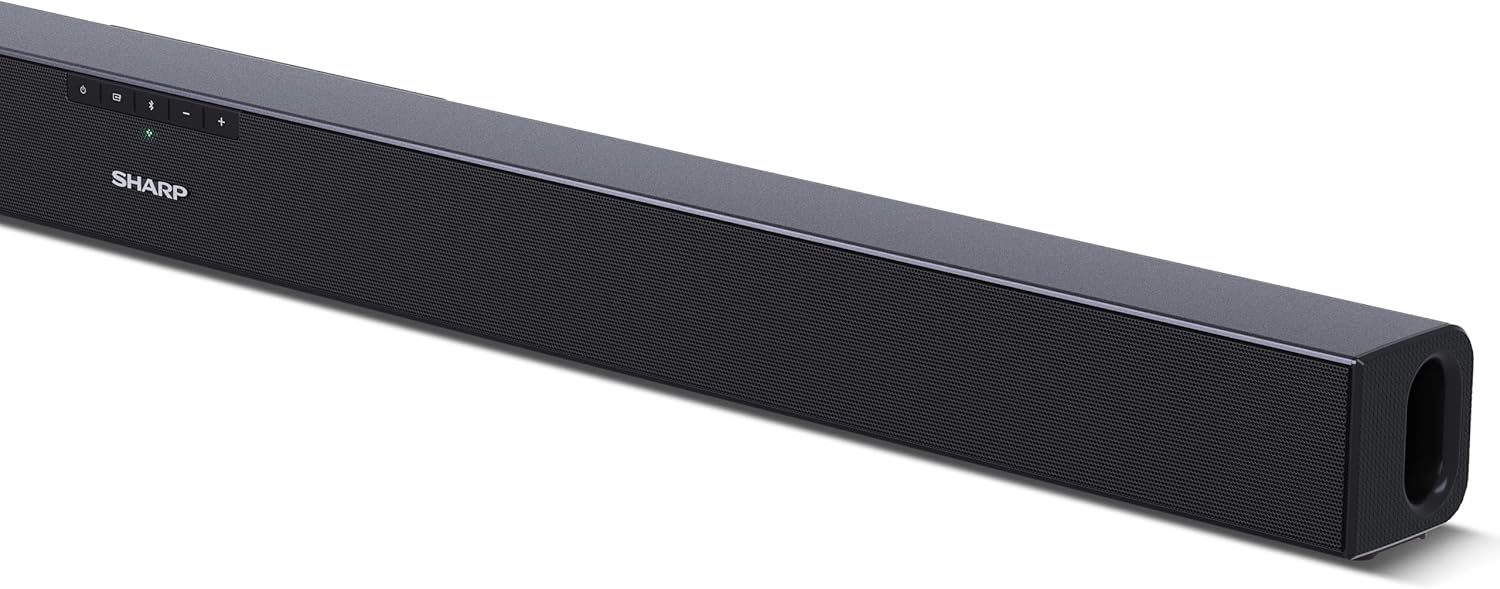
Umfanekiso 4.1: Ngaphambili View
The front of the soundbar features the Sharp logo and LED indicators for source selection and status. Control buttons for power, input, and volume are located on the top panel.
Umfanekiso 4.2: Ngemuva View (Ukuxhumana)
The rear panel provides all necessary connection ports: HDMI ARC, Optical (S/PDIF), and Auxiliary (3.5mm) input, along with the power input.

Umfanekiso 4.3: Isilawuli kude
The included remote control allows for convenient operation of the soundbar, including power, input selection, volume, bass, and treble adjustments.
5. Setha
5.1 Ukubekwa
The Sharp HT-SB140MT Soundbar can be placed on a flat surface, such as a TV stand, or wall-mounted. Its slim profile of 6 cm allows it to fit easily under most TV screens without obstructing the view.

Figure 5.1: Soundbar Placement
The soundbar is ideally positioned directly in front of your television for optimal sound projection.
5.2 Ukuxhuma kumabonakude wakho
Khetha eyodwa kwezilandelayo izindlela zokuxhuma:
- HDMI ARC/CEC (Recommended): Connect an HDMI cable (not included) from the HDMI ARC port on your TV to the HDMI ARC port on the soundbar. This allows your TV remote to control the soundbar's volume and power. Ensure HDMI ARC/CEC is enabled in your TV's settings.
- Digital Optical Audio (S/PDIF): Connect an optical cable (not included) from the Optical Out port on your TV to the OPTICAL IN port on the soundbar. Select the Optical input on the soundbar.
- Isilekeleli (AUX): Connect a 3.5mm audio cable (not included) from the headphone jack or AUX Out port on your TV to the AUX IN port on the soundbar. Select the AUX input on the soundbar.
5.3 Ukuxhuma Amandla
After connecting the audio cable, plug the power cable into the soundbar's power input and then into a wall outlet (220-240V / 50Hz).
6. Iziqondiso Zokusebenza
6.1 Vula/Vala amandla
Press the Power button on the soundbar or the remote control to turn the unit on or off.
6.2 Ukukhethwa Komthombo
Press the Input button on the soundbar or the remote control repeatedly to cycle through the available input sources: HDMI ARC, Optical, AUX, and Bluetooth. The LED indicator on the soundbar will change to reflect the selected source.
6.3 Ukulungiswa Kwevolumu
Use the Volume Up (+) and Volume Down (-) buttons on the soundbar or the remote control to adjust the sound level.
6.4 Ukumatanisa kwe-Bluetooth
Ukuze uxhume idivayisi ye-Bluetooth:
- Select Bluetooth input on the soundbar. The Bluetooth LED indicator will flash, indicating pairing mode.
- On your smart device (smartphone, tablet, etc.), enable Bluetooth and search for available devices.
- Select "SHARP HT-SB140MT" from the list of devices.
- Once connected, the Bluetooth LED indicator will stop flashing and remain solid. You can now stream audio wirelessly to the soundbar.
6.5 Sound Modes (Equalizer)
The soundbar features an equalizer with different sound modes to optimize audio for various content types. Use the EQ button on the remote control to cycle through these modes (e.g., Movie, Music, News). You can also adjust Bass and Treble levels using dedicated buttons on the remote.
7. Isondlo
7.1 Ukuhlanza
To clean the soundbar, unplug it from the power outlet. Use a soft, dry, lint-free cloth to wipe down the surfaces. Do not use abrasive cleaners, waxes, or solvents as they may damage the finish.
7.2 Isitoreji
If you plan to store the soundbar for an extended period, disconnect it from the power supply and store it in a cool, dry place, away from direct sunlight and extreme temperatures.
8. Ukuxazulula izinkinga
Uma uhlangabezana nezinkinga ngebha yakho yomsindo, bheka izinkinga ezilandelayo nezisombululo:
| Inkinga | Imbangela Engenzeka | Isixazululo |
|---|---|---|
| Awukho umsindo ovela kubha yomsindo. | Soundbar is off or muted. Umthombo wokufaka ongalungile ukhethiwe. Amakhebuli awaxhunyiwe kahle. Izilungiselelo zokuphuma komsindo we-TV azilungile. | Ensure the soundbar is powered on and not muted. Select the correct input source (HDMI ARC, Optical, AUX). Check all cable connections (HDMI, Optical, AUX). Verify your TV's audio output settings are set to external speakers or the correct digital output. |
| Idivayisi ye-Bluetooth ayikwazi ukuxhuma. | Soundbar is not in pairing mode. Idivayisi ingaphandle kwebanga. Ukuphazamiseka kwamanye amadivaysi. | Ensure the soundbar is in Bluetooth input mode and the LED is flashing. Sondeza idivayisi yakho ye-Bluetooth eduze kwebha yomsindo (ngaphakathi kwamamitha ayi-10). Turn off other Bluetooth devices nearby. Try unpairing and re-pairing. |
| Isilawuli kude asisebenzi. | Battery is low or inserted incorrectly. Ukuphazamiseka phakathi kwesilawuli kude nebha yomsindo. Isilawuli kude sinephutha. | Shintshanisa ibhethri le-CR2 futhi uqinisekise i-polarity efanele. Remove any obstructions between the remote and the soundbar's sensor. Uma izinkinga ziqhubeka, xhumana nokwesekwa kwamakhasimende. |
9. Imininingwane
| Igama Lemodeli | I-HT-SB140(MT) |
| Uhlobo lwesipika | Ibha yomsindo |
| Ukucushwa Kwesiteshi Somsindo Esizungezile | 2.0 |
| Amandla Okukhipha Isipikha aphezulu | 150 Watts |
| Impendulo Yemvamisa | 60 Hz |
| Ubuchwepheshe bokuxhumana | Bluetooth, HDMI ARC/CEC, Digital Optical Audio (S/PDIF), 3.5mm Auxiliary (AUX) |
| I-Wireless Communication Technology | I-Bluetooth |
| Ibanga eliphezulu (Bluetooth) | 10 Amamitha |
| Indlela Yokulawula | Isilawuli kude |
| Umthombo wamandla | AC (Mains) |
| Okokufaka Voltage | Ama-Volts angama-220-240 |
| Umbala | Mnyama |
| Okubalulekile | Ipulasitiki, insimbi |
| Uhlobo Lokukhweza | I-Wall Mount, I-Tabletop |
| Ubukhulu bomkhiqizo (L x W x H) | 95 x 6 x 6 cm |
| Isisindo sento | 1.5 kg |
| Izingxenye Ezihlanganisiwe | Isilawuli kude |
| Kudingeka Ibhethri | 1 CR2 ibhethri |
| Ingangeni manzi | Cha |
| Ukutholakala Kwezingxenye Ezisele | 5 Iminyaka |
| Ukubuyekezwa Kwesofthiwe Kuqinisekisiwe Kuze kube | Ulwazi alutholakali |
10. Iwaranti kanye Nokusekela
The Sharp HT-SB140MT Soundbar comes with a Limited Warranty. Please refer to the warranty card included in your package for specific terms and conditions. Spare parts are available for up to 5 years from the date of purchase.
For technical support, service, or warranty claims, please contact Sharp customer service through their official website or the contact information provided in your product documentation. When contacting support, please have your product model number (HT-SB140(MT)) and purchase details ready.


