Isingeniso
The Motorola T260 Talkabout 2-Way Radio is designed for reliable communication in various outdoor and indoor environments. With a range of up to 25 miles under optimal conditions, it allows users to stay connected with family and friends. This lightweight and durable radio includes essential features such as NOAA weather channels and alerts, and iVOX/VOX hands-free communication.

Image: Motorola T260 Talkabout Two-Way Radios banner highlighting the 'Go Further' capability.
Yini EseBhokisini
Your Motorola T260 package includes the following items:
- 2 Imisakazo
- 2 Iziqeshana zamabhande
- 2 NiMH Battery Packs
- 1 "Y" Cable Charging Adapter with dual-micro-USB connectors
- 1 Umhlahlandlela Womsebenzisi
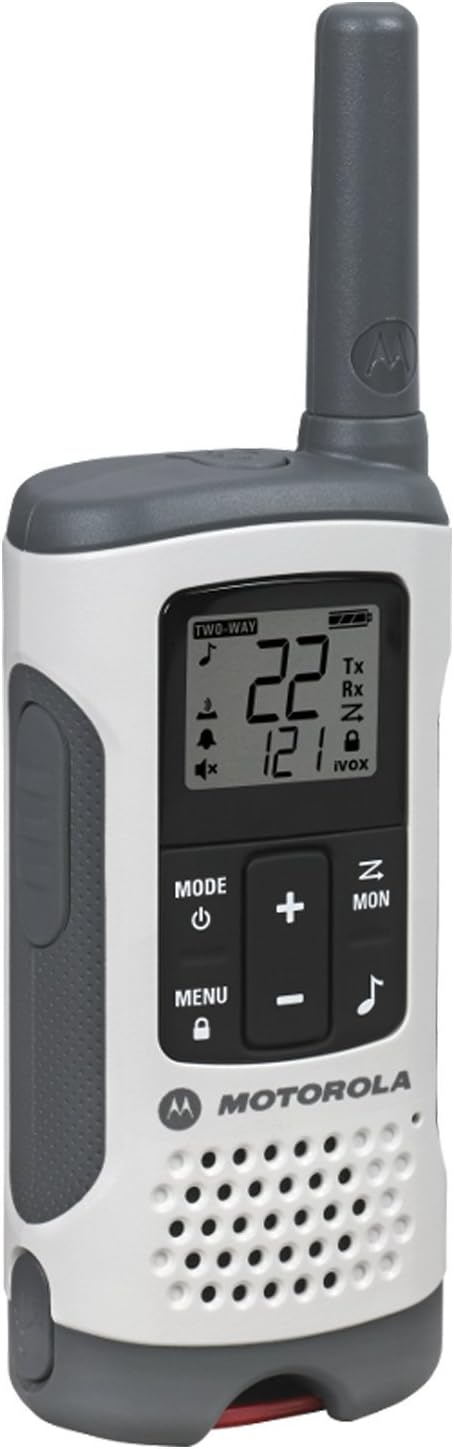
Image: A single Motorola T260 Talkabout 2-Way Radio, showcasing umklamo kanye nesibonisi sayo.
Setha Imiyalelo
1. Ukufaka nokushaja Ibhethri
The T260 radios can be powered using the included NiMH rechargeable battery packs or 3 AA alkaline batteries (not included for AA). For initial use, install the NiMH battery packs and charge the radios.
- Qinisekisa ukuthi umsakazo ucinyiwe.
- Vula isembozo segumbi lebhethri ngemuva komsakazo.
- Insert the NiMH battery pack, ensuring correct polarity.
- Vala ikhava yengxenye yebhethri ngokuphephile.
- Connect the "Y" cable charging adapter to a power source and then to the micro-USB ports on both radios.
- Charge the radios for approximately 10 hours for a full charge. The battery indicator on the display will show charging status.
2. Ukunamathisela iBelt Clip
To attach the belt clip, align the clip with the slots on the back of the radio and slide it down until it clicks into place.
Imiyalelo yokusebenza
1. Ukuvula/Ukucisha
Cindezela bese ubamba i Amandla/Imenyu button until the display lights up to turn the radio on. Repeat to turn off.
2. Channel and Privacy Code Selection
The T260 offers 22 channels and 121 privacy codes, totaling 2,662 combinations for clear communication.
- Cindezela inkinobho Imenyu inkinobho kuze kube yilapho inombolo yesiteshi ikhanya.
- Sebenzisa i- Up or Phansi izinkinobho zokukhetha isiteshi osithandayo.
- Cindezela Imenyu again until the privacy code flashes.
- Sebenzisa i- Up or Phansi izinkinobho zokukhetha ikhodi yobumfihlo oyifunayo.
- Cindezela Imenyu noma i I-PTT inkinobho ukuze uqinisekise ukukhetha kwakho.
3. I-Push-to-Talk (PTT)
Ukudlulisa, cindezela bese ubamba i I-PTT button and speak clearly into the microphone. Release the I-PTT button to listen.
4. Range Considerations
The maximum communication range is up to 25 miles under ideal, unobstructed conditions. Actual range will vary based on terrain, weather, electromagnetic interference, and obstructions.
5. NOAA Weather Channels and Alerts
Stay informed about real-time weather conditions by accessing one of 11 NOAA weather channels or initiating weather alerts. NOAA radio service availability may vary by area.
6. iVOX/VOX Hands-Free Communication
The iVOX/VOX feature allows for hands-free operation. When activated, the radio transmits automatically when it detects your voice, eliminating the need to press the PTT button.
7. Scanning Feature
Use the scanning feature to quickly find active channels. This helps identify channels currently in use for communication.
8. Isexwayiso Sebhethri Eliphansi
The radio will provide an audible alert and/or a visual indicator on the display when the battery level is low, reminding you to recharge or replace batteries.


Images: Icons representing various outdoor activities like hiking, driving, camping, and biking, where the T260 radios can be utilized.
Ividiyo: Umbukiso osemthethweni wevidiyo yomkhiqizoasing the Motorola T260 Talkabout Radio, highlighting its features and ease of use in various scenarios.
Isondlo
To ensure optimal performance and longevity of your Motorola T260 radios, follow these maintenance guidelines:
- Ukuhlanza: Sebenzisa okuthambile, damp cloth to clean the exterior of the radio. Do not use abrasive cleaners or solvents.
- Ukunakekelwa kwebhethri: Fully charge NiMH battery packs before long periods of storage. Store batteries in a cool, dry place.
- Isitoreji: Store radios in a dry, dust-free environment when not in use.
- Ukuchayeka emanzini: While durable, the T260 is not water resistant. Avoid submerging the radio in water.
Ukuxazulula inkinga
If you encounter issues with your Motorola T260 radio, refer to the following common troubleshooting tips:
- Awekho Amandla: Ensure batteries are correctly installed and fully charged. Check if the radio is turned on.
- Ububanzi Obubi/Obunganyakazi: Verify both radios are on the same channel and privacy code. Move to an area with fewer obstructions.
- Ayikwazi Ukudlulisa/Ukwamukela: Check if the PTT button is being pressed correctly. Ensure the radio is not in scan mode or iVOX/VOX mode if manual transmission is desired.
- Isexwayiso Sebhethri Eliphansi: Recharge or replace the batteries promptly.
Imininingwane
| Isici | Imininingwane |
|---|---|
| Inombolo Yemodeli | T260 |
| Ubukhulu bomkhiqizo | 1.24 x 2.13 x 6.42 amayintshi |
| Isisindo sento | 6.4 amakhilogremu |
| Inombolo Yeziteshi | 22 |
| Amakhodi Obumfihlo | 121 |
| I-Frequency Range | FRS/GMRS 462 - 467 MHz |
| Talking Range Maximum | 25 Miles (izimo ezifanele) |
| Umthombo wamandla | 2 NiMH Battery Packs (included) or 3 AA batteries (not included) |
| Voltage | 4.5 Volts (DC) |
| Izici ezikhethekile | Lightweight, NOAA Weather Channels/Alerts, iVOX/VOX Hands-Free |
| Izinga Lokumelana Namanzi | Ayizweli Amanzi |
| Umbala | Emhlophe |
Iwaranti kanye Nokusekela
Specific warranty details and customer support contact information are typically provided in the user guide included with your product. Please refer to the physical user guide for the most accurate and up-to-date information regarding warranty coverage and technical support.


