Isingeniso
The Philips Hue Bridge is the essential central component for establishing your Philips Hue smart lighting system. It acts as the brain of the system, enabling you to control all your Philips Hue lights and accessories through the dedicated Philips Hue application. Once the Bridge is installed and the application is downloaded on your smartphone or tablet, you can customize your lighting experience.
Yini EseBhokisini
Qinisekisa ukuthi zonke izingxenye zikhona ephaketheni:
- 1 Philips Hue Bridge
- 1 i-adaptha yamandla
- 1 Ikhebula le-Ethernet

Image: Philips Hue Bridge, power adapter, and Ethernet cable included in the box.
Setha
Follow these steps to set up your Philips Hue Bridge:
- Connect the Bridge: Plug the power adapter into the Philips Hue Bridge and then into a power outlet. Connect one end of the Ethernet cable to the Bridge and the other end to an available port on your Wi-Fi router.
- Landa uhlelo lokusebenza: Download the official Philips Hue app from your smartphone's app store (available for iOS and Android).
- Pair with the App: Open the Philips Hue app and follow the on-screen instructions to connect to your Bridge. The app will guide you through the process of discovering your Bridge and pairing your Hue lights.
- Add Lights and Accessories: Once the Bridge is connected, you can add up to 50 Philips Hue lights and accessories (sold separately) through the app.
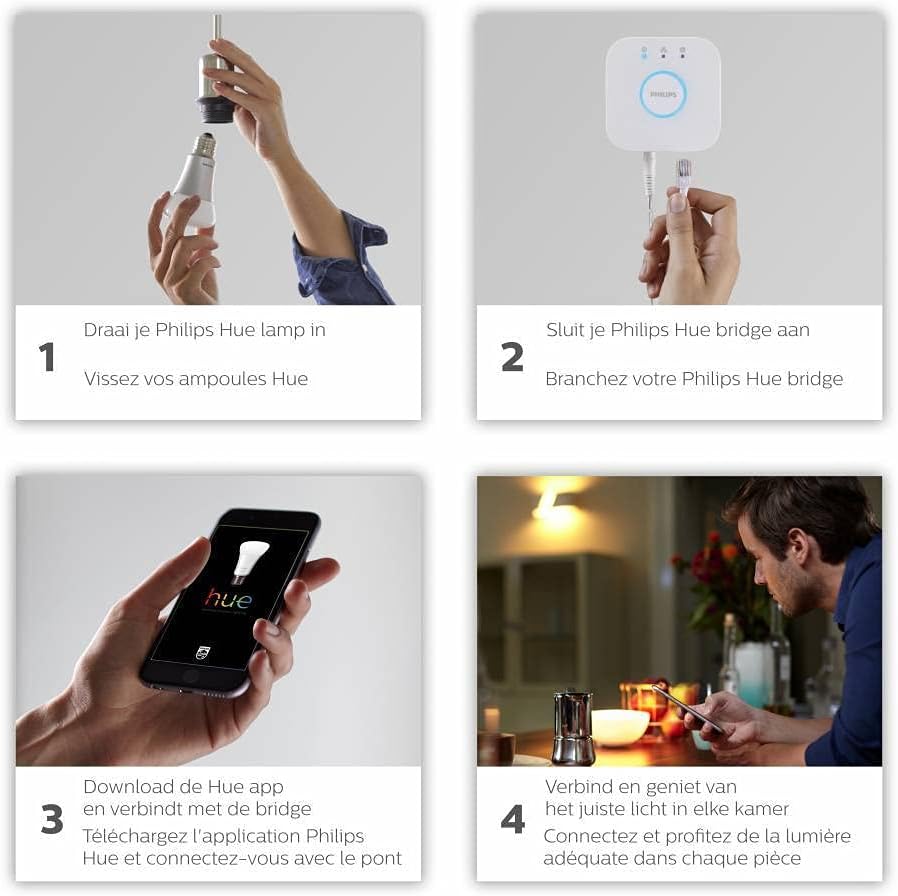
Image: A visual guide showing the four steps for setting up Philips Hue: 1. Screw in Hue bulbs, 2. Connect the Hue Bridge, 3. Download the Philips Hue app and connect to the Bridge, 4. Connect and enjoy appropriate lighting in each room.
Video: This video demonstrates the setup process for the Philips Hue Bridge, including connecting it and integrating with the app. It also highlights compatibility with Alexa, Google Assistant, and Apple HomeKit.
Isebenza
The Philips Hue Bridge allows for comprehensive control over your smart lighting system:
- Ukulawulwa kohlelo lokusebenza: Use the Philips Hue app to turn lights on/off, adjust brightness, change colors, and set scenes.
- Ukulawulwa Kwezwi: The Bridge is compatible with voice assistants such as Amazon Alexa, Apple HomeKit, and Google Assistant, allowing you to control your lights with voice commands.
- Okuzenzakalelayo: Create custom routines and schedules for your lights, such as turning on at sunset or off when you leave home.
- Ukuzijabulisa: Synchronize your lights with music, movies, and games for an immersive experience.

Image: A diagram illustrating the Philips Hue system, showing the Hue Bridge connecting the Hue app to various Hue lamps throughout a house, supporting up to 50 lamps.
Video: A close-up video showcasing the Philips Hue Bridge, demonstrating its compact design and connectivity options.
Isondlo
To ensure optimal performance and longevity of your Philips Hue Bridge:
- Gcina idivayisi ihlanzekile futhi ingenalo uthuli. Sebenzisa indwangu ethambile, eyomile ukuze uhlanze.
- Avoid exposing the Bridge to extreme temperatures or humidity.
- Qinisekisa ukuthi kungena umoya ofanele eduze kocingo.
- Regularly check for firmware updates through the Philips Hue app to benefit from the latest features and security enhancements.
Ukuxazulula inkinga
If you encounter issues with your Philips Hue Bridge, consider the following:
- Alukho Uxhumo: Verify that the Bridge is properly connected to power and your router. Check the indicator lights on the Bridge.
- Izinkinga Zohlelo Lokusebenza: Ensure your Philips Hue app is up to date. Try restarting the app or your smartphone.
- Lights Unresponsive: Confirm that your lights are powered on and within range of the Bridge. Try restarting the Bridge by unplugging it for 10 seconds and plugging it back in.
- Ukusetha kabusha kwefekthri: As a last resort, you can perform a factory reset on the Bridge. Refer to the Philips Hue support website for detailed instructions, as this will erase all settings and paired devices.
Imininingwane
| Ibhrendi | Philips Hue |
| Inombolo Yemodeli | 929001180601 |
| Umbala | Emhlophe |
| Ukuxhumana | ZigBee, Ethernet |
| Izici ezikhethekile | Isikhathi |
| Okubalulekile | Ipulasitiki |
| Izinga Lokushisa Lokusebenza | 0°C - 40°C |
| Uhlobo Lwepulaki | European (EU) |
| Voltage | 230 volts |
Iwaranti
This Philips Hue Bridge comes with a 2-year manufacturer's warranty. Please retain your proof of purchase for warranty claims. For specific terms and conditions, refer to the warranty information provided with your product or visit the official Philips Hue webindawo.
Ukusekela
For further assistance, technical support, or to access additional resources, please visit the official Philips Hue support website or contact their customer service. You can find contact information and FAQs on the manufacturer's webindawo.


