Isingeniso
This manual provides instructions for the HAVIT HV-KB366L RGB Backlit Mechanical Gaming Keyboard. This keyboard features blue mechanical switches, full anti-ghosting, and customizable RGB backlighting, designed for reliable performance.
Setha Imiyalelo
Ixhuma Ikhibhodi
- Thola imbobo ye-USB etholakalayo kukhompuyutha yakho.
- Connect the USB cable from the HAVIT HV-KB366L keyboard to the USB port on your computer.
- Ikhibhodi ixhumeka futhi idlale futhi kufanele ibonwe ngokuzenzakalelayo uhlelo lwakho lokusebenza.
Ukuhambisana Kwesistimu
- Compatible with Windows 10 and other Windows operating systems.
- Mac OS supports 6-key rollover only.
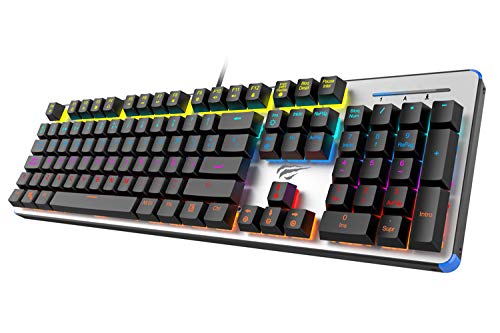
Figure 1: HAVIT HV-KB366L RGB Backlit Mechanical Gaming Keyboard. An overhead view kwekhibhodi, umbukisoasing its full layout with RGB lighting on the keys and a white frame.
Imiyalelo yokusebenza
Ukushintsha Ukhiye Wemishini
The keyboard is equipped with blue mechanical switches, providing tactile feedback and an audible click with each keystroke. This design is intended for precise input during typing and gaming.
Isici Sokulwa Nesipoki
The full key anti-ghosting mechanism ensures that all key presses are registered accurately, even when multiple keys are pressed simultaneously. This feature is beneficial for fast-paced gaming.
Ukulungiswa Kwe-Backlight
- To change the backlight color or mode, press the Fn key kanyekanye ne Khanyisa emuva key. Repeated presses will cycle through available modes and colors.
- Marquee Mode: In 7-color backlit mode (non-breathing), press the Khanyisa emuva key once to activate marquee mode. Press the Khanyisa emuva key again to deactivate marquee mode and return to 7-color backlit mode.
- Amaleveli okukhanya: The backlight offers 4 levels of brightness adjustment.
- Breathing Rate: The breathing effect has 10 adjustable levels.
Isondlo
Ukuhlanza Ikhibhodi
- Nqamula ikhibhodi kukhompuyutha yakho ngaphambi kokuhlanza.
- Sebenzisa indwangu ethambile neyomile ukusula ubuso bekhibhodi.
- Ukuze uthole uthuli nemfucumfucu phakathi kokhiye, sebenzisa umoya ocindezelweyo.
- Avoid using harsh chemicals or abrasive materials, as these can damage the finish or keycaps.
Ukuqina
The keyboard features an aluminum top housing with a sanded finish and a metal base, contributing to its overall durability and stable performance.
Ukuxazulula inkinga
Ikhibhodi Ayiphenduli
- Qinisekisa ukuthi ikhebula le-USB lixhumeke ngokuphephile kukho kokubili ikhibhodi nekhompyutha.
- Zama ukuxhuma ikhibhodi embobeni ehlukile ye-USB kukhompuyutha yakho.
- Hlola ikhibhodi kwenye ikhompuyutha ukuze uthole ukuthi inkinga ikukhibhodi noma imbobo ye-USB yekhompyutha.
Backlight Not Working or Incorrect
- Qinisekisa ukuthi ikhibhodi ixhunywe kahle futhi yamukela amandla.
- Cindezela Fn + Backlit key to cycle through backlight modes and ensure it is not turned off or set to a very low brightness.
- Refer to the "Backlight Adjustment" section for detailed instructions on changing modes and brightness.
Imininingwane
| Ibhrendi | I-HAVIT |
| Inombolo Yemodeli | I-HV-KB366L |
| Umkhiqizi | I-HAVIT |
| Ubukhulu bomkhiqizo | 50.5 x 17.6 x 6 Amasentimitha |
| Isisindo sento | 1.33 kg |
| Ubuchwepheshe bokuxhumana | Inentambo (i-USB) |
| Incazelo Yekhibhodi | Ikhibhodi yeMechanical yeMidlalo |
| Isici Esikhethekile | RGB Backlit, Anti-Ghosting |
| I-Hardware Platform | I-laptop, i-PC |
| Isistimu esebenzayo | Windows 10 (and compatible), Mac OS (6-key rollover) |
| Voltage | 5 volts |
| Izingxenye Ezihlanganisiwe | Ikhebula le-USB |
Iwaranti & Ukusekela
Ulwazi Lwewaranti
Specific warranty details for the HAVIT HV-KB366L keyboard are not provided in the product data. Please refer to the product packaging or contact HAVIT directly for warranty terms and conditions.
Ukwesekwa Kwamakhasimende
For technical assistance, troubleshooting, or further inquiries, please contact HAVIT customer support through their official webisayithi noma imininingwane yokuxhumana enikeziwe ngokuthenga kwakho.


