1. Umkhiqizo Uphelileview
The LB-link BL-MP01 is a compact and versatile 150 Mbps Wireless N Pocket Travel Router designed for easy internet access and sharing on the go. It supports multiple operating modes and features for convenient wireless connectivity.

Umfanekiso 1: Ngaphambili view of the LB-link BL-MP01 Wireless N Router, showing the WPS/RESET button and indicator lights for WiFi, LAN, and Power.
Izici Eziyinhloko:
- Supports random selection of switching between Router, Client, and AP modes.
- WPS (Wi-Fi Protected Setup) support for one-key encryption, eliminating the need for manual password entry.
- Plug and Play functionality for easy wireless access and internet sharing.
- Built-in device for scanning wireless hotspots, remembering SSID names, and automatically bridging/relaying for convenient use.
- Equipped with RJ45 and USB ports for versatile connectivity.
2. Umhlahlandlela wokusetha
2.1 Amandla Okuqala Avuliwe
- Connect the LB-link BL-MP01 to a power source using the provided USB cable.
- Wait for the Power indicator light to turn solid, indicating the device is powered on.
2.2 Ukuxhuma kuRutha
- Uxhumano Okungenantambo: On your computer or mobile device, search for available Wi-Fi networks. Select the network name (SSID) broadcast by the BL-MP01 (e.g., "LB-link_XXXX"). Enter the default password if prompted (refer to the label on the device or packaging for default credentials).
- Uxhumano Lwezintambo: Connect an Ethernet cable from the RJ45 port of the BL-MP01 to your computer's Ethernet port.
2.3 Basic Configuration (Router Mode)
- Vula a web bese ufaka ikheli le-IP elizenzakalelayo (isb.
192.168.16.1) kubha yekheli. - Log in using the default username and password (e.g.,
admin/admin). - Follow the on-screen setup wizard to configure your internet connection type (e.g., PPPoE, Dynamic IP, Static IP).
- Set a new Wi-Fi network name (SSID) and a strong password for your wireless network.
3. Amamodi Okusebenza
The BL-MP01 supports multiple operating modes to suit various networking needs:
- Imodi yomzila: Connects to a modem (DSL/Cable) and creates a private wireless network for multiple devices.
- Imodi Yeklayenti: Allows a wired device (e.g., a desktop computer) to connect to an existing wireless network.
- Imodi ye-AP (Iphoyinti Lokufinyelela): Transforms a wired network connection into a wireless hotspot, allowing wireless devices to connect.
To switch between modes, access the router's web management interface and navigate to the operating mode settings. Select the desired mode and save the changes. The device may restart to apply the new settings.
4. WPS Functionality
The Wi-Fi Protected Setup (WPS) feature allows for quick and secure connection to your wireless network without manually entering the password.
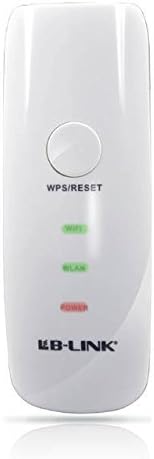
Umfanekiso 2: Vala-up view of the LB-link BL-MP01 Wireless N Router, highlighting the WPS/RESET button at the top.
Ukusebenzisa i-WPS:
- Cindezela inkinobho I-WPS/SETHA KABUSHA button on the BL-MP01 for approximately 1-3 seconds. The Wi-Fi indicator light will start blinking.
- Within two minutes, activate the WPS function on your client device (e.g., laptop, smartphone). Refer to your client device's manual for specific instructions on activating WPS.
- The devices will automatically establish a secure connection. The Wi-Fi indicator light on the router will become solid when connected.
5. Wireless Hotspot Scanning and Bridging
The BL-MP01 features a built-in function to scan for available wireless hotspots, remember their SSID names, and automatically bridge or relay the connection. This is particularly useful for extending Wi-Fi coverage or connecting to public hotspots.
Steps for Hotspot Connection:
- Finyelela kumzila web ukuphathwa interface.
- Zulazulela ku-
Amadokhumenti Ahlobene - BL-MP01

Umhlahlandlela Wokufaka I-LB-LINK Router
Umhlahlandlela wokufaka ophelele we-router ye-LB-LINK, ohlanganisa ukuxhumana kwehadiwe, ukusethwa kwe-inthanethi, izinkomba ze-LED, kanye nezincazelo zesixhumi esibonakalayo. Funda ukuthi ungaxhuma kanjani idivayisi yakho bese ungena ku-inthanethi ngokushesha.
I-BL-M35343XS1 802.11ax 150Mbps WLAN +BLE Combo SDIO Ukucaciswa Kwemojula
Lo mbhalo uhlinzeka ngemininingwane ye-LB-LINK BL-M35343XS1, imojuli ehlanganisiwe ye-2.4GHz WLAN+BLE+SLE Combo. Ichaza izici, ukucaciswa kukagesi nokushisayo, ukusebenza kwe-RF, ubukhulu bemishini, kanye nolwazi lohlelo lokusebenza lwale mojula esebenza kahle engenazintambo.
I-LB-LINK BL-M8189NS1: 150Mbps WLAN SDIO Module Ukucaciswa
Imininingwane enemininingwane ye-LB-LINK BL-M8189NS1, imojuli engu-150Mbps 802.11n WLAN SDIO. Ihlanganisa izici, izincazelo zamaphini, izici zikagesi neze-RF, ubukhulu bemishini, namasekhethi ohlelo lokusebenza.
I-LB-LINK BL-M8733BS2 802.11n 150Mbps WLAN + BT v5.2 Ukucaciswa Kwemojula Yenhlanganisela ye-SDIO
Idokhumenti yokucaciswa kobuchwepheshe ye-LB-LINK BL-M8733BS2, imojuli ye-Dual-band ehlanganiswe kakhulu ye-WLAN + Bluetooth v5.2 Combo SDIO esekela amazinga angu-802.11a/b/g/n kufika ku-150Mbps izinga le-PHY, okuhlanganisa ulwazi lukagesi, i-RF, lwemishini, nolwazi lokulawula.
Imininingwane Yomkhiqizo we-LB-LINK BL-R8812AF1 - I-IEEE 802.11ac WiFi Module
Imininingwane yomkhiqizo enemininingwane ye-LB-LINK BL-R8812AF1, i-WLAN 11ac Dual Band USB 2.0 WiFi Module. Imboza i-RF phezu kwayoview, imisebenzi yesistimu, imininingwane kagesi, kanye nokuhambisana nayo.